


Integration with iFirma


- — 12 months guarantee for all our add-ons
- — add-ons sold to entire world
- — stable, flexible, high-quality products
- — competitive prices, attractive discounts
- — quick and competent technical support
- — installation in 24 hours
- — personalized solutions - we'll write any add-on for you
An extension for Store Builder and Multi-Vendor connects your store with the iFirma.pl accounting platform and takes the most tedious part of the work off your team: rewriting orders into accounting by hand. Every order reaches iFirma on its own, with the full customer data, line items, taxes and delivery address. From there the add-on issues a VAT invoice, registers the payment and submits the document to KSeF, while you see the result of each operation without leaving the store panel.
Key Features
- Automatic order submission to iFirma through the E-commerce (HUB) API, in automatic, on status change or manual mode, with retry of failed attempts.
- Domestic (PLN) and foreign currency (EUR, USD and more) VAT invoices issued automatically, with the rate taken from the NBP or entered manually.
- Contractor synchronization and payment registration, so the invoice shows up as paid right away.
- Submission of domestic invoices to the National e-Invoice System (KSeF) with the system number saved.
- An iFirma tab on the order details page: every status and manual action in one place, plus status badges on the order list.
- Multi-Vendor support: each seller configures their own iFirma account, while full logging and a connection test make diagnostics easy.
You start the configuration in one place. In the General section you enter the iFirma login, point to the profile fields with the company name and tax number, and choose the authorization method, a symmetric HMAC key or an asymmetric RSA key, along with the matching access keys

Screenshot 1: the General section with the login, profile fields and iFirma authorization keys
In the Orders section you decide when orders go to iFirma. You set the integration JWT token, choose the send mode and pick the statuses that trigger the submission and mark an order as paid

Screenshot 2: the Orders section with the JWT token, send mode and status mapping
The VAT Invoices section gives you full control over invoicing. You set the issuing mode, the tax calculation basis, the payment term and method, the currency rate source, automatic payment registration and the issuing of correction invoices

Screenshot 3: the VAT Invoices section with the issuing mode, currency rate, payments and corrections
If you report through KSeF, a single switch is enough. Domestic invoices reach the National e-Invoice System right after they are issued, with no extra steps for your team
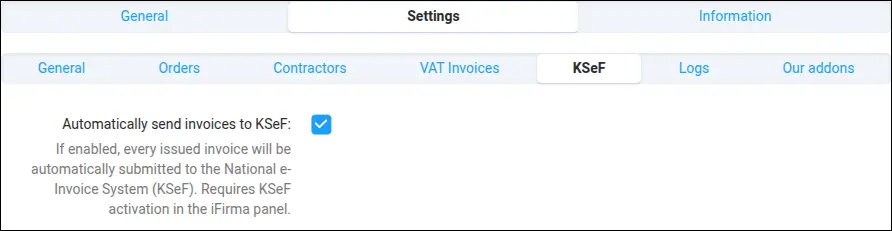
Screenshot 4: the KSeF section with automatic submission of domestic invoices
The heart of the daily work is the iFirma tab in the order details. A single table shows the HUB submission status, the issued invoice number, the registered payment and the KSeF number, with manual action buttons next to them, including issuing a correction invoice

Screenshot 5: the iFirma order tab with HUB, invoice, payment and KSeF statuses
You can judge the integration state without opening any details. The order list gains a column of iFirma badges, green ones mark a correctly submitted order, invoice and KSeF, while red ones point straight to an item that needs attention

Screenshot 6: the order list with iFirma status badges, HUB, invoice and KSeF
Before you go live, you can verify the configuration with one click. The connection test checks both APIs, decodes the JWT token, shows its expiry date and permissions, and does it without sending any data to iFirma

Screenshot 7: the iFirma connection test with Classic iAPI and HUB token diagnostics
When you want to trace exactly what happened in the communication with iFirma, you reach for the log viewer. Each entry has an event level, a link to the order and the full diagnostic context, that is the sent data and the API response

Screenshot 8: the log viewer with the full operation history and links to orders
The iFirma integration turns the tedious rewriting of orders into a process that runs by itself. An order placed in the store appears in iFirma with an invoice, a payment and a KSeF number, and your team gains time and the certainty that nothing falls through the cracks.
Feel free to contact us and purchase the add-on!
Choose the most convenient form of payment for the add-on. You can pay once and use the add-on. Choosing a subscription payment (monthly or annual) means that you pay for the add-on at regular intervals and have access to the latest versions of the addon and technical support.
- Store Bulider
- Multi-Vendor
- 4.21.x
- 4.20.x
- 4.19.x
- 4.18.x
- 4.17.x
- 4.16.x
- 4.15.x
- No changes
No reviews found