


Dane strukturalne JSONLD, GEO

- Zobacz wszystkie warianty jako listę
| KOD | Forma płatności | Cena | ||
|---|---|---|---|---|

|
683
ss_jsonld
2026-08-30
1.1.1.9
|
1450.00 PLN
(Cena netto) |
||

|
706
ss_jsonld_sub_1Y
2026-08-30
1.1.1.9
|
600.00 PLN
/rok
(Cena netto) |
||

|
705
ss_jsonld_sub_1M
2026-08-30
1.1.1.9
|
60.00 PLN
/miesiąc
(Cena netto) |

- — 12 miesięcy gwarancji na wszystkie dodatki
- — sprzedajemy nasze dodatki na całym świecie
- — stabilne, elastyczne, wysokiej jakości produkty
- — konkurencyjne ceny, atrakcyjne rabaty
- — szybkie i kompetentne wsparcie techniczne
- — instalacja w 24h
- — indywidualne rozwiązania - moduły na zamówienie
Rozszerzenie do Store Builder oraz Multi-Vendor, które samo uzupełnia sklep o dane strukturalne Schema.org w formacie JSON-LD oraz tworzy plik llms.txt dla botów AI. Twój sklep staje się w ten sposób czytelny zarówno dla Google (rich results i oferty handlowe), jak i dla wyszukiwarek opartych na sztucznej inteligencji, takich jak ChatGPT, Claude, Perplexity czy Gemini.
Standardowy CS-Cart nie publikuje pełnych schematów Schema.org, których dziś oczekują Google i asystenci AI. Ten addon wypełnia tę lukę bez dotykania szablonów: wstrzykuje gotowy markup na każdej stronie, wiąże encje sklepu w jeden spójny graf, dba o zgodność z wymaganiami Google na 2026 rok i daje narzędzia, które pokazują, czy dane sklepu są kompletne. Ten sam graf danych udostępnia też modelom językowym katalog produktów wprost, bez konieczności czytania kolejnych stron HTML.
Zobacz, jak to działa
Najważniejsze funkcje
- Automatyczne dane strukturalne Schema.org (JSON-LD) na każdej stronie: OnlineStore, WebSite, Product, kategoria, blog i strona CMS, powiązane w jeden graf encji, bez ręcznej pracy w szablonach.
- Dane produktu pobierane wprost z cech CS-Cart: marka i osobno producent, GTIN/EAN, numer MPN, aprobaty OEM i specyfikacje techniczne, a dla wariantów grupa ProductGroup z ceną, dostępnością i obrazem każdego wariantu.
- Pełna polityka zwrotów zgodna z wymaganiami Google 2026: zwrot standardowy, odstąpienie od umowy i rękojmia, z miękką integracją z addonem Odstąpienie od umowy.
- Tryb sklepu dopasowany do asortymentu: produkty fizyczne wysyłane kurierem, produkty cyfrowe dostarczane mailem oraz punkt stacjonarny opisany jako Store z danymi lokalizacji.
- Sygnały autorstwa i świeżości treści cenione przez Google: autor artykułów bloga jako osoba (Person, sygnał E-E-A-T) oraz data ostatniej modyfikacji stron i wpisów.
- Warstwa agentowa dla modeli AI: statyczny feed katalogu w formacie JSON pod adresem /catalog-feed.json, opcjonalny endpoint A2A z kartą agenta oraz formularz wyszukiwania opisany w standardzie WebMCP, który agent w przeglądarce rozpoznaje jako gotowe narzędzie.
- Plik llms.txt dla botów AI, wbudowany walidator JSON-LD, przewodnik pierwszych kroków oraz pulpit diagnostyczny, który sprawdza także dostęp botów AI w robots.txt, gotowość sklepu dla agentów i kompletność feedu katalogu.
Konfigurację zaczynasz od danych firmy i wyboru trybu sklepu. W jednym miejscu ustalasz, czy sprzedajesz produkty fizyczne wysyłane kurierem, czy cyfrowe dostarczane mailem, a addon sam dobiera do tego właściwy markup. Tutaj trafiają też opis firmy, logo wraz z wymiarami, adres e-mail, godziny otwarcia oraz NIP, publikowany w danych strukturalnych jako identyfikator podatkowy firmy:
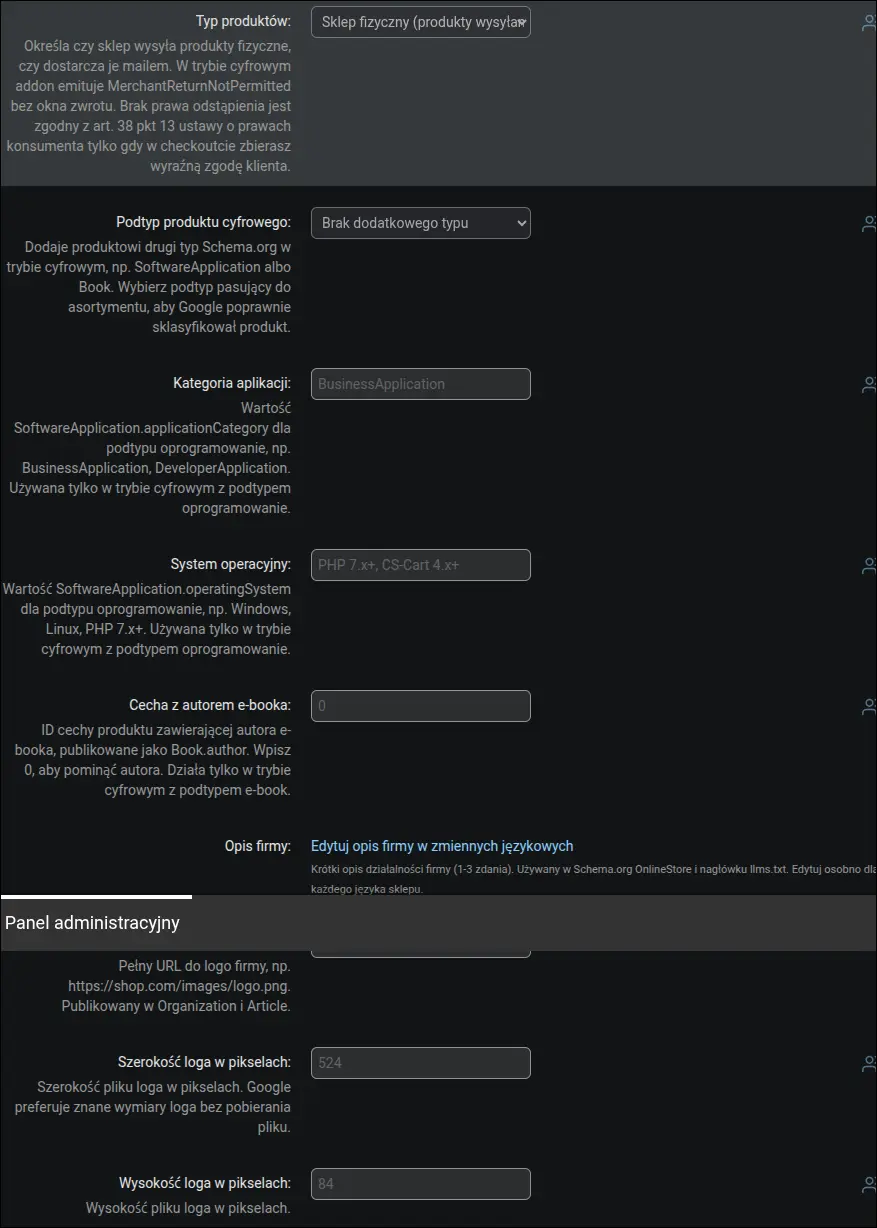
Zrzut ekranu 1: dane firmy, tryb sklepu i NIP
Druga część danych firmy to kontakt i obecność w sieci. Adres e-mail, godziny otwarcia rozbite na dni tygodnia, waluta, linki do profili społecznościowych, dane punktu kontaktowego (obszar obsługi i języki) oraz data założenia firmy trafiają do schematu OnlineStore. Google wykorzystuje je w panelu wiedzy, a asystenci AI przy odpowiedziach o kontakcie do sklepu:
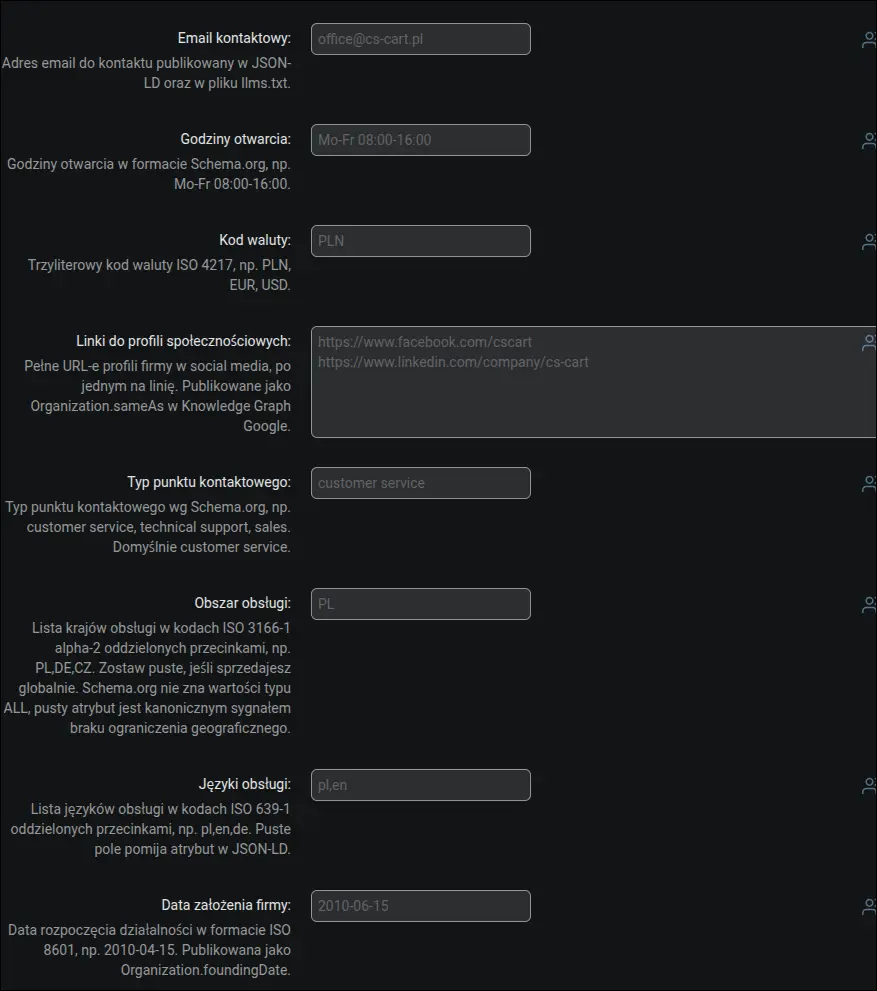
Zrzut ekranu 2: dane kontaktowe, profile społecznościowe i punkt kontaktowy
Jeśli prowadzisz sprzedaż także w punkcie stacjonarnym, addon opisze firmę dodatkowo jako Store i doda współrzędne geograficzne. Wystarczy włączyć sklep stacjonarny i podać szerokość oraz długość geograficzną. Ta sama zakładka zawiera notę o duplikacie danych firmy z motywu UniTheme2 wraz z instrukcją, jak go usunąć, aby w kodzie strony została tylko jedna encja Organization:
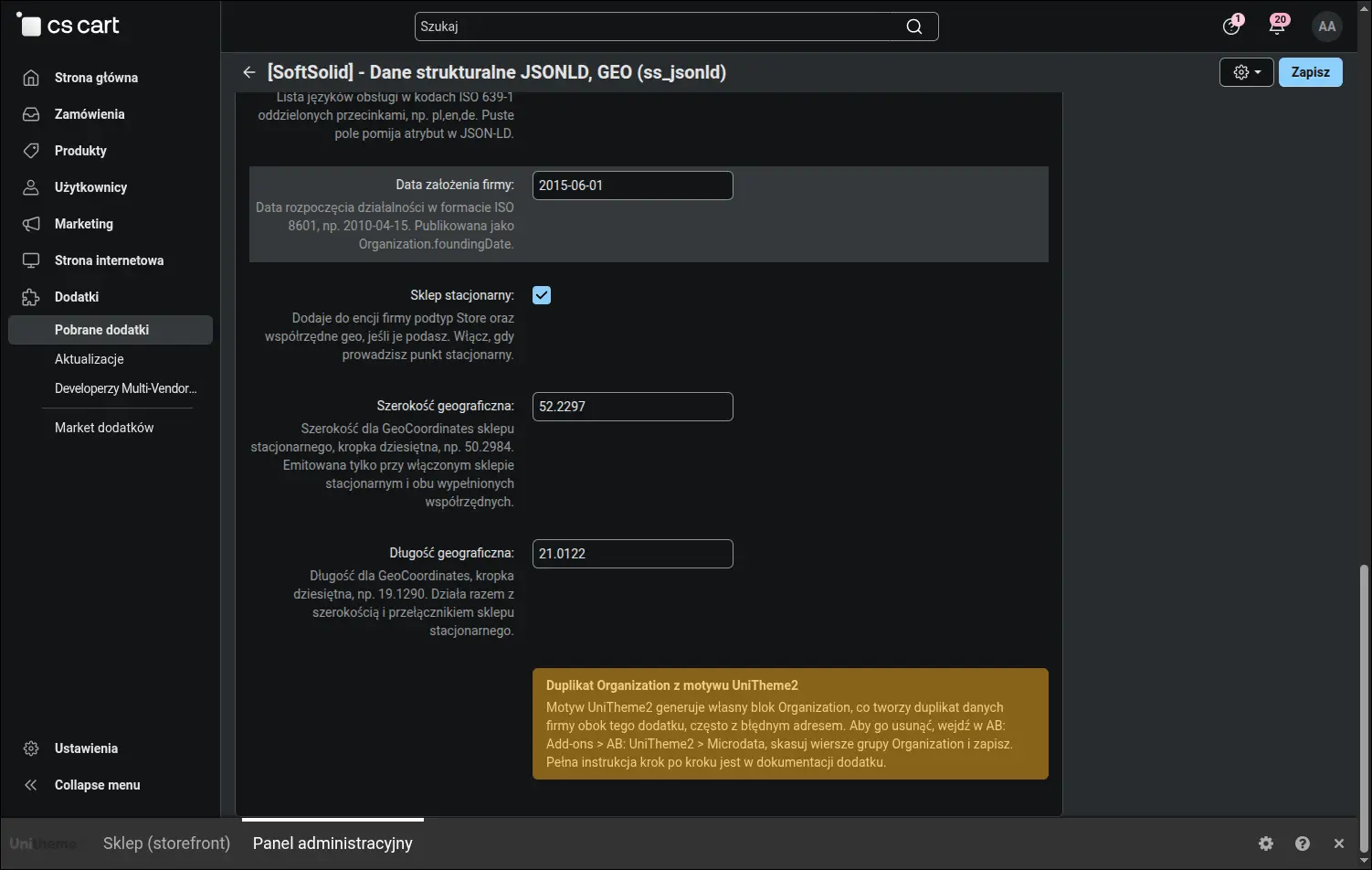
Zrzut ekranu 3: sklep stacjonarny (Store) ze współrzędnymi geo
Sklepy z asortymentem cyfrowym mają osobną zakładkę. W trybie cyfrowym markup dopasowuje się do dostawy mailem i braku fizycznego zwrotu, a Ty dobierasz podtyp produktu (oprogramowanie, e-book, dokument lub media). Dla oprogramowania podajesz kategorię aplikacji i system operacyjny, a dla e-booków cechę z autorem, dzięki czemu Google poprawnie klasyfikuje produkt cyfrowy:
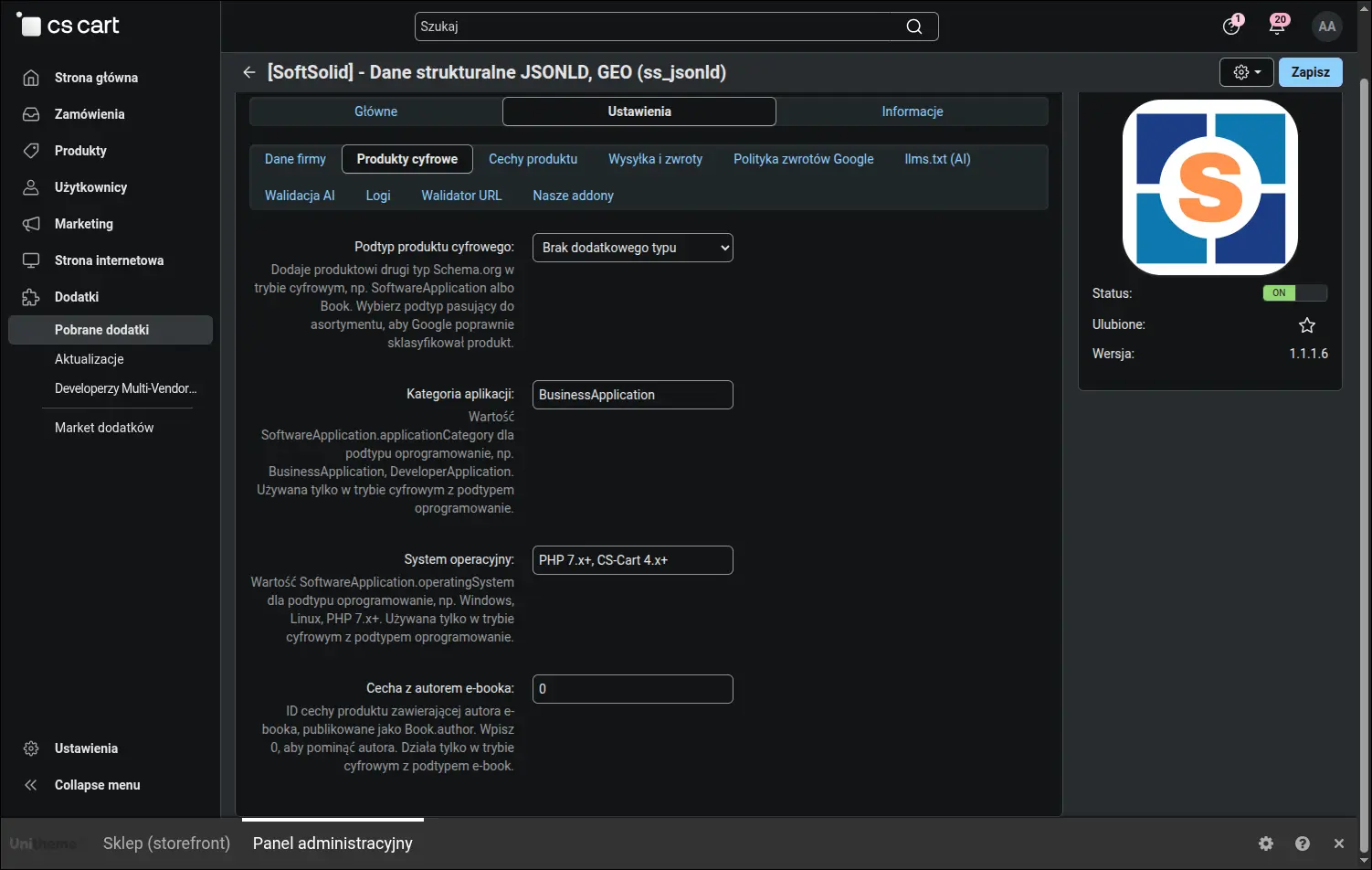
Zrzut ekranu 4: zakładka produktów cyfrowych
W tej sekcji łączysz cechy produktu CS-Cart z danymi Schema.org. Wskazujesz, która cecha przechowuje markę, a która producenta (osobno od marki handlowej), oraz kod GTIN/EAN, numer MPN, aprobaty OEM i specyfikacje techniczne. Addon przepisze te wartości do markupu produktu, a gdy cecha producenta jest pusta, użyje wartości domyślnej albo marki:
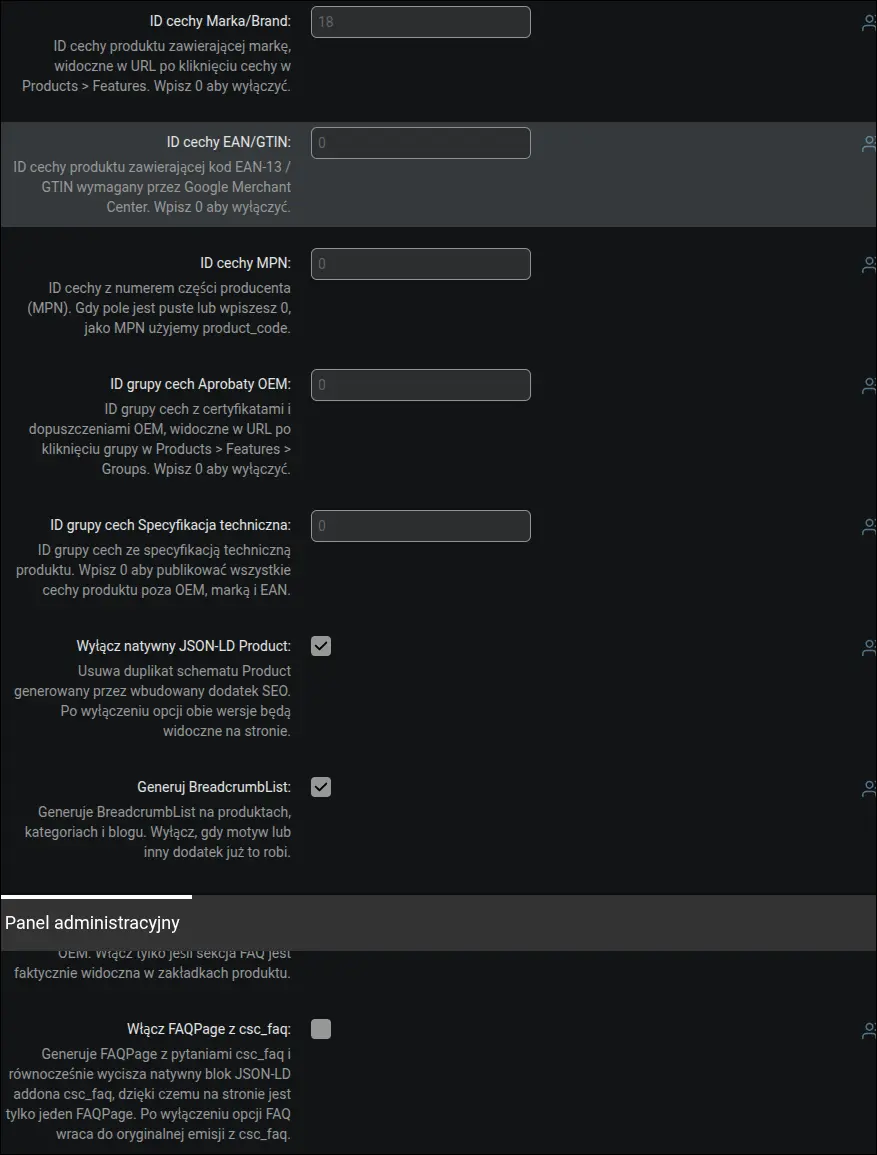
Zrzut ekranu 5: mapowanie cech produktu, marka i producent
Tu decydujesz, co dokładnie addon renderuje na produktach i blogu. Wyłączasz dublujący się blok Product z addonu SEO, włączasz ścieżkę BreadcrumbList, generowanie Article na wpisach bloga oraz datę ostatniej modyfikacji stron. Opcja powiązania wariantów łączy produkty w grupę ProductGroup, a pola autora bloga zamieniają autora treści z firmy na konkretną osobę, co jest mocniejszym sygnałem E-E-A-T dla Google:
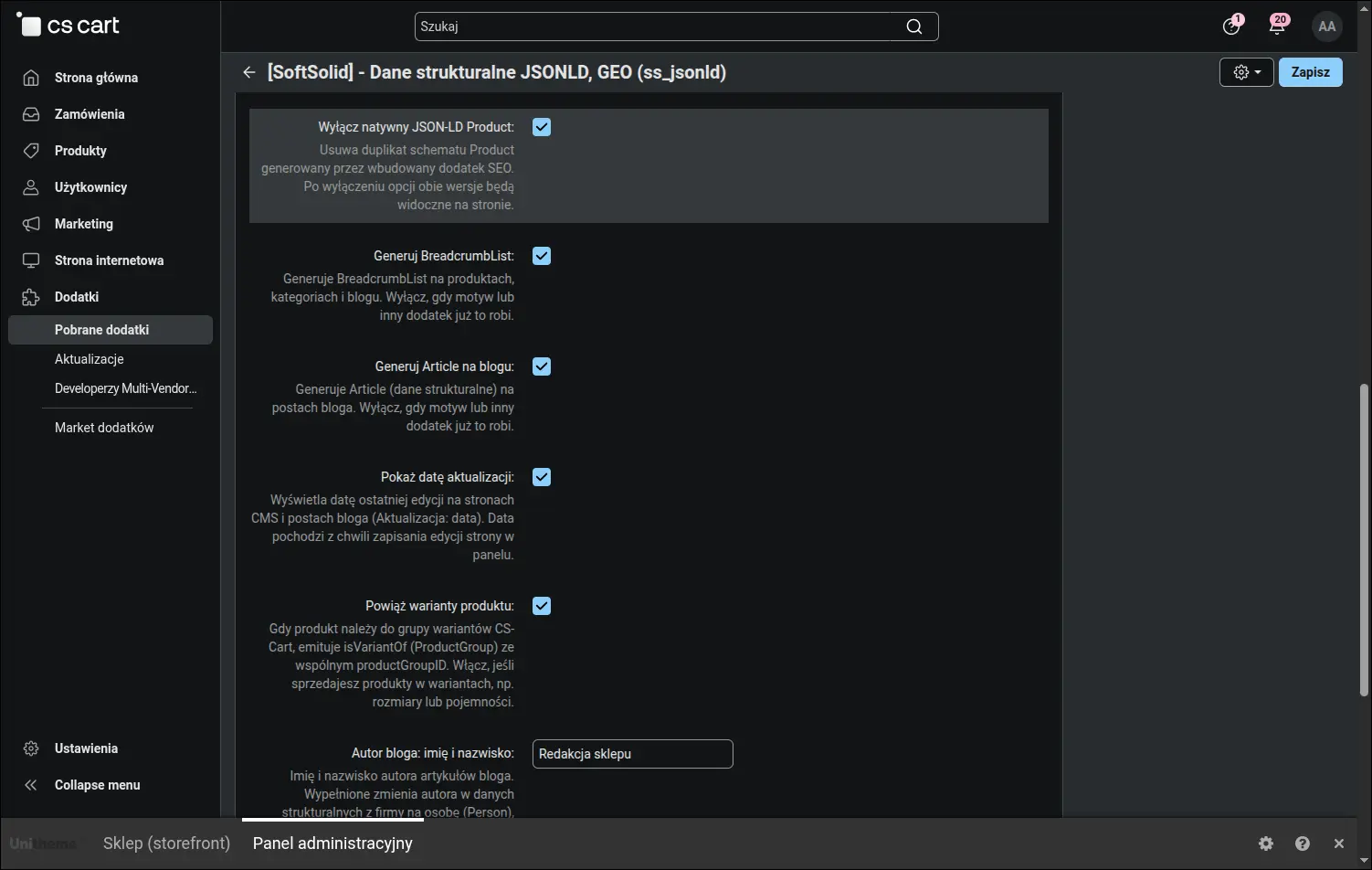
Zrzut ekranu 6: opcje renderowania, warianty ProductGroup i autor bloga
Produkty z wariantami zasługują na więcej niż jedną cenę w wynikach wyszukiwania. W czterech polach wskazujesz, które cechy wariantowe sklepu oznaczają rozmiar, kolor, materiał i wzór, wpisując po prostu ich numery. Gdy grupa wariantów różni się taką cechą, addon opisuje w danych strukturalnych każdy wariant strony osobno: z adresem, który od razu go wybiera, z ceną po promocjach katalogowych, dostępnością, obrazem i wartością cechy. Google widzi wtedy całą rodzinę produktu, a nie tylko wariant akurat wyświetlany, a grupy różniące się cechą spoza tych czterech, na przykład datą odbioru, zachowują dotychczasowy opis:
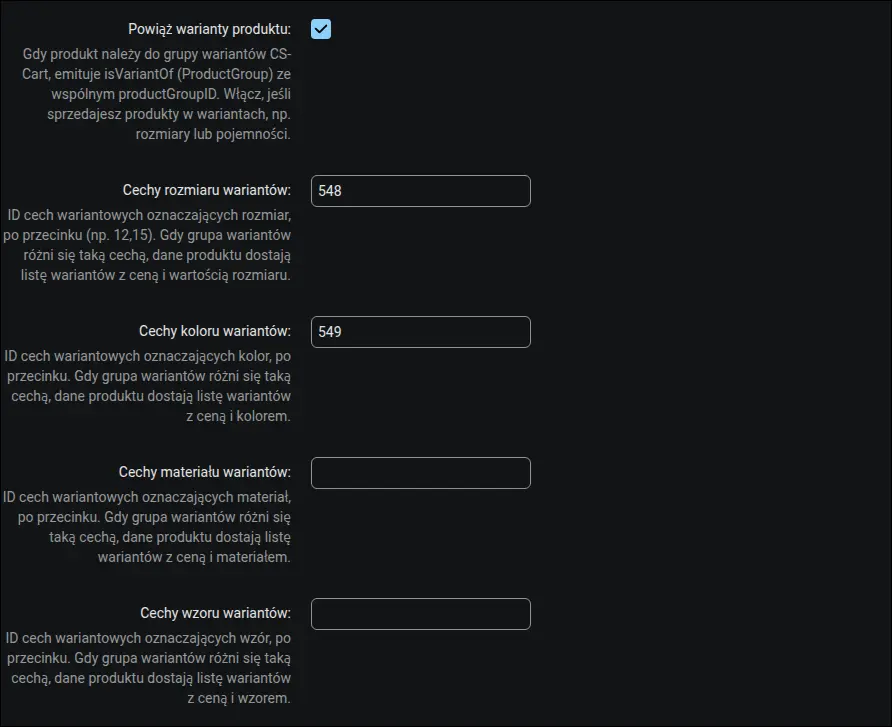
Zrzut ekranu 7: cechy wariantów przypisane do rozmiaru, koloru, materiału i wzoru
Parametry wysyłki zasilają blok OfferShippingDetails: koszt dostawy, czas realizacji, czas transportu oraz liczba dni na zwrot. Możesz też ustawić próg darmowej wysyłki, po którego przekroczeniu koszt w danych strukturalnych spada do zera. Oferta w wynikach Google odzwierciedla realne warunki dostawy:
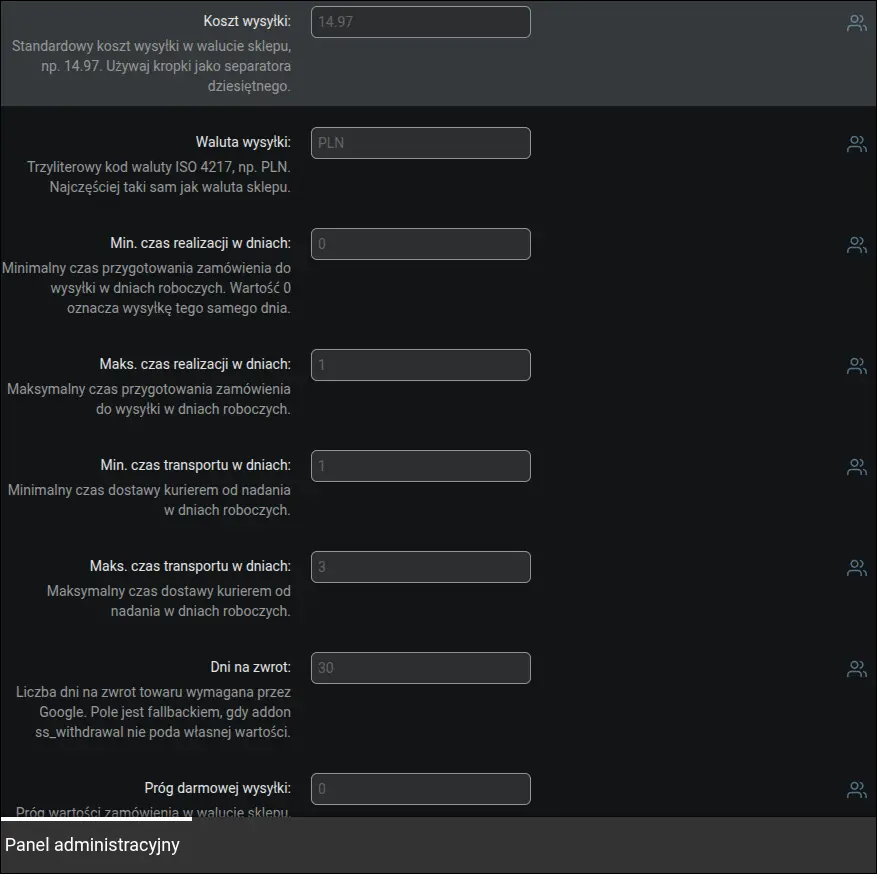
Zrzut ekranu 8: parametry wysyłki dla bloku OfferShippingDetails
Pełna polityka zwrotów rozpisana zgodnie z wymaganiami Google na 2026 rok. Osobno opisujesz zwrot standardowy, odstąpienie od umowy (w prawie polskim 14 dni) oraz zwrot towaru wadliwego z tytułu rękojmi. Komplet tych pól wyraźnie zwiększa szansę na wyświetlenie produktu w ofertach handlowych Google:
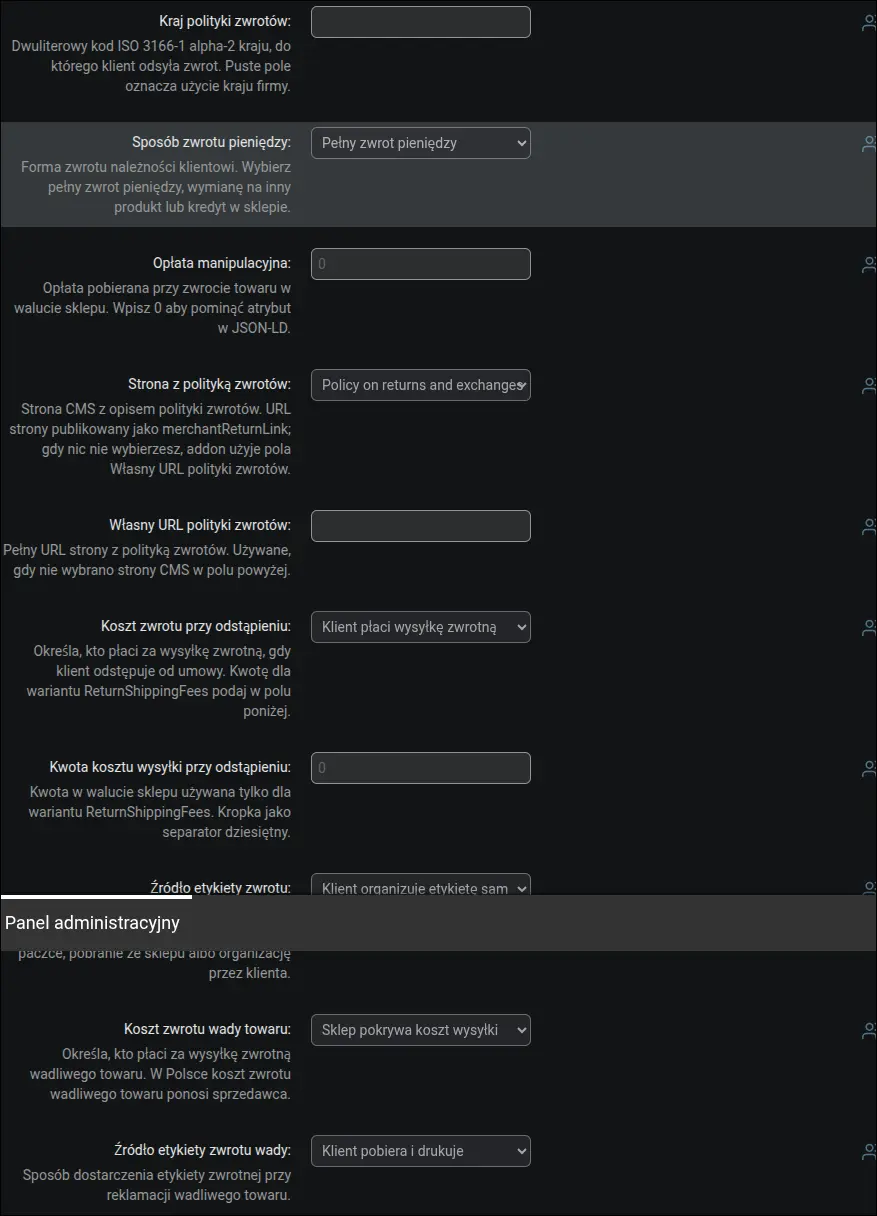
Zrzut ekranu 9: polityka zwrotów MerchantReturnPolicy zgodna z Google 2026
Konfiguracja pliku llms.txt, czyli mapy sklepu przygotowanej dla botów AI. Włączasz generowanie, dobierasz adresy stron pomocniczych oraz liczbę artykułów bloga, a plik tworzysz jednym kliknięciem. Panel pokazuje publiczny adres pliku i gotową komendę CRON do codziennej aktualizacji:
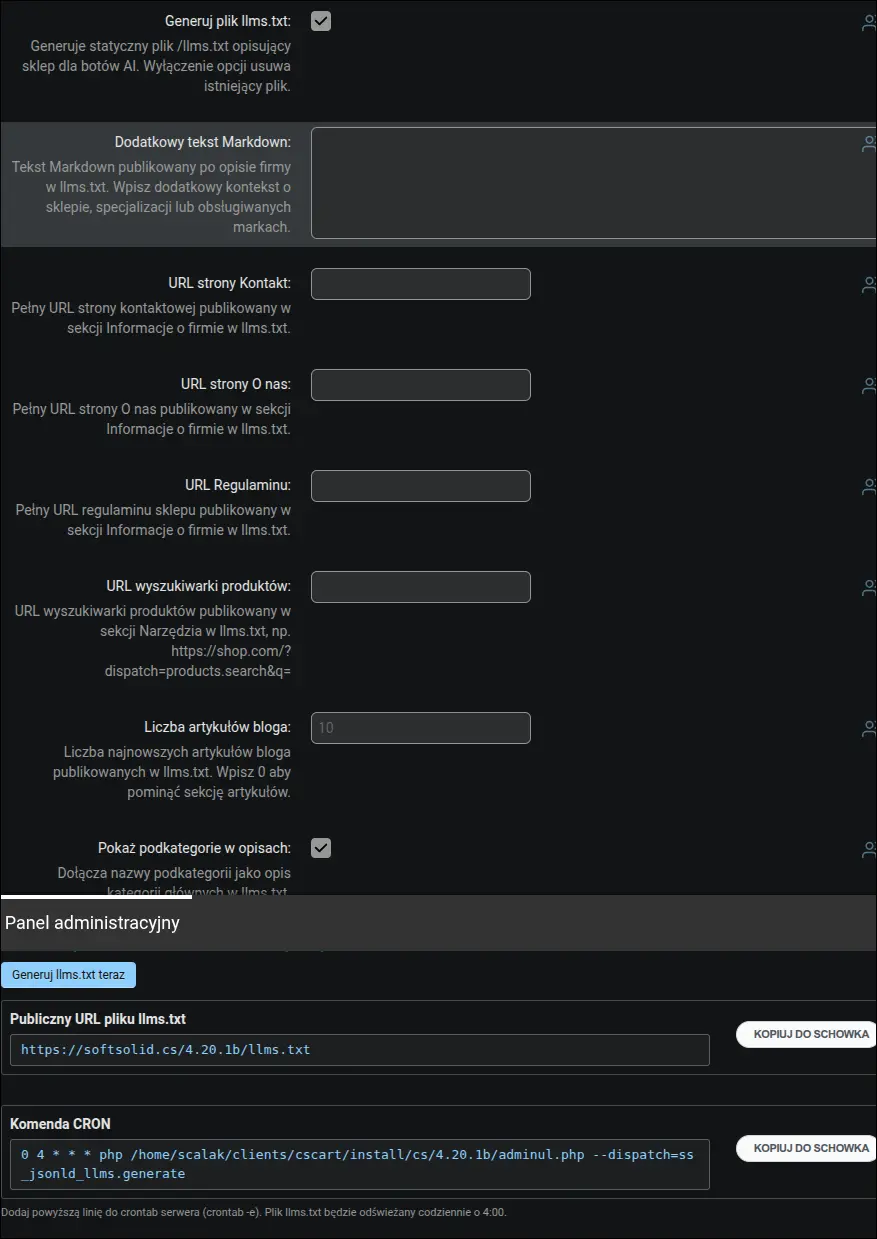
Zrzut ekranu 10: ustawienia generowania pliku llms.txt
Warstwa agentowa to trzeci artefakt obok danych strukturalnych i pliku llms.txt: statyczny feed katalogu w formacie JSON oraz opcjonalny endpoint dla agentów AI. Feed włączasz jednym przełącznikiem i ustalasz limit pozycji w pliku (domyślnie 1000), a addon publikuje pod adresem /catalog-feed.json nazwę, cenę, dostępność, adres strony i obraz każdego produktu widocznego w sklepie. Endpoint w standardzie A2A pozostaje świadomą decyzją: domyślnie wyłączony, a po włączeniu odpowiada w transporcie JSON-RPC 2.0 wyłącznie na zapytania o wyszukiwanie w katalogu, chroniony wymogiem połączenia HTTPS i limitem zapytań na adres IP. W tej samej sekcji znajduje się opcja opisu wyszukiwarki w standardzie WebMCP, domyślnie włączona: formularz wyszukiwania sklepu otrzymuje nazwę narzędzia i opis, więc agent AI działający w przeglądarce wie, że może przez niego szukać produktów, a przeglądarki bez obsługi WebMCP po prostu pomijają te atrybuty. Jedna komenda CRON generuje feed i kartę agenta naraz:
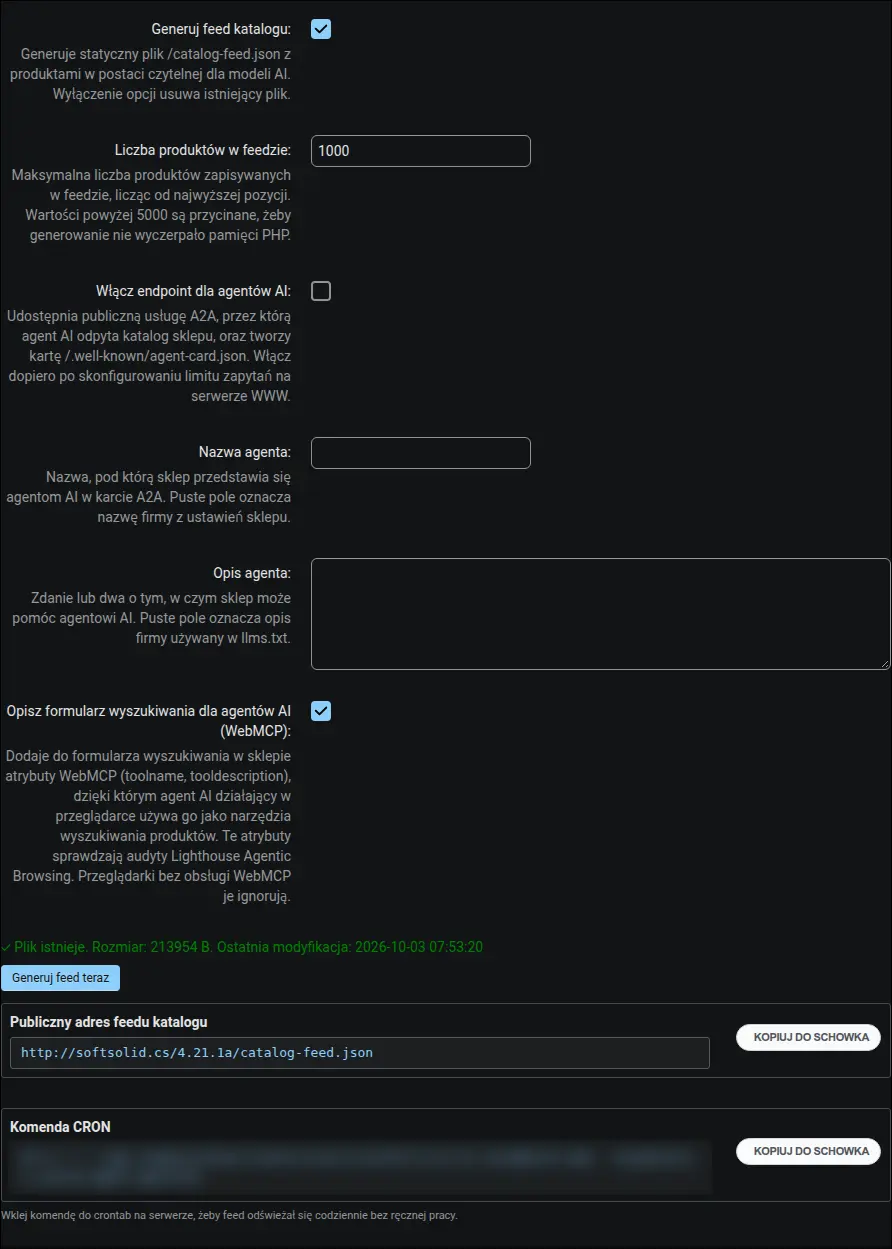
Zrzut ekranu 11: ustawienia warstwy agentowej z feedem katalogu, endpointem A2A i opisem WebMCP
Opcjonalna walidacja semantyczna przez sztuczną inteligencję. Po podaniu klucza API i wybraniu modelu Claude lub OpenAI walidator, poza sprawdzeniem struktury, oceni także sens danych, na przykład czy opis produktu odpowiada jego nazwie i cechom:

Zrzut ekranu 12: walidacja AI z wyborem modelu Claude lub OpenAI
Wbudowany walidator pobiera dowolny adres sklepu, wyodrębnia bloki JSON-LD i sprawdza ich zgodność ze Schema.org oraz wymaganiami Google. Na stronie produktu od razu widać komplet wykrytych schematów: OnlineStore, WebSite, MerchantReturnPolicy, Product i BreadcrumbList, każdy z osobnym statusem i listą ewentualnych uwag:
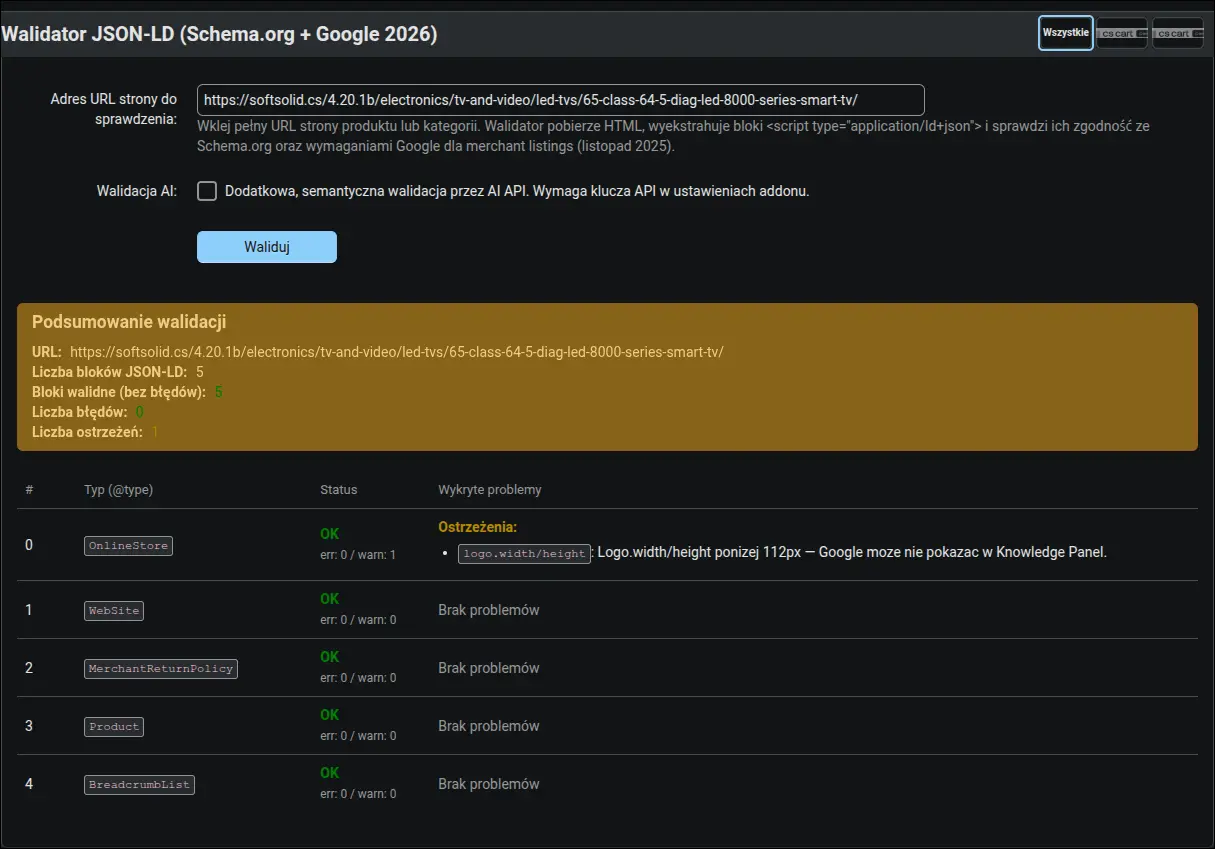
Zrzut ekranu 13: raport walidatora dla strony produktu
Pulpit diagnostyczny zbiera stan addonu w trzech kartach: błędy, ostrzeżenia i informacje. Jednym spojrzeniem oceniasz, czy konfiguracja jest kompletna i co warto poprawić, aby zwiększyć szansę na rich results. Cały raport można wyeksportować do JSON lub CSV:
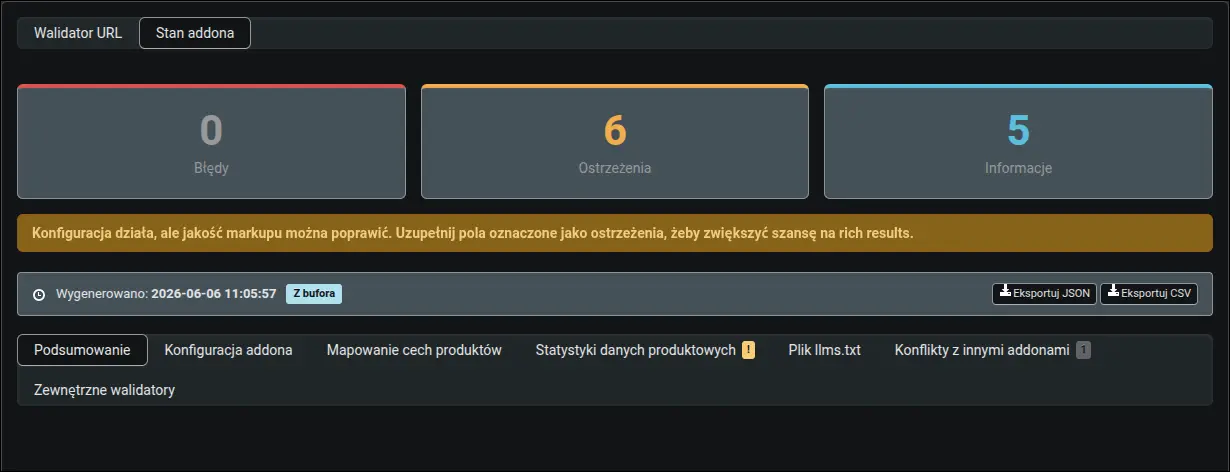
Zrzut ekranu 14: pulpit diagnostyczny, przegląd stanu addonu
Zaraz po instalacji addon podpowiada, od czego zacząć. Przewodnik pierwszych kroków rozpoznaje aktywny motyw sklepu i pokazuje tylko te zadania, które faktycznie dotyczą Twojej konfiguracji, na przykład jak uniknąć duplikatu ścieżki nawigacji czy bloku Organization pochodzącego z motywu. Każdy krok ma przyciski sprawdzenia i przejścia wprost do właściwego ustawienia:
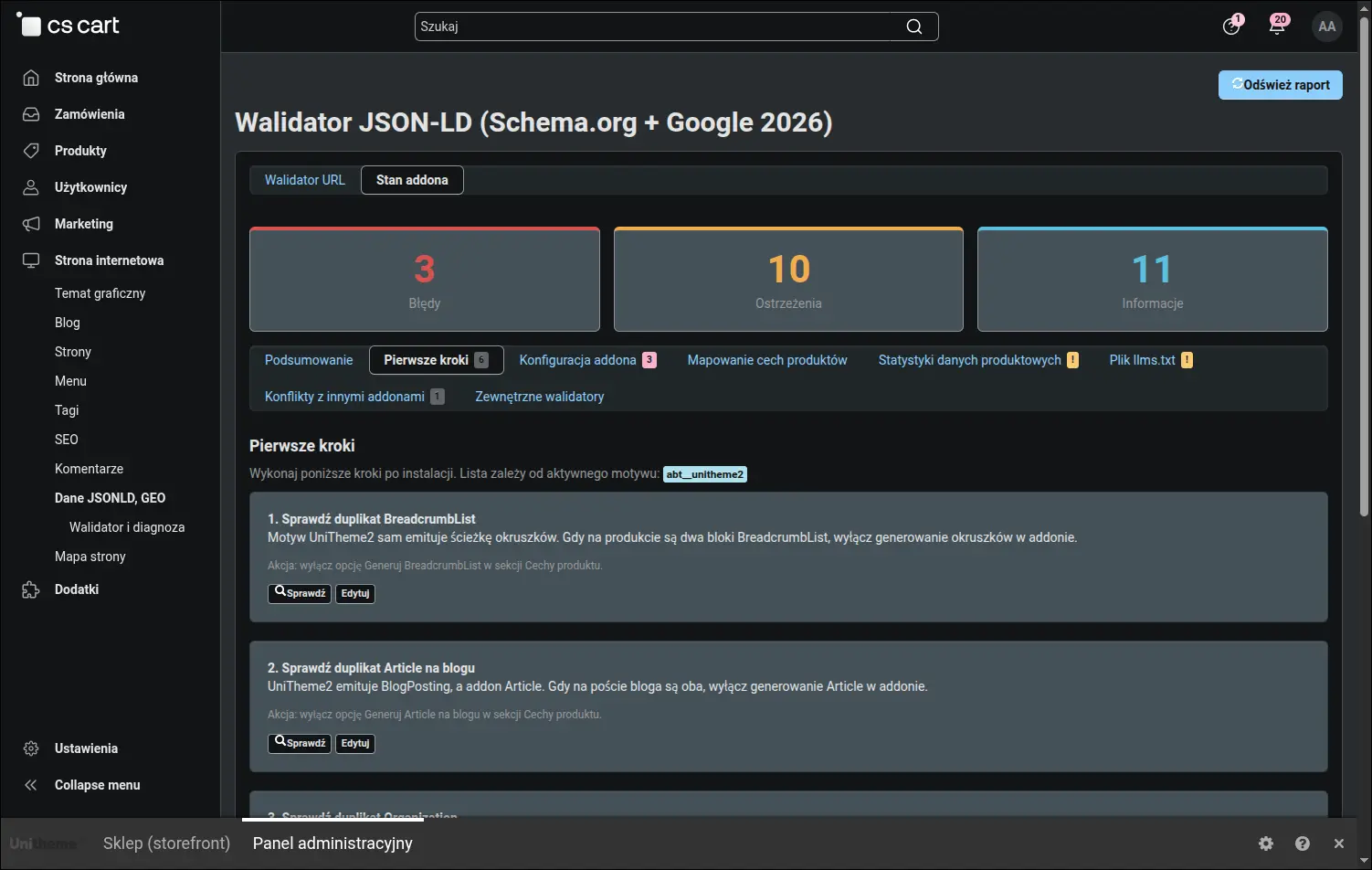
Zrzut ekranu 15: przewodnik pierwszych kroków dopasowany do motywu
Zakładka jakości danych produktowych pokazuje w procentach, ile produktów ma uzupełnioną markę, GTIN, MPN, opis i zdjęcie. Listy najczęstszych braków prowadzą wprost do edycji konkretnych produktów, więc od razu wiesz, gdzie zacząć porządki, zanim zrobi to za Ciebie Google:
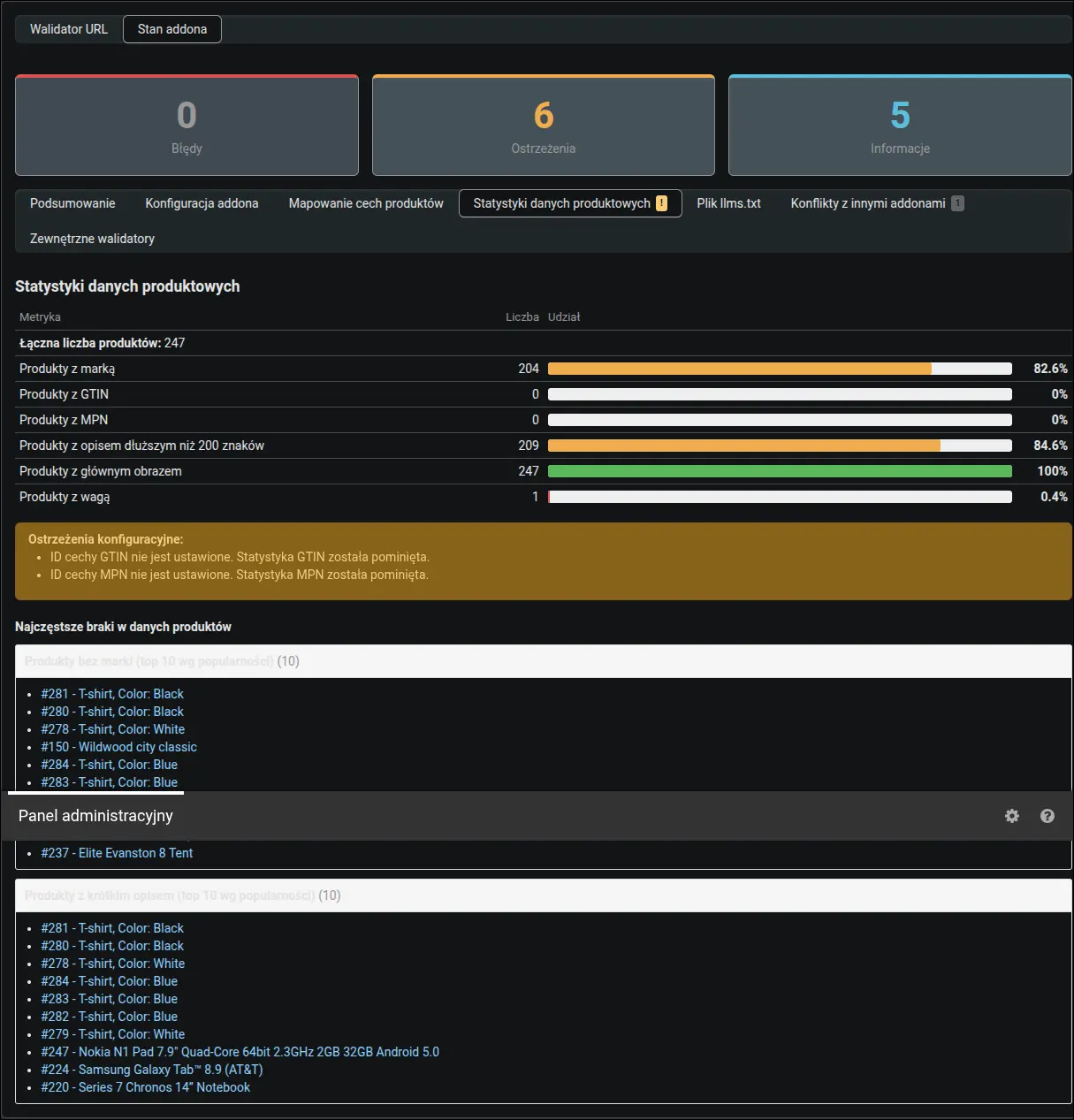
Zrzut ekranu 16: statystyki jakości danych produktów
Pulpit diagnostyczny ma osobną zakładkę dla warstwy agentowej. Widzisz w niej publiczny adres feedu, datę ostatniej aktualizacji z oceną pracy zadania CRON, rozmiar pliku oraz liczbę produktów w feedzie zestawioną z liczbą aktywnych produktów sklepu. To zestawienie ma praktyczne znaczenie przy rosnącym asortymencie: gdy feed zatrzymał się na ustawionym limicie, panel ostrzega, że agent AI widzi tylko część oferty, i podaje konkretną wartość limitu do wpisania. Różnica wynikająca z widoczności produktów dla wybranych grup klientów jest za to oznaczona jedynie jako informacja, bo feed świadomie publikuje tylko to, co widzi niezalogowany klient:
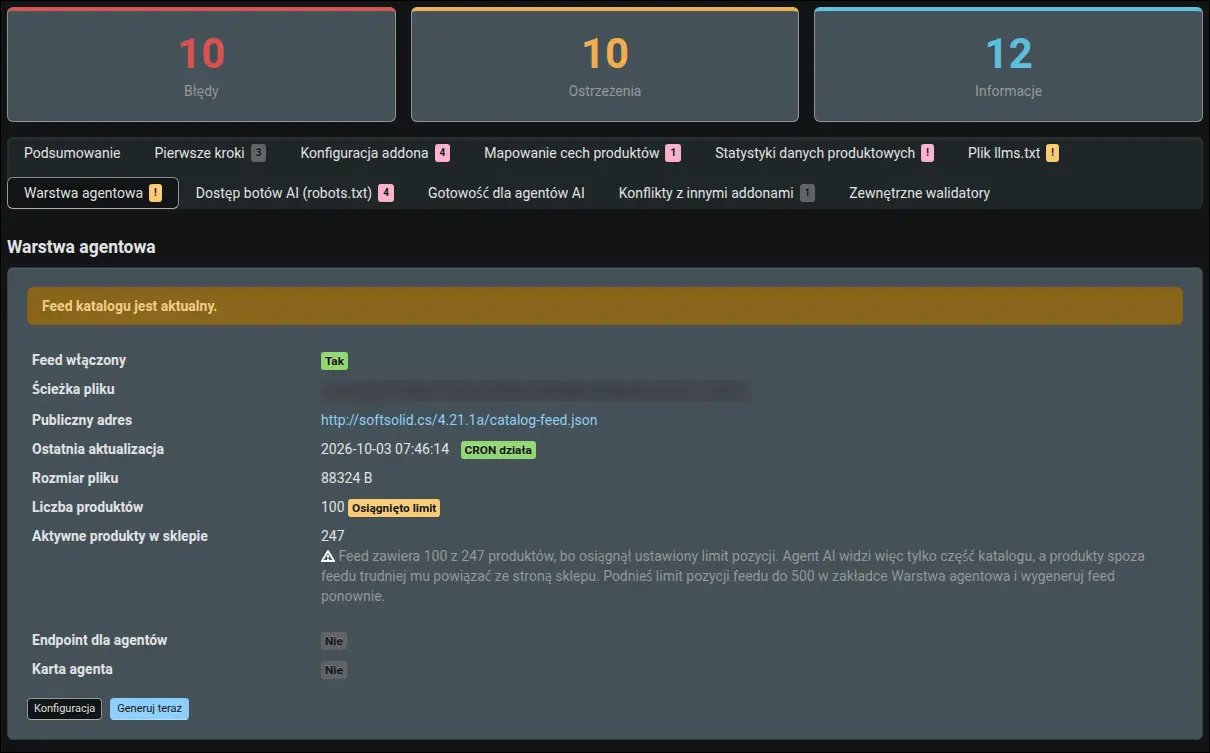
Zrzut ekranu 17: ostrzeżenie o feedzie obciętym limitem z podpowiedzią nowej wartości
Najstaranniej przygotowane dane nic nie dadzą, jeśli plik robots.txt nie wpuszcza botów AI do sklepu. Panel dostępu botów czyta plik, który boty naprawdę otrzymują, i ocenia go w trzech grupach. Zablokowany bot cytujący stronę w odpowiedziach, taki jak ClaudeBot czy PerplexityBot, jest zgłaszany jako błąd, bo to od niego zależy widoczność sklepu w wyszukiwarkach AI. Blokada bota zbierającego dane do trenowania modeli bywa świadomą decyzją właściciela, więc pojawia się tylko jako informacja. Osobno sprawdzane są pliki publikowane przez addon, a pod tabelą czeka gotowy blok do wklejenia i przycisk przejścia do edytora robots.txt. Sam plik pozostaje pod Twoją kontrolą, bo addon go nie nadpisuje:
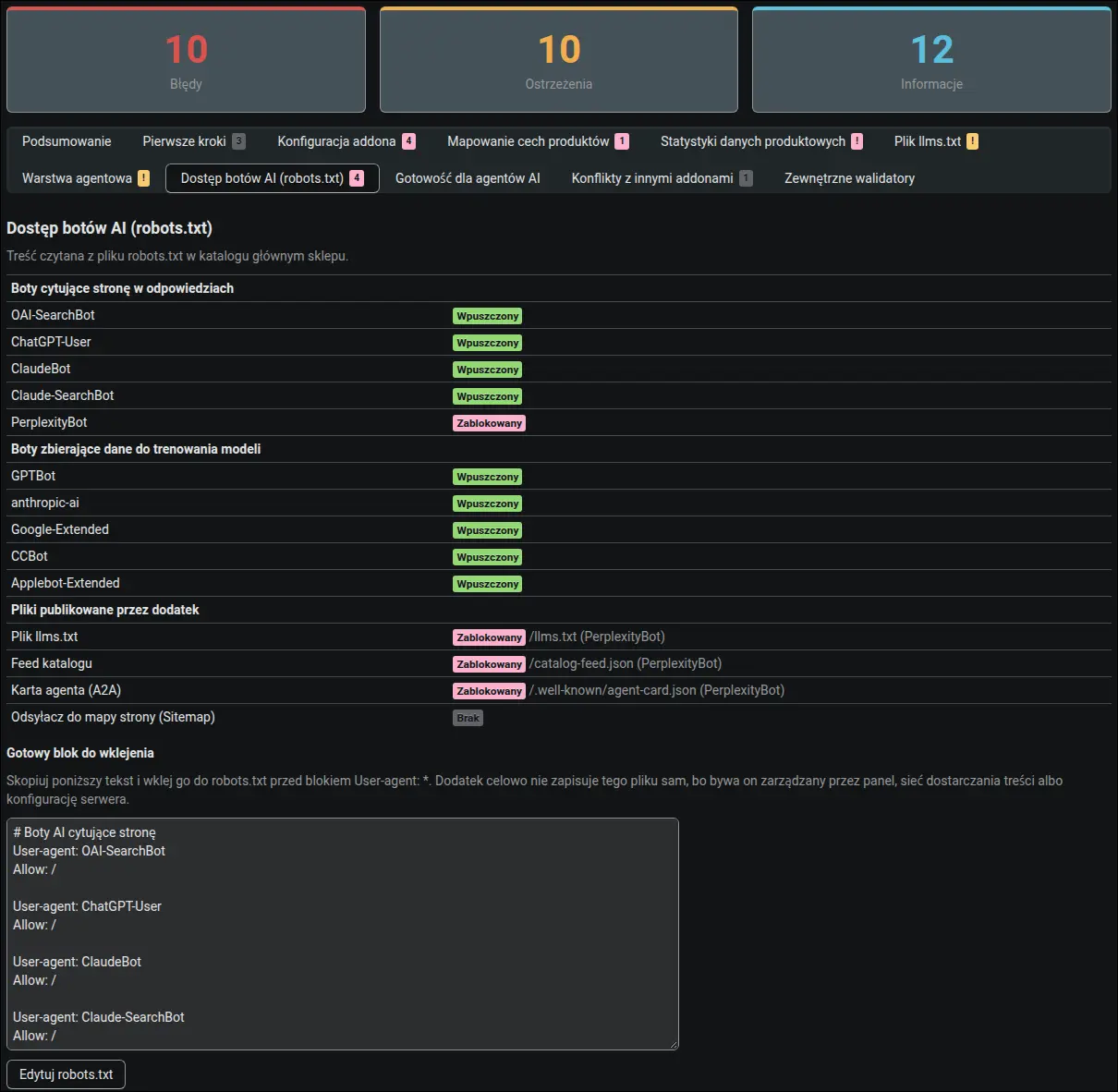
Zrzut ekranu 18: dostęp botów AI do sklepu i plików według robots.txt
Panel gotowości dla agentów AI patrzy na sklep z perspektywy agenta. Pobiera stronę główną i plik /llms.txt, a następnie ocenia je według reguł wzorowanych na audytach Lighthouse Agentic Browsing w przeglądarce Chrome: odpowiedź serwera dla llms.txt, komplet opisu WebMCP na formularzu wyszukiwania, ewentualny duplikat narzędzia oraz liczbę pozostałych formularzy bez opisu. Gdy coś nie działa, panel wskazuje prawdopodobną przyczynę, a wynik przechowuje przez godzinę, żeby nie obciążać sklepu kolejnymi pobraniami:
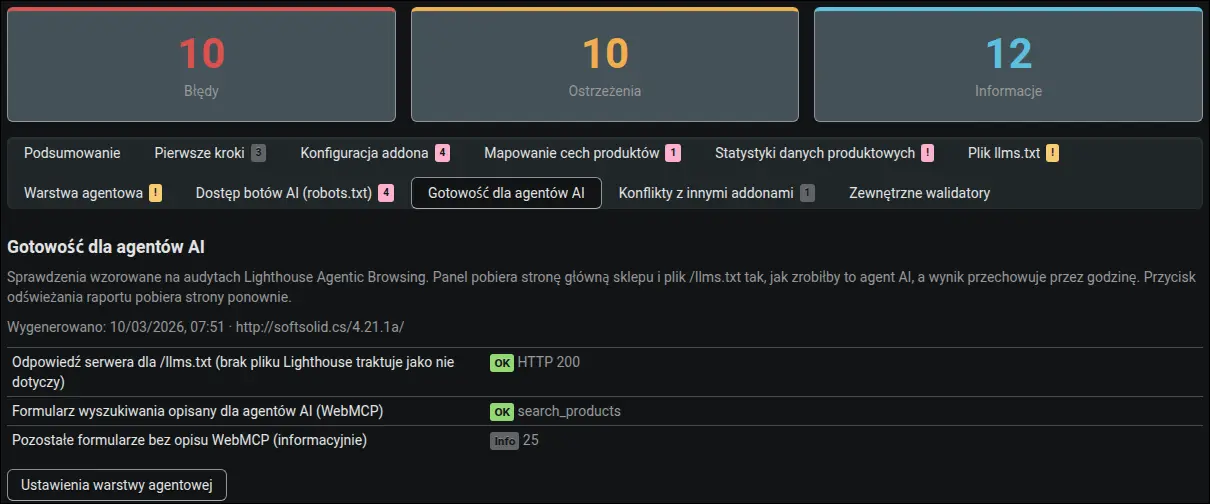
Zrzut ekranu 19: gotowość sklepu dla agentów AI w duchu audytów Lighthouse
Ten sam walidator uruchomiony na stronie kategorii potwierdza, że addon generuje schemat CollectionPage z listą produktów. To dowód, że dla Google i wyszukiwarek AI czytelne są zarówno karty produktów, jak i strony kategorii:
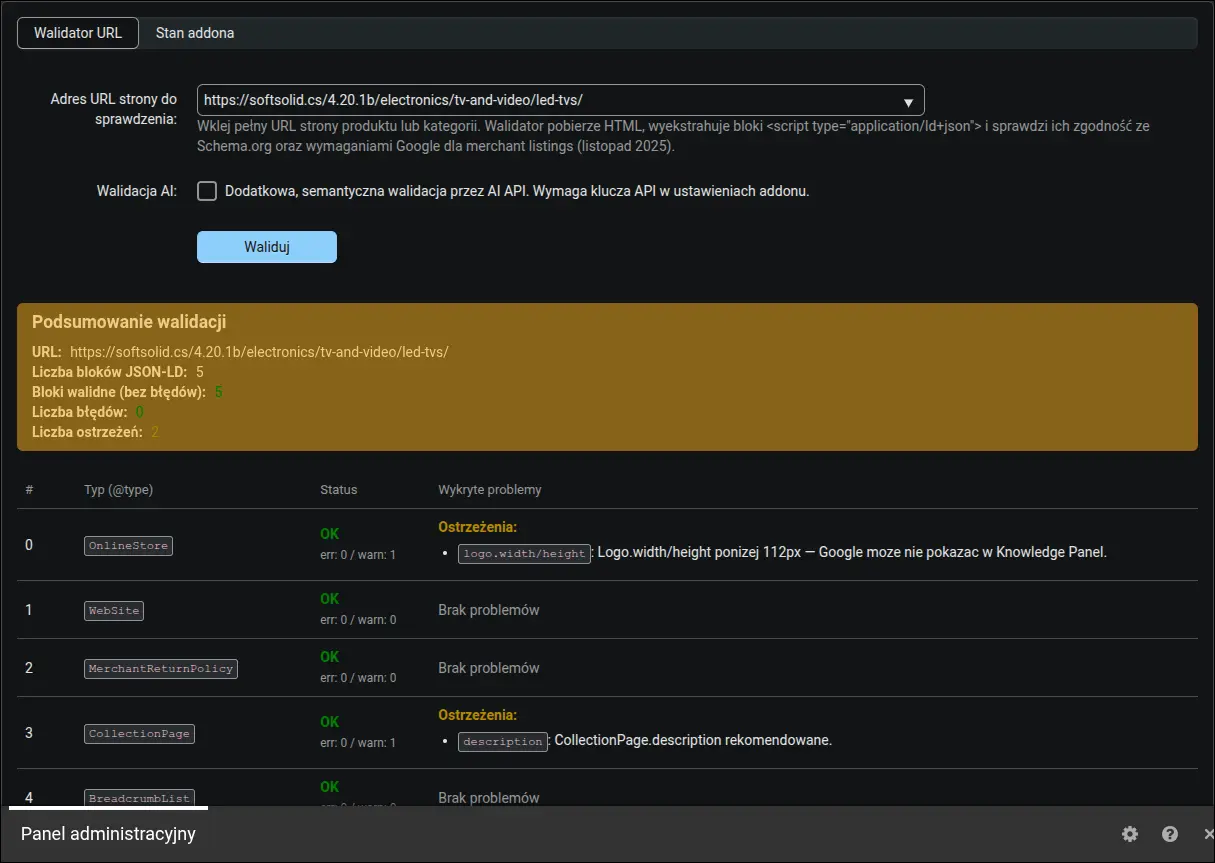
Zrzut ekranu 20: raport walidatora dla strony kategorii (CollectionPage)
Gotowy plik llms.txt otwarty w przeglądarce pod adresem /llms.txt. Zawiera krótki opis firmy, kategorie produktów, artykuły bloga i dane kontaktowe w formacie, który boty AI czytają wprost. To odpowiednik pliku robots.txt, tyle że adresowany do sztucznej inteligencji, a nie do robotów indeksujących:

Zrzut ekranu 21: wygenerowany plik llms.txt dostępny pod adresem /llms.txt
Sam plik /catalog-feed.json otwarty w przeglądarce wygląda jak zwykły dokument JSON: nagłówek z walutą, datą wygenerowania i liczbą pozycji, a dalej tablica produktów z nazwą, ceną, dostępnością, adresem strony i obrazem. Model językowy nie musi już parsować HTML, żeby poznać asortyment sklepu, wystarczy pobrać ten jeden plik pod stałym adresem:
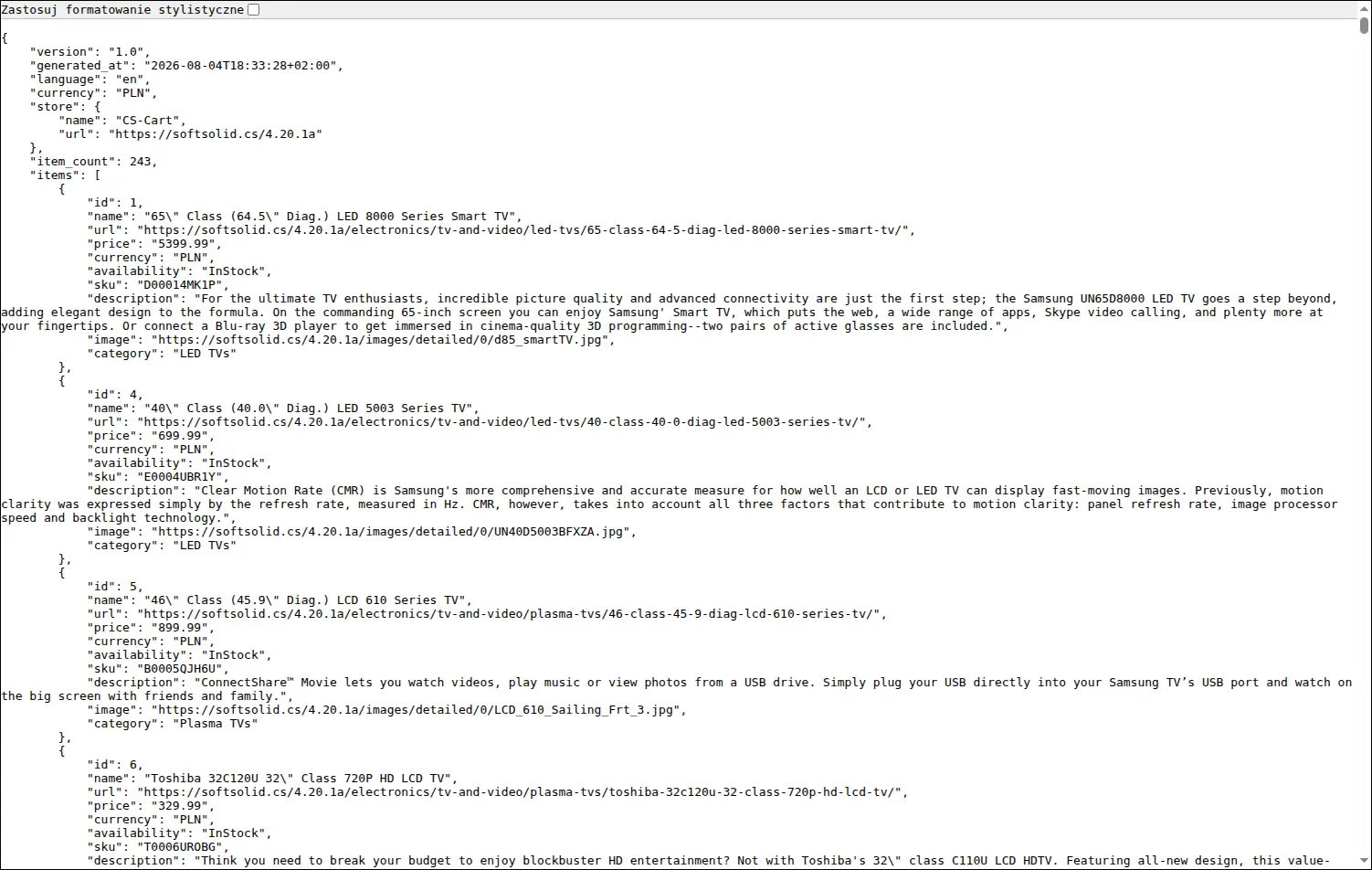
Zrzut ekranu 22: feed katalogu dostępny pod adresem /catalog-feed.json
Addon Dane strukturalne JSONLD, GEO porządkuje to, czego standardowy CS-Cart nie udostępnia: komplet schematów Schema.org powiązanych w jeden graf encji, rozdzielenie marki i producenta, warianty opisane z ceną każdego z nich, politykę zwrotów na miarę wymagań Google 2026, plik llms.txt oraz feed katalogu z opcjonalnym endpointem A2A i wyszukiwarką opisaną dla agentów AI. Konfiguracja sprowadza się do uzupełnienia danych firmy i wskazania cech produktu, a wbudowany walidator, pulpit diagnostyczny i przewodnik pierwszych kroków czuwają na bieżąco nad jakością markupu i nad tym, czy boty AI w ogóle mają do niego dostęp.
Pełna prezentacja, 6 minut
Zapraszamy do kontaktu i zakupu!
Wybierz najbardziej korzystaną dla siebie formę płatności za dodatek. Możesz zapłacić raz i korzystać z dodatku. Wybranie płatności subskrypcyjnej (miesięcznej lub rocznej) oznacza, że za dodatek płaci się w regularnych interwałach czasu i ma się dostęp do najnowszych wersji addona oraz wsparcia technicznego.
- Płatność jednorazowa
- Store Bulider
- Multi-Vendor
- 4.21.x
- 4.20.x
- 4.19.x
- 4.18.x
- 4.17.x
- 4.16.x
- 4.15.x
- Bez zmian w kodzie
Nie znaleziono opinii