


JSONLD, GEO structured data

- View all variations as list
| CODE | Payment method | Price | ||
|---|---|---|---|---|

|
683
ss_jsonld
2026-11-06
1.1.2.2
|
1450.00 PLN
(Price without tax) |
||

|
706
ss_jsonld_sub_1Y
2026-11-06
1.1.2.2
|
600.00 PLN
/year
(Price without tax) |
||

|
705
ss_jsonld_sub_1M
2026-11-06
1.1.2.2
|
60.00 PLN
/month
(Price without tax) |

- — 12 months guarantee for all our add-ons
- — add-ons sold to entire world
- — stable, flexible, high-quality products
- — competitive prices, attractive discounts
- — quick and competent technical support
- — installation in 24 hours
- — personalized solutions - we'll write any add-on for you
An extension for Store Builder and Multi-Vendor that enriches your store with Schema.org structured data in JSON-LD format and builds an llms.txt file for AI bots. As a result, your store becomes readable both for Google (rich results and merchant listings) and for AI-powered search engines such as ChatGPT, Claude, Perplexity and Gemini.
A standard CS-Cart installation does not publish the full Schema.org schemas that Google and AI assistants expect today. This add-on fills that gap without touching your templates: it injects ready markup on every page, links the store entities into one coherent graph, keeps everything aligned with Google requirements for 2026, and gives you the tools to confirm that your store data is complete. That same graph of data also hands language models the product catalog directly, with no need to parse page after page of HTML.
See how it works
Key Features
- Automatic Schema.org structured data (JSON-LD) on every page: OnlineStore, WebSite, Product, category, blog and CMS page, linked into a single entity graph, with no manual template work.
- Product data pulled straight from CS-Cart features: brand and, separately, manufacturer, GTIN/EAN, MPN number, OEM approvals and technical specifications, plus a ProductGroup for variants with the price, availability and image of every variant.
- A full return policy aligned with Google 2026 requirements: standard return, buyer's remorse withdrawal and statutory warranty, with a soft integration with the Withdrawal from Contract add-on.
- A store mode that matches your catalogue: physical products shipped by courier, digital products delivered by email, and a brick-and-mortar location described as a Store with its address data.
- Authorship and freshness signals that Google values: the blog article author as a person (Person, an E-E-A-T signal) and the last modification date of pages and posts.
- An agent layer for AI models: a static JSON catalog feed at /catalog-feed.json, an optional A2A endpoint with an agent card, and a search form described in the WebMCP standard, which an in-browser agent recognizes as a ready-made tool.
- An llms.txt file for AI bots, a built-in JSON-LD validator, a first-steps guide and a diagnostic dashboard that also checks AI bot access in robots.txt, the store readiness for agents and the completeness of the catalog feed.
You begin the setup with company data and the store type. In one place you decide whether you sell physical products shipped by courier or digital ones delivered by email, and the add-on selects the matching markup for you. This is also where the company description, the logo with its dimensions, the email address, opening hours and the tax number belong, the last one published in the structured data as the company tax identifier:
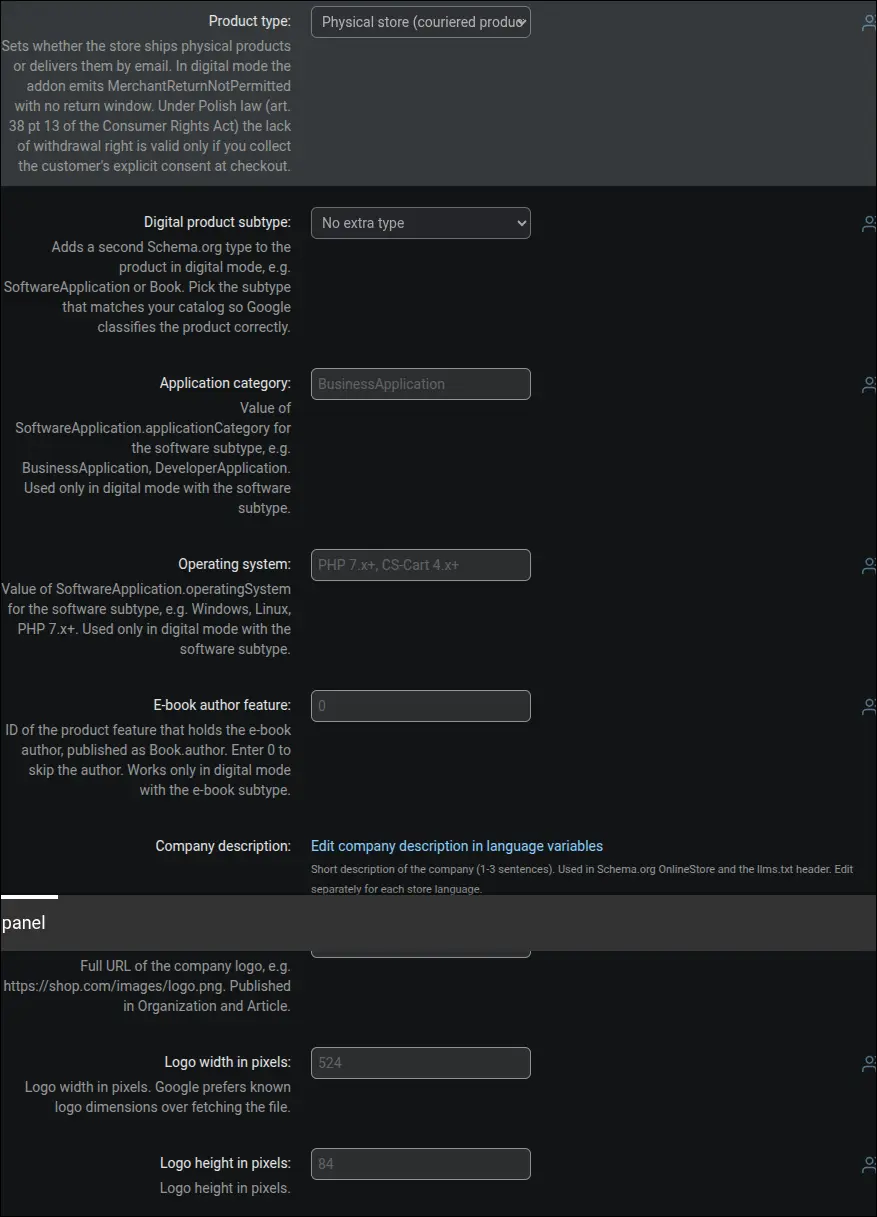
Screenshot 1: company data, store type and tax ID
The second part of the company data covers contact details and online presence. The email address, opening hours split by weekday, currency, social media profile links, contact point data (areas served and languages) and the founding date feed the OnlineStore schema. Google uses them in the Knowledge Panel, and AI assistants use them when answering questions about how to reach the store:
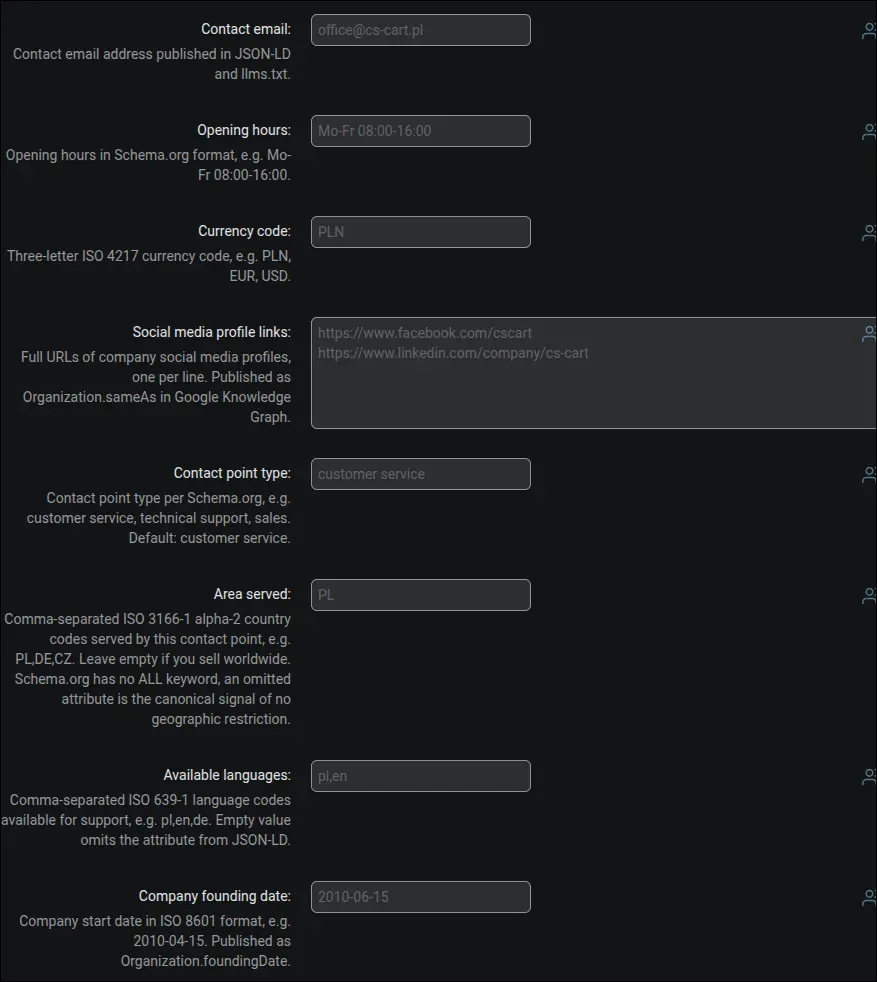
Screenshot 2: contact details, social profiles and contact point
If you also sell from a physical location, the add-on describes the company additionally as a Store and adds geographic coordinates. You simply enable the brick-and-mortar option and provide the latitude and longitude. The same tab holds a note about the company data duplicate coming from the UniTheme2 theme, together with instructions on how to remove it so that only one Organization entity remains in the page source:
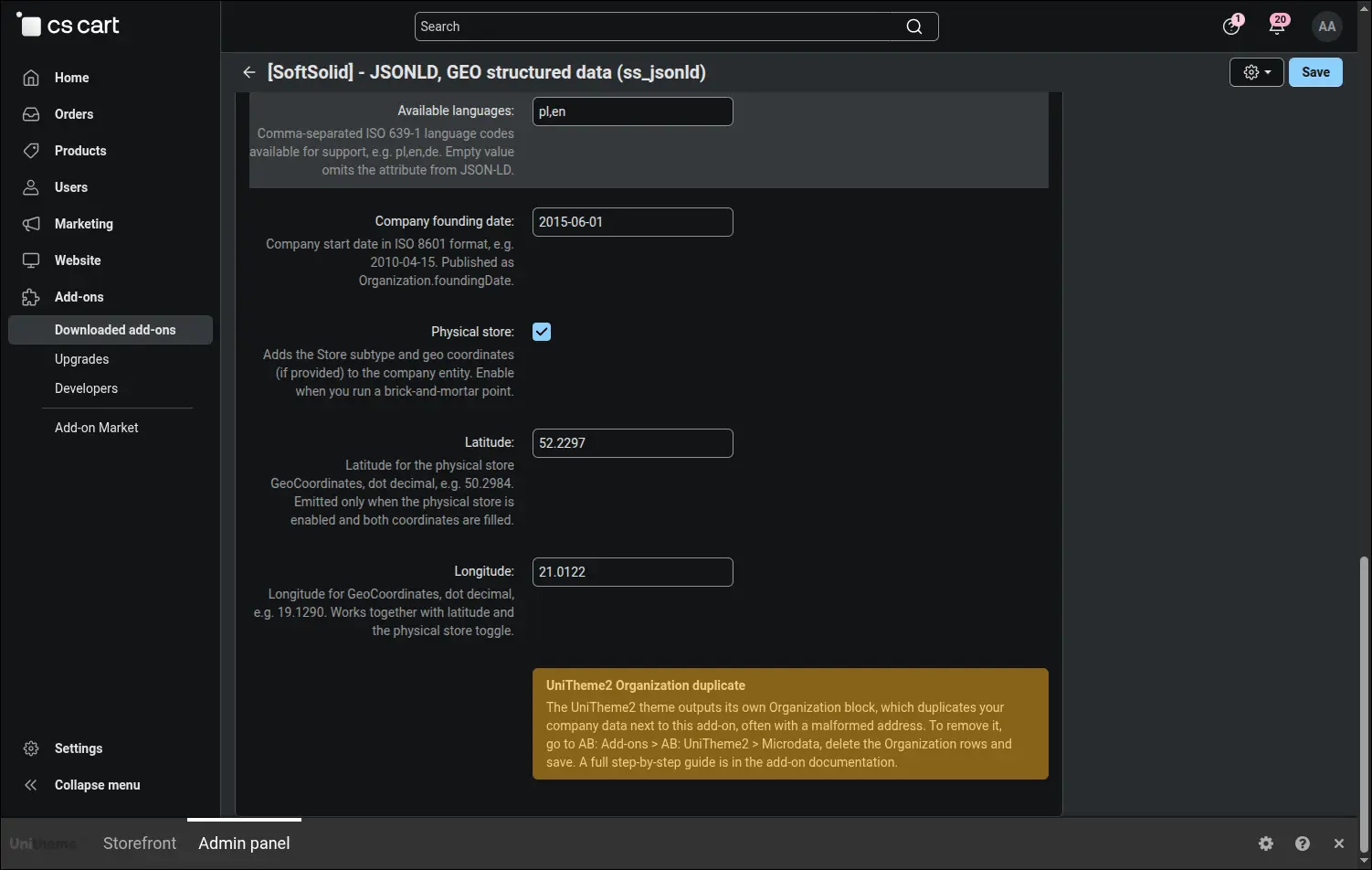
Screenshot 3: brick-and-mortar store (Store) with geo coordinates
Stores with a digital catalogue get a dedicated tab. In digital mode the markup adapts to email delivery and the absence of a physical return, and you choose the product subtype (software, e-book, document or media). For software you provide the application category and operating system, and for e-books the author feature, so that Google classifies the digital product correctly:
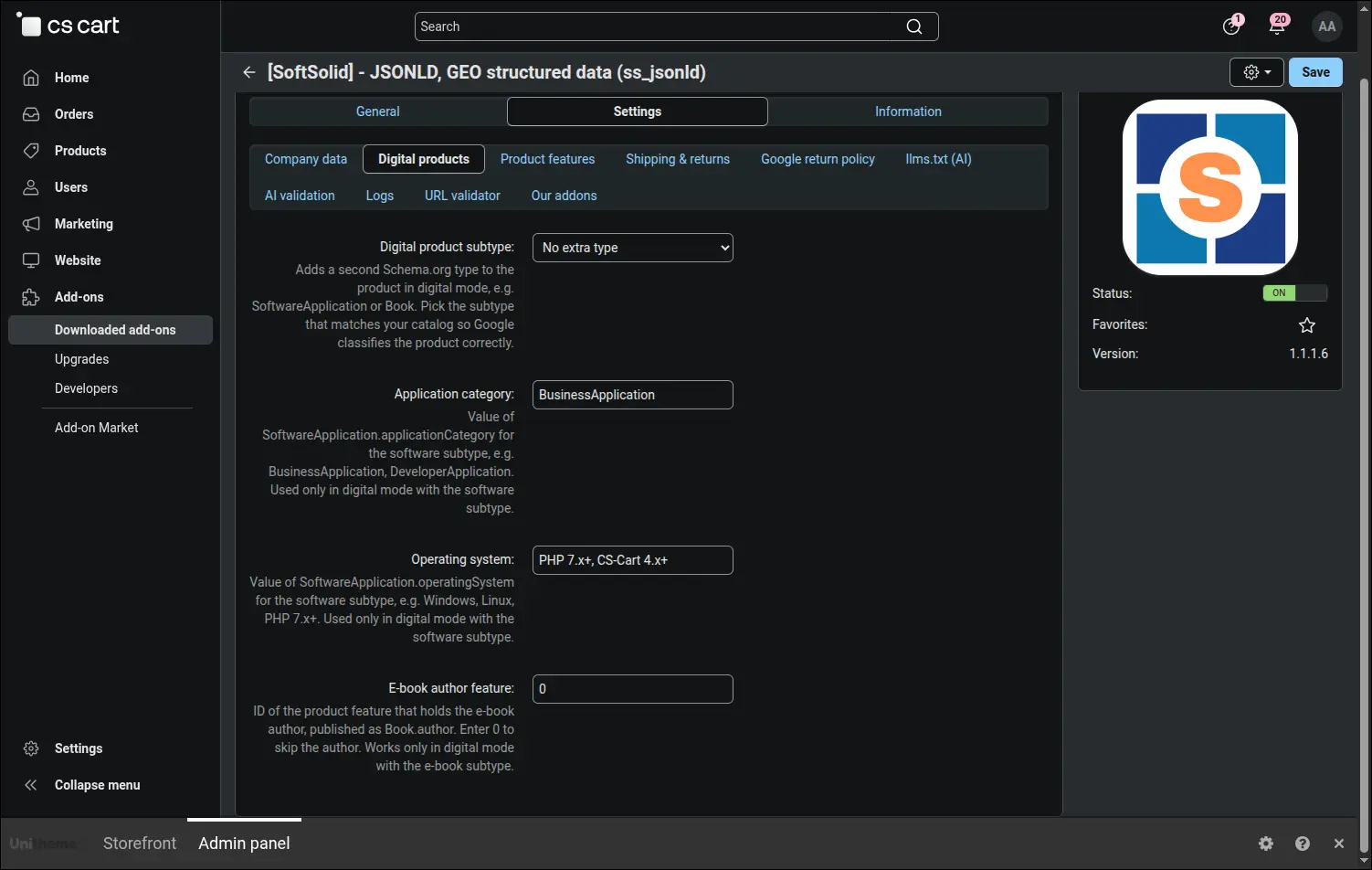
Screenshot 4: the digital products tab
In this section you connect CS-Cart product features with Schema.org data. You point to the feature that holds the brand and to the one that holds the manufacturer (kept separate from the trade brand), as well as the GTIN/EAN code, the MPN number, OEM approvals and technical specifications. The add-on copies these values into the product markup, and when the manufacturer feature is empty it falls back to a default value or to the brand:
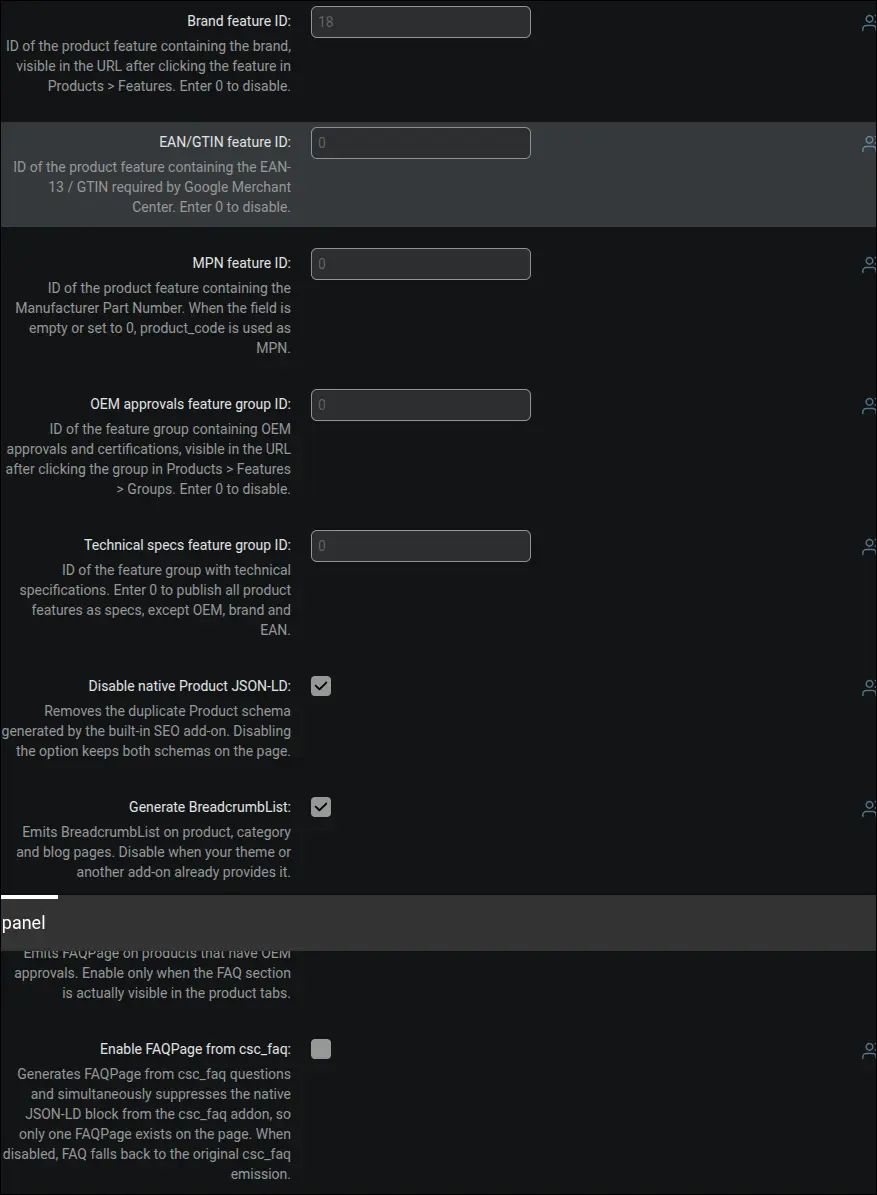
Screenshot 5: mapping product features, brand and manufacturer
Here you decide what exactly the add-on renders on products and the blog. You disable the duplicate Product block from the SEO add-on, turn on the BreadcrumbList path, the Article markup on blog posts and the last modification date on pages. The variant linking option joins products into a ProductGroup, and the blog author fields switch the content author from the company to a specific person, a stronger E-E-A-T signal for Google:
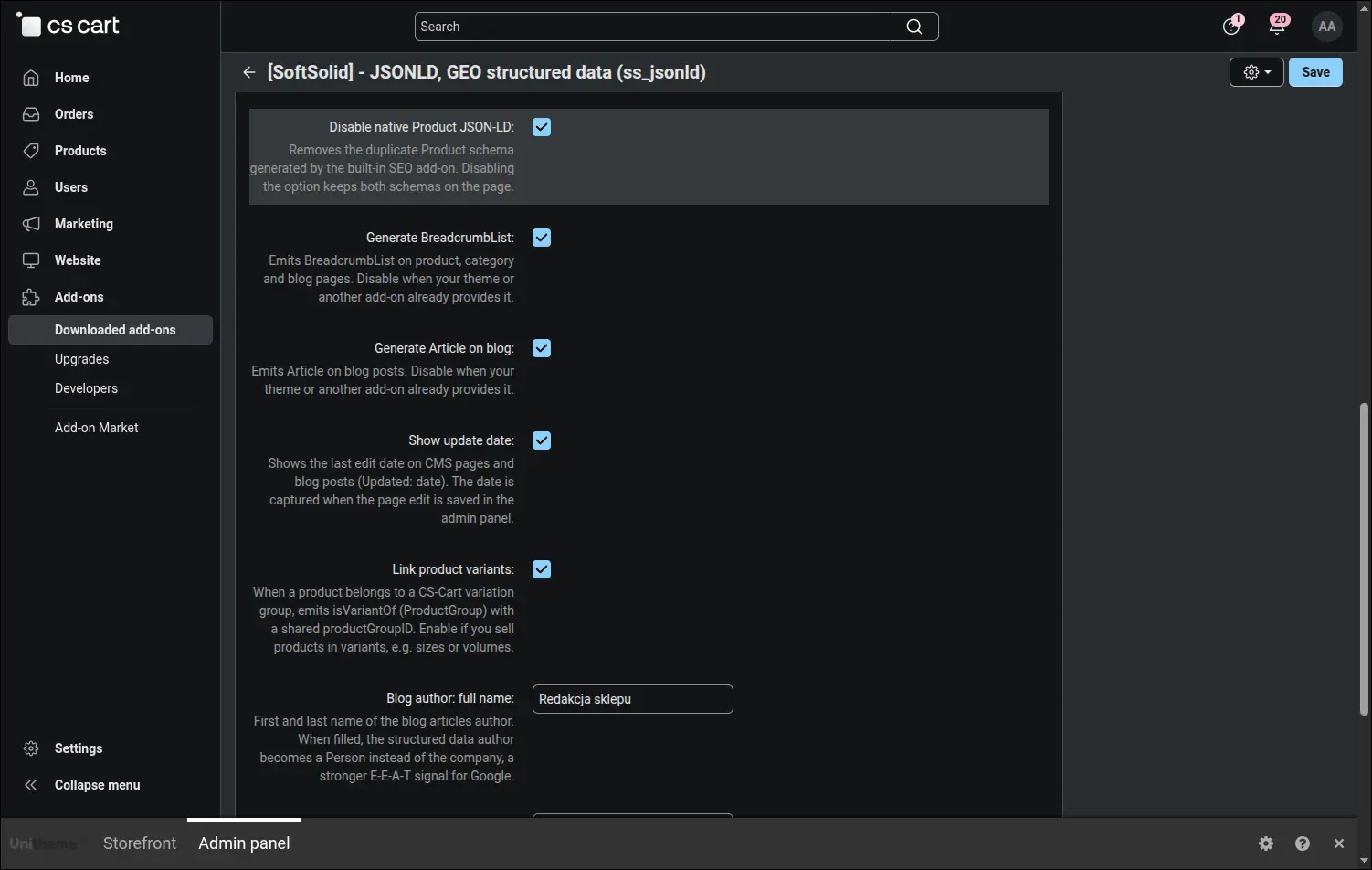
Screenshot 6: rendering options, ProductGroup variants and blog author
Products with variants deserve more than a single price in search results. In four fields you point out which variation features of the store stand for size, color, material and pattern, simply by entering their IDs. When a variation group differs by such a feature, the add-on describes every variant of the page separately in the structured data: with an address that preselects it, a price after catalog promotions, availability, an image and the feature value. Google then sees the whole product family rather than only the variant currently displayed, while groups that differ by a feature outside these four, such as a pickup date, keep their previous description:
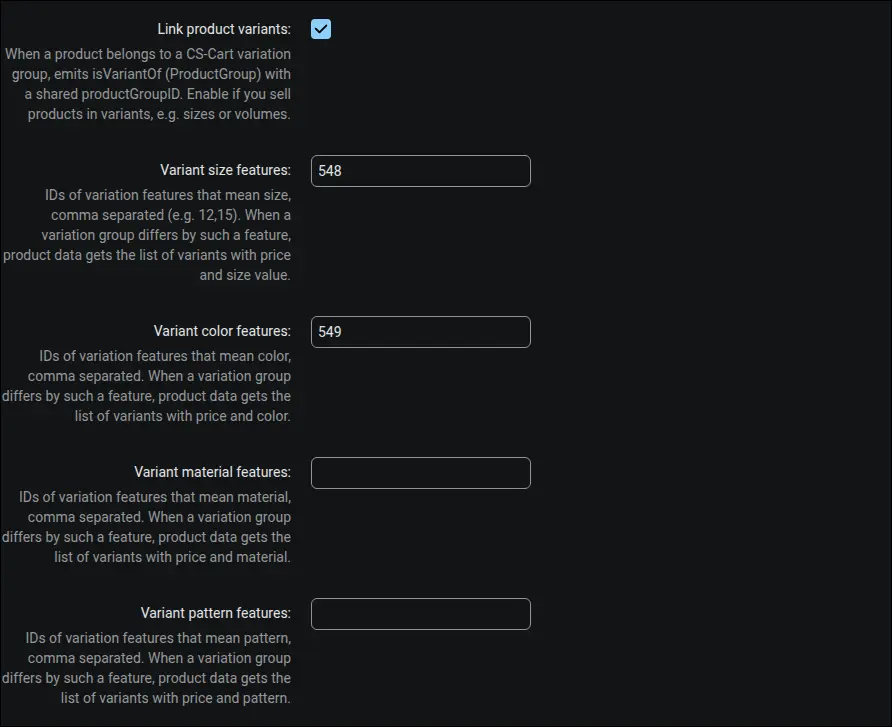
Screenshot 7: variation features mapped to size, color, material and pattern
Shipping parameters feed the OfferShippingDetails block: delivery cost, handling time, transit time and the number of days allowed for returns. You can also set a free shipping threshold, above which the cost in the structured data drops to zero. This way the offer in Google results reflects the real delivery terms:
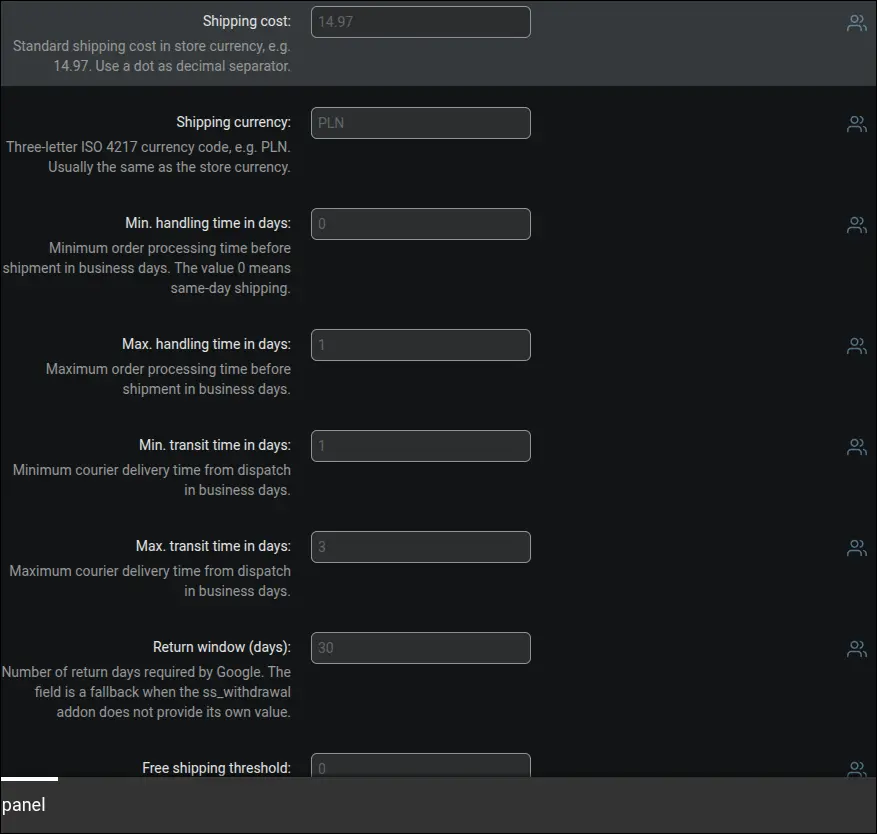
Screenshot 8: shipping parameters for the OfferShippingDetails block
A full return policy laid out according to Google requirements for 2026. You describe separately the standard return, the buyer's remorse withdrawal (14 days under Polish law) and the return of a defective product under the statutory warranty. This complete set of fields clearly improves the chance of showing the product in Google merchant listings:
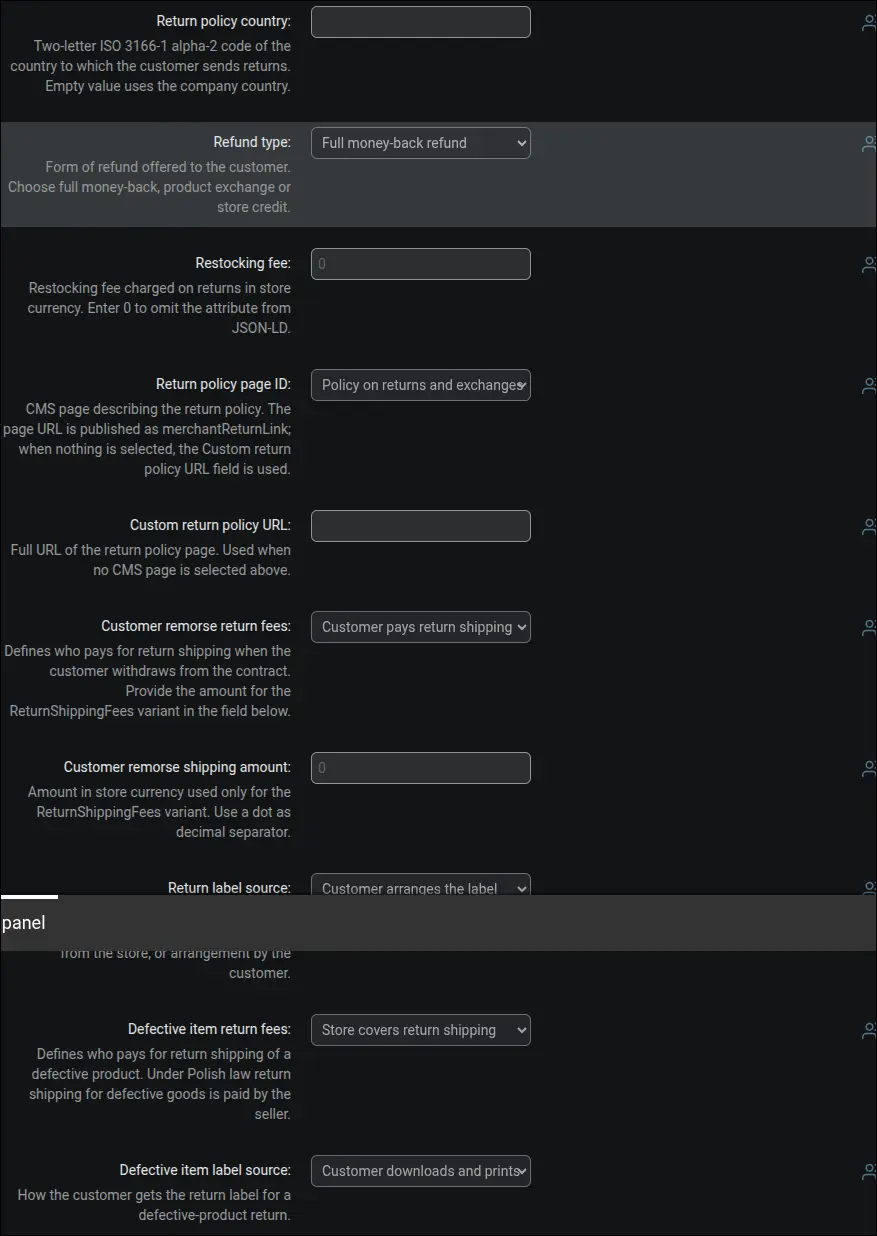
Screenshot 9: MerchantReturnPolicy aligned with Google 2026
Configuration of the llms.txt file, a store map prepared for AI bots. You turn on generation, choose the addresses of supporting pages and the number of blog articles, and create the file with a single click. The panel shows the public address of the file and a ready CRON command for daily updates:
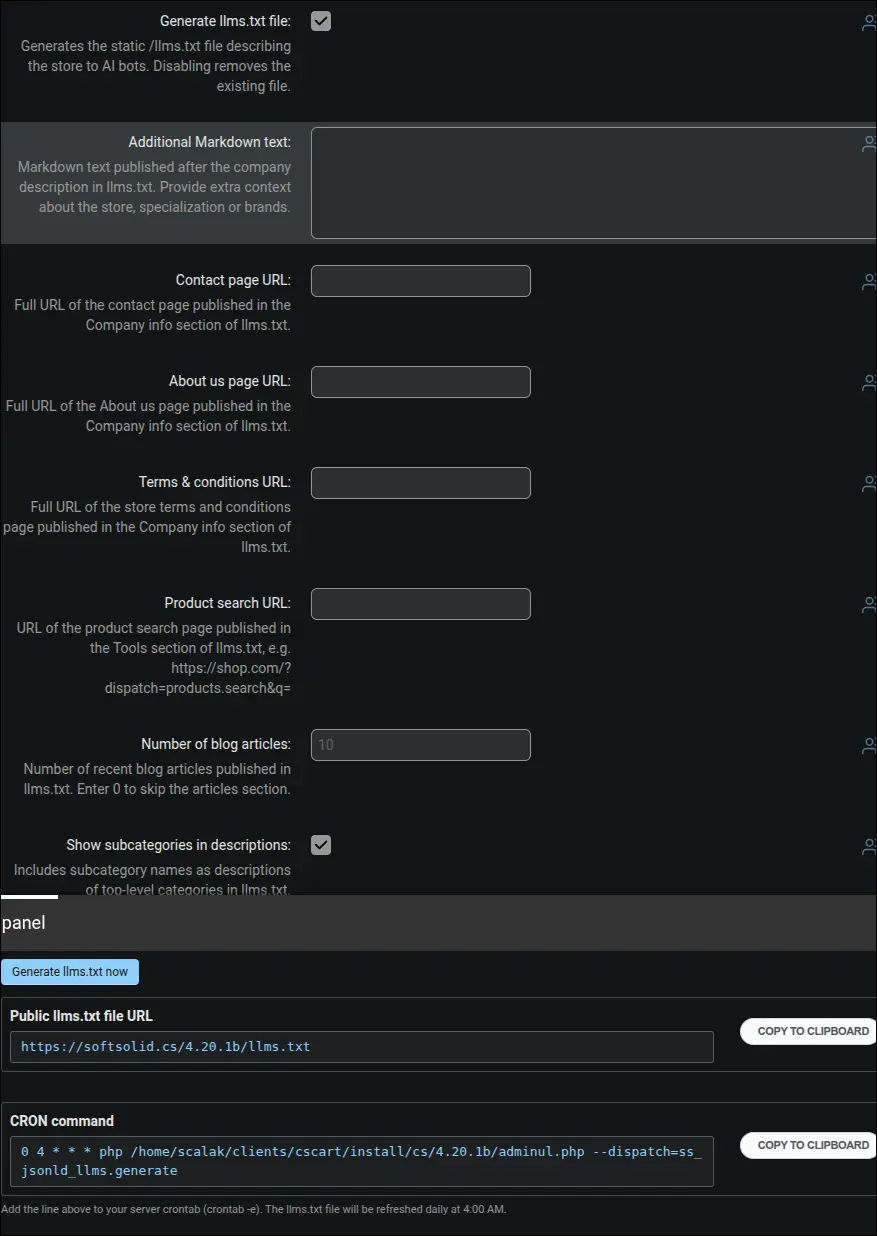
Screenshot 10: llms.txt file generation settings
The agent layer is a third artifact alongside structured data and the llms.txt file: a static JSON catalog feed and an optional endpoint for AI agents. You turn the feed on with a single switch and set the item limit for the file (1000 by default), and the add-on publishes, at /catalog-feed.json, the name, price, availability, page address and image of every product visible in the store. The A2A endpoint stays a deliberate choice: disabled by default, and once enabled it answers, over JSON-RPC 2.0, only catalog search requests, protected by an HTTPS requirement and a per-IP request limit. The same section holds the WebMCP option, enabled by default: the store search form receives a tool name and a description, so an AI agent working in the browser knows it can search products through it, while browsers without WebMCP support simply skip these attributes. A single CRON command generates the feed and the agent card at once:
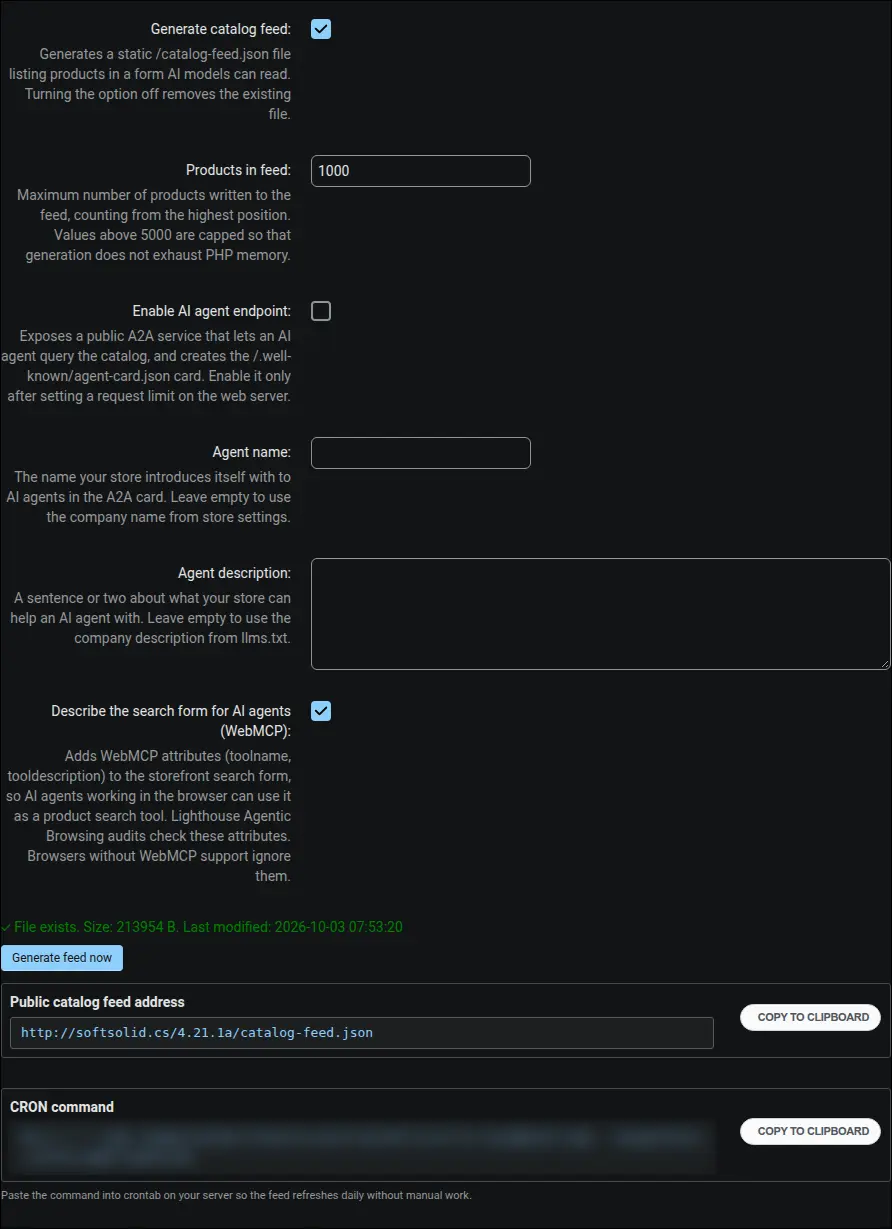
Screenshot 11: agent layer settings with the catalog feed, the A2A endpoint and the WebMCP description
An optional semantic validation powered by artificial intelligence. After you provide an API key and pick a Claude or OpenAI model, the validator goes beyond the structure check and also judges whether the data makes sense, for example whether the product description matches its name and features:

Screenshot 12: AI validation with a Claude or OpenAI model
The built-in validator fetches any store address, extracts the JSON-LD blocks and checks their compliance with Schema.org and Google requirements. On a product page you immediately see the complete set of detected schemas: OnlineStore, WebSite, MerchantReturnPolicy, Product and BreadcrumbList, each with its own status and a list of any remarks:
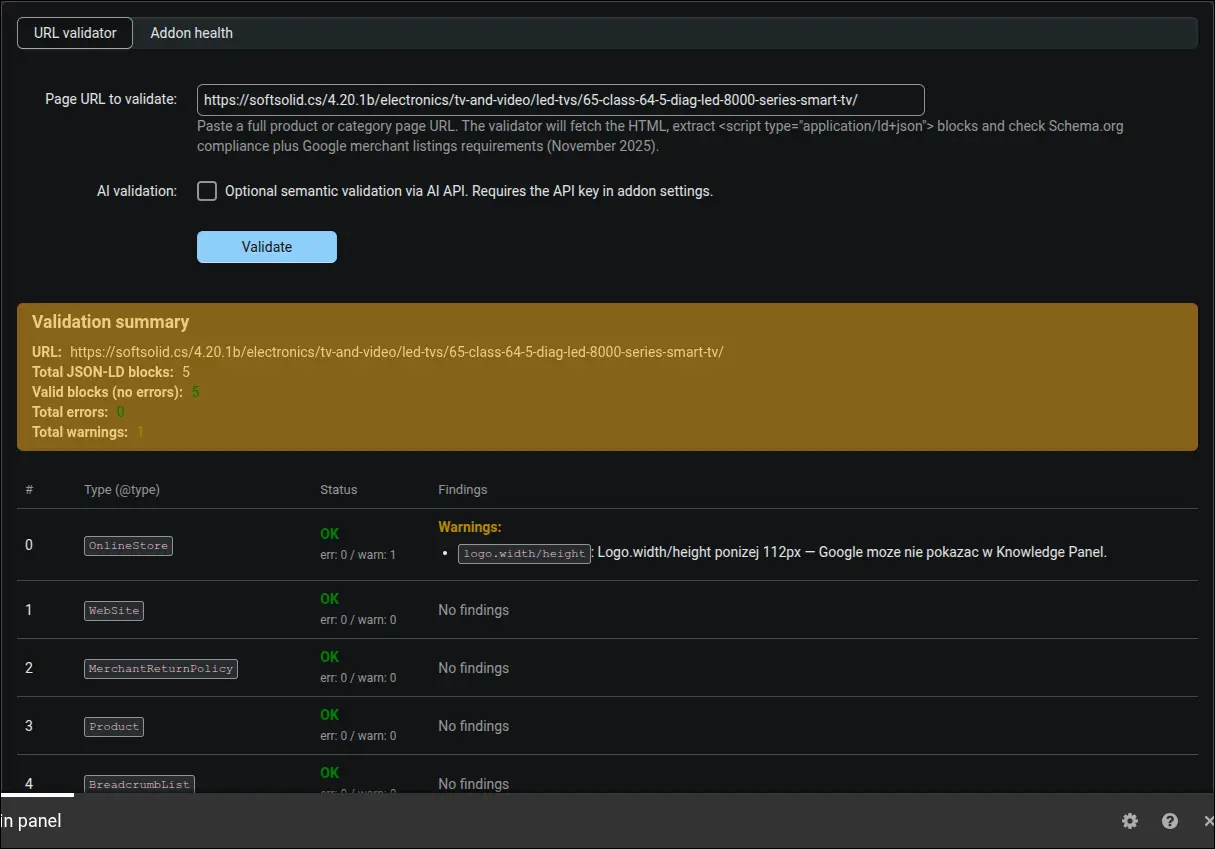
Screenshot 13: validator report for a product page
The diagnostic dashboard gathers the add-on status into three cards: errors, warnings and notices. At a glance you can tell whether the configuration is complete and what is worth improving to increase the chance of rich results. The whole report can be exported to JSON or CSV:
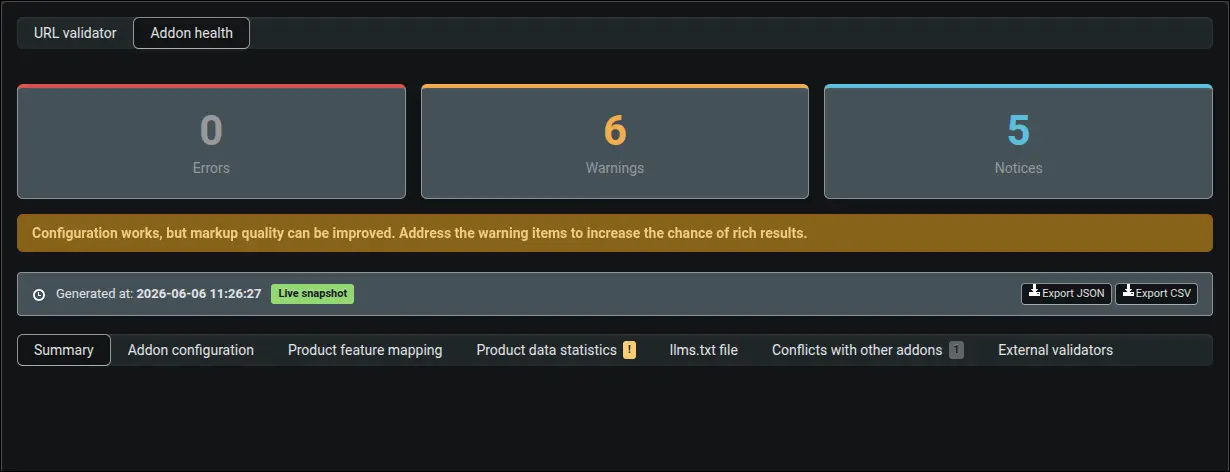
Screenshot 14: diagnostic dashboard, add-on status overview
Right after installation the add-on tells you where to start. The first-steps guide recognizes the active store theme and shows only the tasks that actually apply to your setup, for example how to avoid a duplicate navigation path or an Organization block coming from the theme. Each step has buttons to check it and to jump straight to the relevant setting:
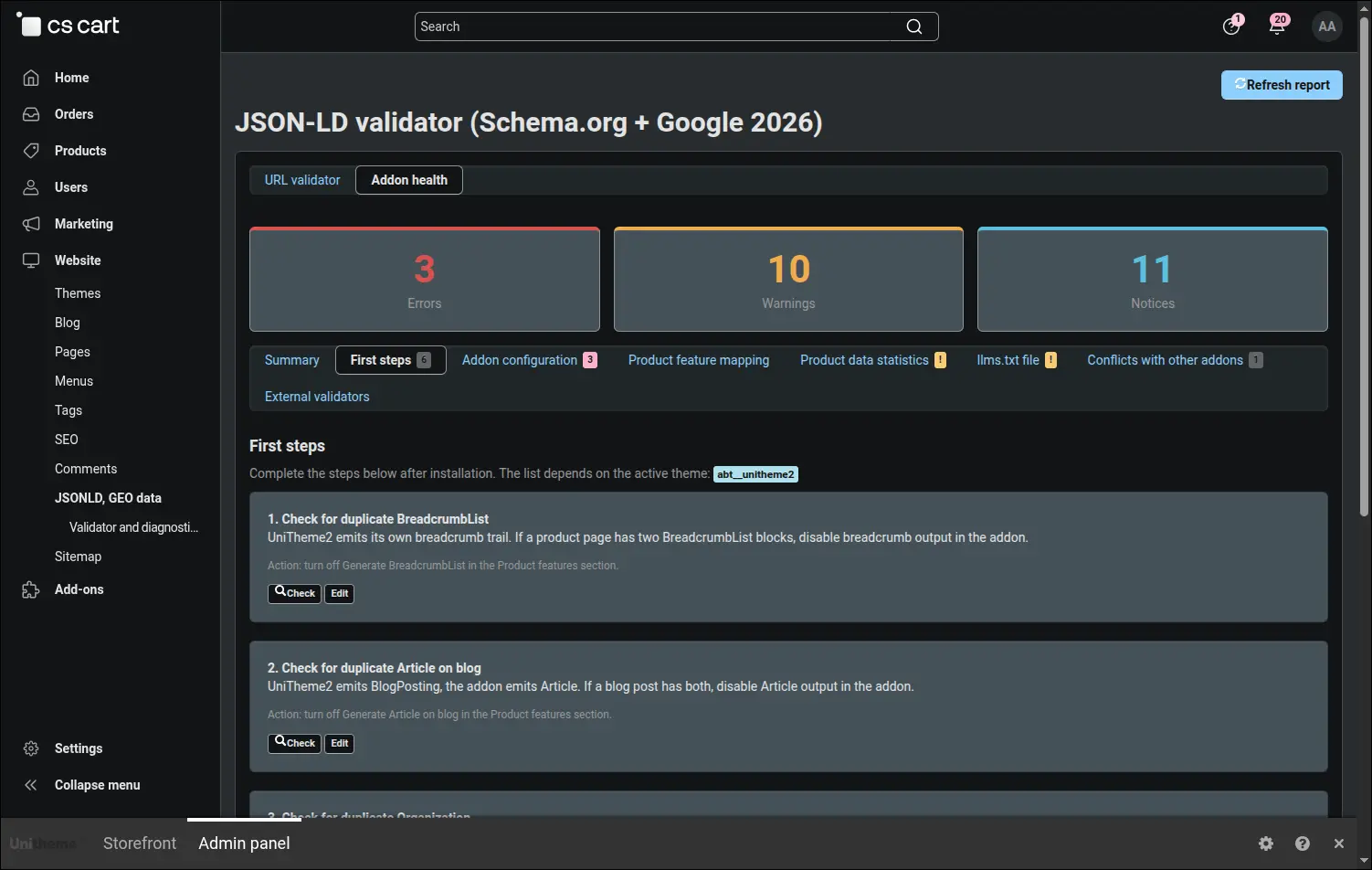
Screenshot 15: first-steps guide tailored to the theme
The product data quality tab shows, as percentages, how many products have a brand, GTIN, MPN, description and image filled in. Lists of the most common gaps lead straight to editing specific products, so you know exactly where to start tidying up before Google does it for you:
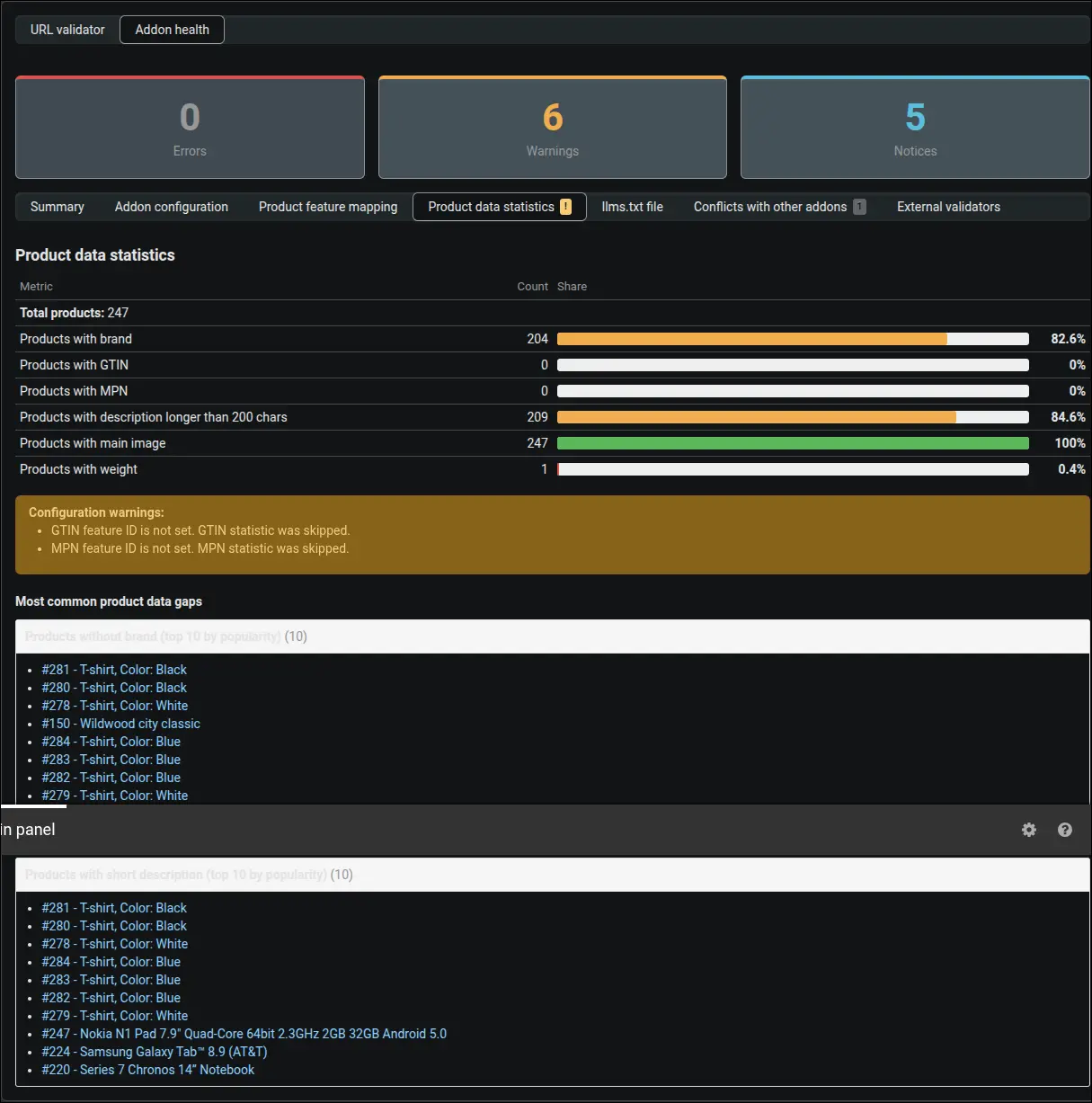
Screenshot 16: product data quality statistics
The diagnostic dashboard has a dedicated tab for the agent layer. It shows the public feed address, the last update date with an assessment of the CRON job, the file size and the number of products in the feed set against the number of active products in the store. That comparison matters as the assortment grows: when the feed has stopped at the configured limit, the panel warns that AI agents see only part of the offer and suggests a concrete limit value to enter. A difference caused by product visibility for selected customer groups, on the other hand, is marked as plain information, because the feed deliberately publishes only what a logged-out customer can see:
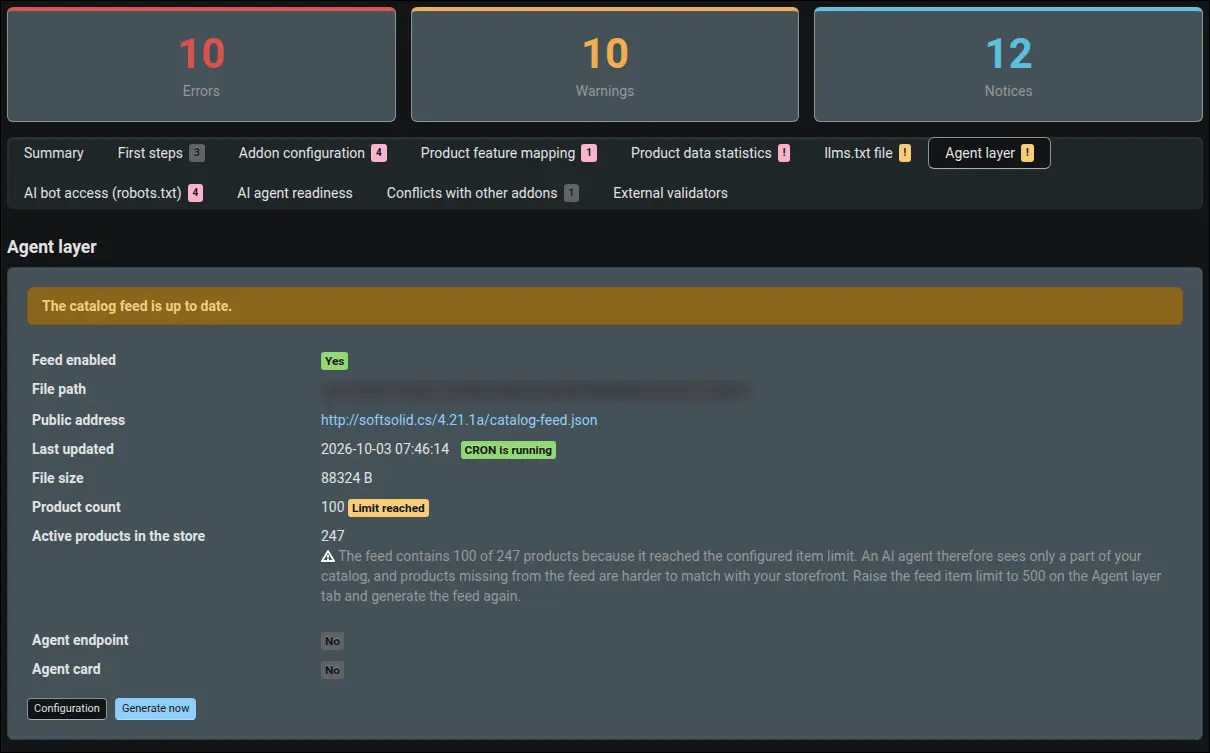
Screenshot 17: truncated feed warning with a suggested limit value
The most carefully prepared data is worth nothing if robots.txt keeps AI bots out of the store. The bot access panel reads the file that bots actually receive and assesses it in three groups. A blocked bot that cites pages in its answers, such as ClaudeBot or PerplexityBot, is reported as an error, because the store visibility in AI search depends on it. Blocking a bot that collects data for model training is often a deliberate decision by the owner, so it appears only as information. The files published by the add-on are checked separately, and below the table there is a ready-made block to paste and a button leading to the robots.txt editor. The file itself stays under your control, because the add-on never overwrites it:
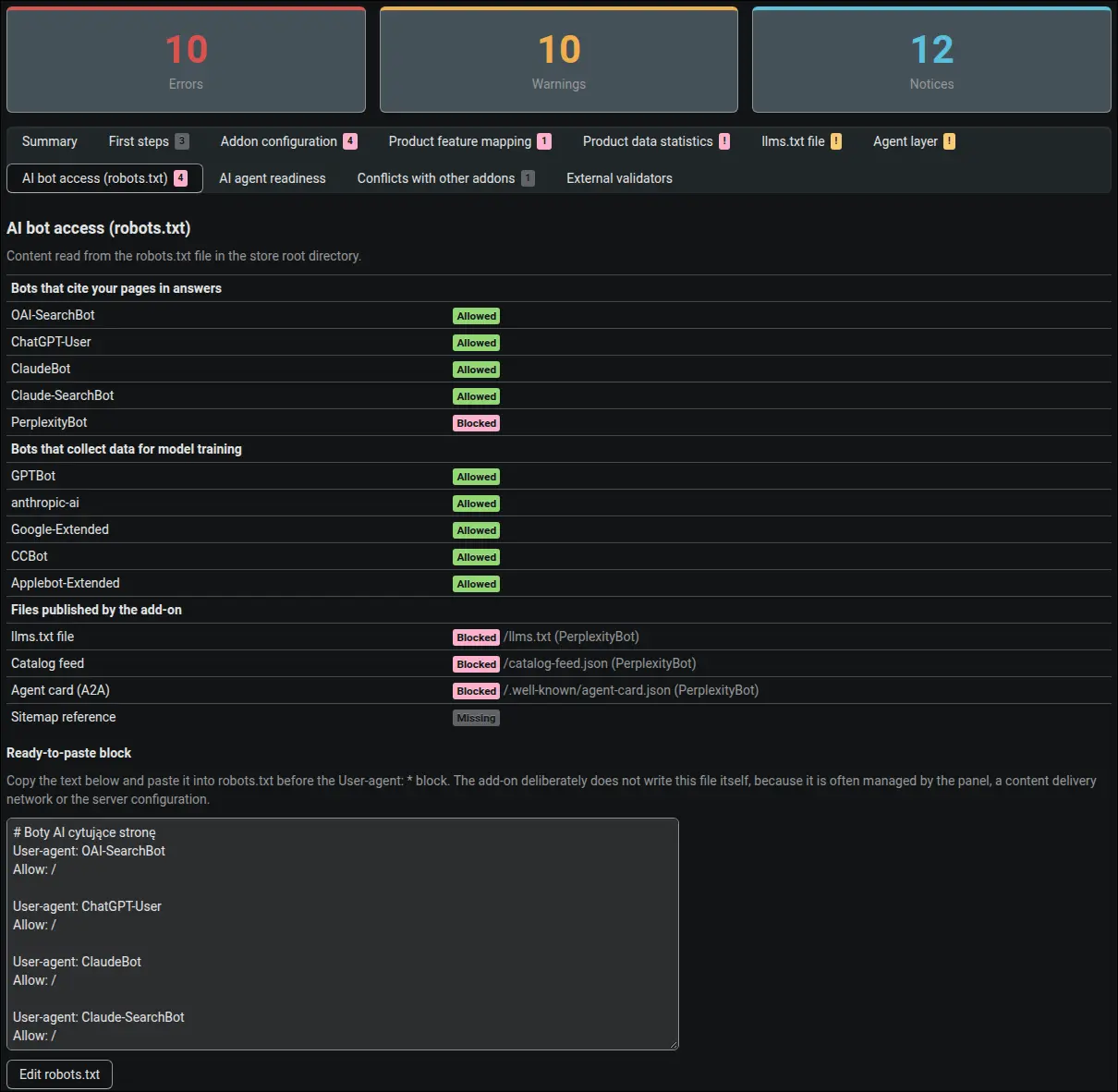
Screenshot 18: AI bot access to the store and files according to robots.txt
The AI agent readiness panel looks at the store from the agent side. It fetches the home page and the /llms.txt file and then assesses them against rules modelled on the Lighthouse Agentic Browsing audits in Chrome: the server response for llms.txt, a complete WebMCP description on the search form, a duplicated tool if there is one, and the number of other forms without a description. When something does not work, the panel points to the likely cause, and it keeps the result for an hour so that the store is not burdened with repeated fetches:
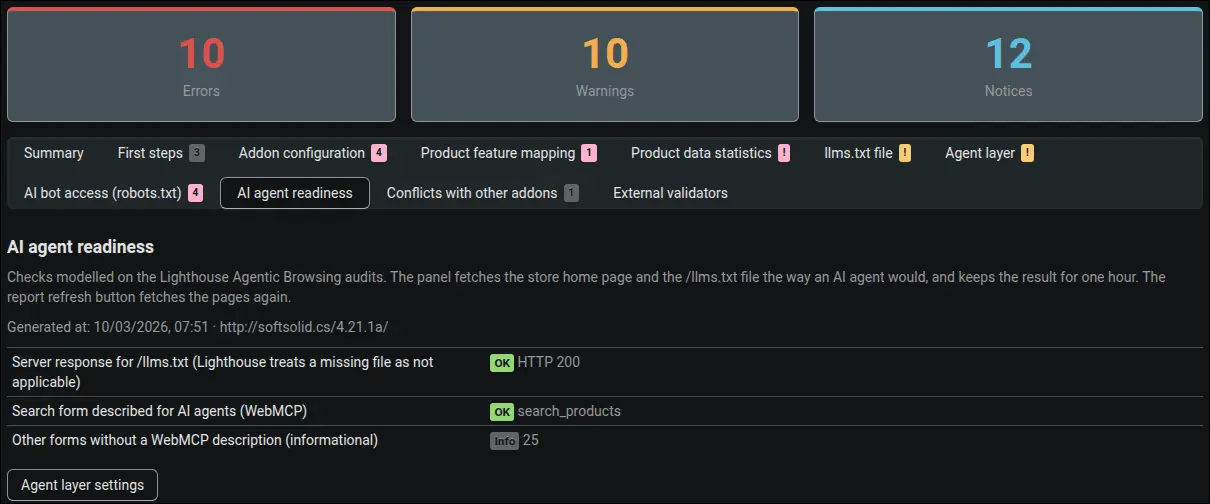
Screenshot 19: store readiness for AI agents based on Lighthouse audits
The same validator run on a category page confirms that the add-on generates a CollectionPage schema with a product list. This proves that both product pages and category pages are readable for Google and AI search engines:
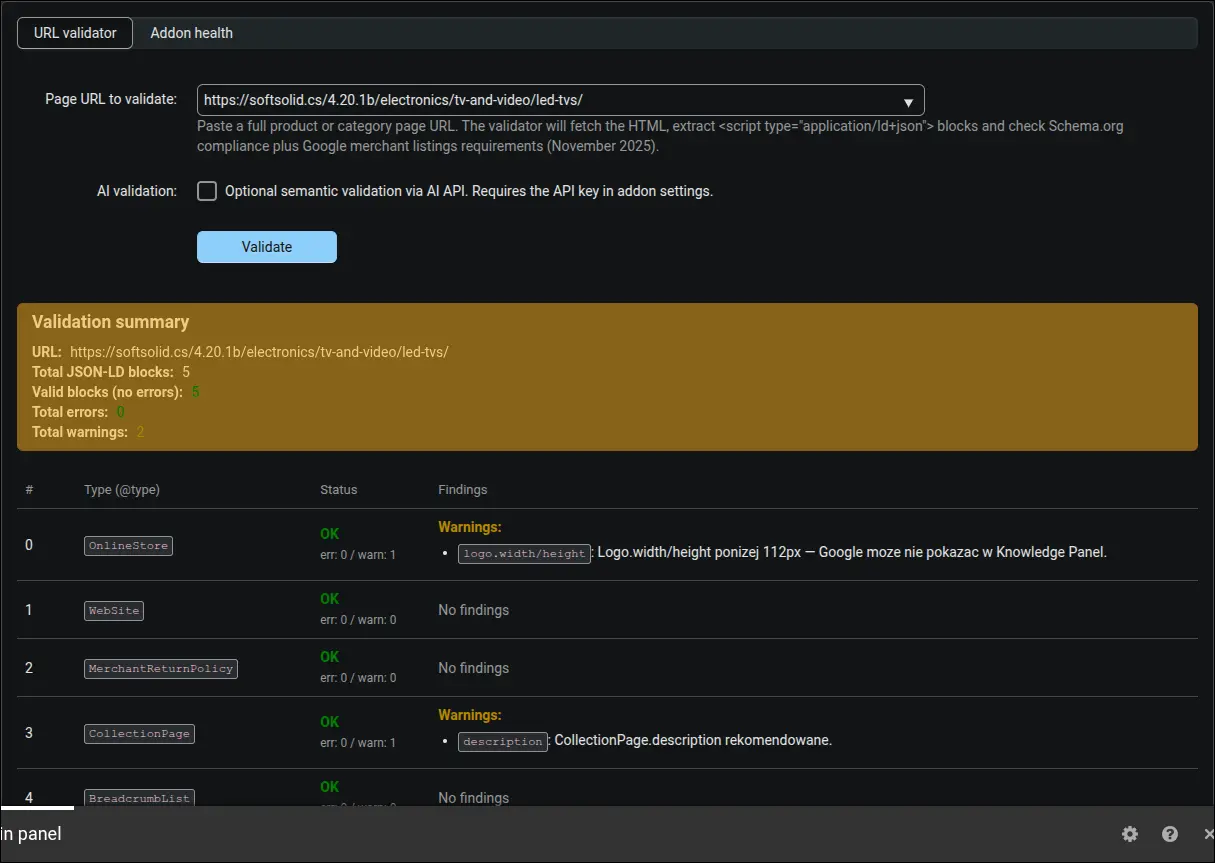
Screenshot 20: validator report for a category page (CollectionPage)
The finished llms.txt file opened in a browser at /llms.txt. It contains a short company description, product categories, blog articles and contact details in a format that AI bots read directly. It is the counterpart of robots.txt, only addressed to artificial intelligence rather than to indexing crawlers:

Screenshot 21: the generated llms.txt file available at /llms.txt
The /catalog-feed.json file itself, opened in a browser, looks like a plain JSON document: a header with the currency, the generation date and the item count, followed by an array of products with their name, price, availability, page address and image. A language model no longer needs to parse HTML to learn the store's assortment; fetching this one file at a fixed address is enough:
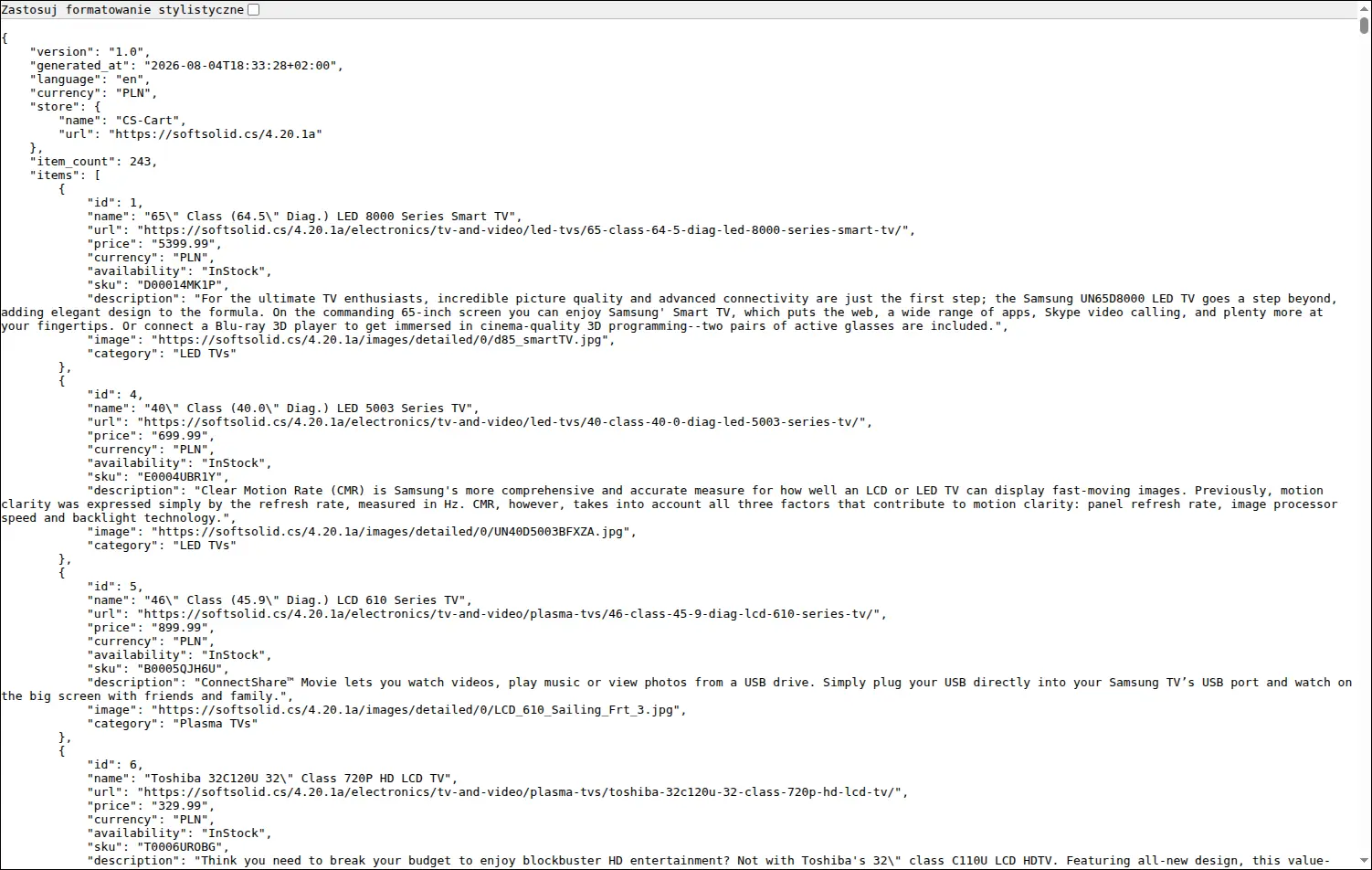
Screenshot 22: catalog feed served at /catalog-feed.json
The JSON-LD, GEO Structured Data add-on organizes what a standard CS-Cart does not provide: a complete set of Schema.org schemas linked into one entity graph, a clear split between brand and manufacturer, variants described with the price of each one, a return policy that meets Google 2026 requirements, an llms.txt file, and a catalog feed with an optional A2A endpoint and a search form described for AI agents. Setup comes down to filling in the company data and pointing to the product features, while the built-in validator, the diagnostic dashboard and the first-steps guide keep an eye on the markup quality and on whether AI bots can reach it at all.
Full walkthrough, 6 minutes
Feel free to contact us and purchase the add-on!
- One-time payment
Choose the most convenient form of payment for the add-on. You can pay once and use the add-on. Choosing a subscription payment (monthly or annual) means that you pay for the add-on at regular intervals and have access to the latest versions of the addon and technical support.
- Store Bulider
- Multi-Vendor
- 4.21.x
- 4.20.x
- 4.19.x
- 4.18.x
- 4.17.x
- 4.16.x
- 4.15.x
- No changes
No reviews found