


AI Agent/Assistant Chat Bot RAG


- — 12 months guarantee for all our add-ons
- — add-ons sold to entire world
- — stable, flexible, high-quality products
- — competitive prices, attractive discounts
- — quick and competent technical support
- — installation in 24 hours
- — personalized solutions - we'll write any add-on for you
Extension for Store Builder and Multi-Vendor is an intelligent AI assistant that talks to your customers in a chat widget and answers questions about products, content, reviews, documents and order status, using the live data of your store. The same knowledge base powers an internal staff chat in the back office, with per-group access control. The assistant learns your offer in the background and is available to customers around the clock, so simple questions no longer reach your support team. The conversations come back to the panel as working material: you see what customers ask about, which answers did not help them, what the assistant could not explain and how many orders came out of those chats.
See how it works
Key Features
- Monthly subscription from 75 USD net.
- A storefront chat widget that greets the customer with ready questions, answers from your real offer, attaches a product card with price and availability, and collects a rating under every answer.
- Automatic synchronisation of products, pages, blog posts, reviews and documents into the knowledge base, always in step with the state of the store, extended with product code lookup for customers who arrive with a symbol from a catalogue or an invoice.
- Your own knowledge documents in PDF, DOCX, TXT and Markdown, global or pinned to a category, together with text recognition for scans and public product attachments.
- Knowledge gap analytics and an editorial layer for the store: short FAQ entries and longer articles written with the help of the assistant, with version history, change comparison and a consistency check that warns you when a new text contradicts what the store has already published.
- An internal staff chat over the same knowledge base, with access tags on every document, so sensitive material stays in the right hands and never reaches customers.
- A chat return report that translates conversations into orders and revenue, verified order status checks with a one-time code sent by e-mail, and a synchronisation status screen with a report and an alert delivered to your inbox.
This is the assistant seen through the eyes of a customer. A chat window opens in the corner of the store, the customer asks about warranty and invoices, and the assistant answers with specifics and a link to the source document:

Screenshot 1: chat widget on the storefront
The conversation begins with prompts instead of an empty field. Buttons with the questions you enter in the configuration sit right under the greeting, so the customer immediately sees what is worth asking about, and the chat starts on topics the store answers well:
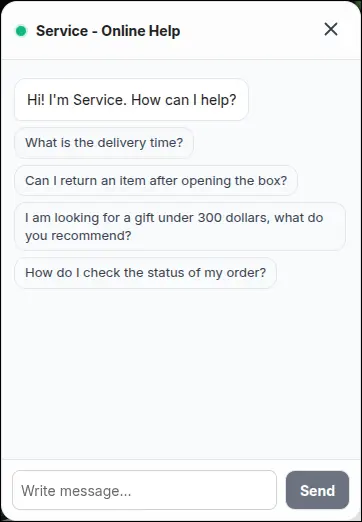
Screenshot 2: suggested questions at the start of a conversation
When the assistant recommends an item, a product card appears under the answer: thumbnail, name, price, availability and a button leading to the product page. The figures on the card are read from the store at the moment of display, not from the knowledge base, so the customer sees the price that applies right now instead of a snapshot from the last synchronisation:
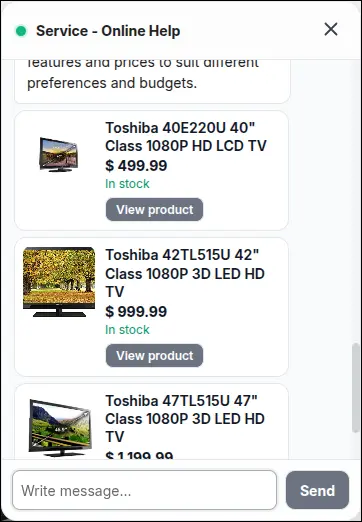
Screenshot 3: product card in a chat answer
Under every answer the customer leaves a rating with one click. This is the only signal that catches answers which sound confident and are wrong anyway, because those leave no other trace behind them. Ratings return to the panel together with the conversation and to the e-mail report:
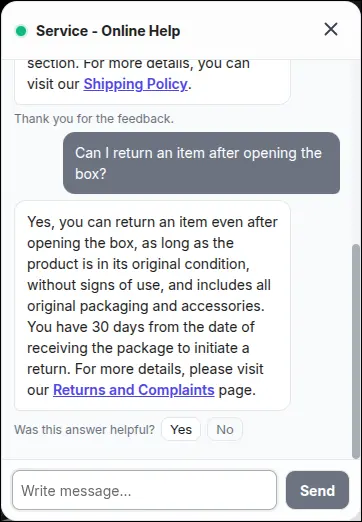
Screenshot 4: answer rating left by the customer
Where do those answers come from? Not from the internet and not from the general knowledge of the model, but from the content your store already has. Products, reviews, pages and blog posts together with documents leave a marker when they are saved, the nightly run turns them into searchable material, and content deleted in the store leaves the knowledge base just as quietly:
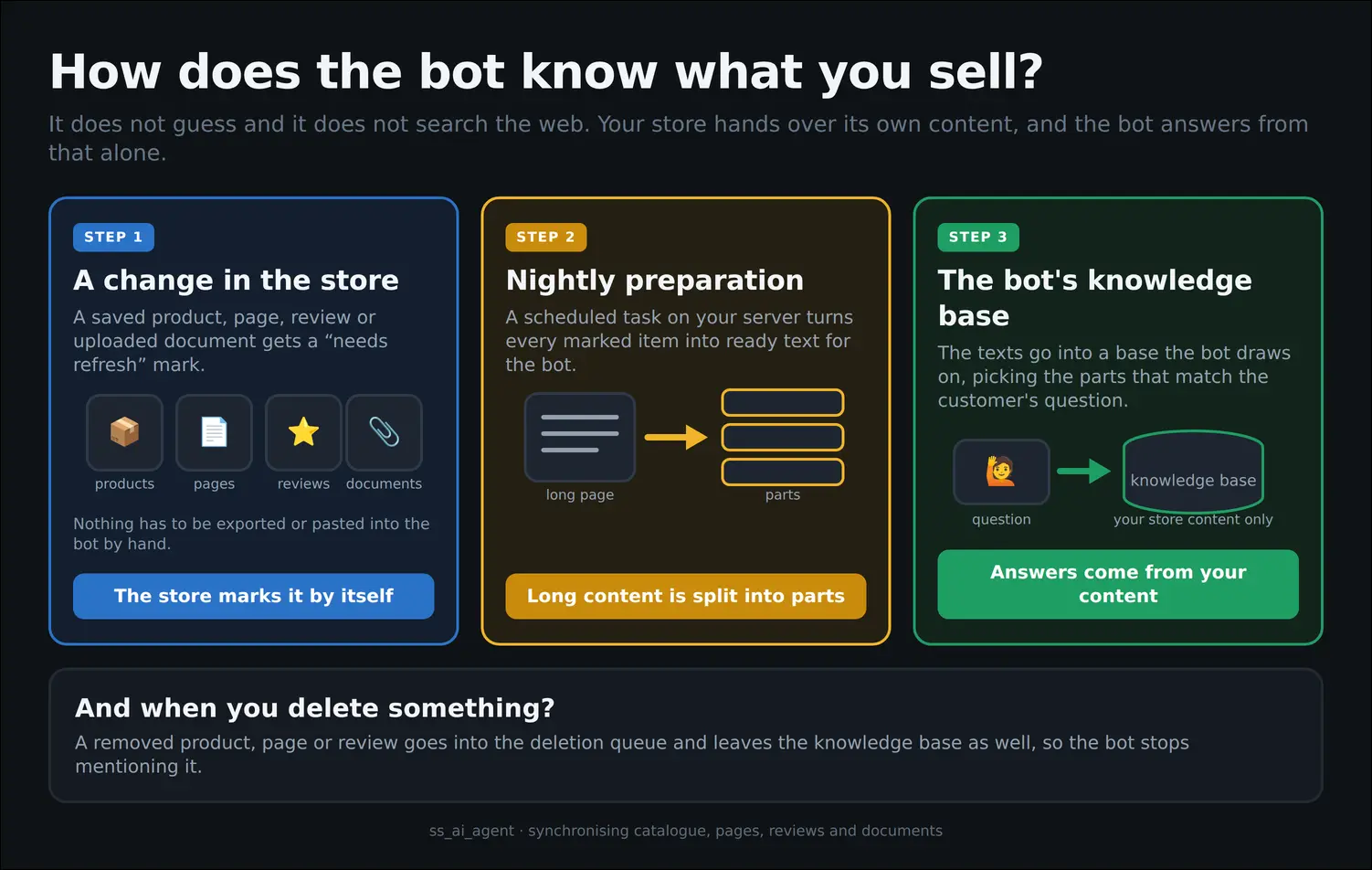
Diagram 1: the path from store content to the assistant knowledge base
For the same reason the assistant does not improvise. A language model knows a great deal about the world, yet about your store it knows only what you give it, so when the material is missing it says so instead of guessing. Prices and availability have a single source, the product record, never an editorial article that has had time to age:
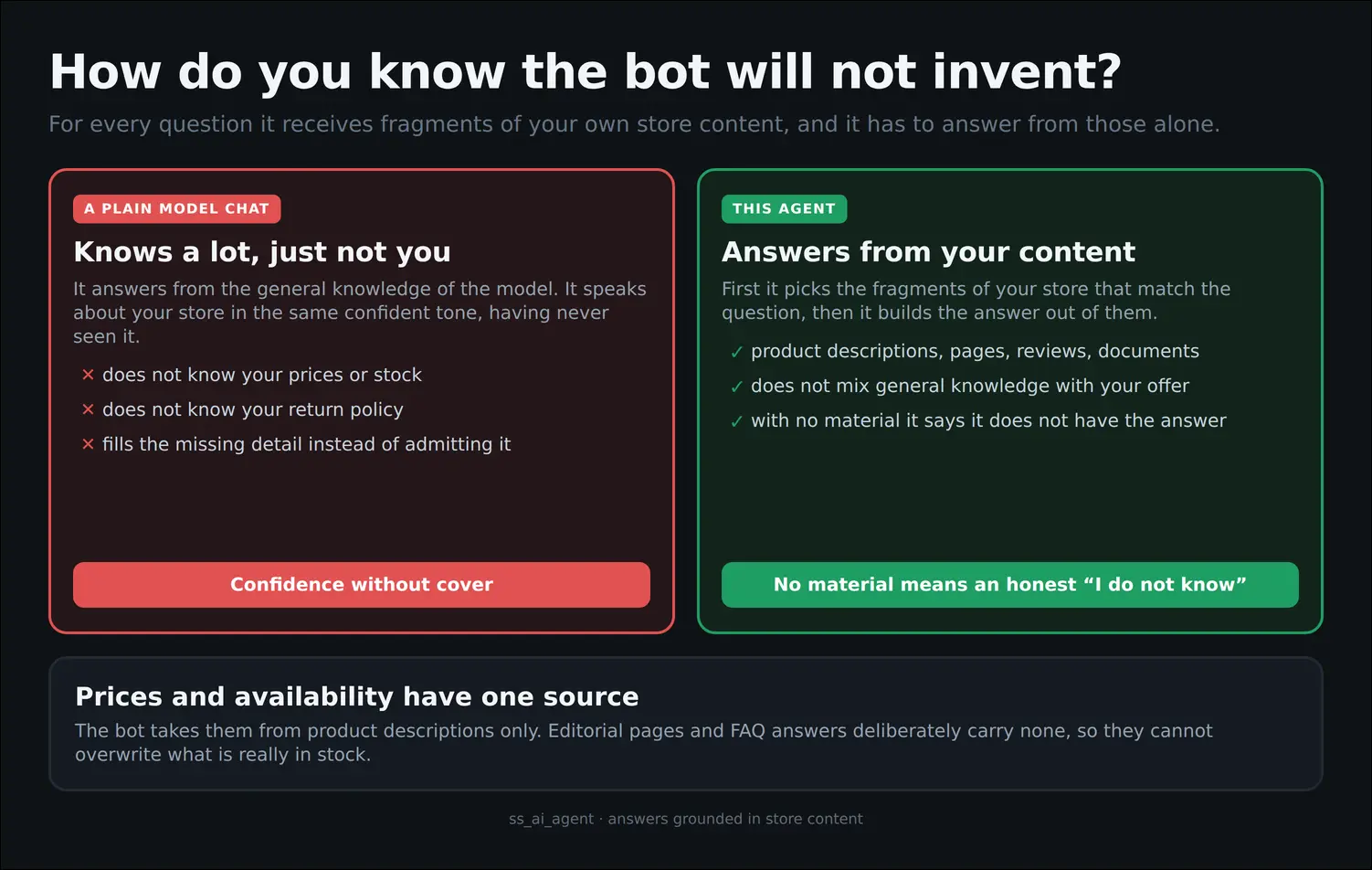
Diagram 2: answers taken from store content alone
The General section is the integration centre. Here you copy the ready REST addresses into your processor, choose the language of the content sent to the AI, and describe the specialisation of your store along with the industry glossary, both of which go straight into the assistant prompt:

Screenshot 5: general configuration and industry context
The instructions the assistant follows travel with the add-on and are refreshed with every release, so a wording fix reaches all deployments at once. Next to them sits a field for the guidance of your own store, where you set the tone of voice or the habits of your industry, and three retrieval tuning fields for deployments that want to push answer accuracy further:
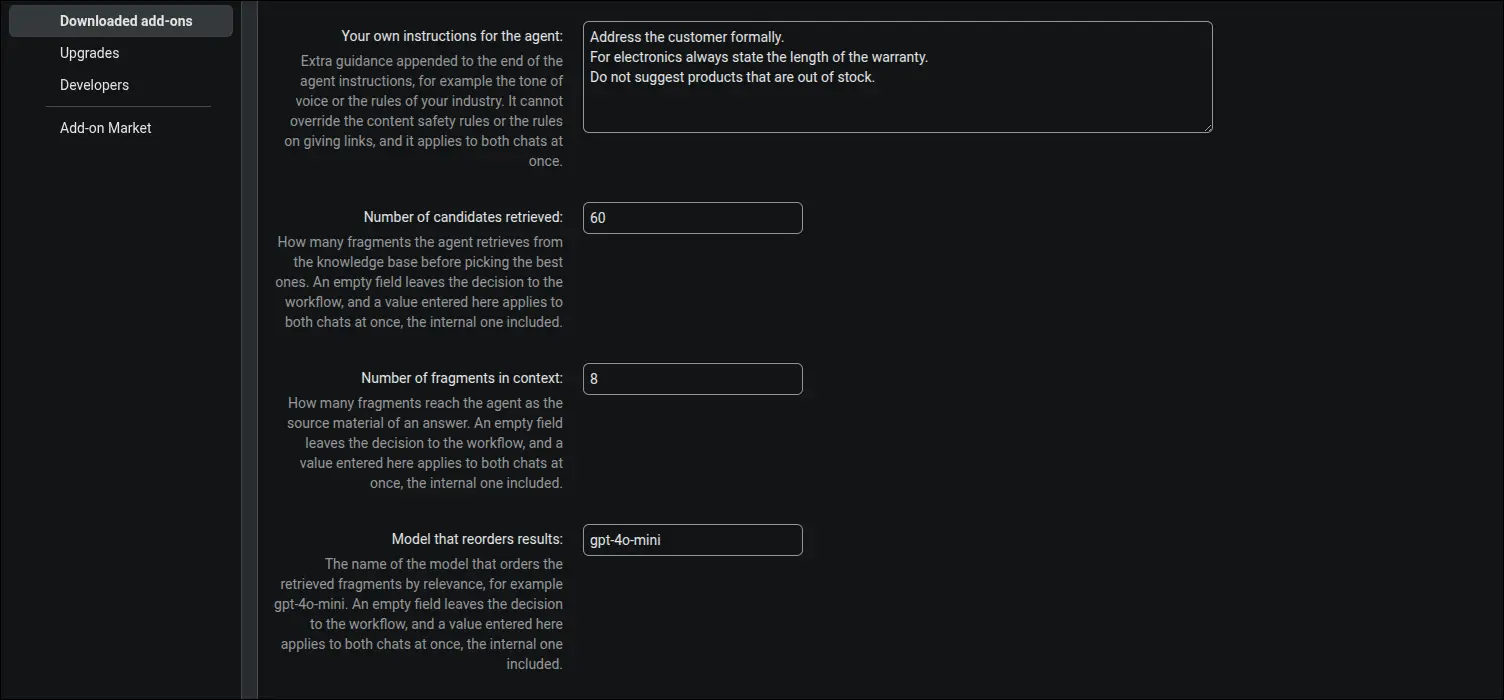
Screenshot 6: store guidance and retrieval tuning
Lower in the same section you will find the settings for channel security and personal data hygiene: chat webhook protection, the list of allowed IP addresses and chat history retention. A marketplace also chooses the chat scope here, deciding whether a conversation covers the whole platform or only the offer of the vendor whose store the customer is visiting:
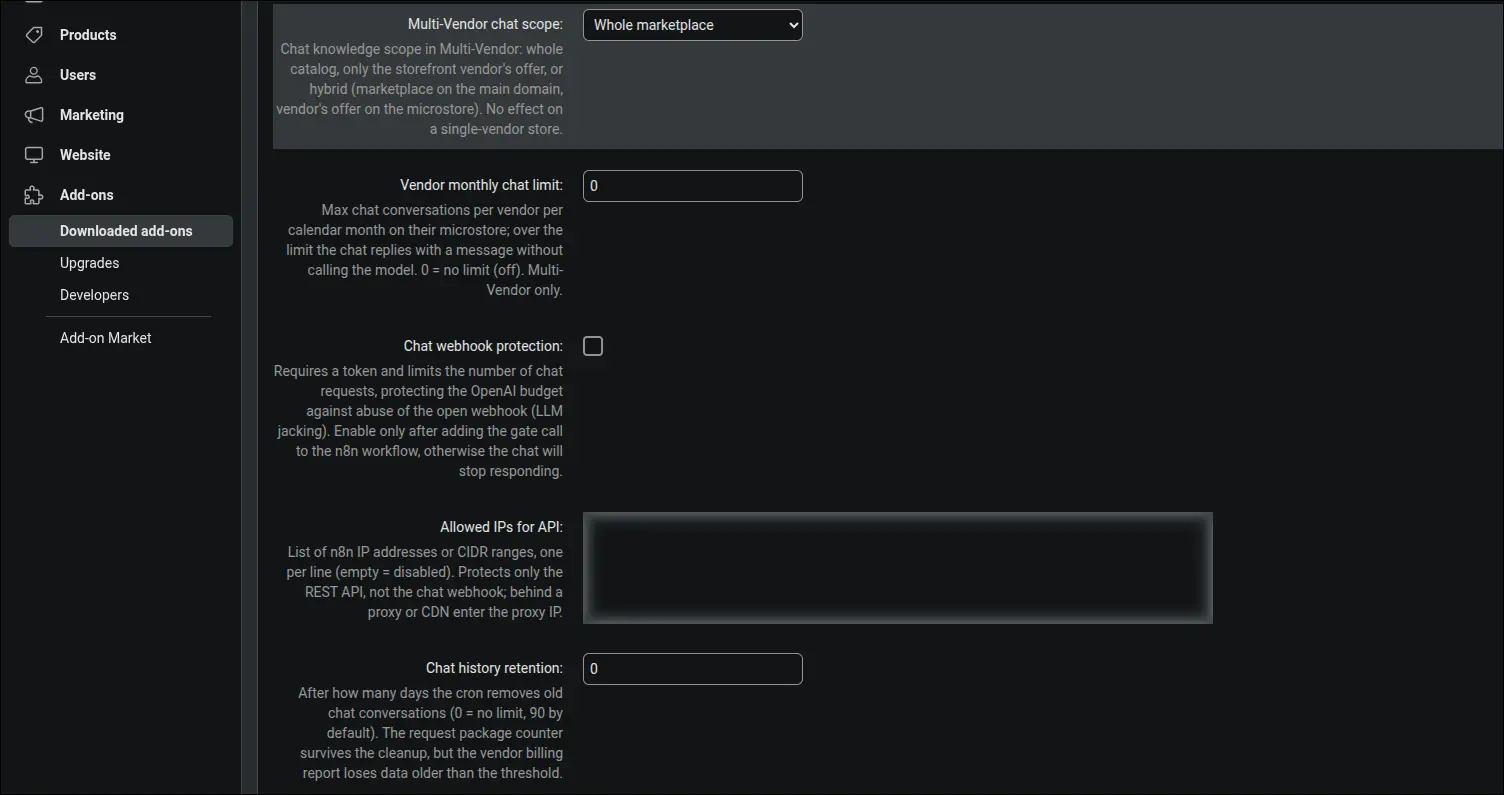
Screenshot 7: channel hardening and chat scope
In the Products section you decide which products enter the knowledge base and how they are enriched: with category, brand, market or the full set of features. You will also enable loading of product documents, hiding of stock quantity and attaching a product image to the chat answer:

Screenshot 8: product scope, enrichment and images
The Knowledge documents section sets the file and fragment limits, switches on text recognition for scans together with a field that checks whether the server is ready for it, and defines the period after which an article asks for a review. This is also where you configure the internal staff chat: its address and the groups with full access to the knowledge:
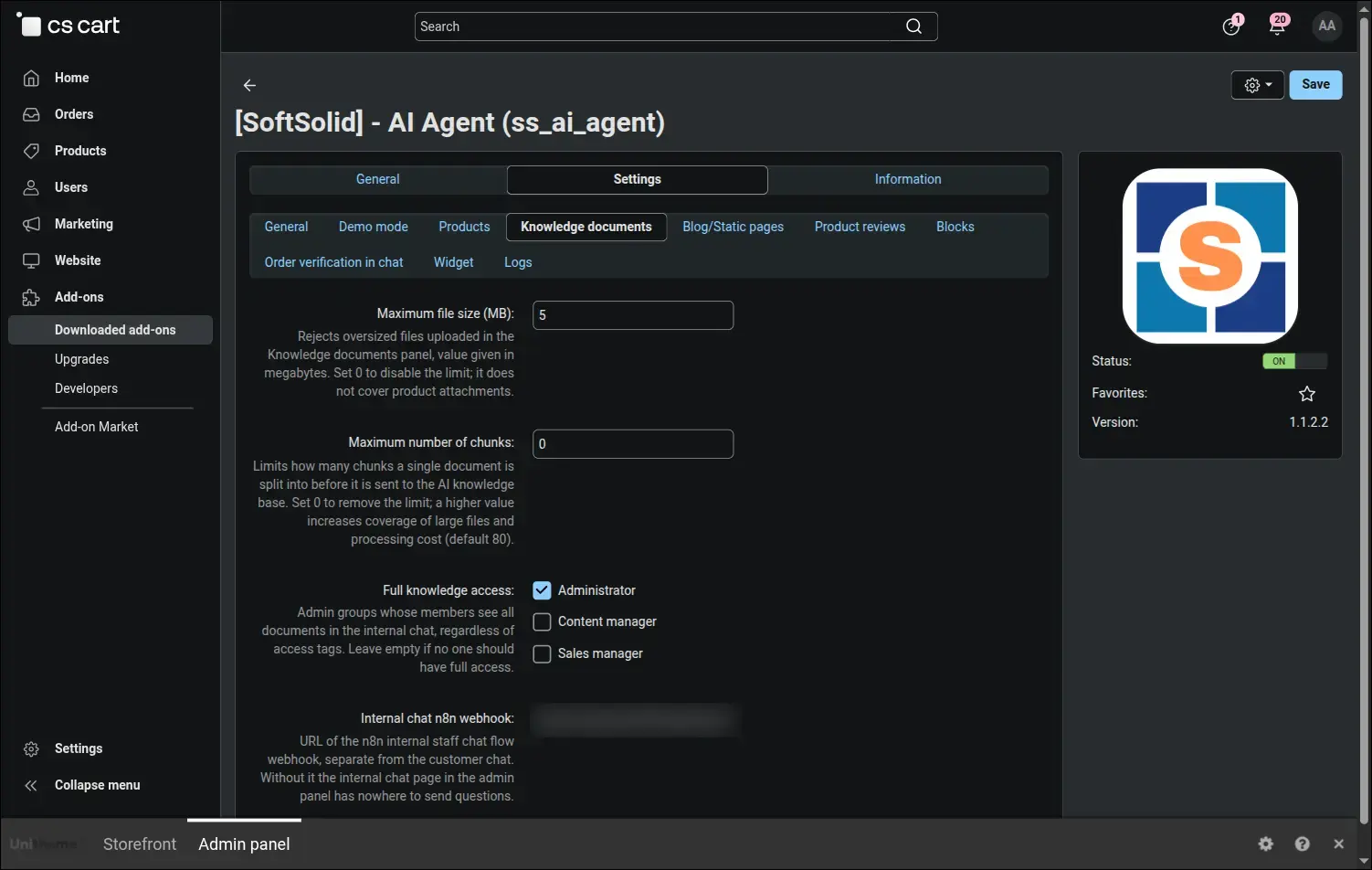
Screenshot 9: knowledge documents, scans and internal chat
The Knowledge documents panel lets you upload your own PDF, DOCX, TXT and Markdown files. A document without a category is global, a document with one is pinned to its listing. Every row shows the synchronisation status, the access scope and the Edit action, and editorial articles also carry a marker reminding you about a review:

Screenshot 10: knowledge documents panel
When a topic keeps returning in many wordings and deserves a broader explanation, you select the related customer questions and turn them into a single article. The first version of the text is proposed by the assistant reading the staff knowledge base, then an editor refines it and decides whether the page should be visible to customers:
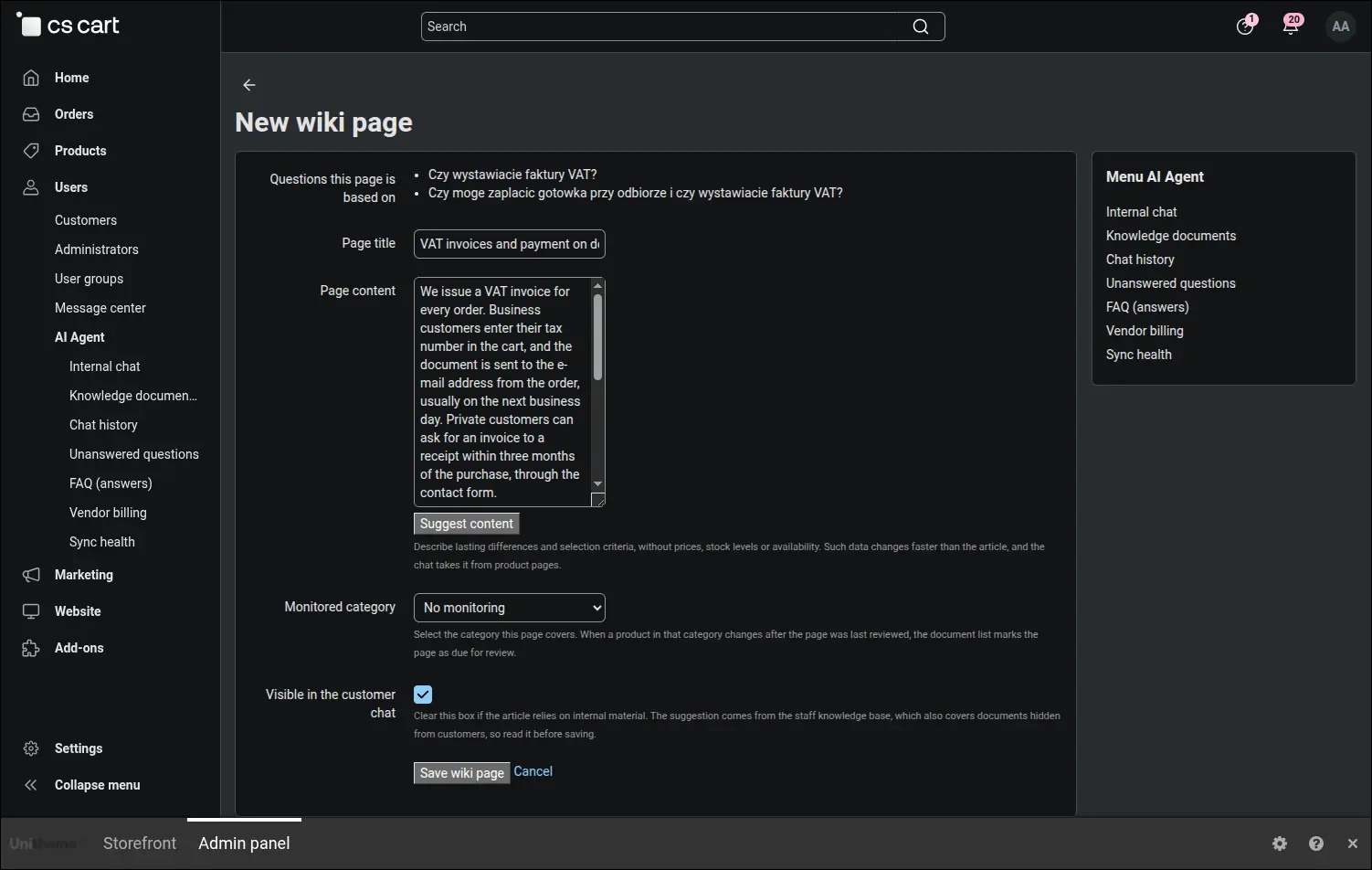
Screenshot 11: a new article written with the assistant
Before saving it pays to check whether the new text clashes with what the store has already published. The consistency button compares the text being written with the knowledge base and quotes the conflicting fragment word for word, so the divergence surfaces during editing rather than in a conversation with a customer:
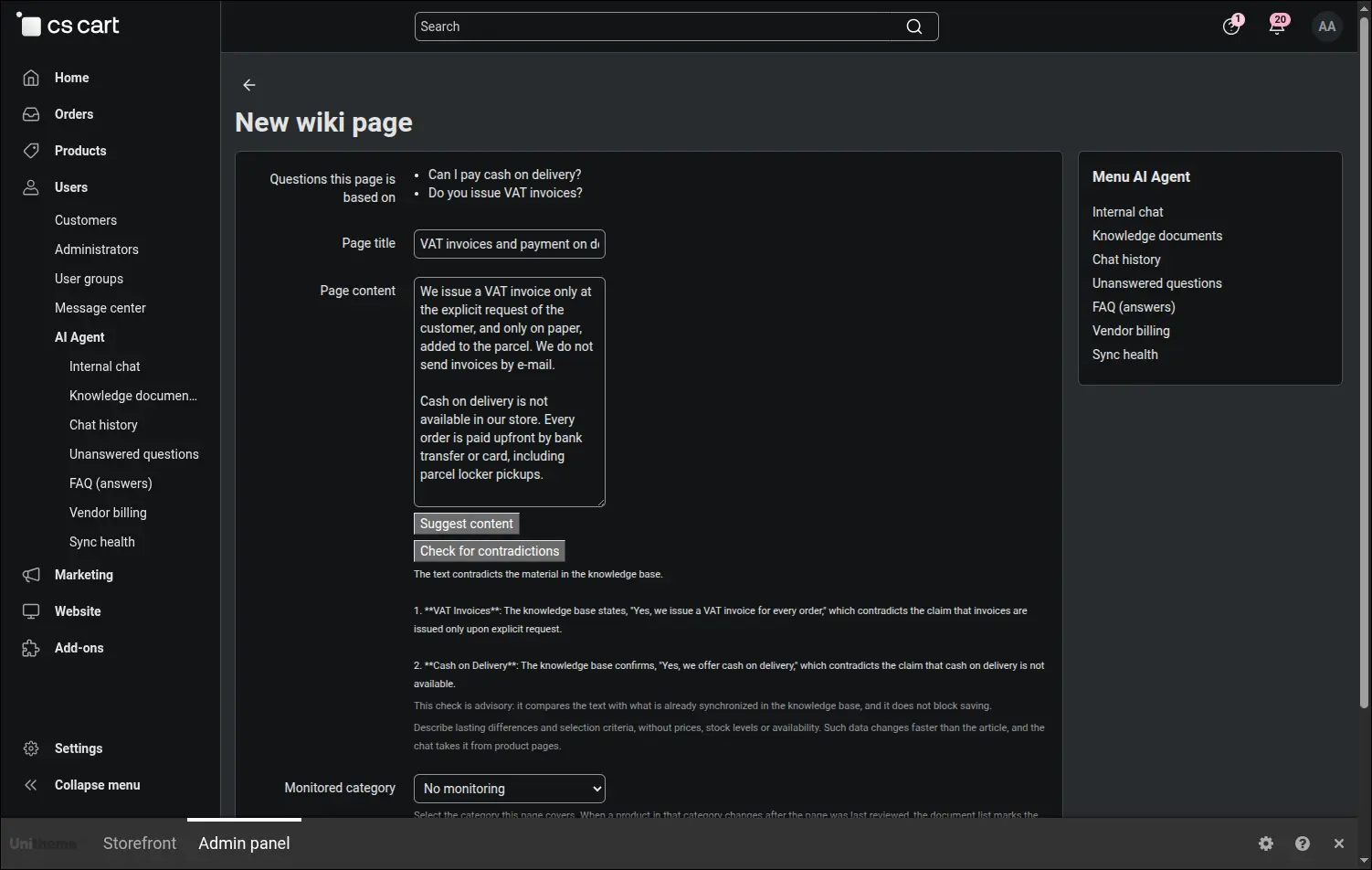
Screenshot 12: consistency check of an article
Every change to an article is stored in the version history, and the comparison screen marks in colour what was added, what disappeared and whether the title changed. The editor weighs the difference before deciding to return to an older text:
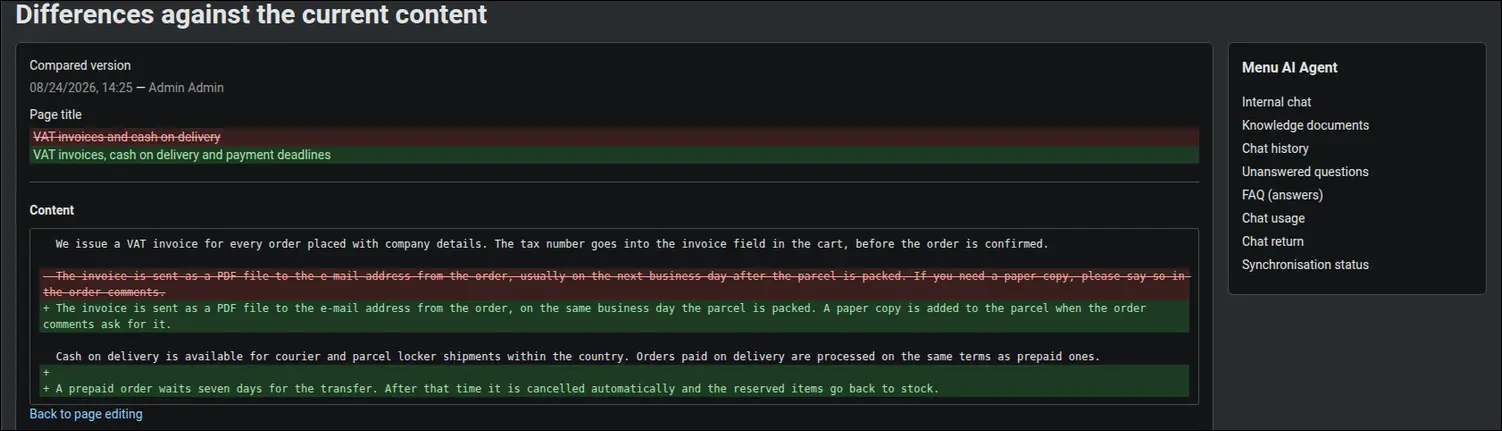
Screenshot 13: article version comparison
The Order verification section gives you full control over what the assistant may show a customer: status, dates, tracking number, item list or total. You tick only what you want to share, and the identity of the customer is confirmed with a one-time code sent to the address from the order:
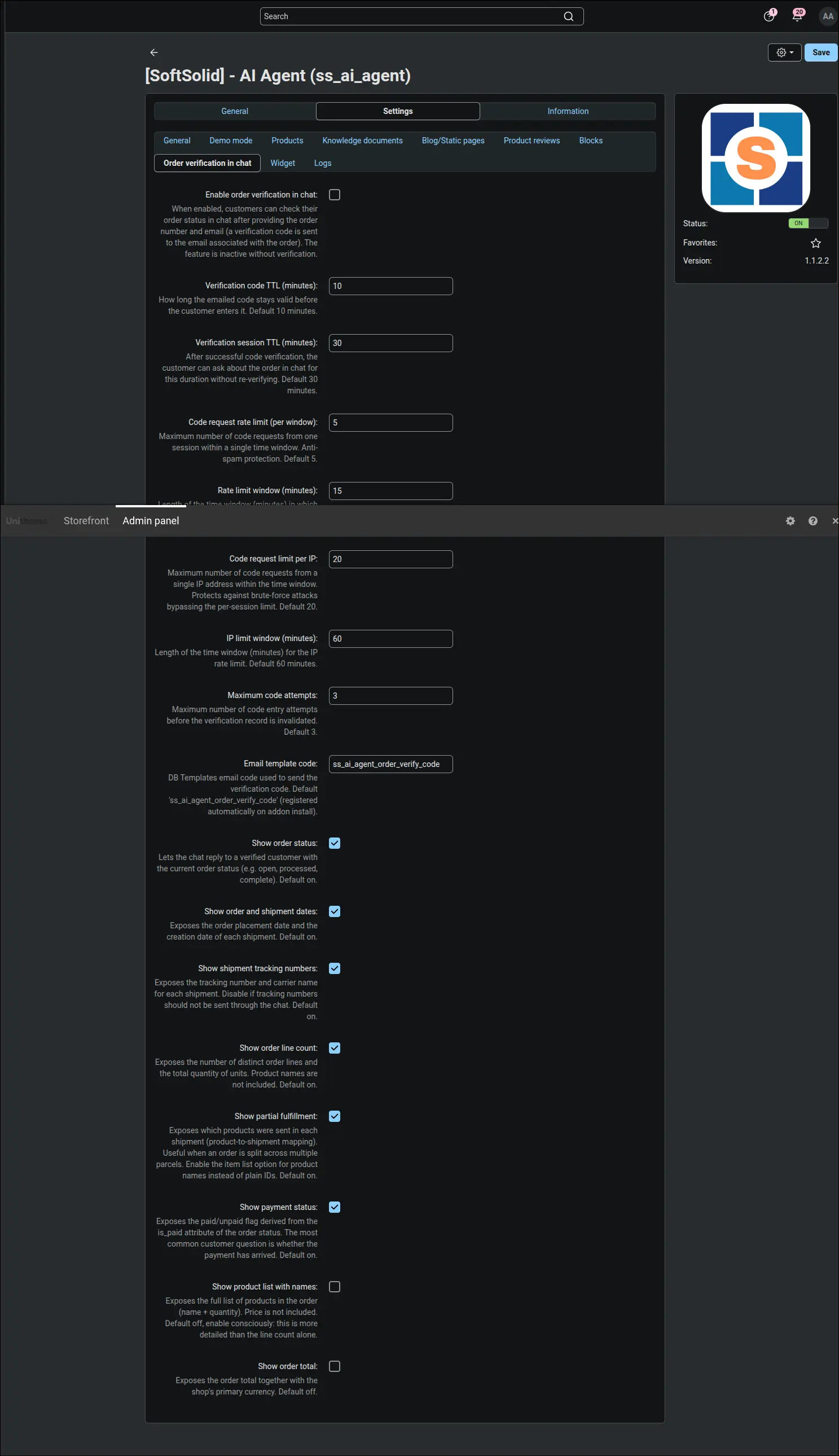
Screenshot 14: scope of order data in the chat
Before the assistant says anything about an order, the customer has to prove the order is theirs. The one-time code goes to the address stored in the order rather than the one given in the chat, it has a short life and a limited number of attempts, so knowing the order number alone gets nobody anywhere. The feature starts out disabled and you switch it on deliberately:
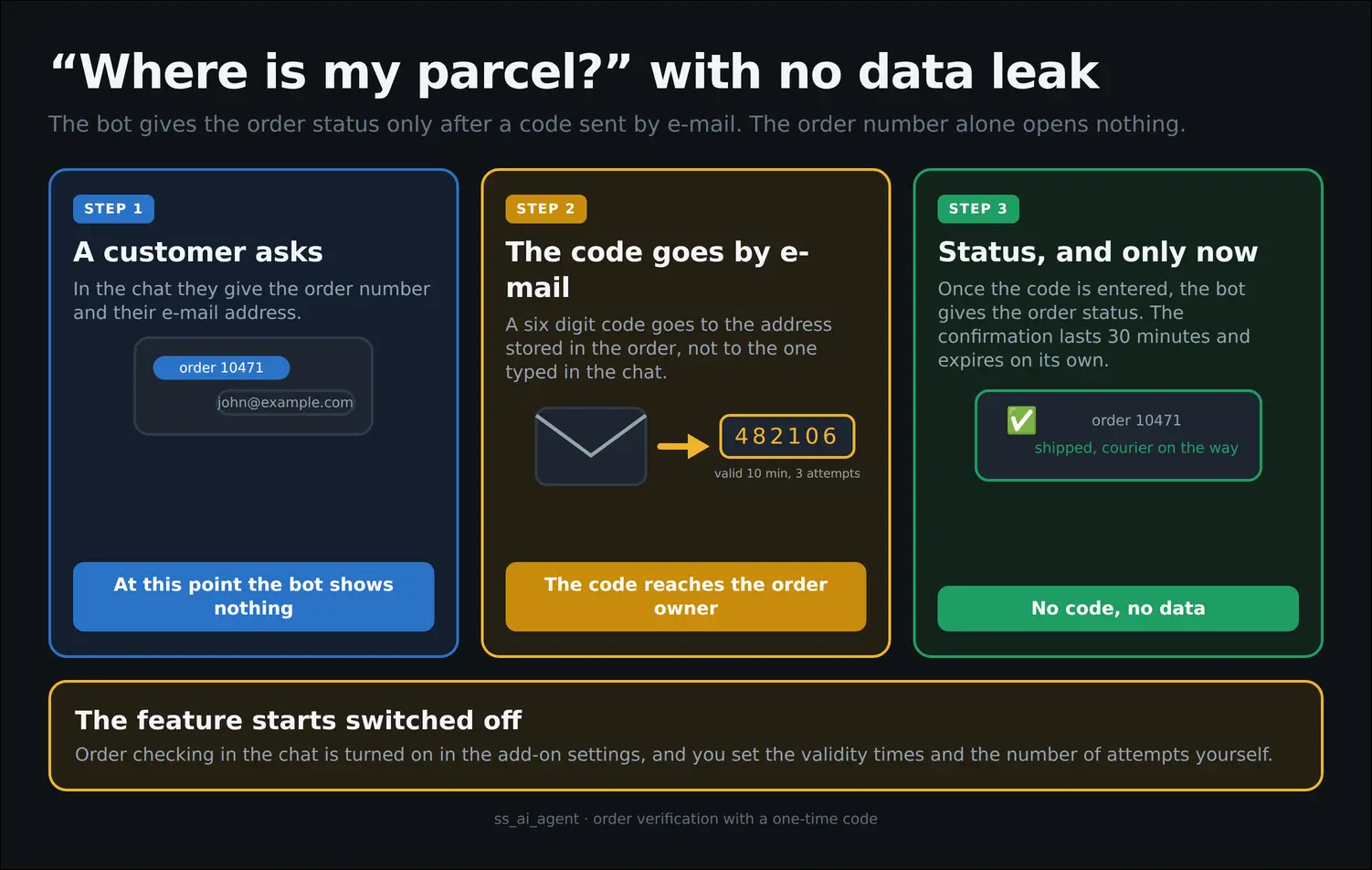
Diagram 3: order status released after the identity is confirmed
In the Widget section you set the look and behaviour of the chat: its position on the screen, its state on entry and the window size on desktop and mobile. Below them you switch on four elements of the conversation itself: suggested questions, answer ratings, product cards and crediting orders placed after a chat:
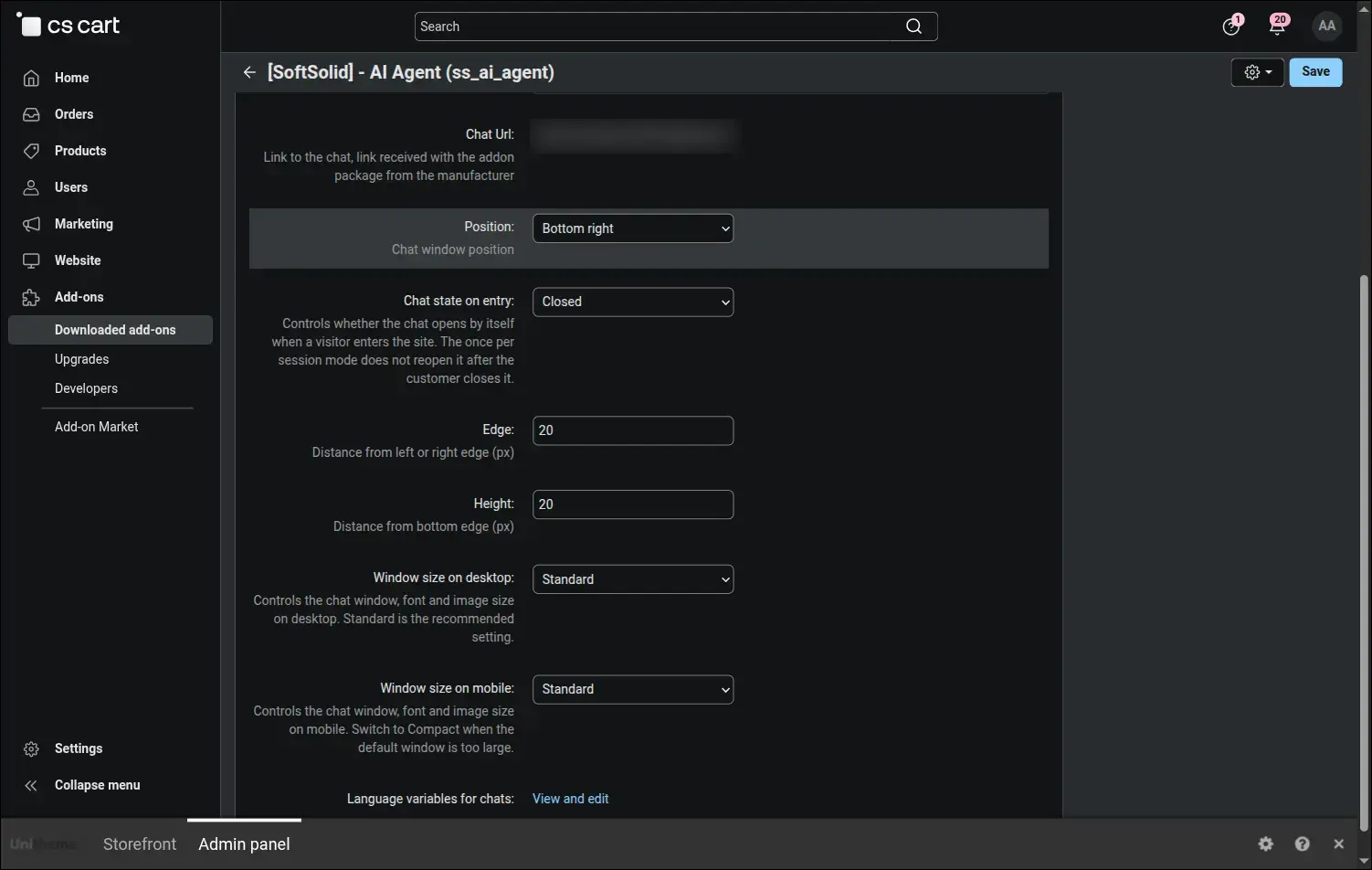
Screenshot 15: widget configuration and conversation features
Chat history collects all customer conversations with the assistant, grouped into sessions, with a column of ratings and a filter narrowing the list to answers judged unhelpful. This is the shortest route to the places where the assistant needs work:
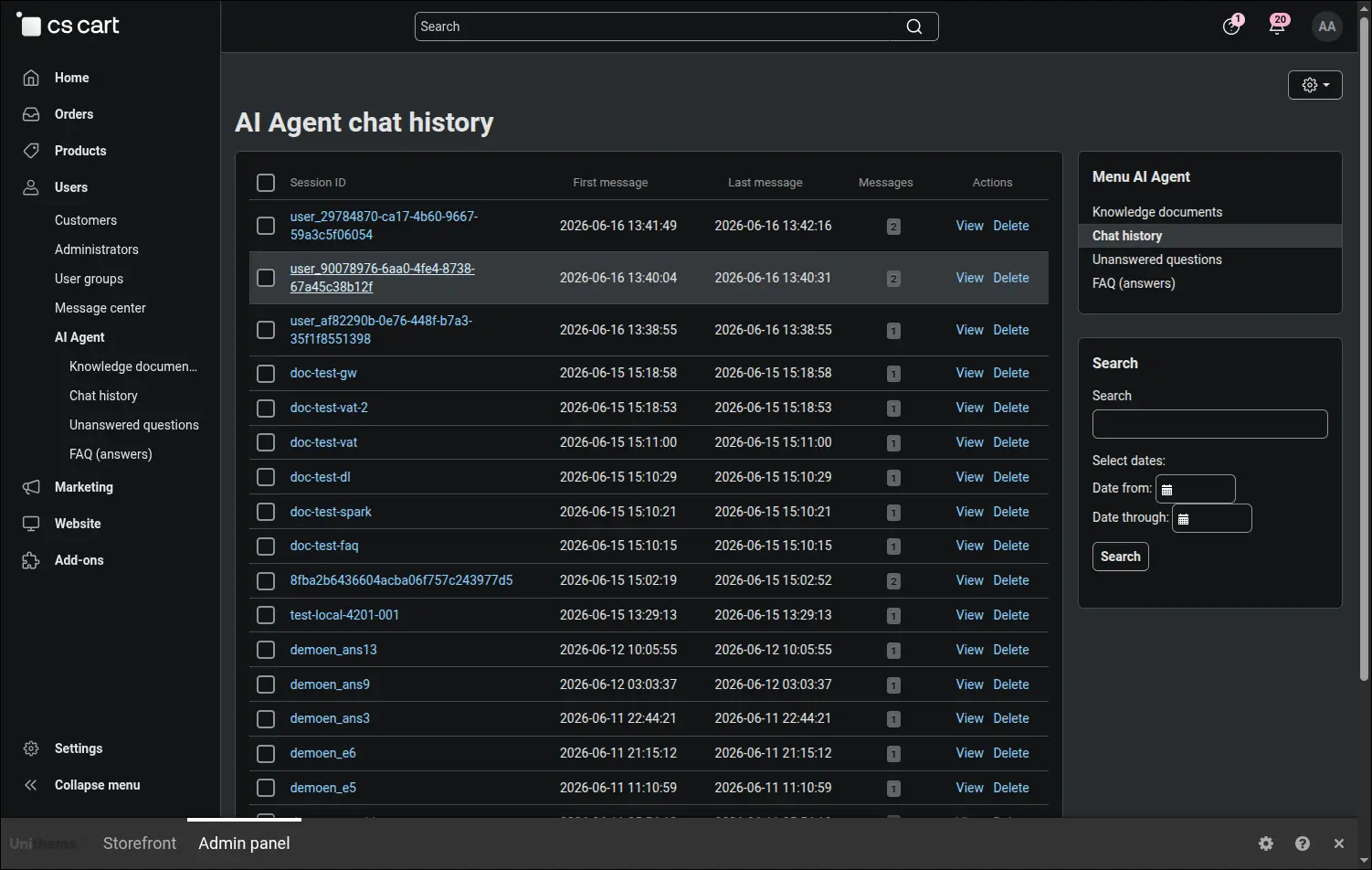
Screenshot 16: chat history with customer ratings
Unanswered questions are the analytics of gaps in the knowledge base. The assistant recognises when it found no material, and the panel collects such questions with a counter, from the most frequent to the rarest. Different wordings of one question are merged into a single entry, so the list shows real topics instead of scattered variants of the same sentence:
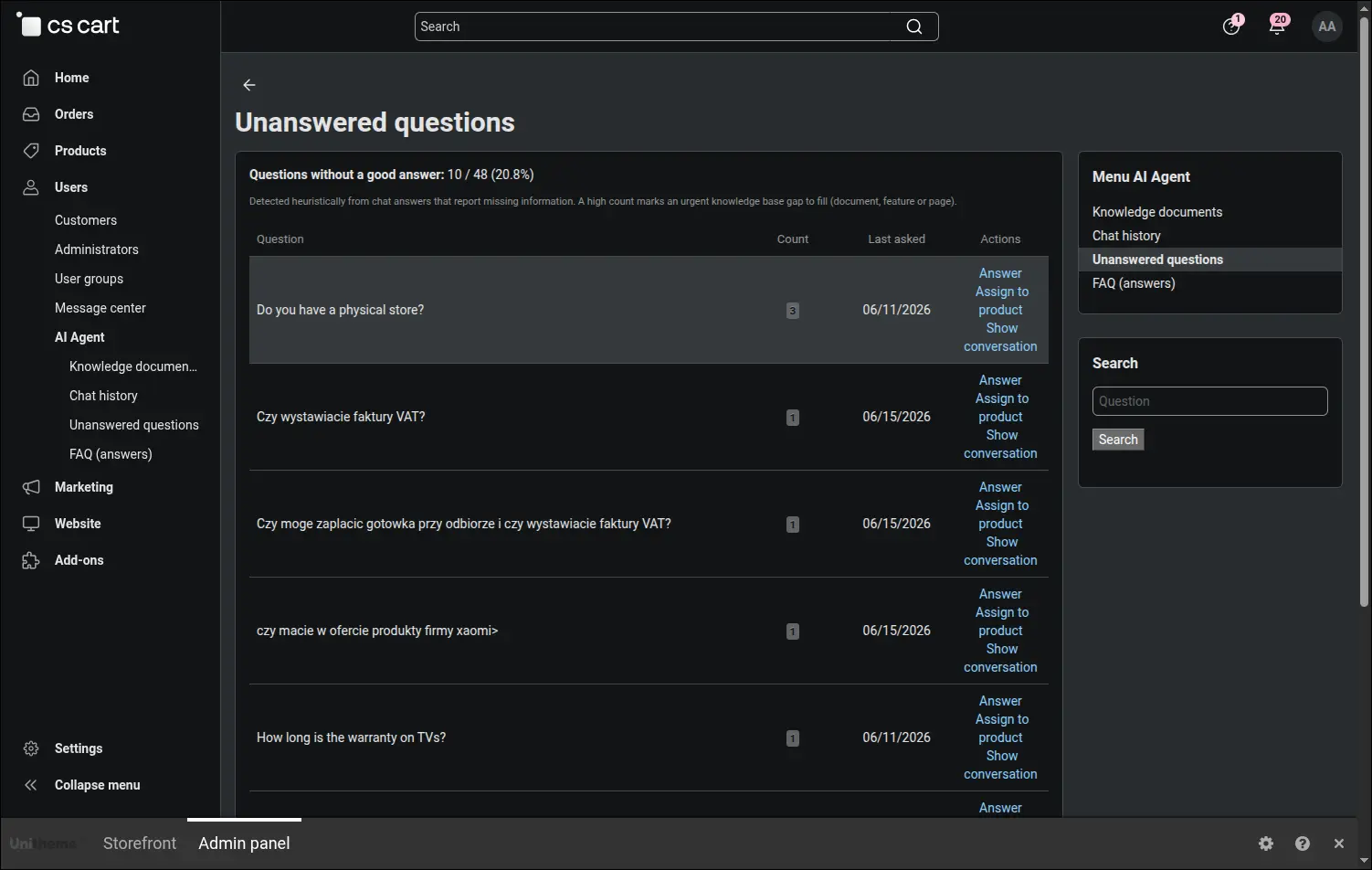
Screenshot 17: unanswered questions
Straight from a gap you write an answer, which is saved as an FAQ entry in the knowledge base. The suggestion button prepares a first version based on what the store already knows, and you decide whether the answer should be visible to customers or stay internal material. After the next synchronisation the assistant starts answering that question:
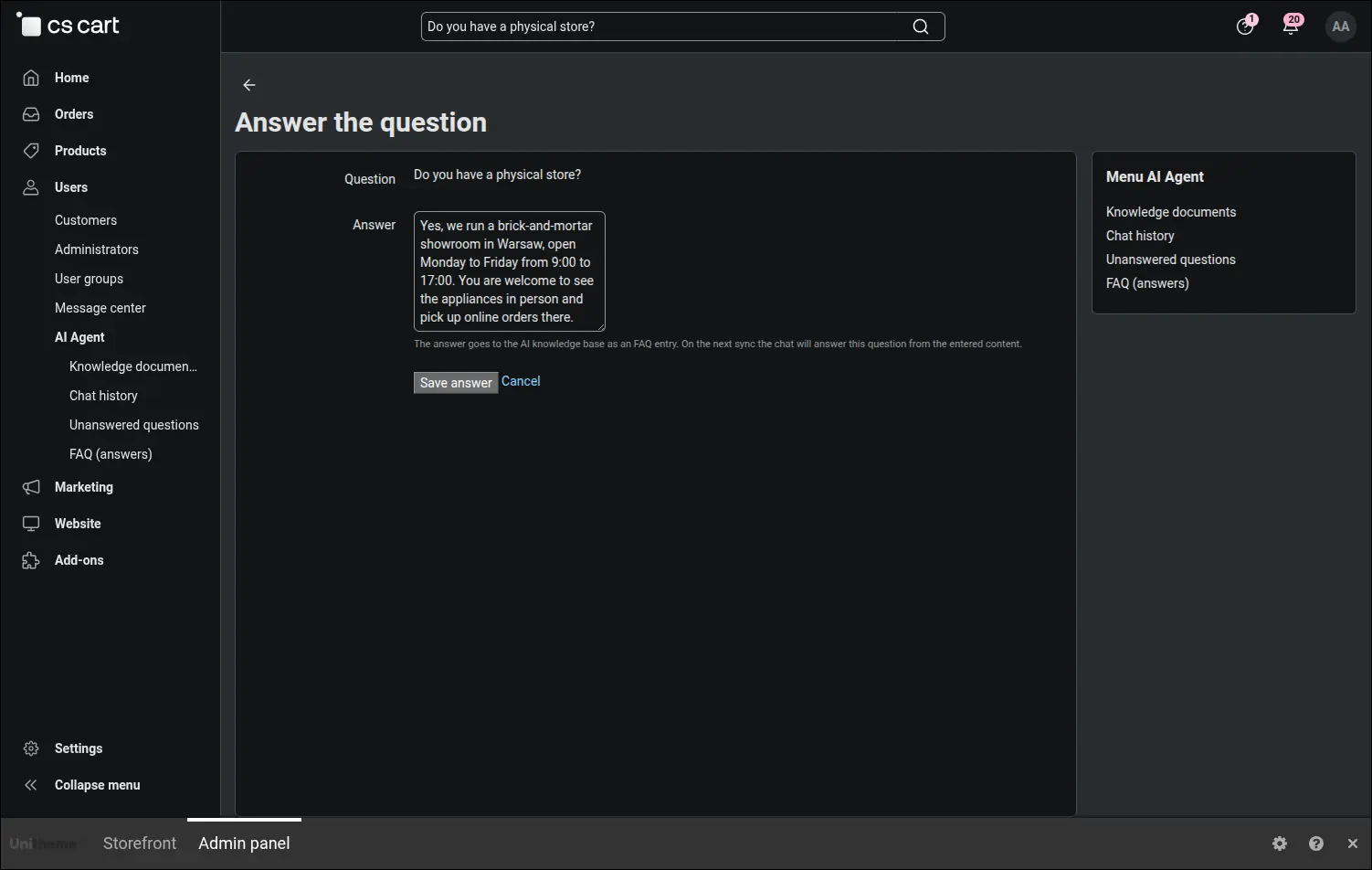
Screenshot 18: an answer added to the knowledge base
The whole path forms a loop in which the store learns from its own gaps. A question without an answer lands on the gap list together with its paraphrases, an editor answers it once, and after the next processing run the assistant knows the topic and explains it the same way to every customer:
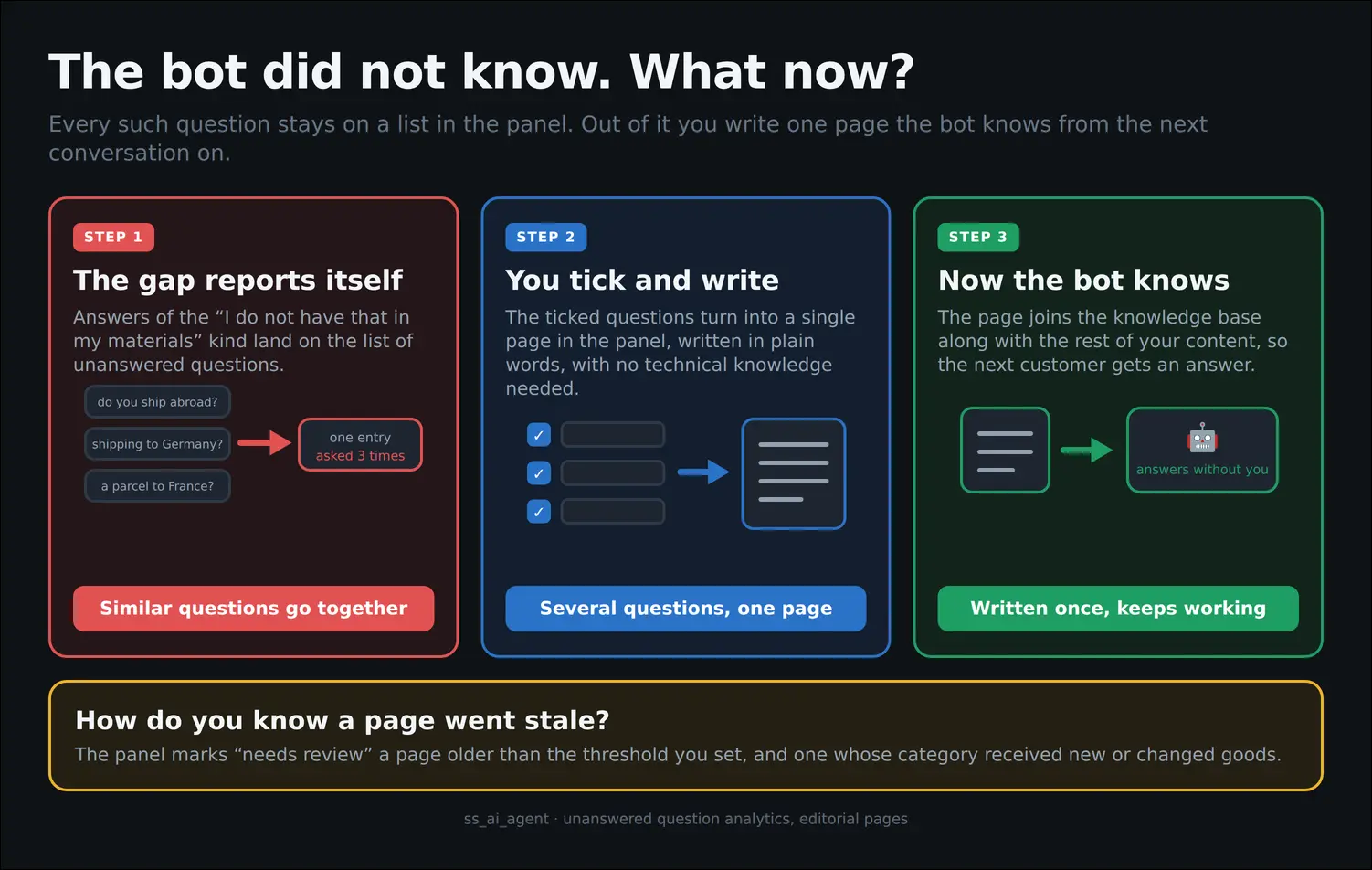
Diagram 4: from an unanswered question to a ready store answer
The internal staff chat answers your team from the same knowledge base, but with access narrowed to the role of the employee. Sensitive internal documents reach only the permitted administrator groups and customers never see them, while the access itself is resolved live at the moment of the question:
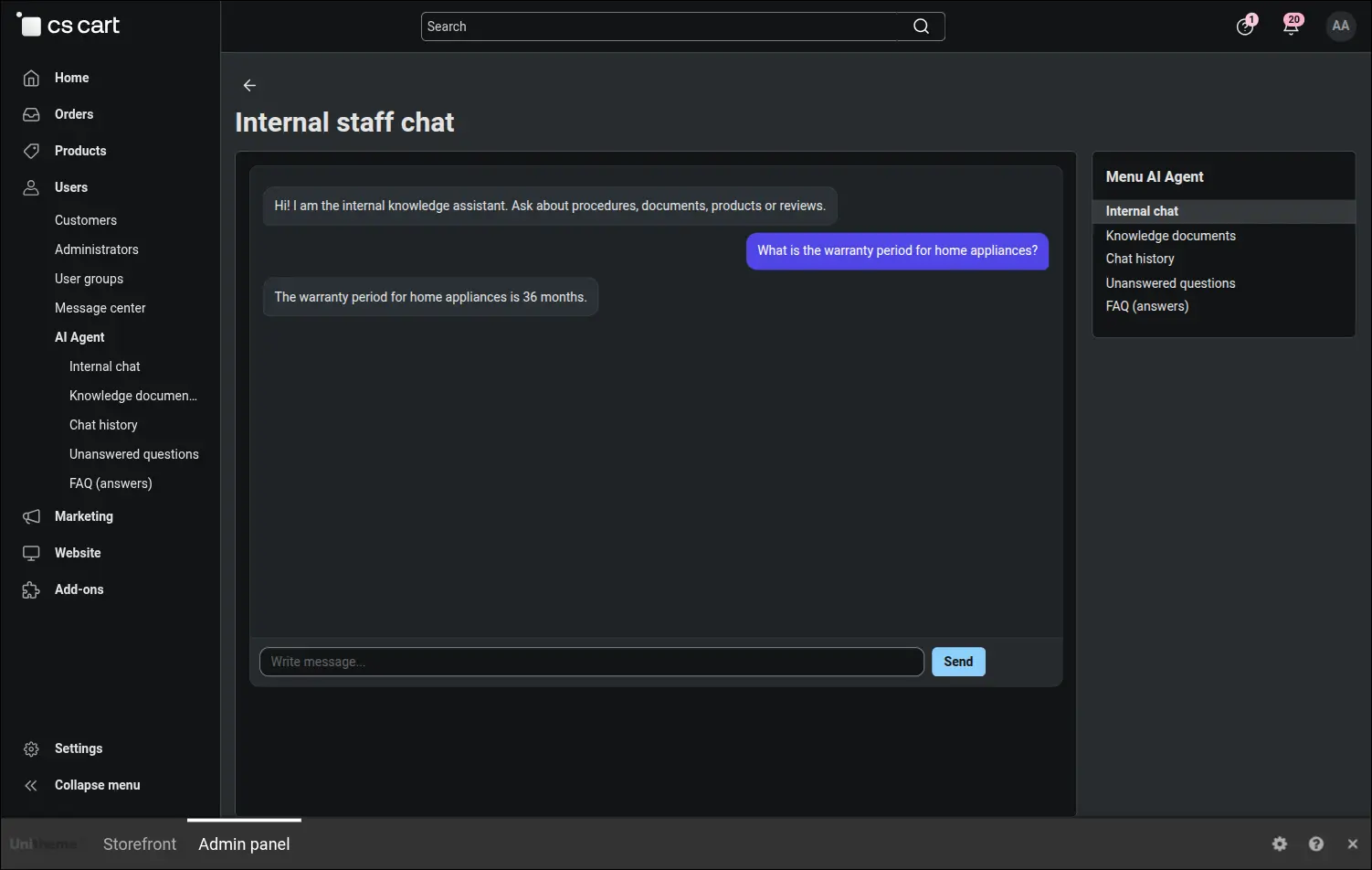
Screenshot 19: internal staff chat
The line between one chat and the other runs through the document, not through the person answering. Material uploaded by an administrator starts its life as internal and has to be shared with customers deliberately, while the reach of an employee is calculated from their permission groups at the moment the question is asked, so revoking access takes effect at once:
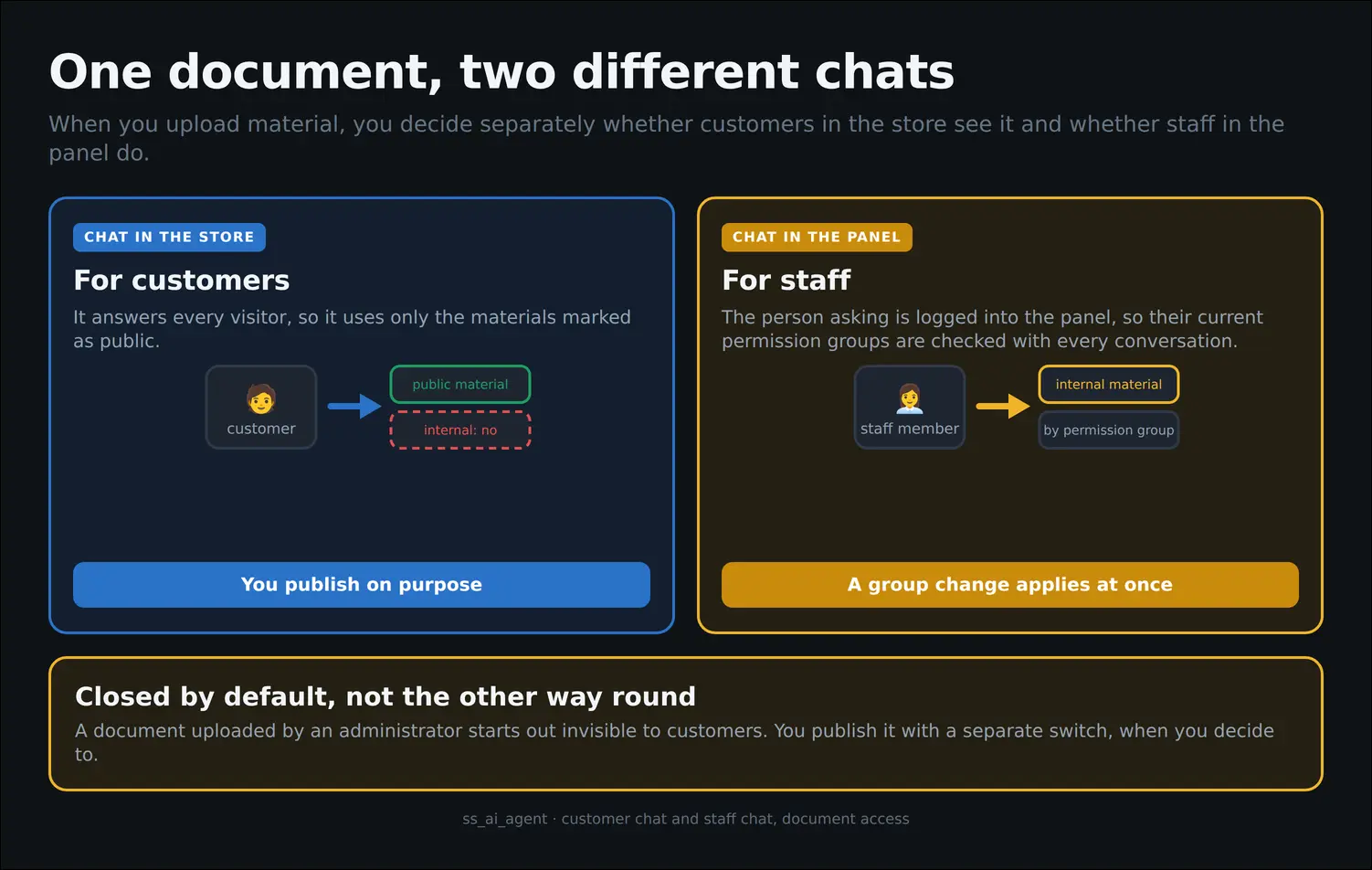
Diagram 5: the same document in the customer chat and the staff chat
Finally the question that comes up whenever a service is renewed: what is this chat worth. The Chat return screen shows how many conversations ended in a purchase, what share that is and how much those orders were worth. The figure is counted conservatively, because it covers only purchases made during the same visit as the conversation, and cancelled orders drop out of the report on their own:
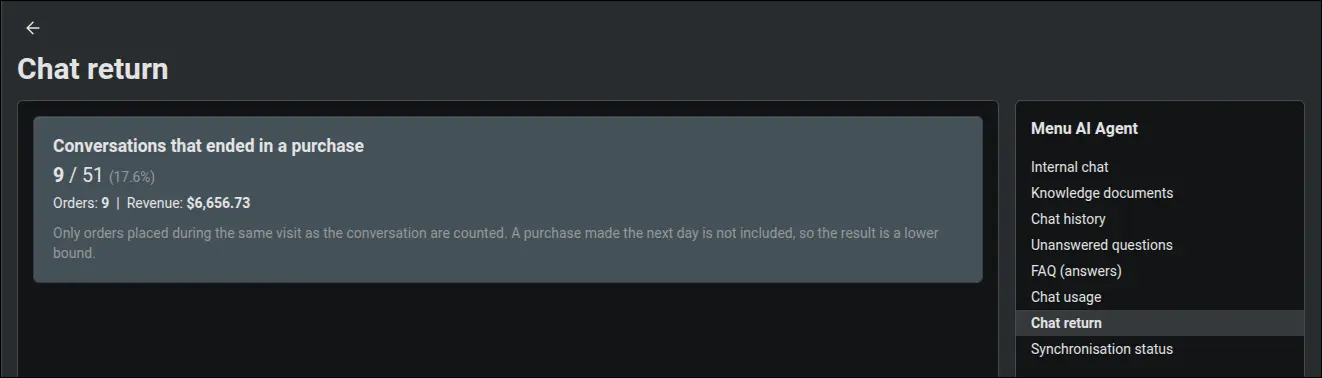
Screenshot 20: chat return expressed in orders
Day to day operations are closed by the technical back office. The synchronisation status screen shows in numbers how much content is waiting to be processed, how much already reached the knowledge base and whether anything got stuck on the way, and the generate button starts processing on demand. The e-mail report delivers the same knowledge to your inbox: the most frequent gaps, answers rated unhelpful, articles waiting for a review and an alert whenever synchronisation runs into an error.
A marketplace adds one more question, the scope of the conversation. The operator decides whether the storefront chat covers the whole platform or only the offer of the vendor being visited, while the vendor manages their own documents alone and sees neither the conversations of the whole platform nor the synchronisation status:
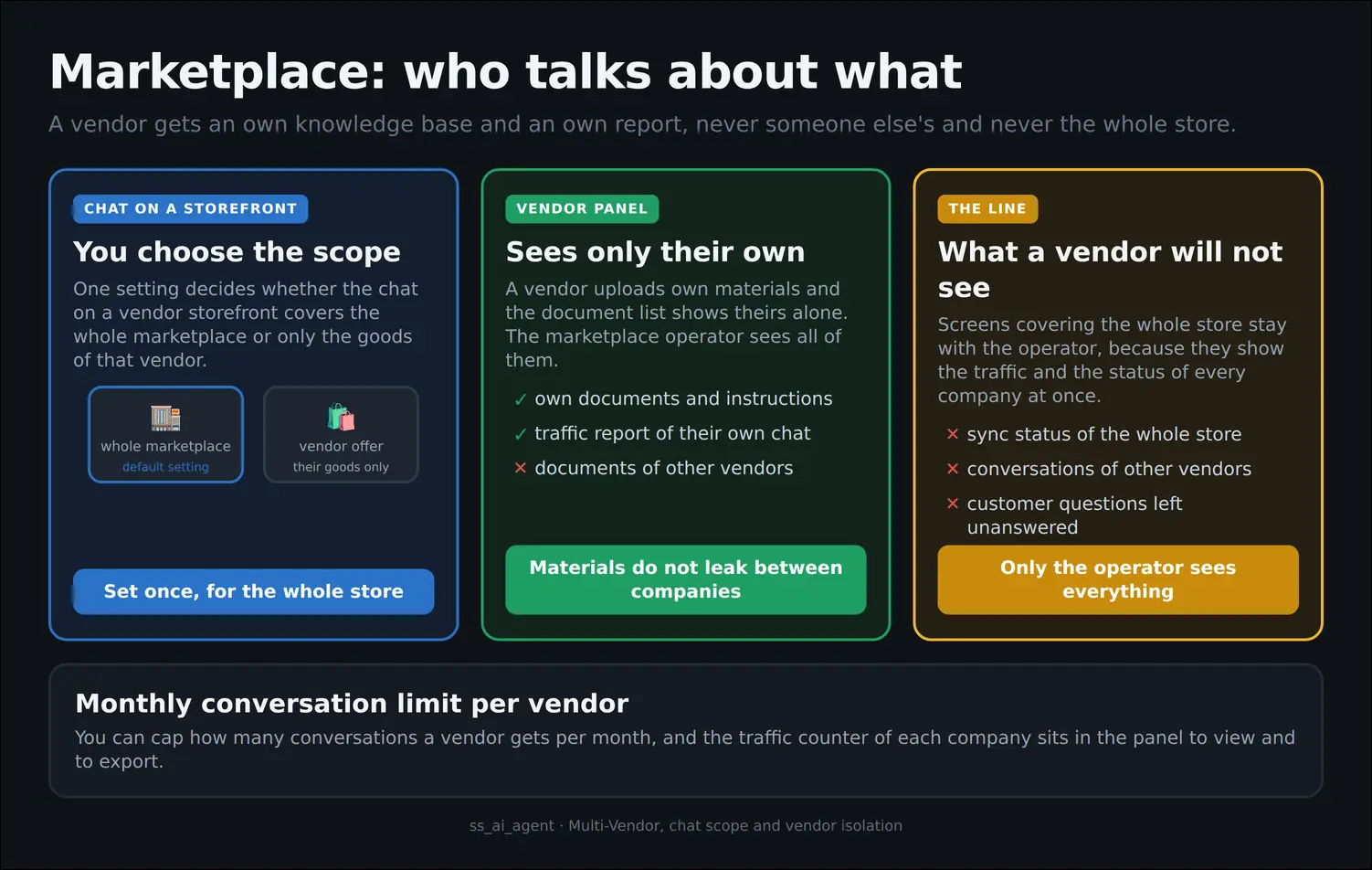
Diagram 6: the limits of conversation and access on a marketplace
The AI Assistant combines up to date knowledge about your store with a convenient storefront chat, an internal chat for your team and a complete management panel in the back office. It runs on CS-Cart and Multi-Vendor, and in the marketplace edition a conversation can cover the whole platform or only the offer of the vendor whose store the customer is visiting. The marketplace operator also sees chat usage split by vendor, can set a monthly conversation limit, and every vendor sees the orders that came out of their own conversations. Deployment comes down to connecting the processor to one REST address, the add-on takes care of the rest.
Full walkthrough, 6 minutes
Feel free to contact us and purchase the add-on!
Choose the most convenient form of payment for the add-on. You can pay once and use the add-on. Choosing a subscription payment (monthly or annual) means that you pay for the add-on at regular intervals and have access to the latest versions of the addon and technical support.
- Store Bulider
- Multi-Vendor
- 4.21.x
- 4.20.x
- 4.19.x
- 4.18.x
- 4.17.x
- 4.16.x
- 4.15.x
- No changes
No reviews found