


Pickup date: a calendar of order pickup days for CS-Cart and Multi-Vendor

- View all variations as list
| CODE | Payment method | Price | ||
|---|---|---|---|---|

|
699
ss_pickup_date
2026-10-25
1.1.3.3
|
750.00 PLN
(Price without tax) |
||

|
701
ss_pickup_date_sub_1Y
2026-10-25
1.1.3.3
|
375.00 PLN
/year
(Price without tax) |
||

|
700
ss_pickup_date_sub_1M
2026-10-25
1.1.3.3
|
37.50 PLN
/month
(Price without tax) |

- — 12 months guarantee for all our add-ons
- — add-ons sold to entire world
- — stable, flexible, high-quality products
- — competitive prices, attractive discounts
- — quick and competent technical support
- — installation in 24 hours
- — personalized solutions - we'll write any add-on for you
An extension for Store Builder and Multi-Vendor that turns a product variation feature into a pickup calendar, one that moves forward on its own every night. It was built for shops that hand over goods on a specific day: pastry shops, bakeries, caterers, florists and anyone taking holiday orders. Variations in CS-Cart know about sizes and flavors, but not about calendars, so a list of pickup days typed into the variants by hand is out of date by the next morning. Our add-on takes over that daily chore, and the customer only ever sees the days on which the bakery will actually hand over the order. Once the orders are in, the add-on keeps helping: it shows how much of what to prepare, lays out the pickup list for the counter and mails tomorrow's plan to the team.
See how it works, in about a minute
Full walkthrough, 5 minutes
Key Features
- Pickup schedules with selling days, an order cutoff hour, preparation time and pickup hours in every store language.
- Daily rotation of dates in the feature variants, run by CRON from the command line or through an HTTP address protected by a token.
- Days off entered once for the whole company, a sales start and a last pickup date for the season, and fixed dates such as Christmas Eve or Easter with a colored highlight on the product page.
- A cart that remembers the chosen day: when the date moves, the customer confirms the new one before placing the order.
- The pickup date next to every order item, in the order list and in order documents, plus a pickup list sorted by customer surname where handed-over orders are marked in one go.
- A production plan for the day and for the week, A4 printouts, box labels, CSV export, tomorrow's list by mail for staff and a customer reminder with a calendar file.
The global configuration fits on a single screen. Here you decide whether the pickup date appears under the order items and in its own column of the order list, and which order statuses count toward the report used by the bakery. Below sits the CRON block with three ways to run the generator: a button for a manual recalculation, a ready command for the server task scheduler, and an HTTP address with a token for hosting without PHP CLI access. The dates therefore move forward by themselves on any server:
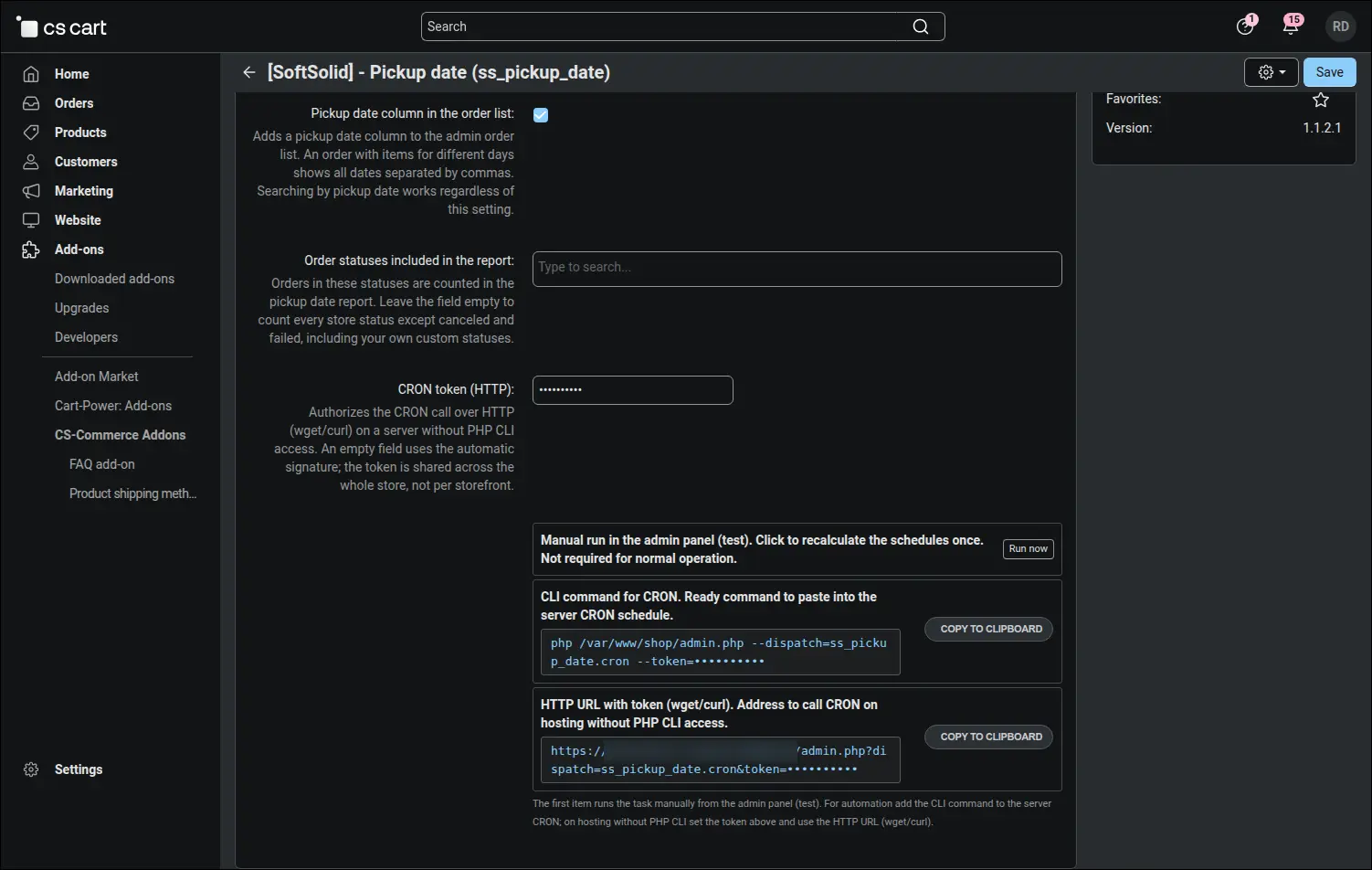
Screenshot 1 - add-on settings: order display, report statuses and three ways to run CRON
Schedules are the heart of the add-on. Each product line can follow its own pickup rules, so cakes, sweet buns and seasonal baking live side by side, each with its own feature, number of dates, preparation time and the hour after which an order moves to the following day. The screenshot shows the six schedules of a real pastry shop, gathered in one place:
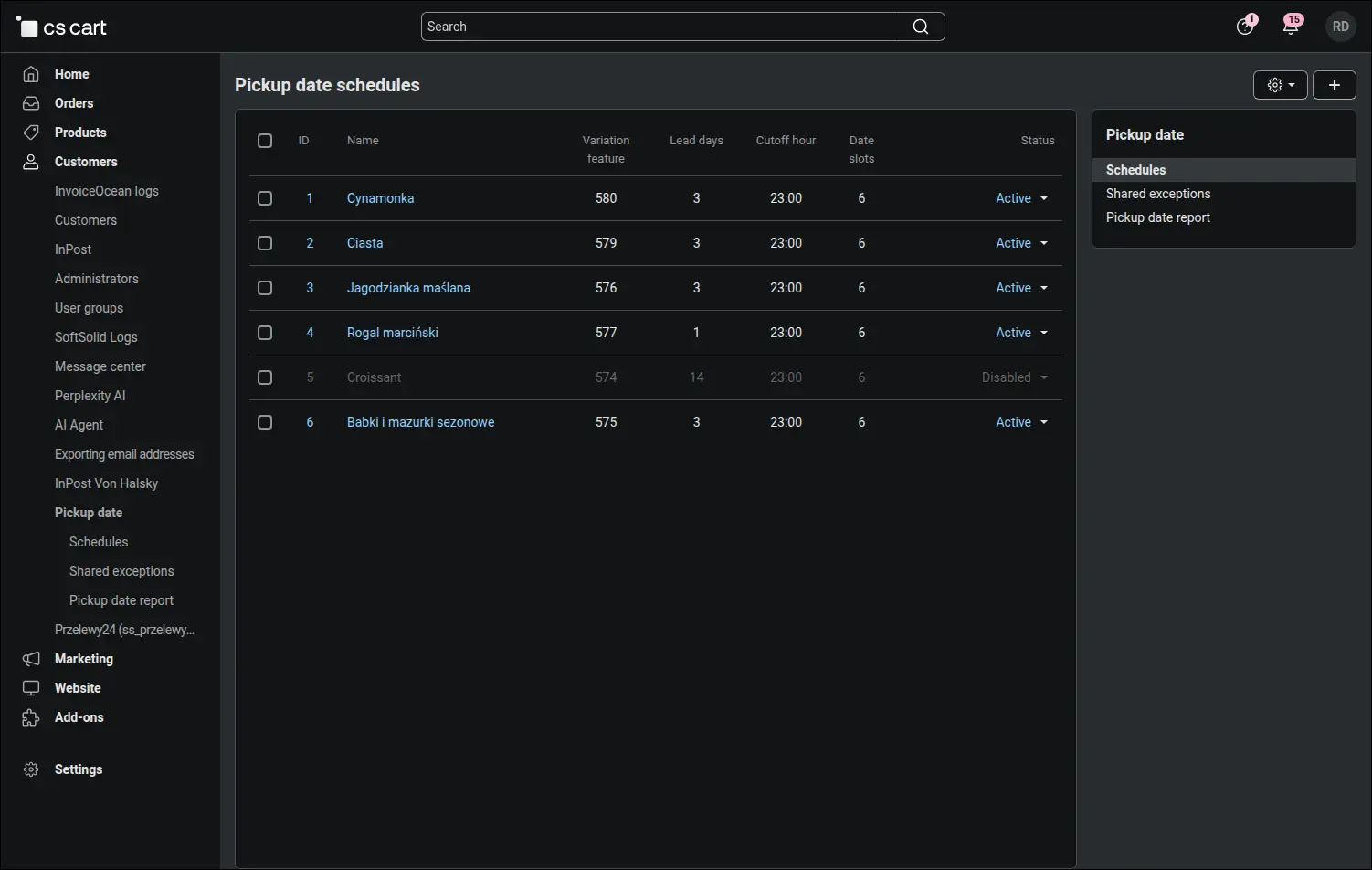
Screenshot 2 - pickup schedules: separate rules for each group of products
In the schedule form you write down the rules, and the generator works out the dates. You choose the feature whose variants become date tiles, tick the selling days, set the cutoff hour and the number of days the bakers need. The label format is built from date, weekday and hours placeholders, and the pickup hours table has a separate column for every store language, which is why an English-speaking customer sees 9 a.m. - 3 p.m. where a Polish one reads 9.00 - 15.00. Products in the selected variation groups are enabled and disabled by the add-on itself, depending on whether their variant received a date:
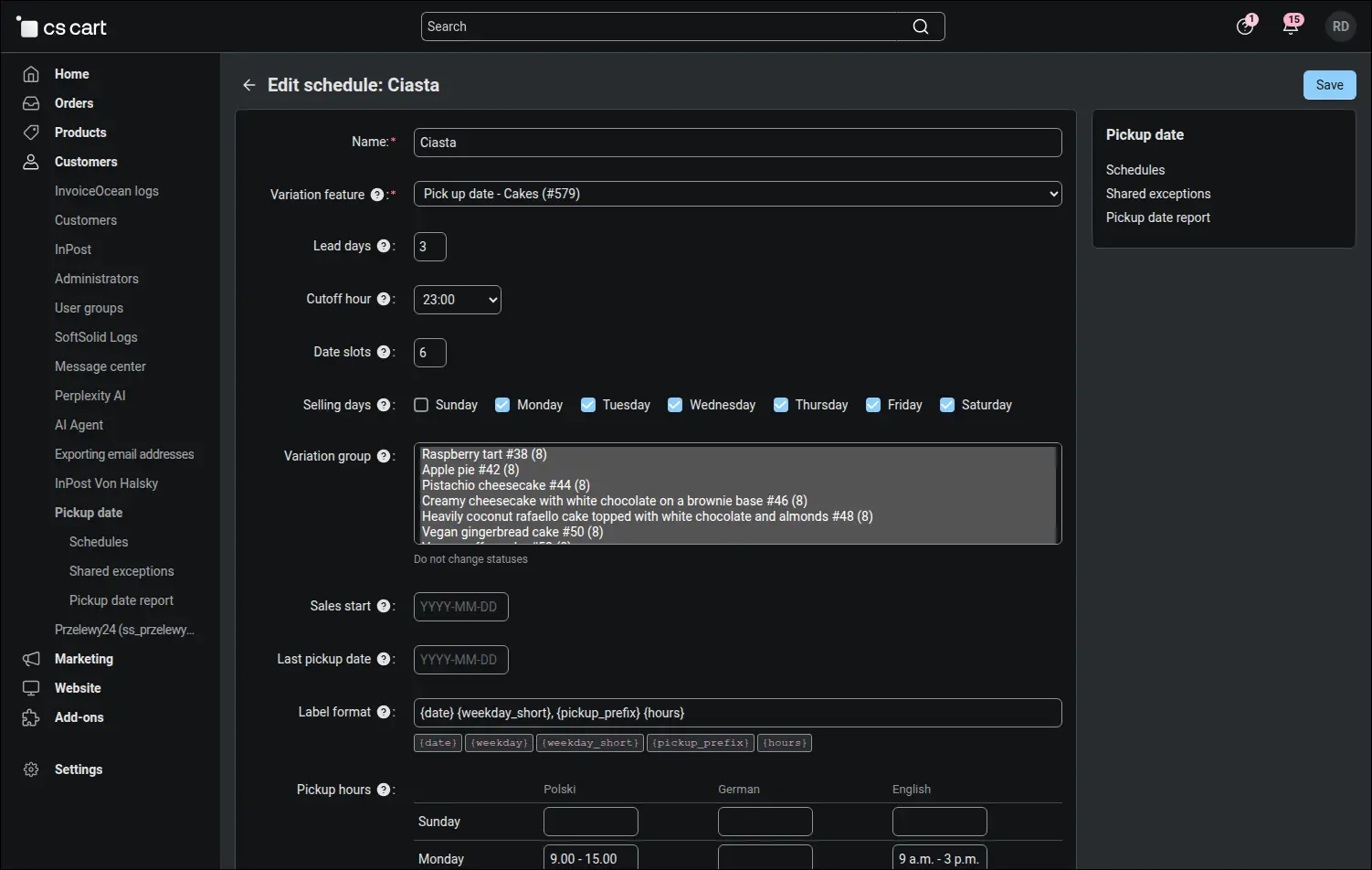
Screenshot 3 - schedule rules: selling days, cutoff hour and pickup hours in every language
A bakery calendar is rarely even, so the lower part of the form holds the exceptions: single days off and whole ranges, such as a holiday break written as one line. Next to them stand the fixed dates, special occasion dates that join the daily rotation instead of replacing it. Each one carries its own caption and hours, the caption can be translated into every store language, and a visibility threshold can keep Easter hidden until Christmas Eve, so that two seasons never light up at once. Finally you choose the highlight style and its color:
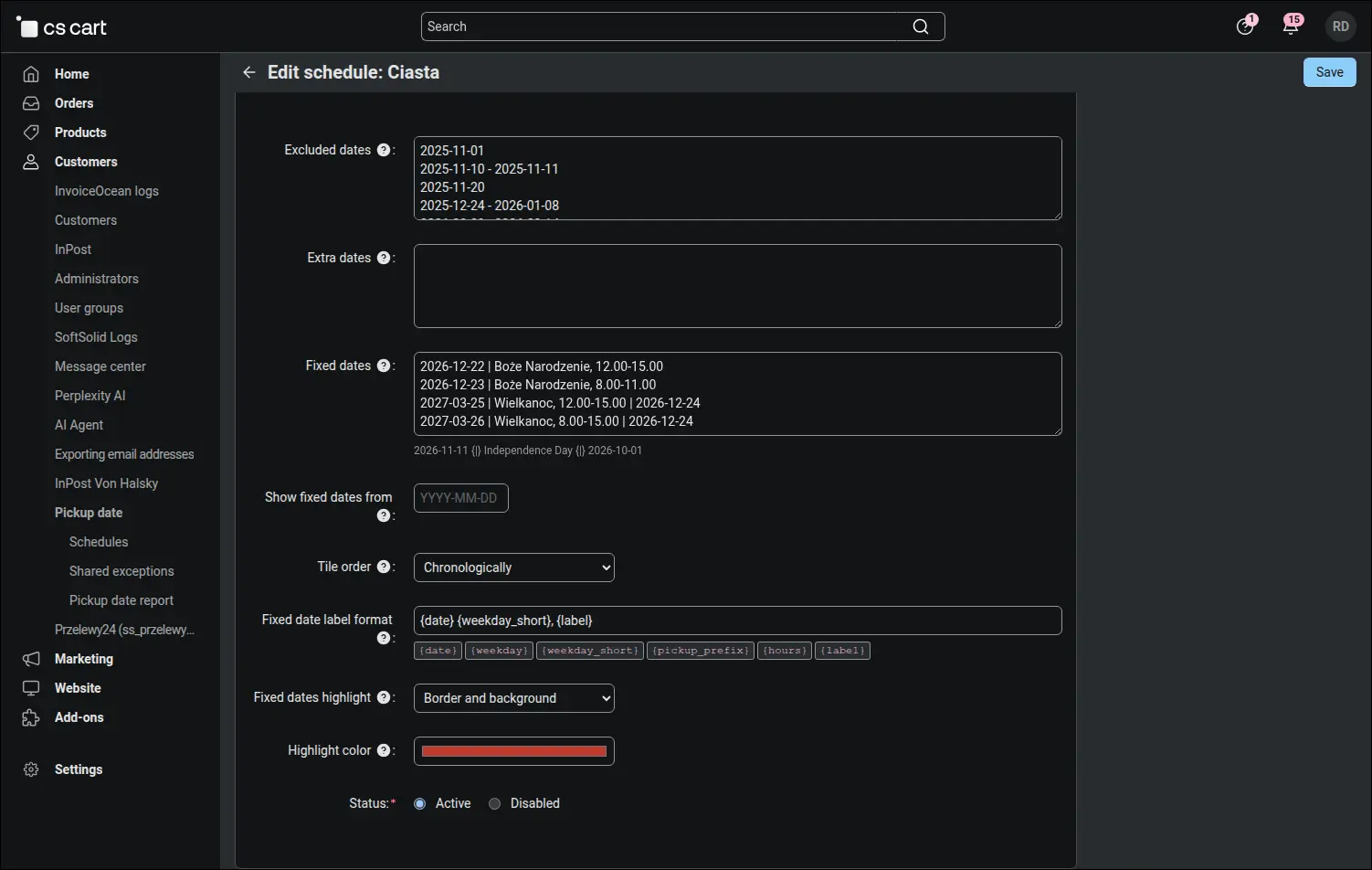
Screenshot 4 - fixed dates with a caption, a visibility threshold and a custom highlight color
Company-wide days off do not have to be copied into every schedule. On the shared exceptions screen you enter a public holiday, a break from Christmas Eve to Epiphany or an extra trading Sunday before the holidays just once, and the generator merges this list with the exceptions of each schedule. A single line closes sales for every product at the same time:
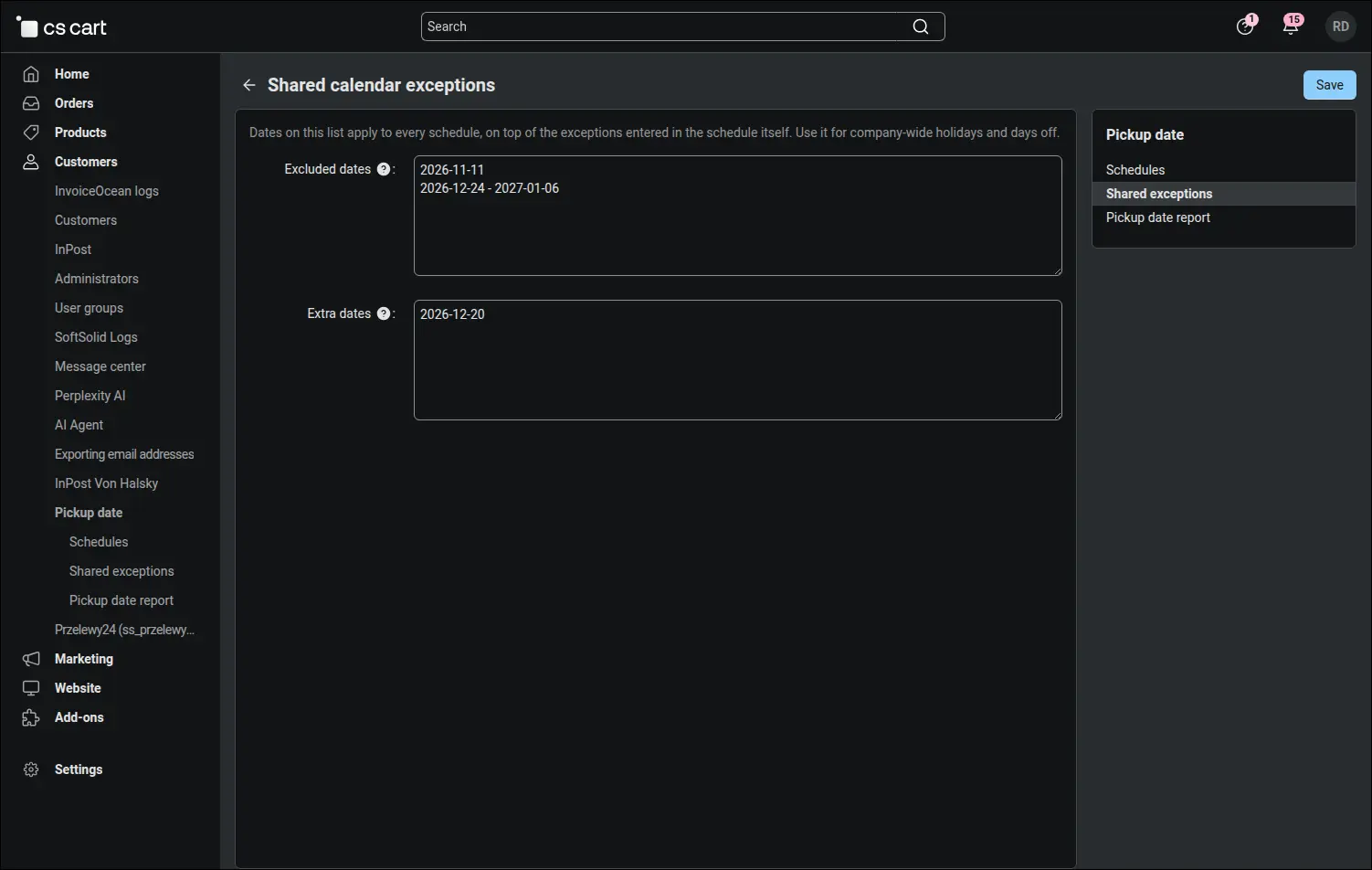
Screenshot 5 - shared days off and extra days that apply to every schedule
This is what the customer sees. The pickup day is chosen on the product page just like a size or a flavor, and the tiles show consecutive days with the weekday name and pickup hours. The Christmas dates stand out with a red border and background, and their caption tells the customer which occasion they were prepared for. A date description, written in the schedule for every language, can also tell the customer below the tiles how long they have to place the order. The highlight is created without touching the theme templates, so it never gets in the way of theme updates. Behind every tile stands a regular variation product with its own stock, price and sales history:
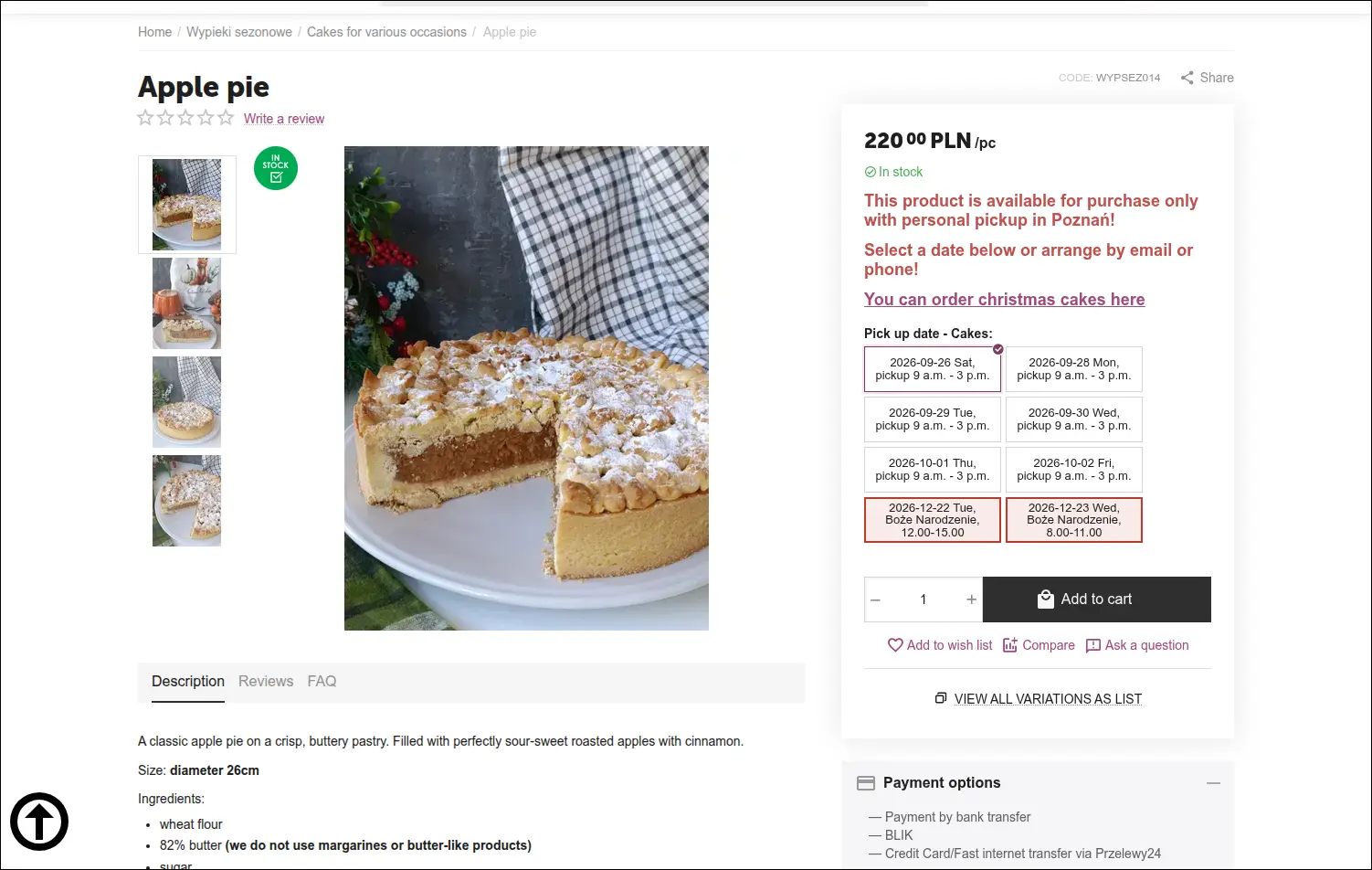
Screenshot 6 - the customer picks a pickup day, and special occasion dates stand out in color
A cart can wait for days, and the dates keep moving in the meantime. The add-on remembers the day chosen when the product was added and compares it with the current one every time the cart is recalculated. When the date has moved, the customer sees a banner with the day they picked, the day that applies now and a confirmation button. Until the new date is confirmed, the order cannot be placed, and an item whose date has dropped out of the calendar is removed with an explanation. Nobody turns up for a cake on a day they never chose:
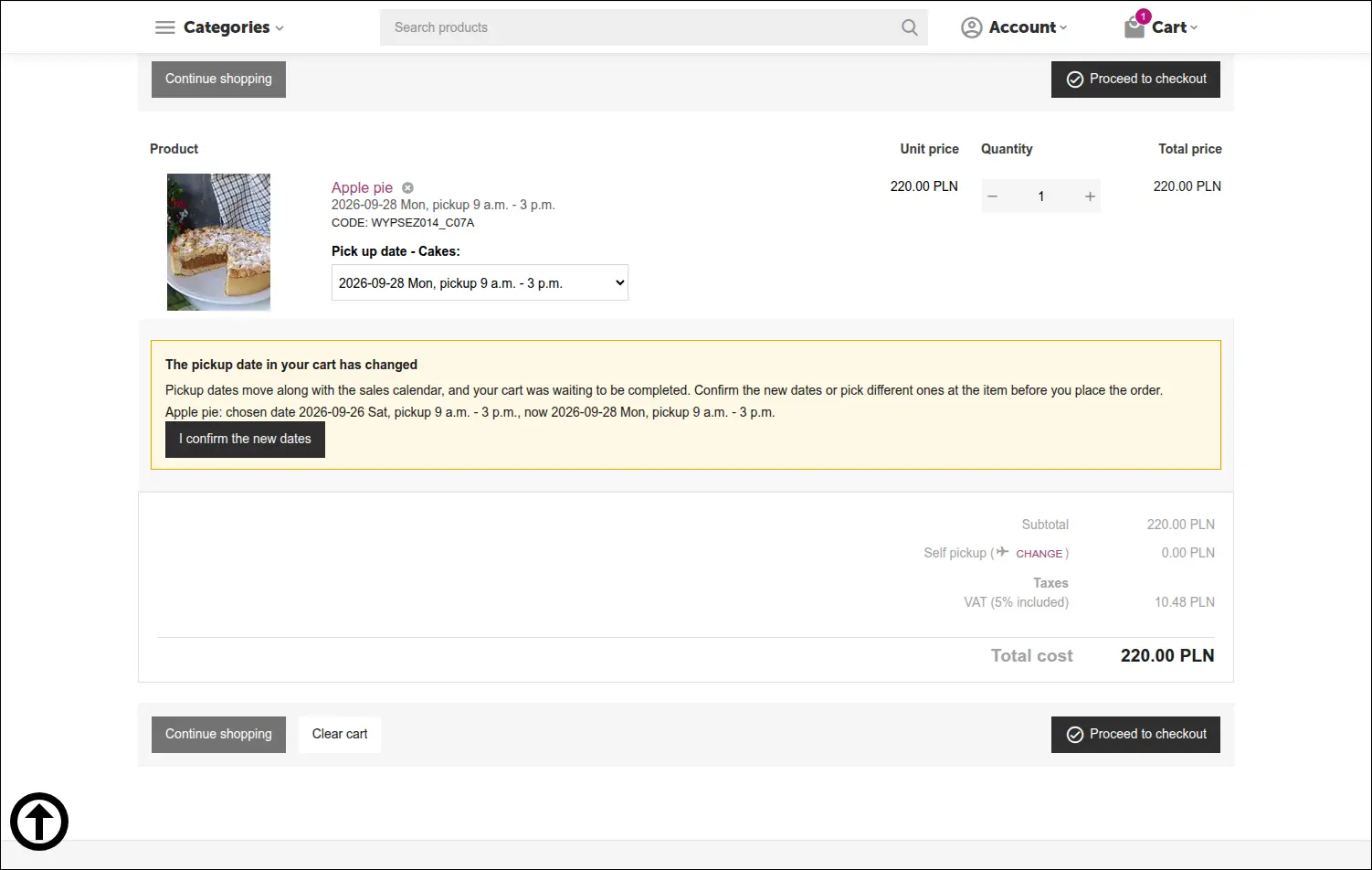
Screenshot 7 - the cart warns when the chosen pickup date has moved while it was waiting
Once the order is placed, the add-on stores the real date and the label from the moment of purchase with every item. This matters, because tomorrow the same variant will carry a different date, while last week's order still shows the day the customer actually bought. Staff see the pickup date in the order details in the admin panel, and the customer sees it in their account. The date can also appear on the invoice or the packing slip: you insert the add-on variable in the document editor, with no changes to the store files:
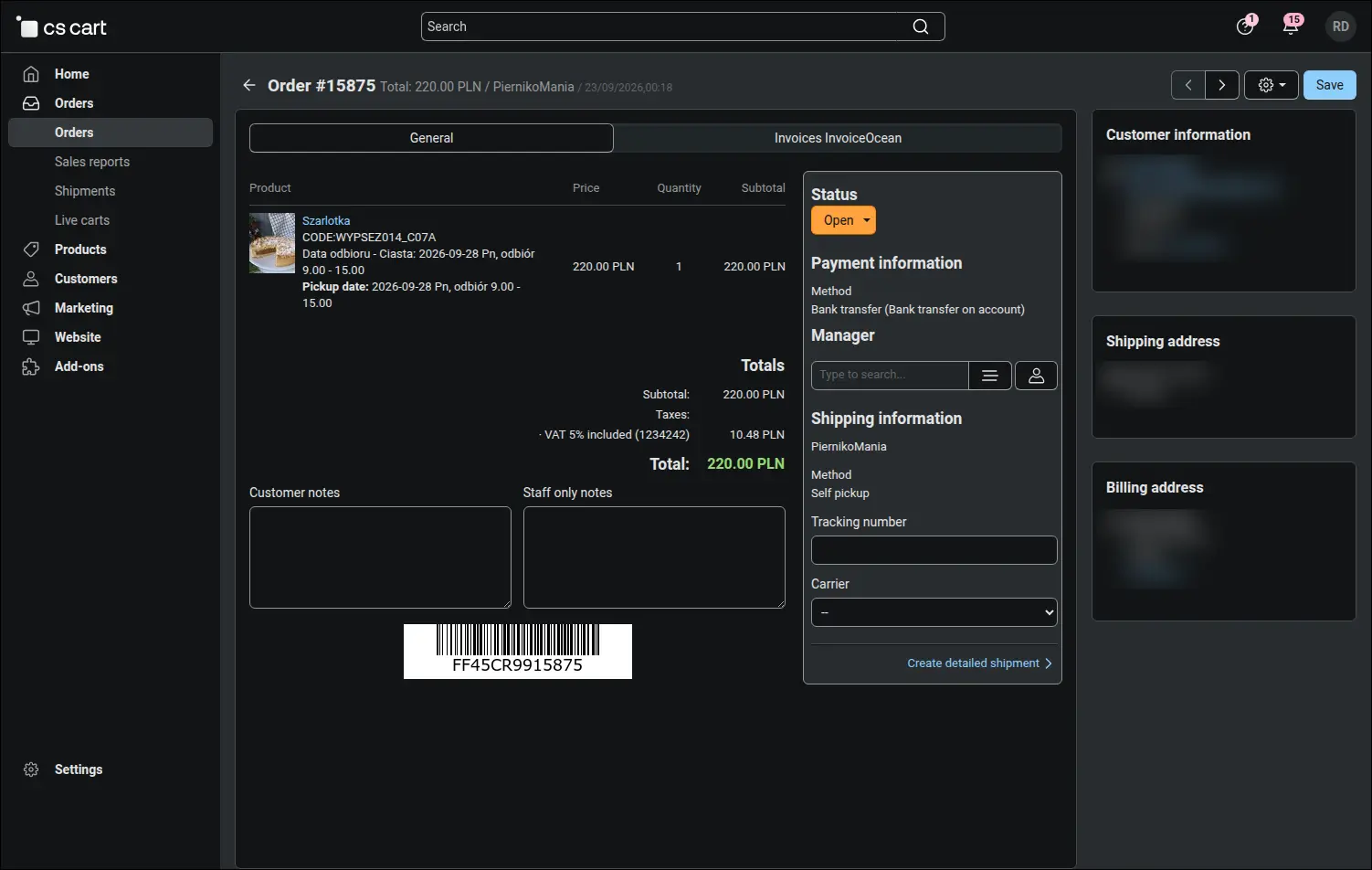
Screenshot 8 - staff see the pickup date next to every order item
The order list gains a pickup date column, so the date is visible without opening the order. An order spread over several days shows every date separated by commas and stands out at once. The advanced search offers the Pickup from and Pickup to fields, which pull out every order for a given day with a single filter, ready for printing or a status change:
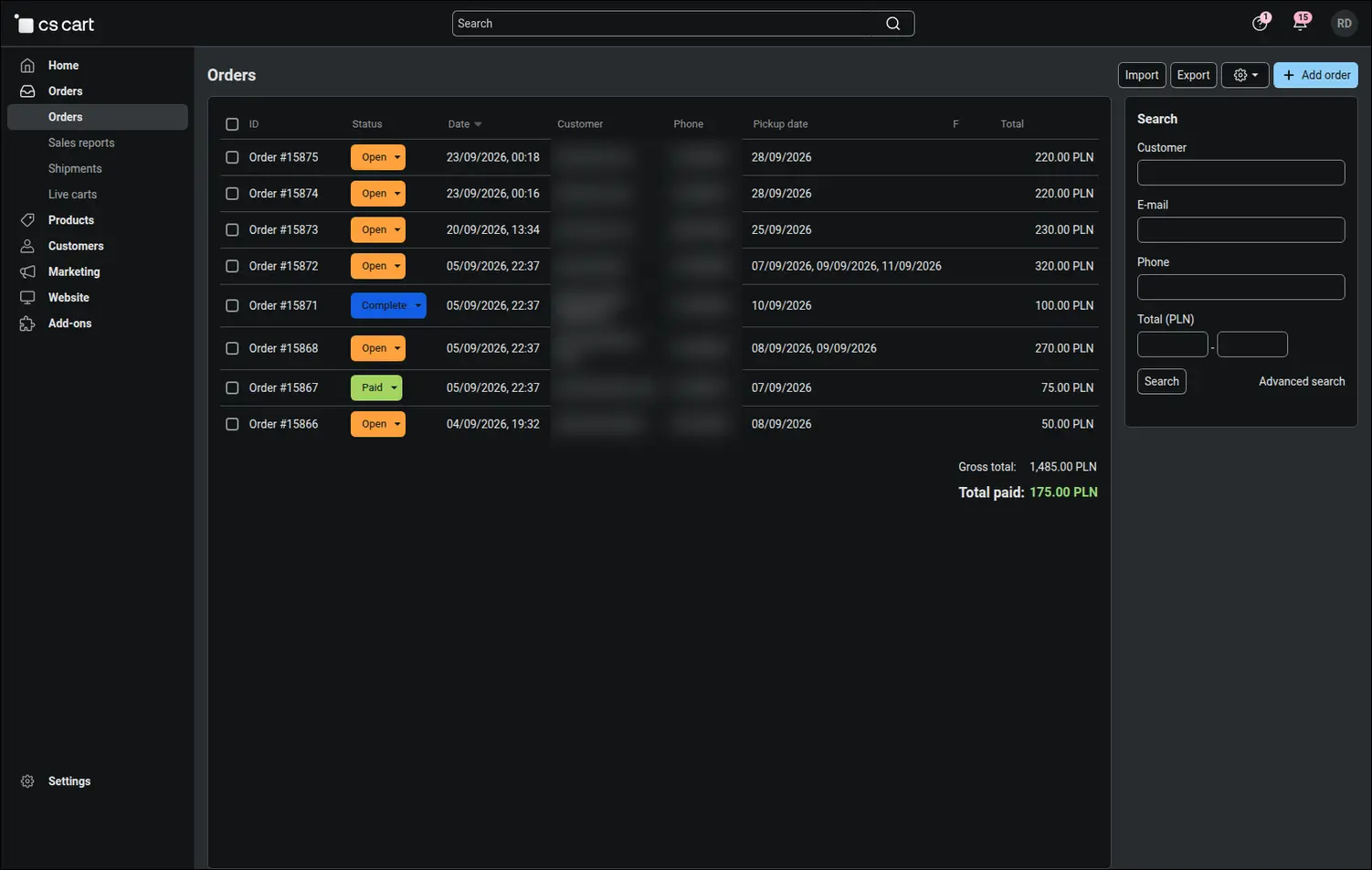
Screenshot 9 - the order list with pickup dates and a filter by pickup day
In the morning a bakery needs to know one thing: how much of what to bake. The pickup date report lists every day with the number of items and the number of orders, from today onwards by default, with date range and schedule filters. Production planning no longer calls for a spreadsheet export or counting by hand:
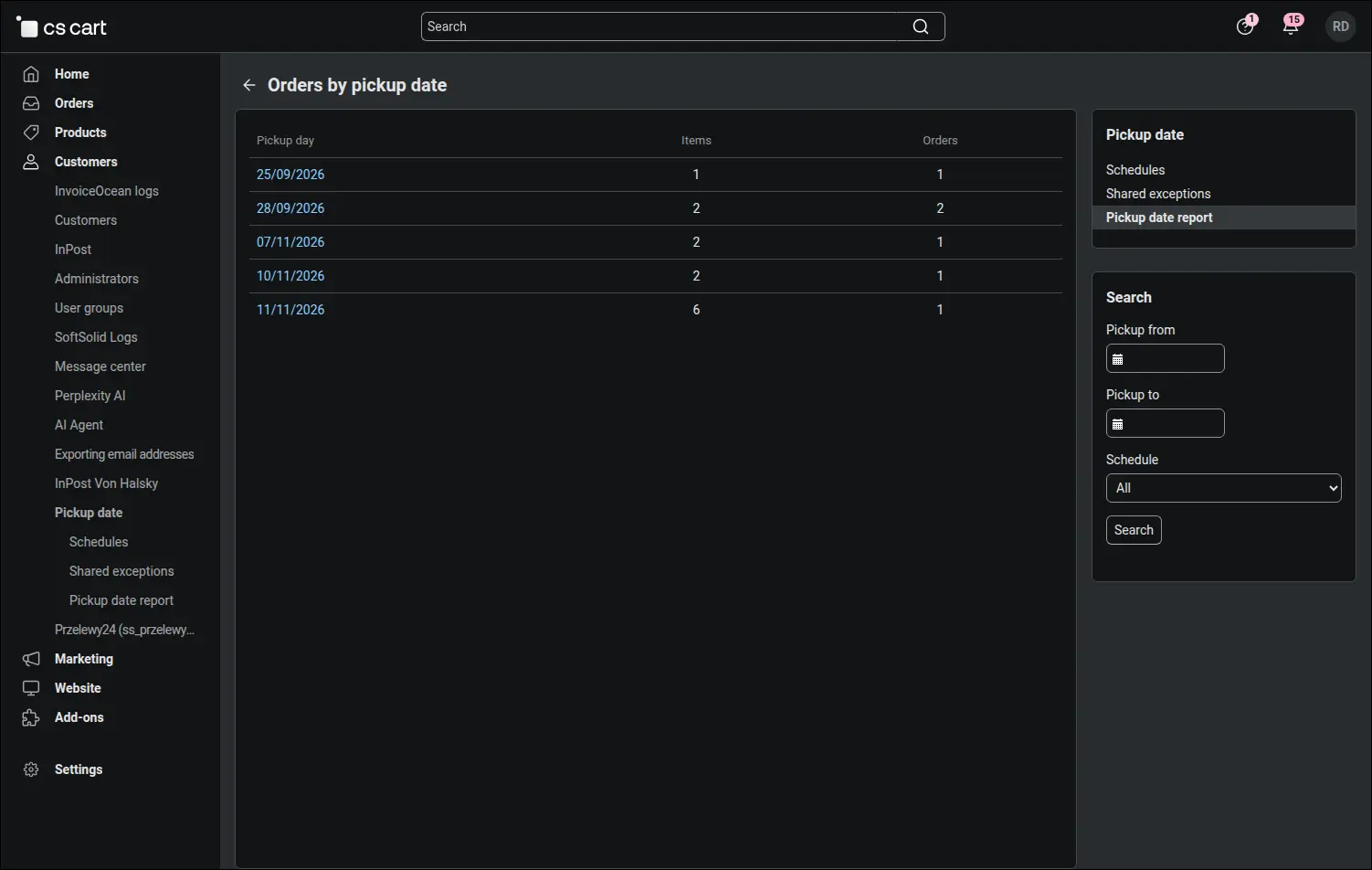
Screenshot 10 - the report: how many items and orders fall on each pickup day
A click on a day opens its breakdown by product, with the item and order count next to each one. All variations of a single product share one row, and when customers ordered it in different shapes or with different inscriptions, each combination is listed below it with its own item count. It is a ready list for the bakers for that day, and from this screen you can also move on to the orders with that pickup date:
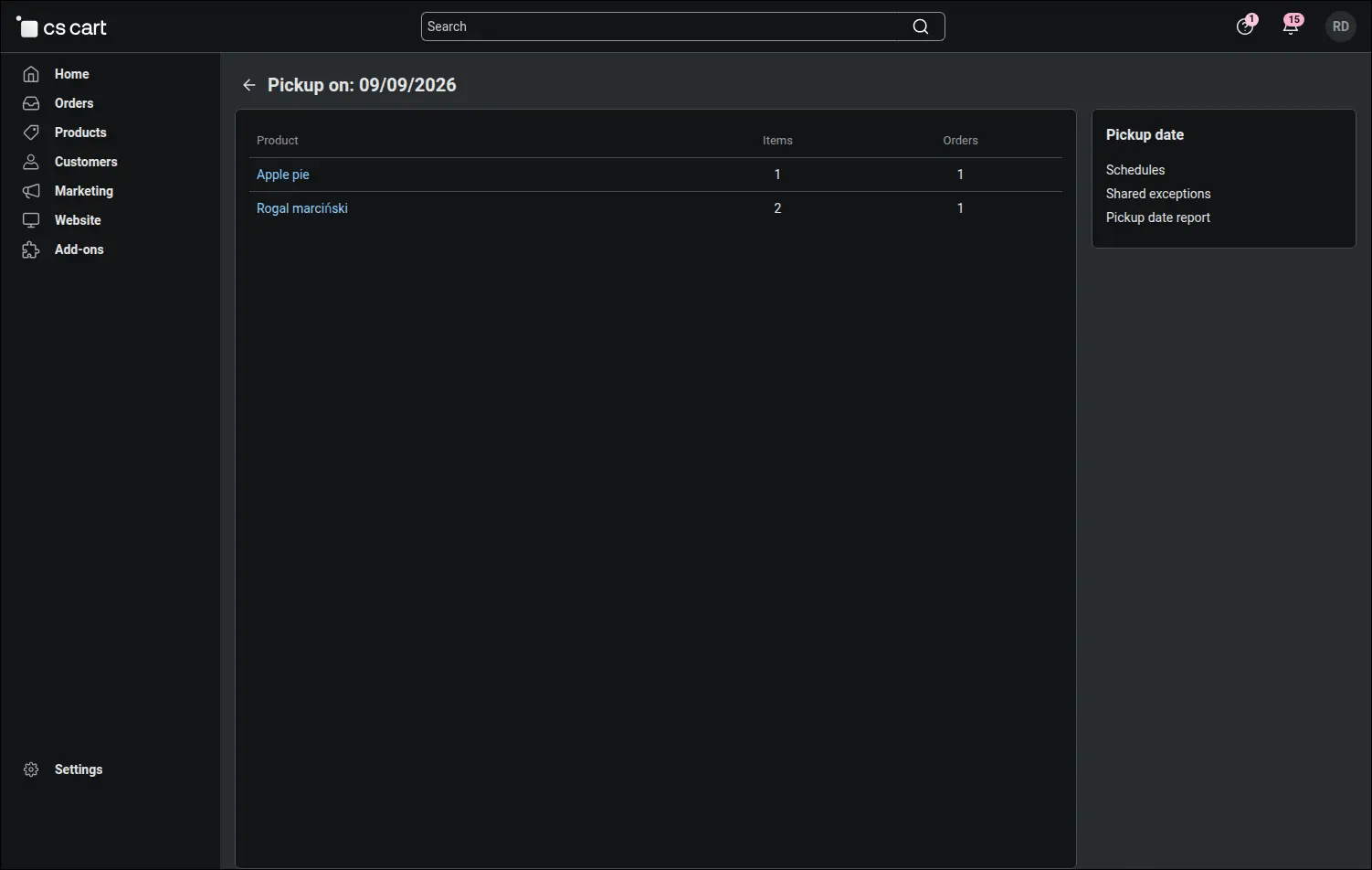
Screenshot 11 - a single pickup day broken down by product
The same day has a second side, meant for the counter. The pickup list arranges the orders by customer surname and shows the phone number, the items for that day with their variant and options, the total, the status, the payment method and the customer notes. Staff look for a name rather than an order number, and they can tell at a glance whether the order has been paid. Handed-over orders are ticked off, and at the end of the day a single button moves them to the status chosen in the add-on settings. Customers receive an email only when you tick the notification box, so a bulk status change never floods their inboxes. Less frequent actions, namely labels, spreadsheet export and the store packing slips, wait in a drop-down menu:
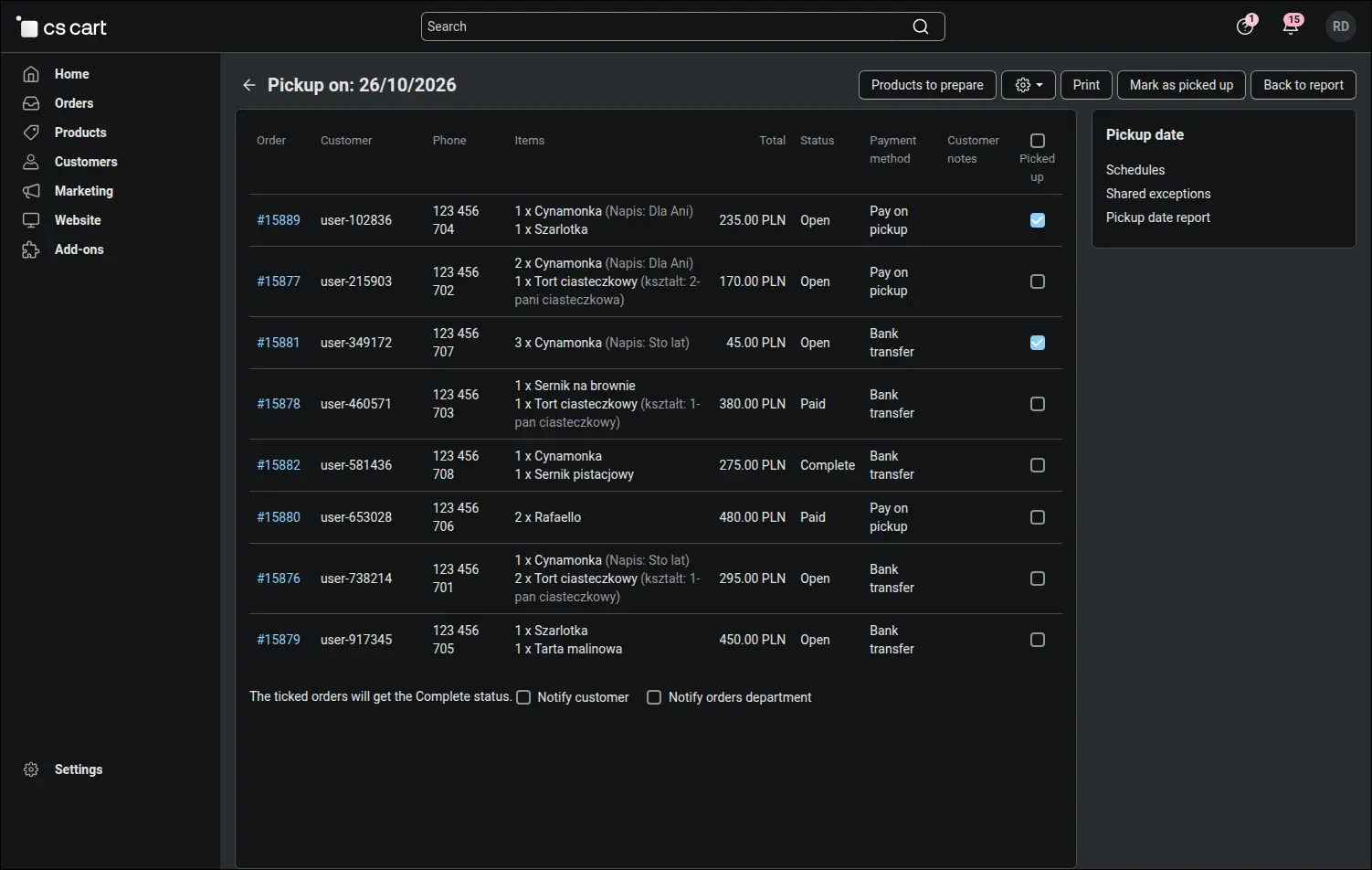
Screenshot 12 - the pickup list by customer surname, with handed-over orders marked in one go
When you plan several days ahead, the range view comes in handy. Products sit in rows, pickup days in columns, and the row and day totals close the table, so a weekly production plan fits on a single sheet. By default the view covers seven days from today, and the filter stretches it to as many as 31 days. Each column total matches the screen of that single day, so ingredient purchases and staff rotas can be arranged in advance without worrying about mismatched numbers. The table prints in landscape on A4 and saves to a spreadsheet as a CSV file:
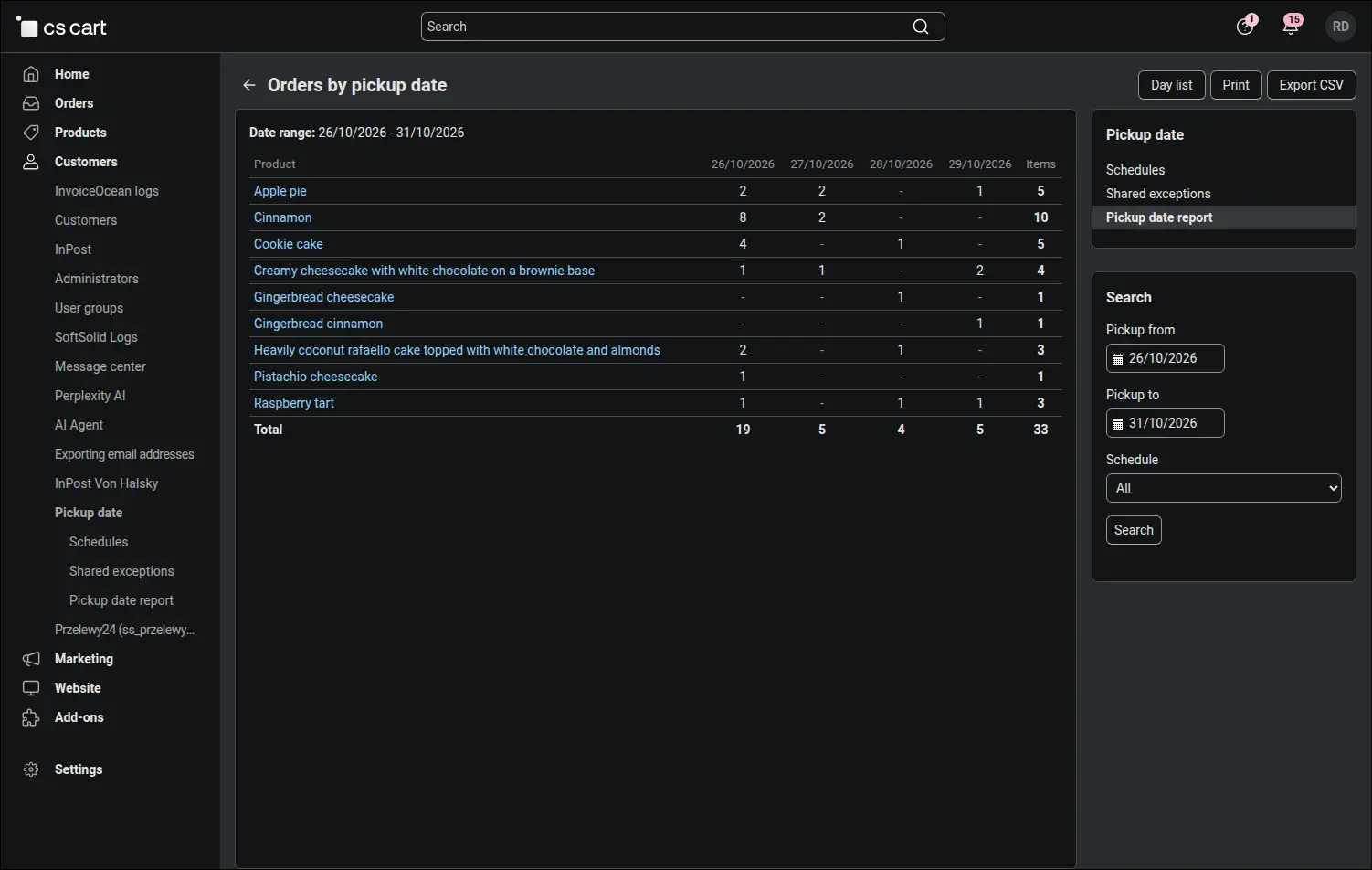
Screenshot 13 - a production plan for several days: products in rows, pickup days in columns
From the day list you can also print box labels, eight on an A4 sheet in a 2 x 4 layout. Each one carries the customer surname, the order number, the pickup date and the ordered items with their inscription or shape, so nobody at the counter mixes up two similar cakes. The production list for the back room and the pickup list for the counter go to paper the same way, and the ordinary browser print window is all it takes. The day's data can also be exported to a CSV file that Excel and LibreOffice open with every accented character intact:
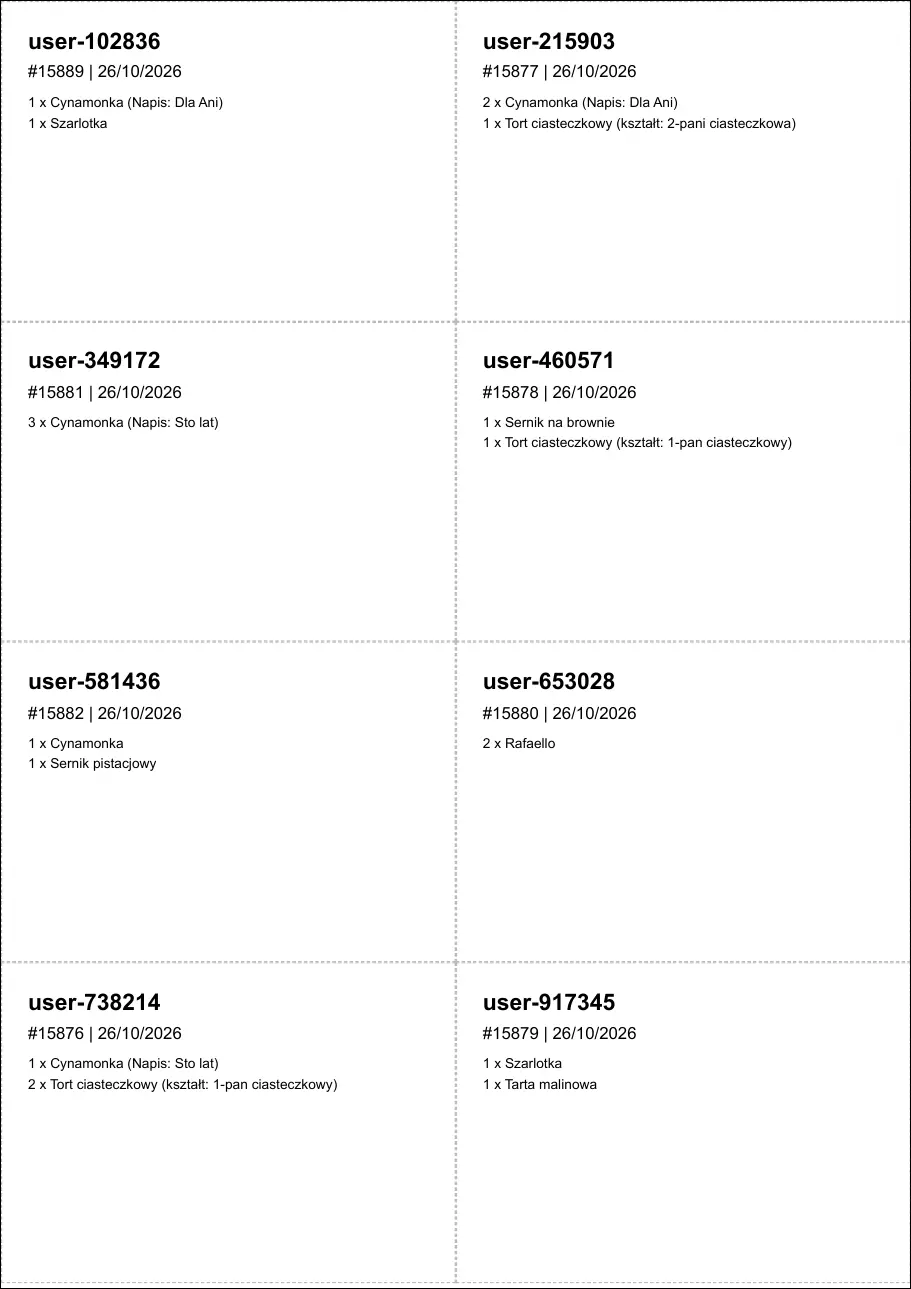
Screenshot 14 - box labels, eight on an A4 sheet
Tomorrow's plan can be waiting in the inbox before anyone logs in to the admin panel. A second CRON command sends the production list for the next day once a day to the addresses entered in the settings, broken down by combination and with the pickup list attached as a CSV file. The person in the back room therefore needs no panel access to know what to bake. A day without orders sends nothing, and running the command again does not repeat the email. The same command can also send customers a reminder one day before pickup, with the order number, the items and a calendar file they can save on their phone. The reminder is off by default, and both email templates are edited in the store's email templates menu:
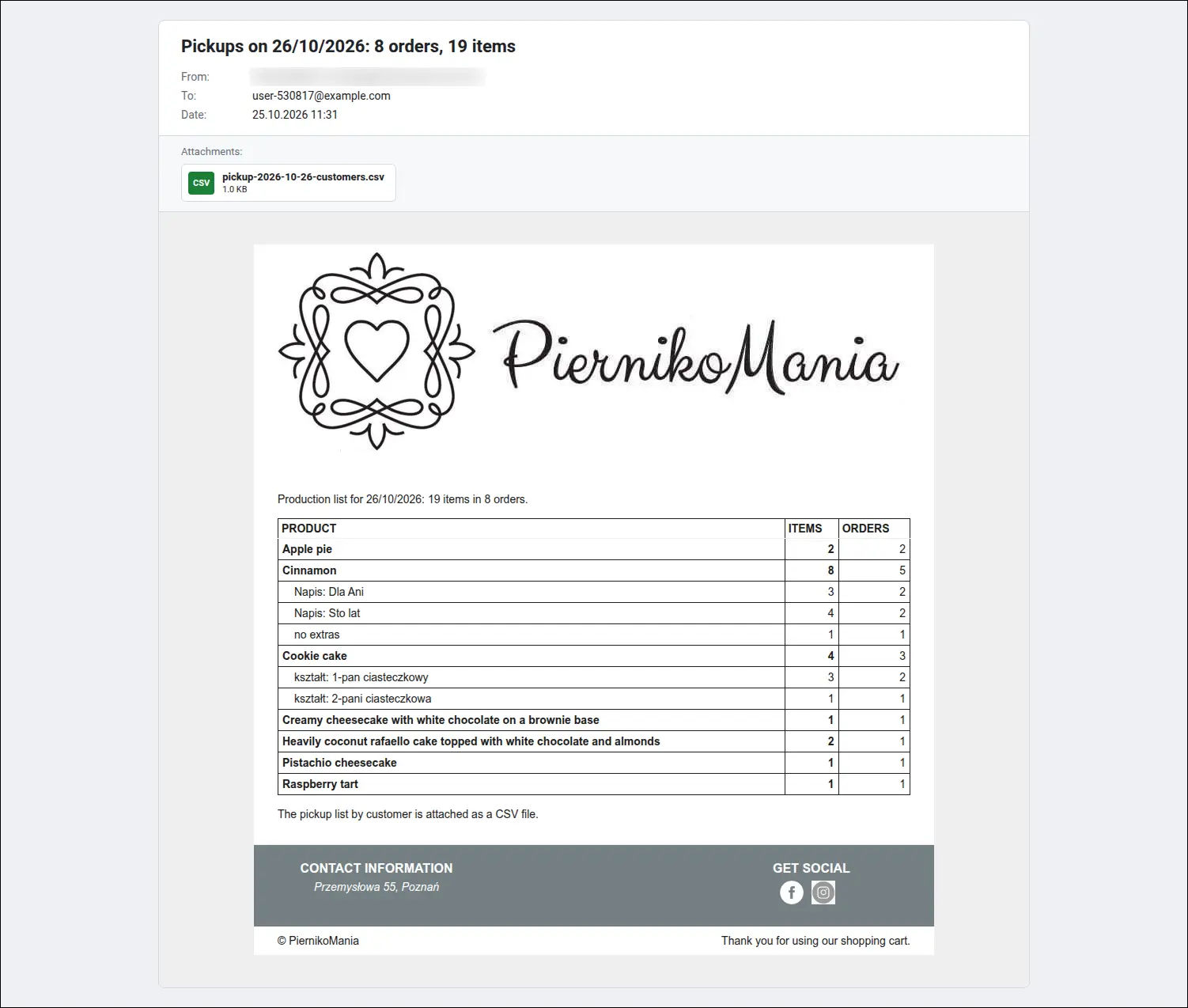
Screenshot 15 - the staff email with tomorrow's production list and the pickup list attached
The Pickup Date add-on relieves the shop team of rewriting the calendar every day and guards the date on both sides of the counter. The customer buys only the days on which the bakery will really hand over the order, and when a date moves, they confirm it knowingly. Staff see the date next to every item and in the order list, plan production from the daily and weekly reports, hand over orders from a list sorted by surname and receive tomorrow's plan by email. The add-on works on the core product variations of CS-Cart and Multi-Vendor, so the stock, prices and sales history of every date stay exactly where they have always been.
Feel free to contact us and purchase the add-on!
Choose the most convenient form of payment for the add-on. You can pay once and use the add-on. Choosing a subscription payment (monthly or annual) means that you pay for the add-on at regular intervals and have access to the latest versions of the addon and technical support.
- Store Bulider
- Multi-Vendor
- 4.21.x
- 4.20.x
- 4.19.x
- 4.18.x
- No changes
No reviews found