


Generate Intrastat declarations in INSTAT/XML format


- — 12 months guarantee for all our add-ons
- — add-ons sold to entire world
- — stable, flexible, high-quality products
- — competitive prices, attractive discounts
- — quick and competent technical support
- — installation in 24 hours
- — personalized solutions - we'll write any add-on for you
An add-on for Store Builder and Multi-Vendor that prepares the monthly Intrastat declaration directly from shop orders. Once sales to other EU countries pass the national statistical threshold, the office expects a monthly return listing the goods, their commodity codes, mass, value and countries of origin. The shop already holds all of that data, only scattered: the commodity code sits in a product feature, the origin in another feature, the mass in the product weight, and the VAT number of the buyer in a profile field. Collecting it by hand in a spreadsheet takes hours and invites the kind of mistake the office does not forgive. Our add-on reads the orders of the chosen month, arranges them according to the Eurostat model and writes a finished file ready to be filed in the official portal.
Key Features
- A ready file for five offices: the German INSTAT/XML return filed with eSTATISTIK.core, the French EMEBI response filed through the DEBWEB2 service on the ProDouane portal, the Spanish file imported in the AEAT sede electronica, the Romanian XML of the INS office and the Italian elenchi riepilogativi uploaded in Intr@web.
- Both directions of trade: dispatches calculated straight from orders, and intra-EU arrivals kept in a register of their own, filled in by hand or imported from a CSV file prepared by the accounting department.
- A one-off mapping of the shop onto the Eurostat model: the administrator points from drop-down lists to the feature that carries the commodity code, the one that carries the country of origin, the source of the mass and of the buyer VAT number, and the order statuses that count as a dispatch.
- A declaration preview with a missing-data report that names the very orders and products to complete before the file reaches the office.
- A history of generated files with repeated download, an audit trail of what was filed and for which period.
- A monthly scheduled task that generates the declaration for the past month and sends it by e-mail with the files attached, without anyone opening the panel.
- Support for official details that are easy to overlook: splitting an oversized declaration into consecutively numbered files, the statistical value calculated as a percentage markup, the substitute buyer code for consumer sales, the Romanian nil declaration and the Italian file name built after the official pattern.
The work begins on a single settings screen where the shop is translated into the language of Eurostat. The administrator picks the feature holding the commodity code, the feature holding the country of origin, the order statuses treated as a dispatch and the profile field in which customers enter their EU VAT number. Everything is chosen from drop-down lists built out of the real data of the shop, so no identifiers have to be known. A separate field decides whether the VAT number should come from the order snapshot or from the current customer profile, which matters for buyers who changed their details after the purchase
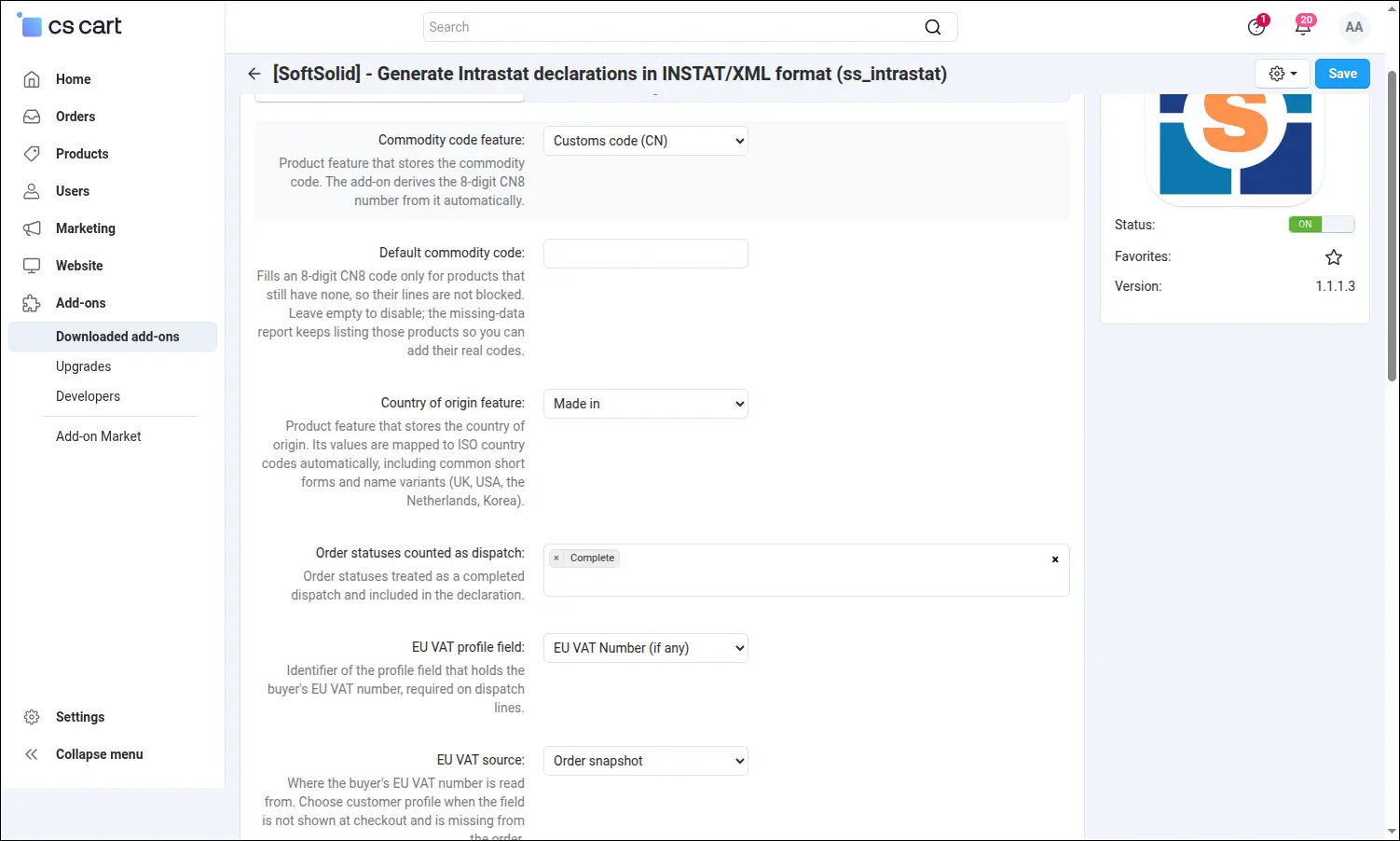
Screenshot 1: mapping of shop data onto the Eurostat model in the add-on settings.
The second part of the settings covers what differs most from shop to shop in practice. The net mass can be taken from the product weight, from a chosen feature or from the units field of a popular extension, and the unit may be pointed to separately, because cosmetics tend to be described in millilitres and supplements in grams. This is also where the storefronts selling to consumers are marked, those where the buyer never enters a VAT number, along with the address that receives the monthly notification with the finished declaration
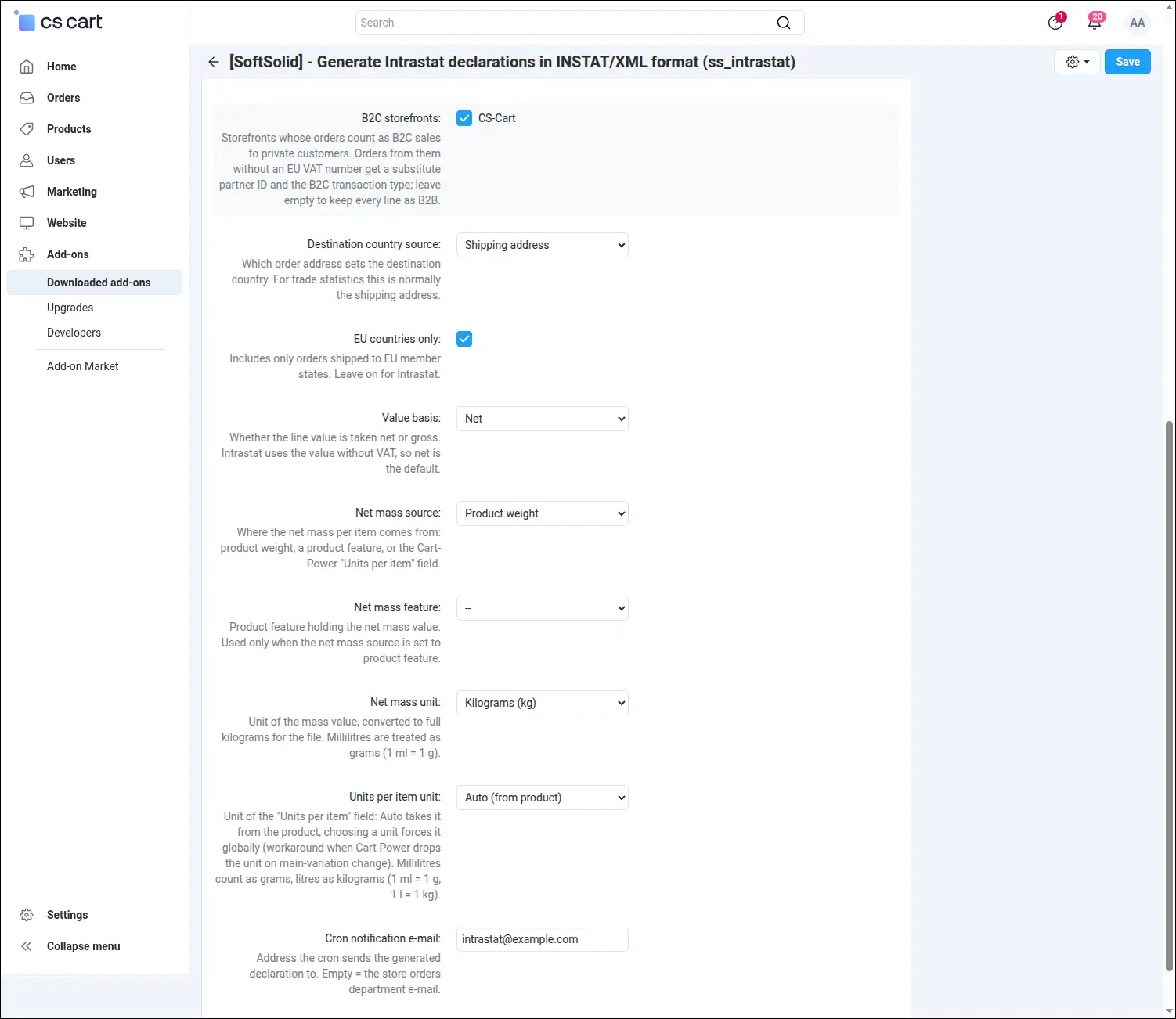
Screenshot 2: the mass source, consumer sales and the address for monthly notifications.
The daily work happens under Orders, in the Intrastat entry. Every row is a saved declaration for one country and one direction, ready to be reused in the months to come. Next to the row the period is chosen and one of two buttons pressed: preview, or generate the file. Below it the history gathers the file name, the line count and the total value, so a single screen shows what has been filed and for which month. A company reporting in several countries keeps several declarations side by side, without switching between tools
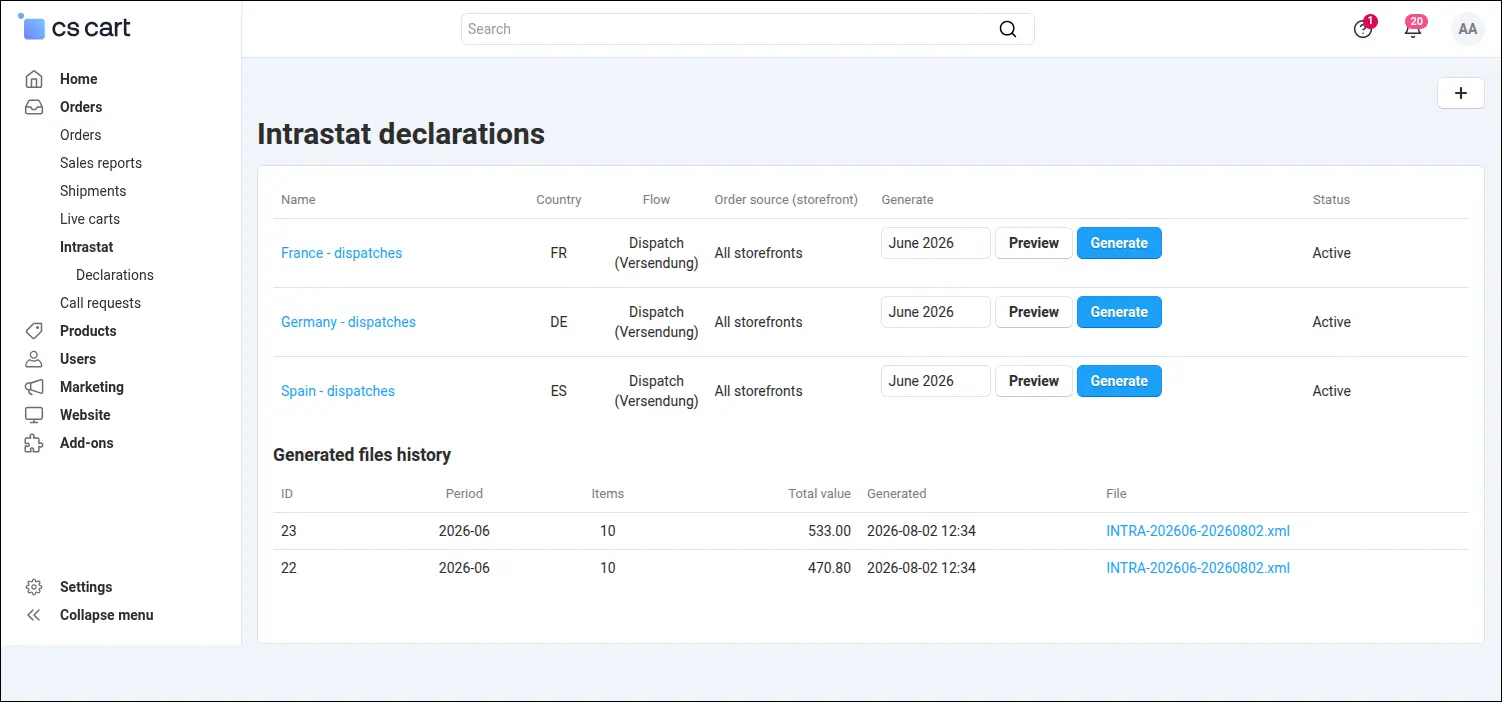
Screenshot 3: the declaration list with period selection and the history of generated files.
The declaration itself is written on a form that arranges itself according to the chosen country. The German variant asks for the reporting identifier, the sender details, the Bundesland, the mode of transport and the Art des Geschäfts, and under the fields sit hints referring to German practice, including the test mode that helps with a first filing. Whoever files the declaration recognises the fields known from the official portal instead of translating generic technical names
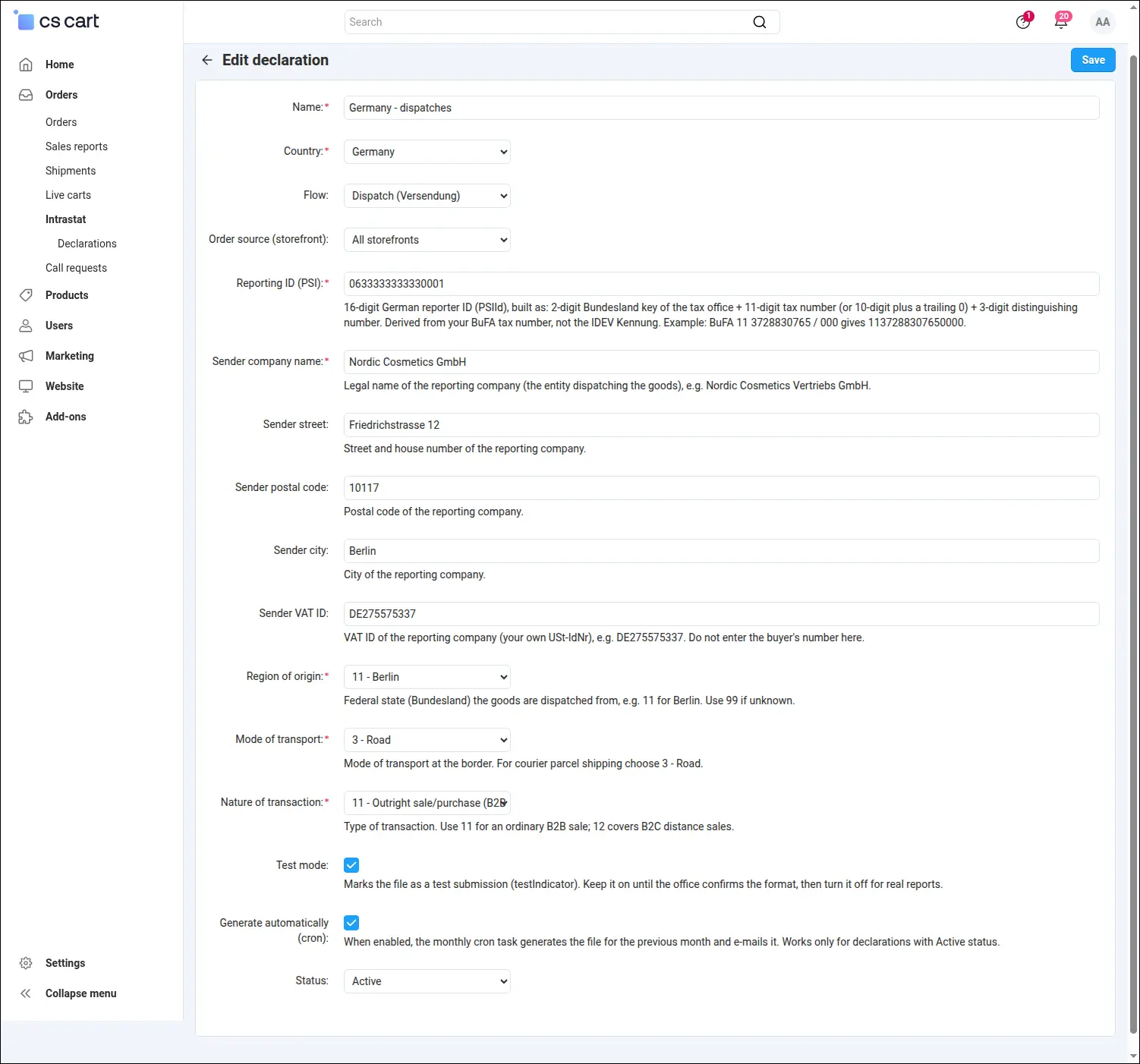
Screenshot 4: the German declaration form with declarant data and country dictionaries.
Romania goes one step further and asks for something no other office requires, namely the person responsible for the declaration. Their surname, first name and phone number have to appear in the file, next to the company CUI number and the name of the entity. The form asks for them directly instead of leaving a gap in the finished file that would fail the import in the official portal. A separate switch decides whether the declaration takes its extended form
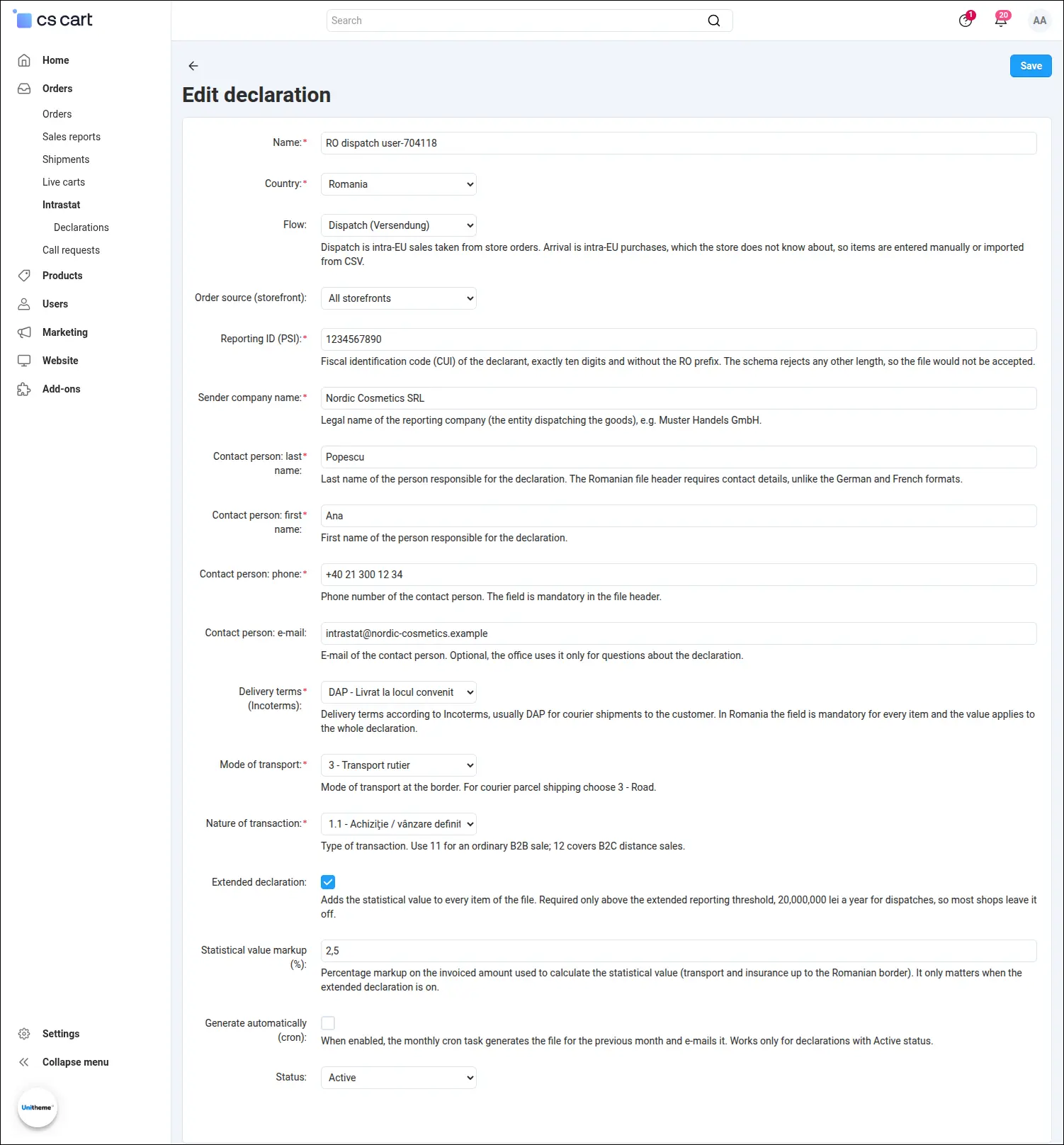
Screenshot 5: the Romanian declaration form with the contact person and the extended declaration switch.
Changing the country is enough to make the same screen look entirely different. Spain does not ask for declarant data at all; it expects the province of dispatch, the delivery terms under Incoterms, the mode of transport and the markup used to calculate the statistical value. The hints then speak of the Canary provinces and of the cost of transport up to the Spanish border. The country profile is a real layer of rules here rather than a change of labels, and it is what shapes the resulting file
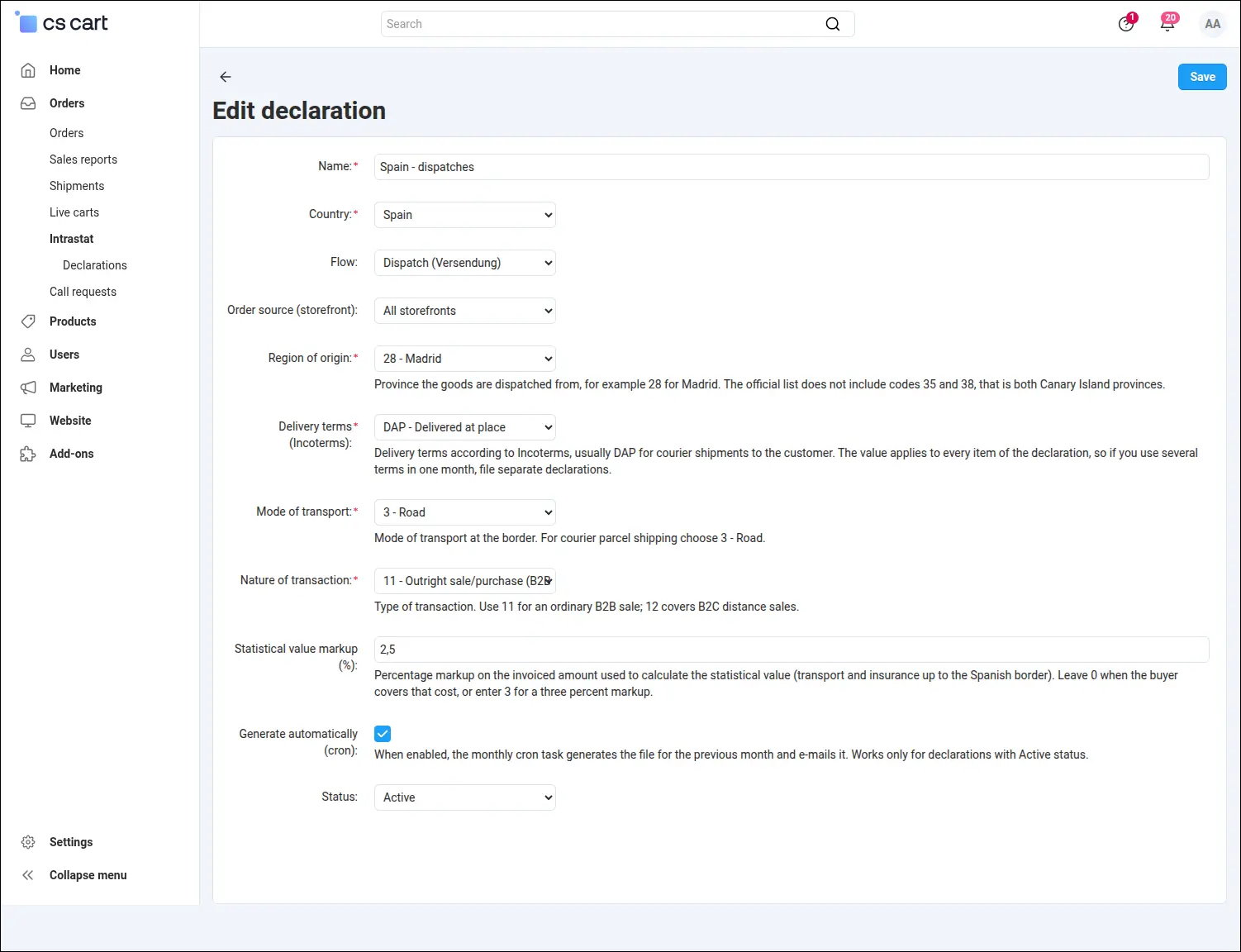
Screenshot 6: the Spanish declaration form with the province, Incoterms and the statistical value markup.
France asks for the number and name of the declarant and for the department of dispatch, while the hints lead straight to the DEBWEB2 service on the ProDouane portal and point out that Corsica is reported as department twenty. Each office has its own set of fields, its own dictionary and its own file format, and yet one extension handles them all, in one place in the panel
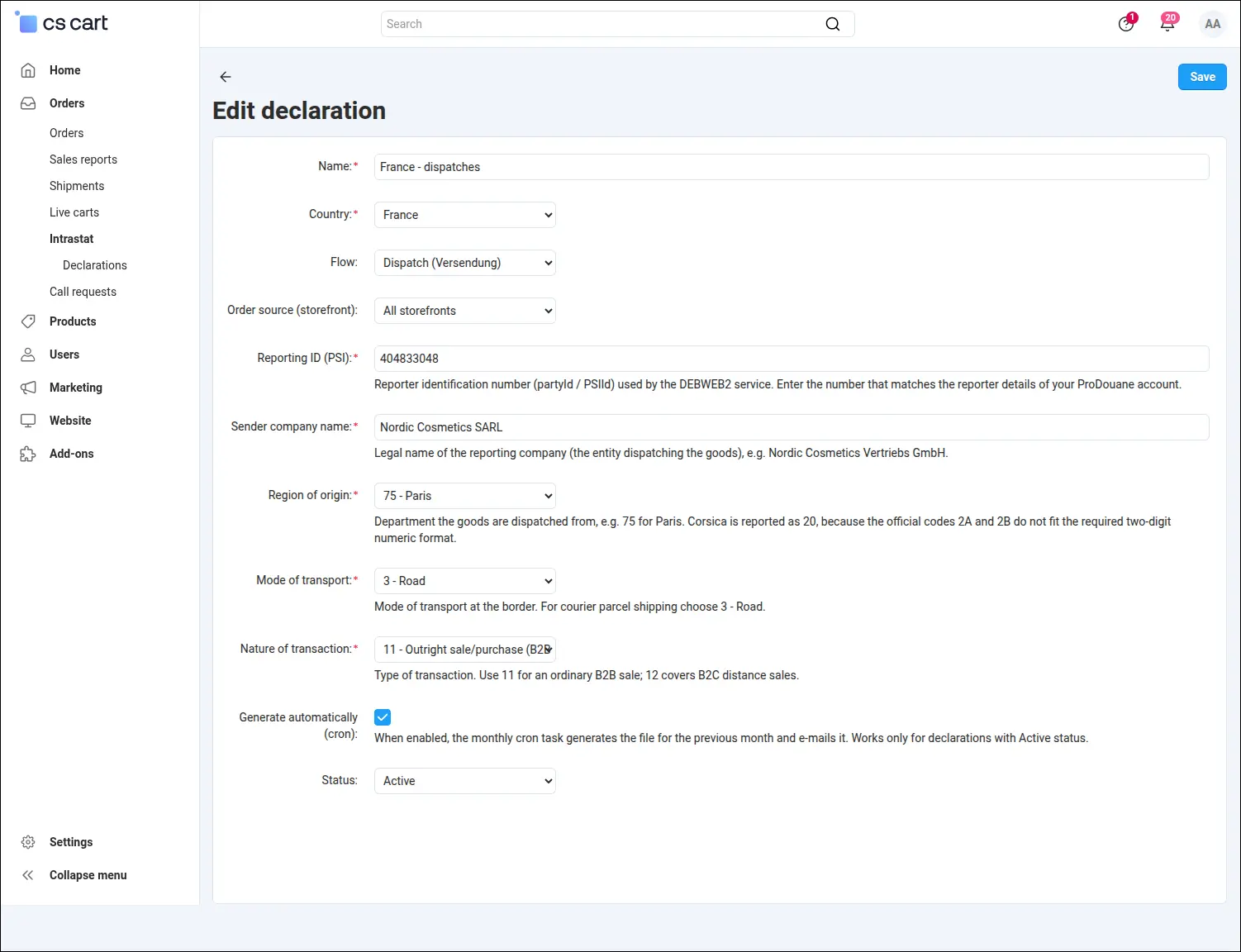
Screenshot 7: the French declaration form with the department of dispatch and declarant data.
Italy allows the return to be filed in a fiscal, statistical or full scope, and the choice genuinely changes the contents of the file, because the fiscal scope carries no statistical columns. In other tools that means clearing columns by hand; here it comes down to a single field on the form. Beside it stand three partita IVA numbers, the Intr@web user code, the province code and the starting reference number of the declaration
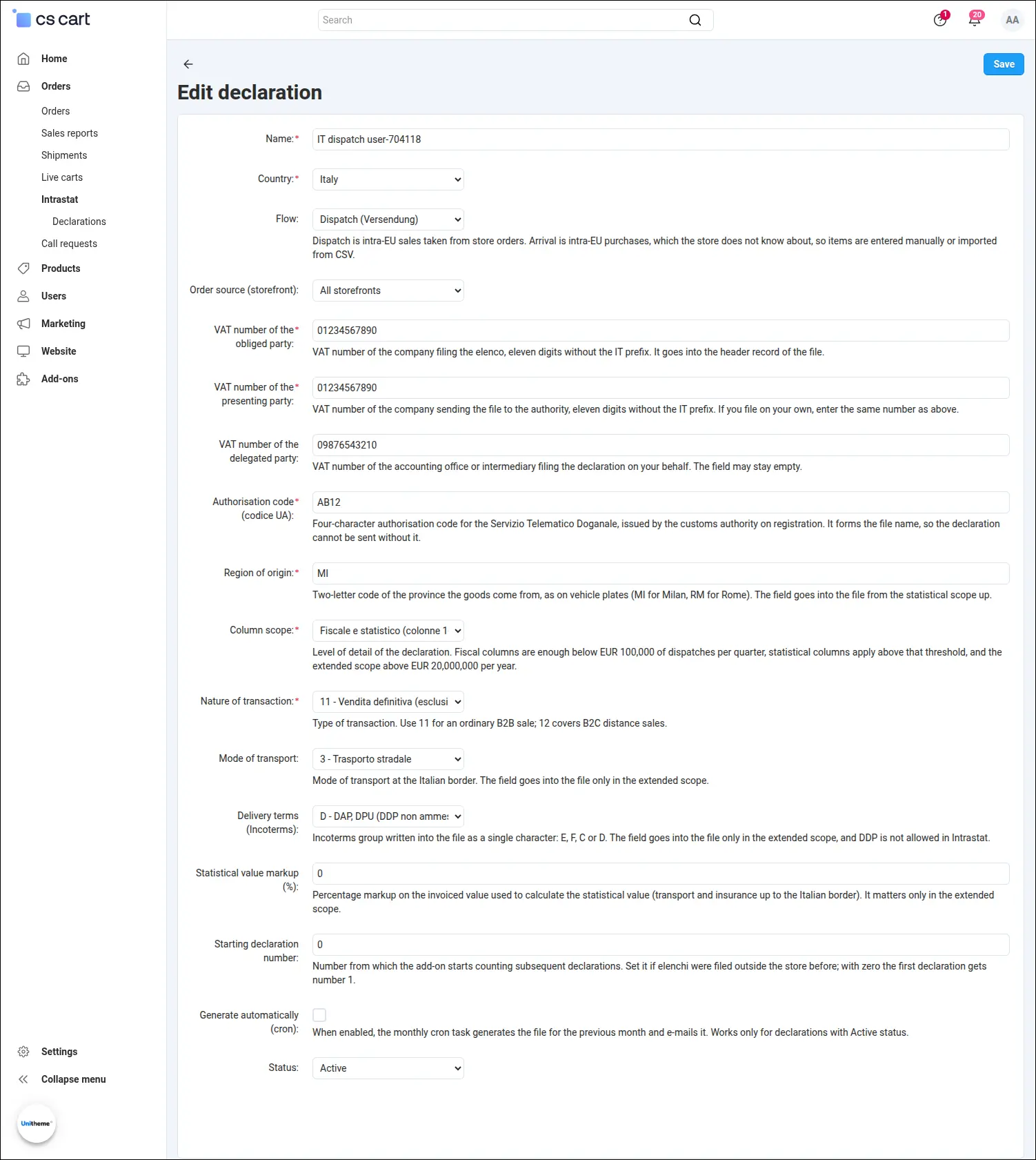
Screenshot 8: the Italian declaration form with the column scope and the partita IVA numbers.
Before the file is generated it is worth opening the preview, which shows the declaration exactly as it will reach the office. The lines are already grouped by commodity code, country of destination, country of origin and buyer, with the mass, the value and the nature of transaction. The header carries the line count and the total value, the two numbers the accounting department compares against its own statement. For consumer sales the buyer column shows the substitute code provided by the office, because a private person holds no VAT number
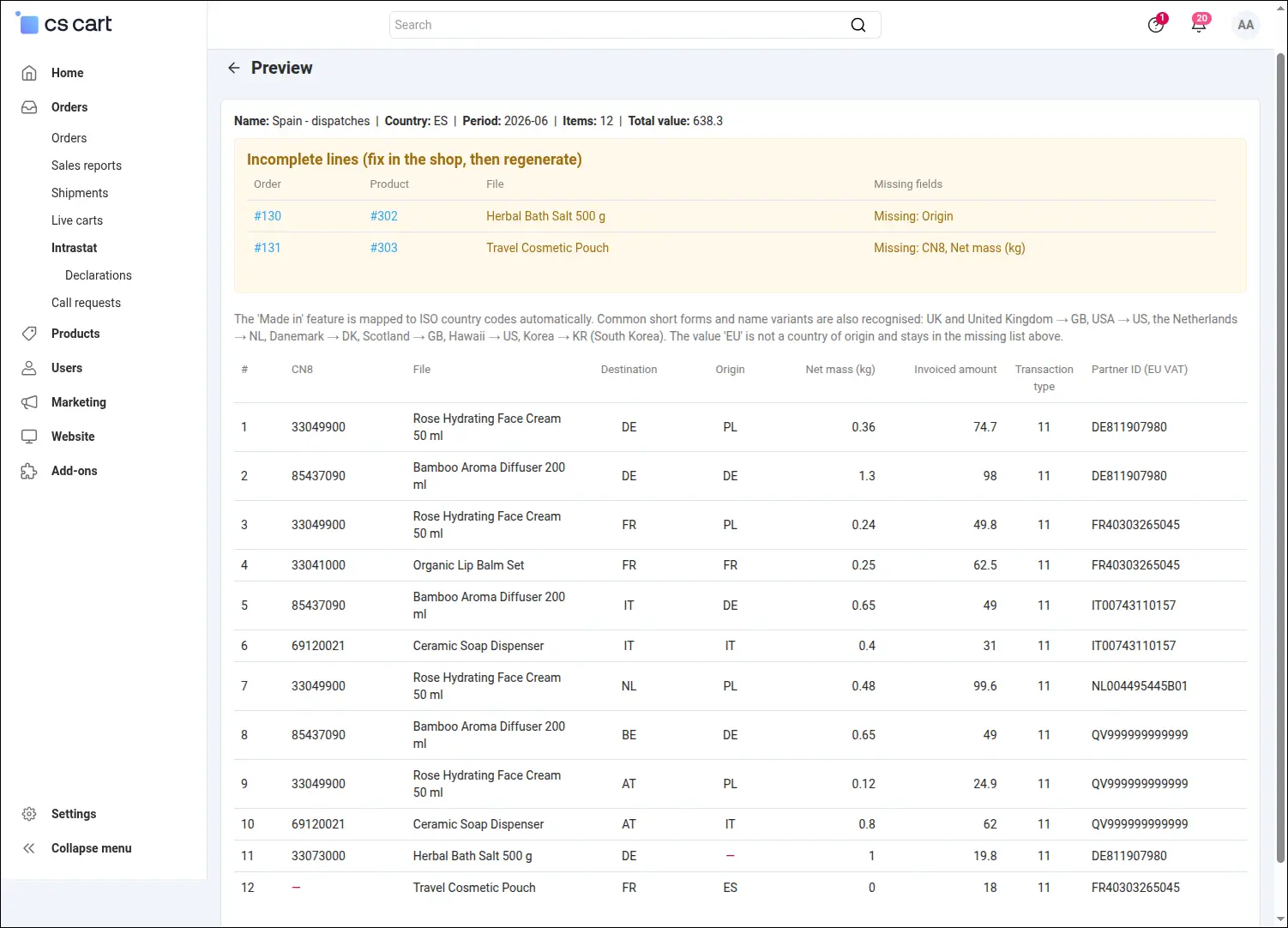
Screenshot 9: a preview of the aggregated lines before the file is generated.
Above the table of lines waits the most practical part of the preview, the missing-data report. The add-on lists every line with incomplete data together with a link to the order and the product and the name of the missing field, for instance the country of origin, the commodity code or the mass. The fix takes a moment and the file can be generated again the same day. Gaps surface before the declaration is filed, not after it has been rejected
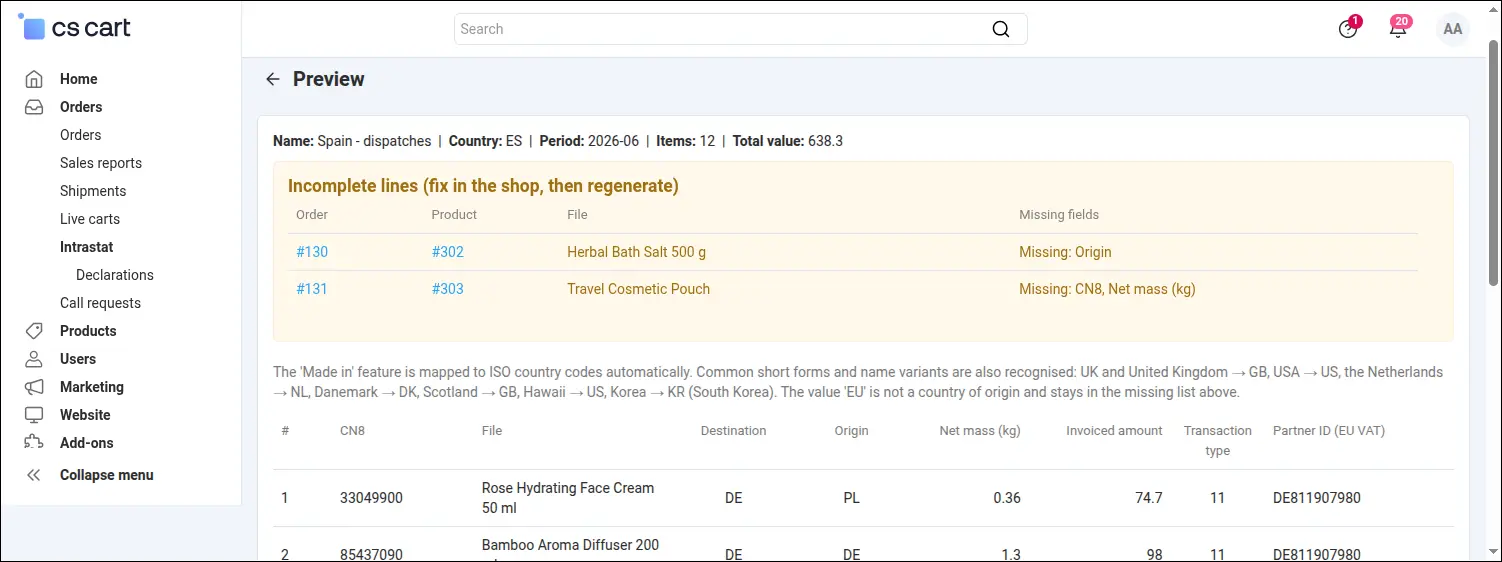
Screenshot 10: the missing-data report pointing to the products to complete before filing.
Shops with a wide catalogue sometimes meet an official limit. The Spanish office accepts at most nine hundred and ninety nine lines in a single file, so a large declaration has to be divided. The add-on does it on its own: it writes consecutively numbered files with suffixes, gives each its own line count and total value, and places them all in the history as separate download links. The monthly notification brings the whole set in one message
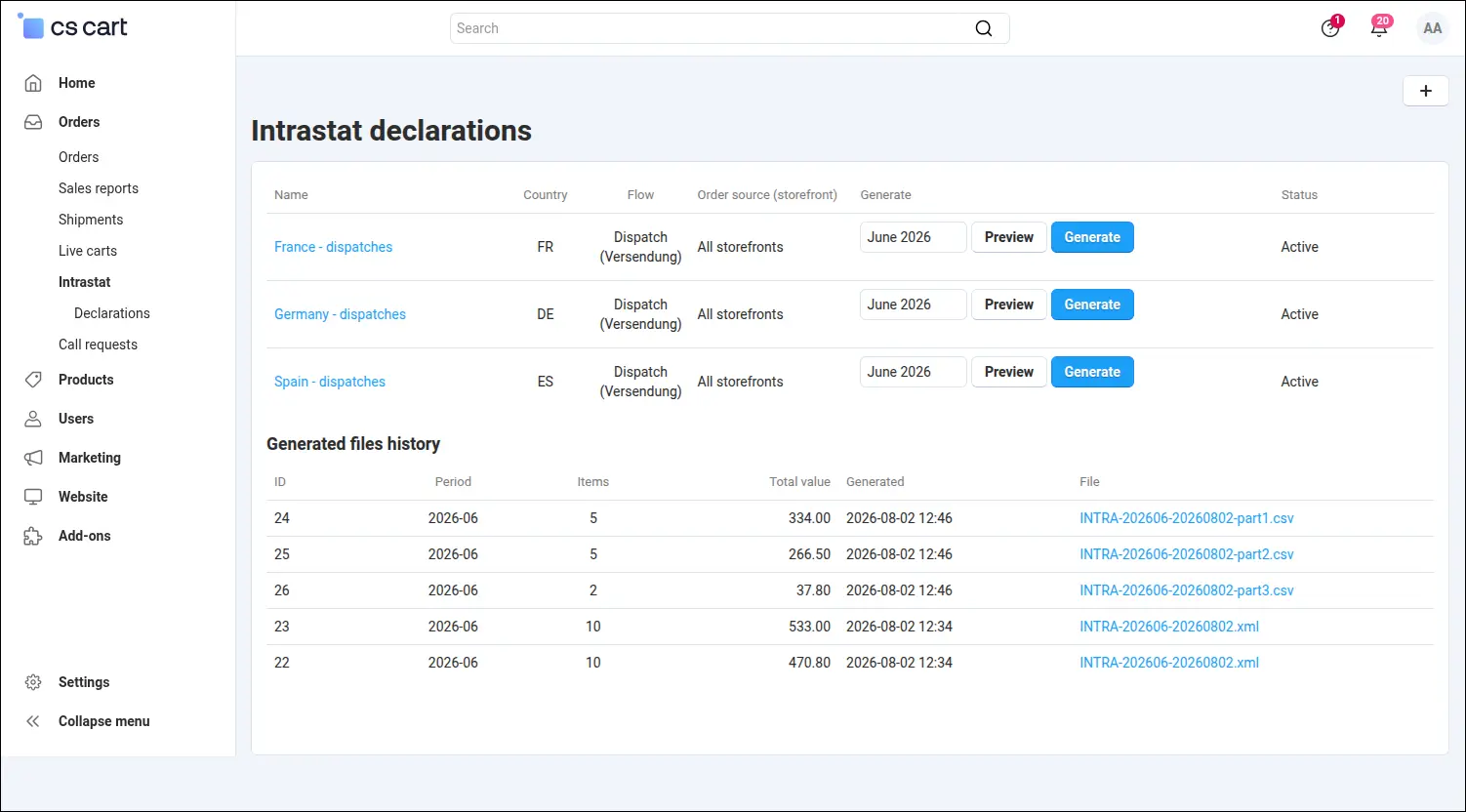
Screenshot 11: a declaration above the official limit split into consecutively numbered files.
The reporting duty does not end with sales. Companies buying goods from EU suppliers report arrivals as well, and the shop knows nothing about that data, because purchase invoices never pass through orders. The add-on therefore keeps a separate register for them, where lines can be added by hand or loaded from a single CSV file prepared by the accounting department. The import checks every row on its own and lists the rejected ones with their line numbers, so a typo in a commodity code does not spoil the whole batch
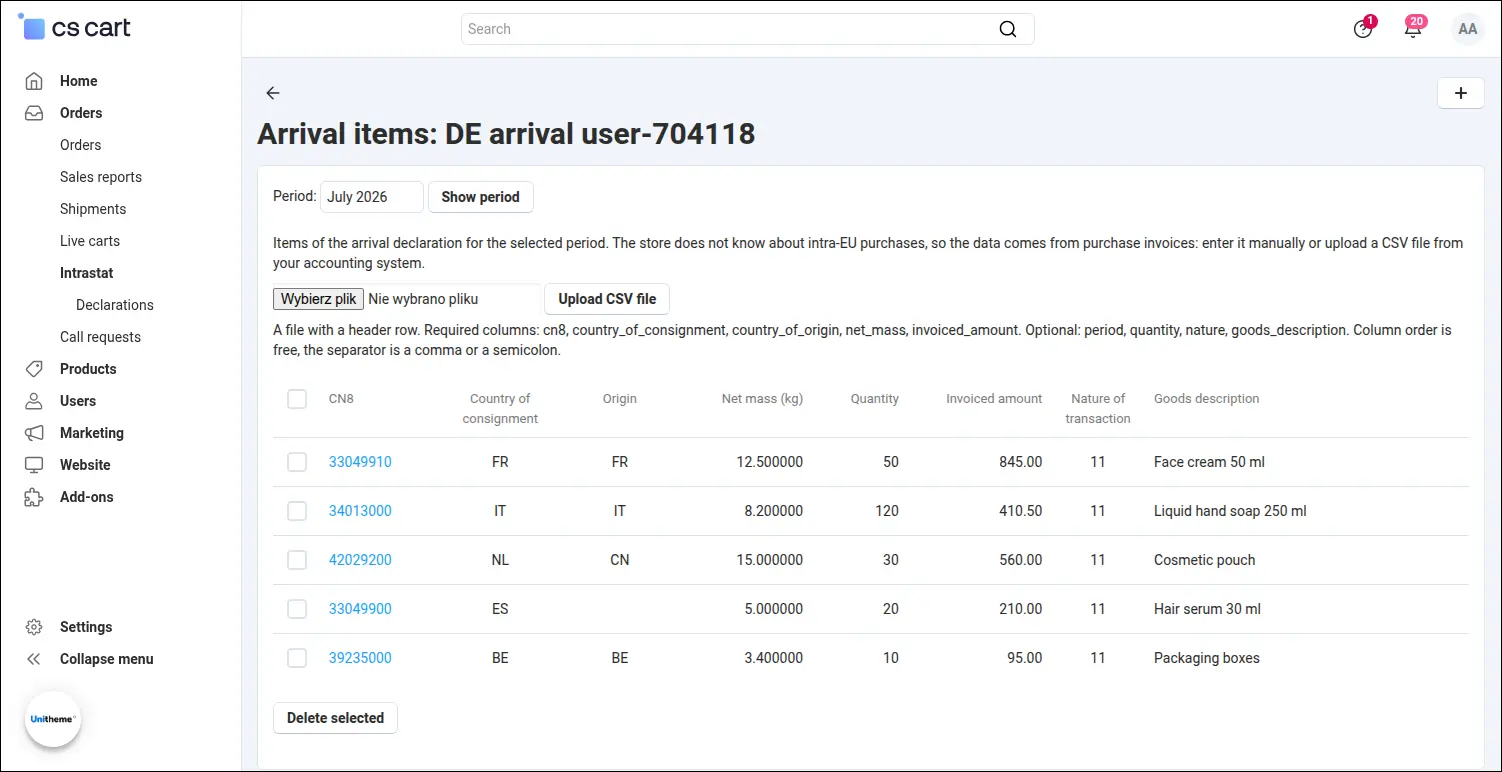
Screenshot 12: the register of arrival lines with the period filter and CSV upload.
A single supplier invoice is added without preparing a file at all. The line form asks for the period, the commodity code, the country of consignment, the country of origin, the mass, the quantity and the value, precisely what the invoice shows. The nature of transaction may be left empty, and the line then takes the value set on the declaration itself
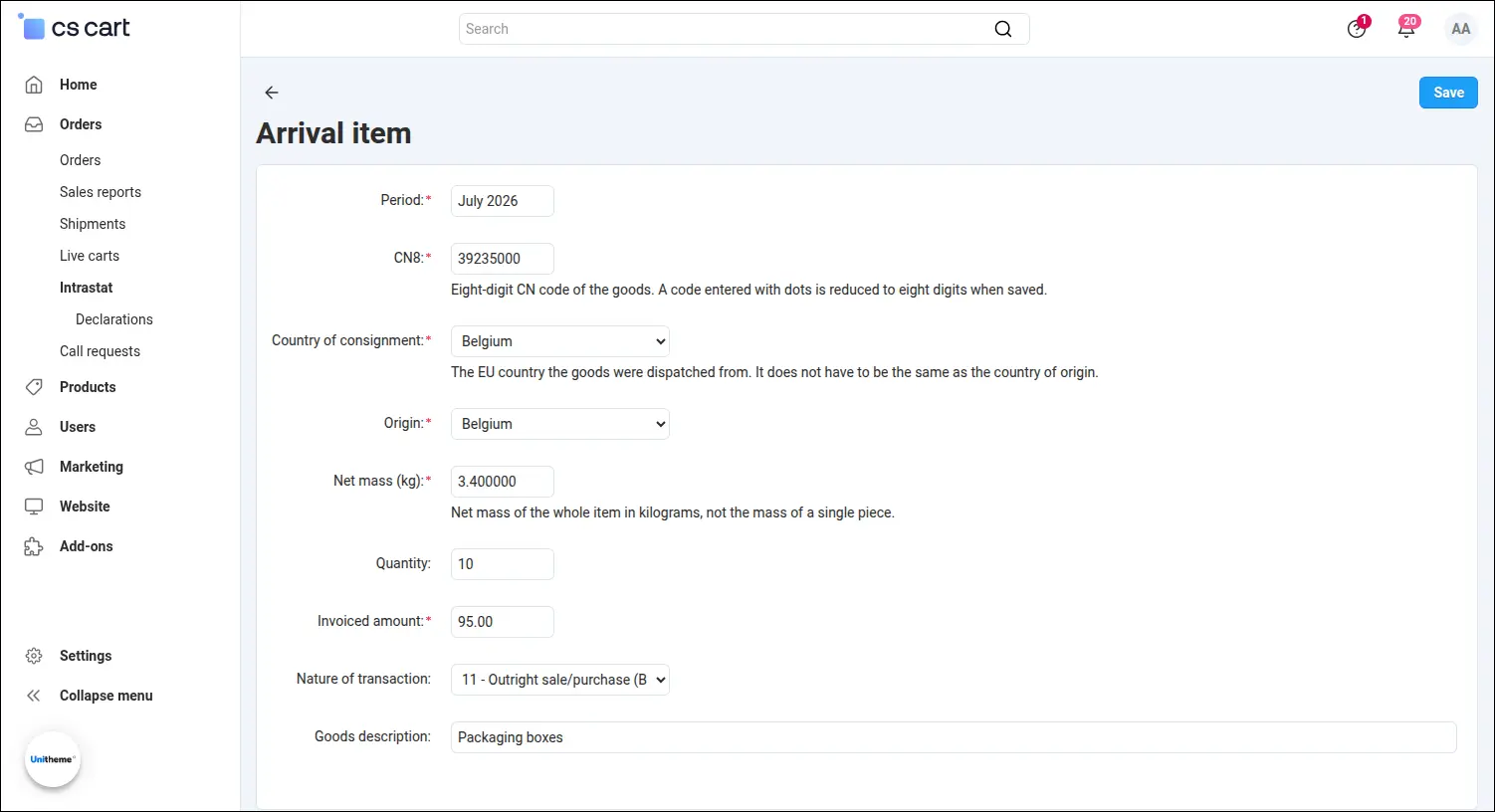
Screenshot 13: adding a single arrival line by hand.
From the moment the lines are in the register, the road ahead looks the same as for dispatches. The same preview, the same missing-data report, the same generate button. What changes is the meaning of the fields, because in an arrival the country column shows the country of consignment and the counterparty column disappears, since the offices forbid its number in an arrival return. The missing-data report then links to a register line instead of an order
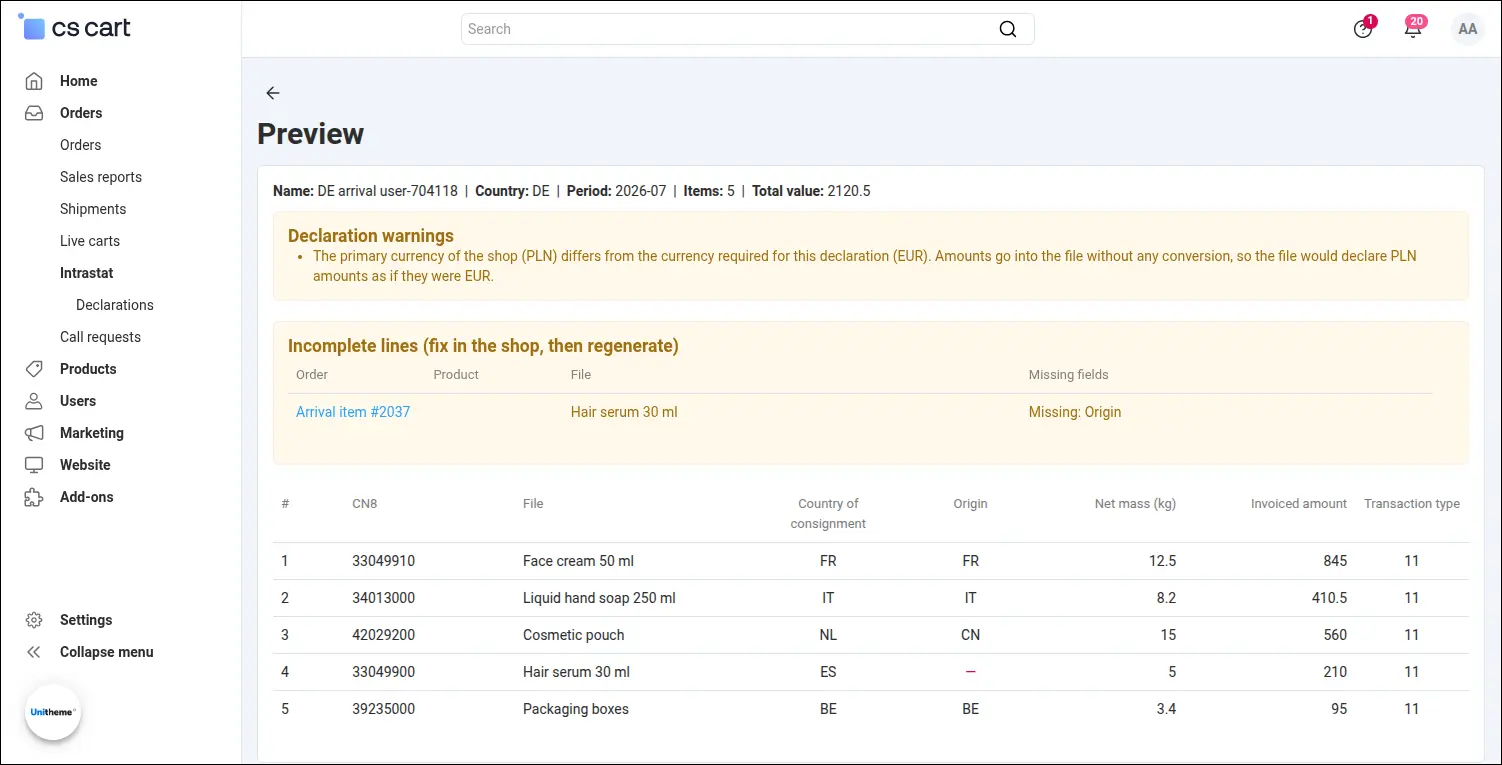
Screenshot 14: the arrival declaration preview with the country of consignment and the missing-data report.
One last detail can cost a rejected filing. The Italian office dictates a file name made of the user code, the day and month and the sequential number of the return on that day. The add-on assigns it and keeps track of the numbering, so a second filing on the same day receives the next number without anyone thinking about it. The history shows both files, each with its own line count and total value

Screenshot 15: the Italian file named after the official pattern, with its sequential reference number.
The Intrastat declarations add-on turns a monthly reporting duty into a routine of a few minutes. The data comes from orders the shop keeps anyway, arrivals have a register of their own fed by a single file, the configuration is written once, and every following month comes down to choosing the period and downloading the file, or simply reading the message that already carries the finished declaration. Five country profiles work side by side, and the architecture of the add-on was designed so that further EU countries can be added as new profiles.
Feel free to contact us and purchase the add-on!
Choose the most convenient form of payment for the add-on. You can pay once and use the add-on. Choosing a subscription payment (monthly or annual) means that you pay for the add-on at regular intervals and have access to the latest versions of the addon and technical support.
- Store Bulider
- Multi-Vendor
- 4.21.x
- 4.20.x
- 4.19.x
- 4.18.x
- 4.17.x
- 4.16.x
- 4.15.x
- No changes
No reviews found