


Change interaction between quantity discounts and promotions - pay monthly (subscription)

- View all variations as list
| CODE | Payment method | Price | ||
|---|---|---|---|---|

|
459
ss_qty_logic
2026-11-06
1.1.1.5
|
750.00 PLN
(Price without tax) |
||
|
|
630
ss_qty_logic_sub_1Y
2026-11-06
1.1.1.5
|
375.00 PLN
/year
(Price without tax) |
||
|
|
629
ss_qty_logic_sub_1M
2026-11-06
1.1.1.5
|
37.50 PLN
/month
(Price without tax) |

- — 12 months guarantee for all our add-ons
- — add-ons sold to entire world
- — stable, flexible, high-quality products
- — competitive prices, attractive discounts
- — quick and competent technical support
- — installation in 24 hours
- — personalized solutions - we'll write any add-on for you
An extension for Store Builder and Multi-Vendor that hands the store the decision on how a quantity tier price combines with a catalog promotion. Instead of a single fixed core rule, you choose the one that fits your pricing policy, and customers see on the product page exactly the prices they will pay in the cart.
CS-Cart always applies a promotion on top of the tier price, so the two discounts multiply. For a $100 product with a tier of 20 units at $70 and a 20 percent promotion, the customer pays $56 per unit, usually more discount than the store meant to give in a single sale. The Change interaction between quantity discounts and promotions add-on introduces one setting with three modes and calculates the price by the chosen one on the product page, in the cart, at checkout and when a placed order is edited.
Key Features
- Three discount combination modes selected with one field in the settings: summing the tier and promotion discounts, disabling tiers on promotion, and the lower of two prices.
- A disable tiers mode in which a promoted product sells at its single unit price minus the promotion, and the tier table on the product page disappears.
- A lower of two prices mode in which the customer pays the smaller amount, the tier price without the promotion or the promotional price, and the product page lists only the tiers that actually pay off.
- Discount summing for customer-specific promotions as the default mode, so an update does not change prices in a running store.
- Correct prices with percentage and fixed options, products with variations, and carts holding products from several vendors on Multi-Vendor.
- A log of cart line price decisions with a diagnostic mode that expires on its own after 72 hours, so each of those prices can be explained later from the record.
The whole rule lives in one place. In the add-on settings, in the General section, the Quantity discount mode field offers three options, and the description under the label shows on a single example how a 30 percent tier and a 20 percent promotion give a 50, 20 or 30 percent discount respectively. Summing, familiar from earlier versions, stays the default, so prices in the store do not change after an update until you choose another rule yourself:
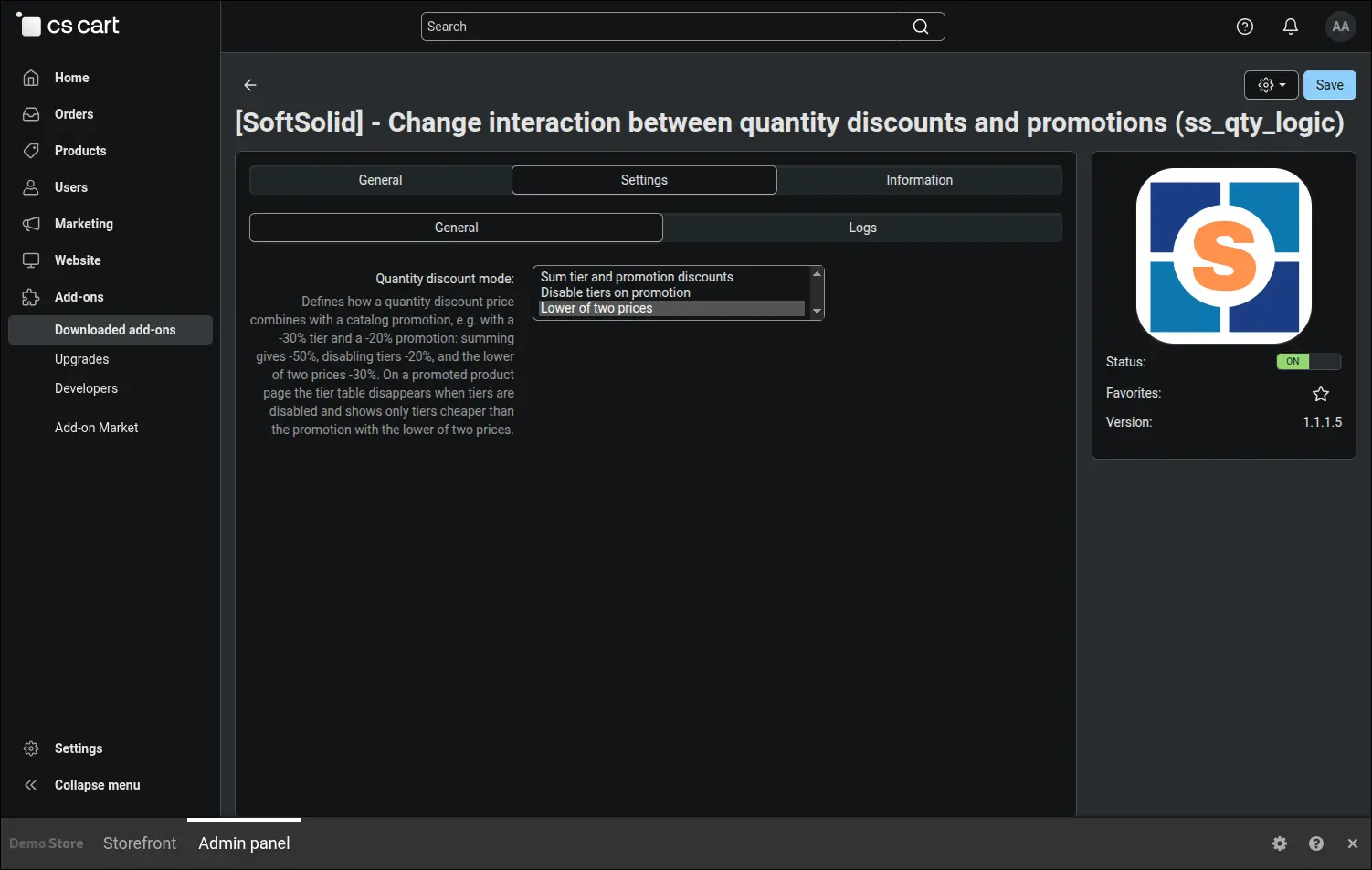
Screenshot 1: one setting decides how tier prices combine with catalog promotions
The difference between the modes is easiest to see on one example. A product costs $100, has tiers of 10 units at $90 and 20 units at $70, and the customer has a 20 percent catalog promotion. In the lower of two prices mode the customer pays $80 for 10 units, since the promotional price beats the tier, and $70 for 20 units, because this time the tier wins. The product page tells the customer so plainly: next to the $80 promotional price and the crossed-out $100, the table keeps only the 20 units at $70 tier, while the 10 unit tier is gone, because it would give the customer nothing:
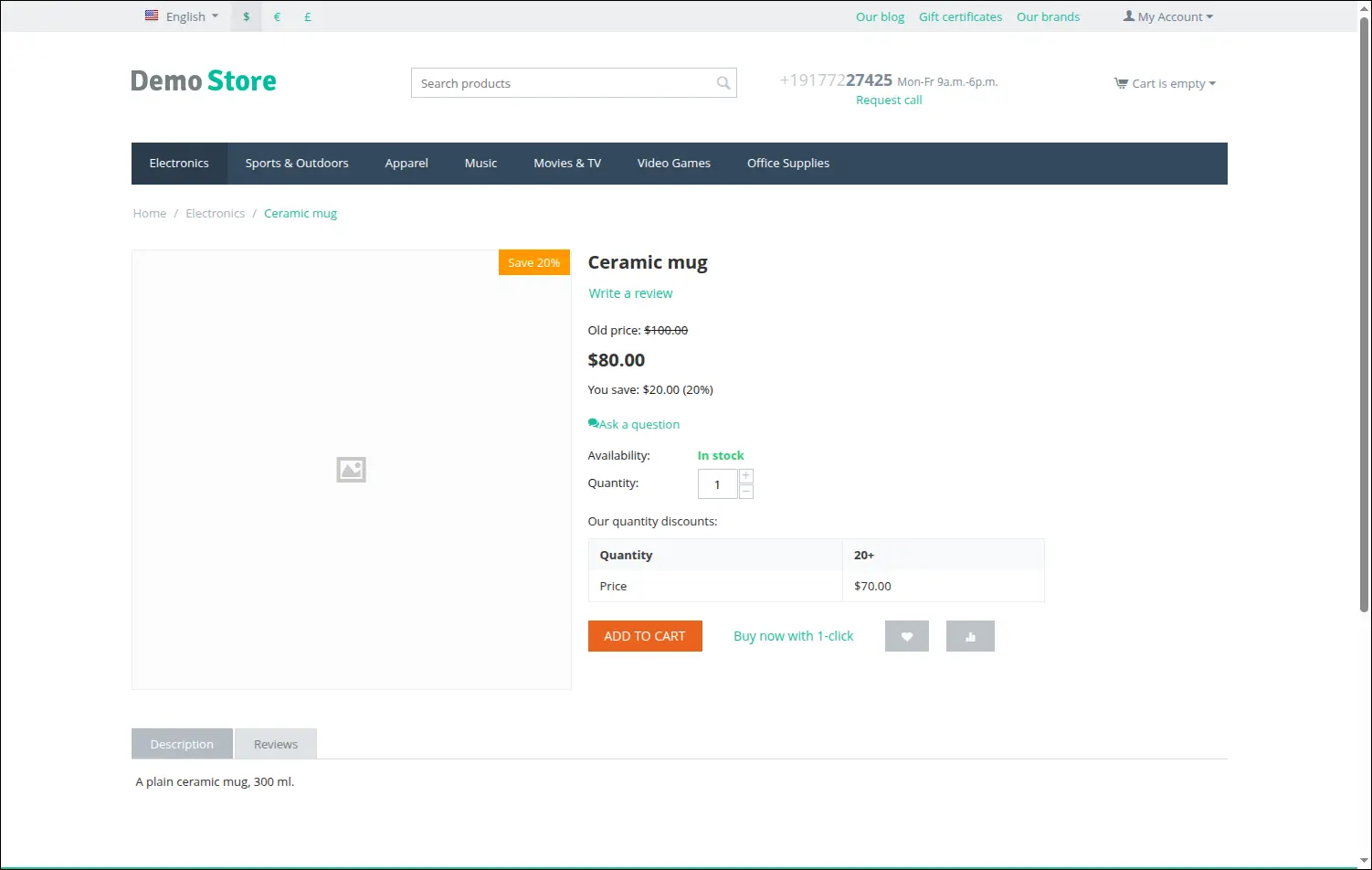
Screenshot 2: the product page lists only tiers cheaper than the promotional price
The disable tiers mode follows a simpler principle: the promotion and the quantity discount do not stack at all. A customer covered by the promotion pays $80 per unit regardless of quantity, and the tier table does not appear on the product page, so nobody counts on a discount they will not receive. A customer without the promotion still sees the full table and buys by the tiers, just like with products outside the promotion:
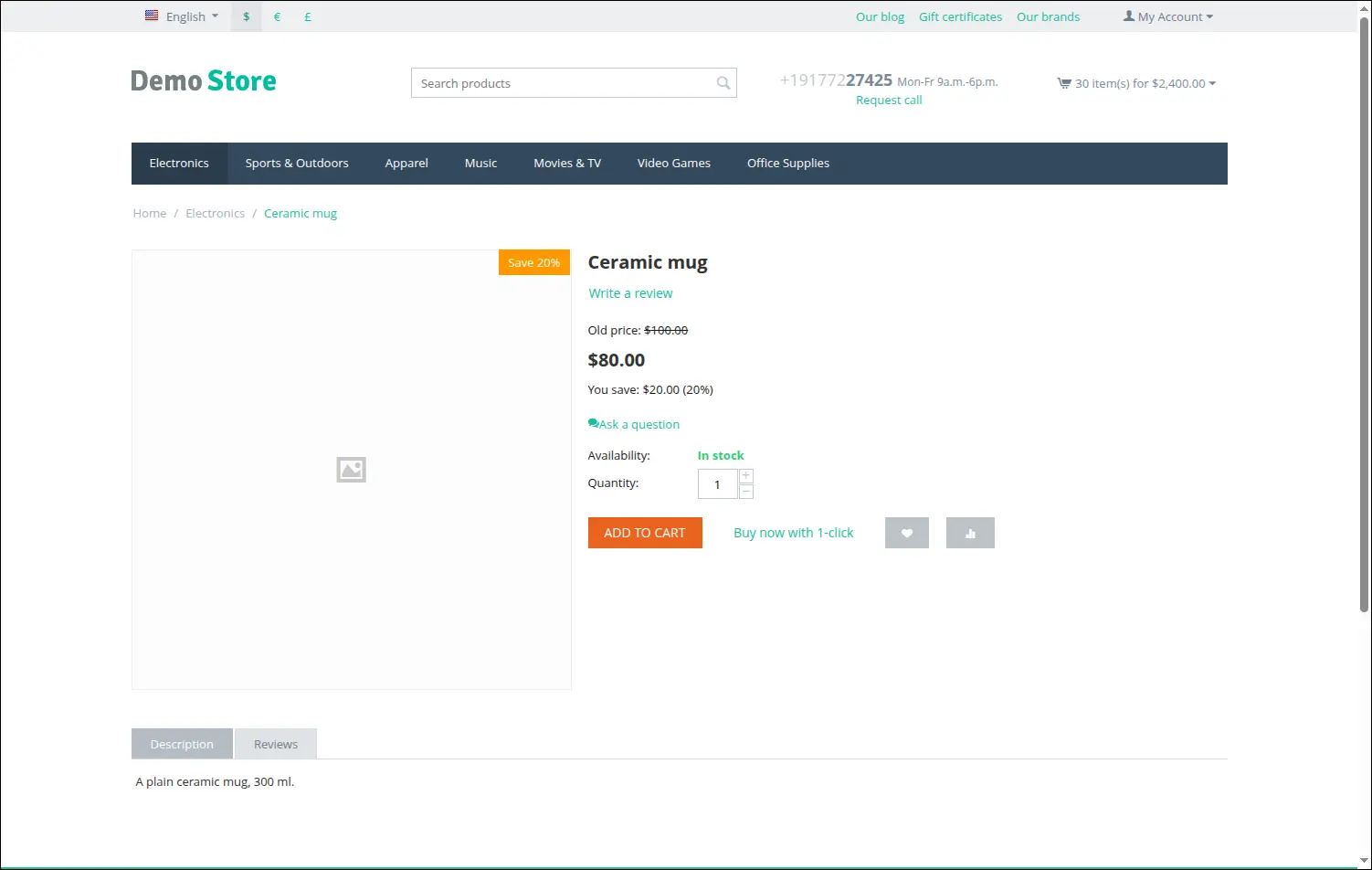
Screenshot 3: with an active promotion the tier table is hidden and the promotional price applies
The same rule applies in the cart, separately for every line. Two products with identical tiers and the same promotion can therefore end up with different prices: at 10 units the line takes the $80 promotional price with a discount link, and at 20 units the $70 tier price without the promotional discount. Never both reductions at once. Order discounts and coupons are calculated just as in CS-Cart, because the add-on deals only with the meeting point of a tier and a catalog promotion:
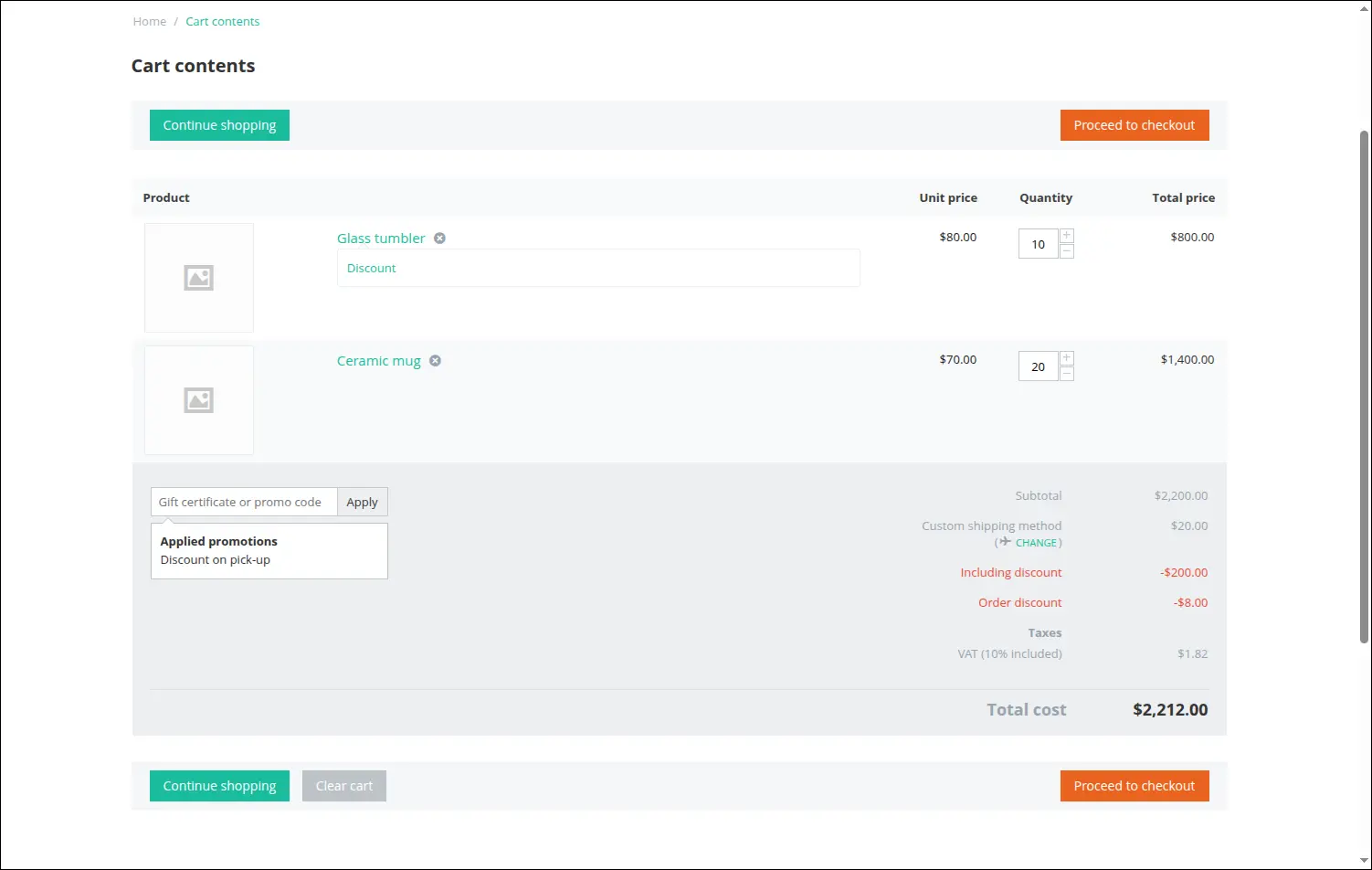
Screenshot 4: each cart line gets the lower of the tier price and the promotional price
When a customer asks where the price in their cart came from, the answer is in the log. After you tick Enable generating logs, the add-on runs in diagnostic mode for 72 hours, and a notice above the list reminds you of the expiry date. Each entry states the mode, the product and the promotion behind the decision, as well as the decision itself. Once that time has passed, the logger goes back to recording only warnings and errors, and old entries are removed by the daily cleanup:
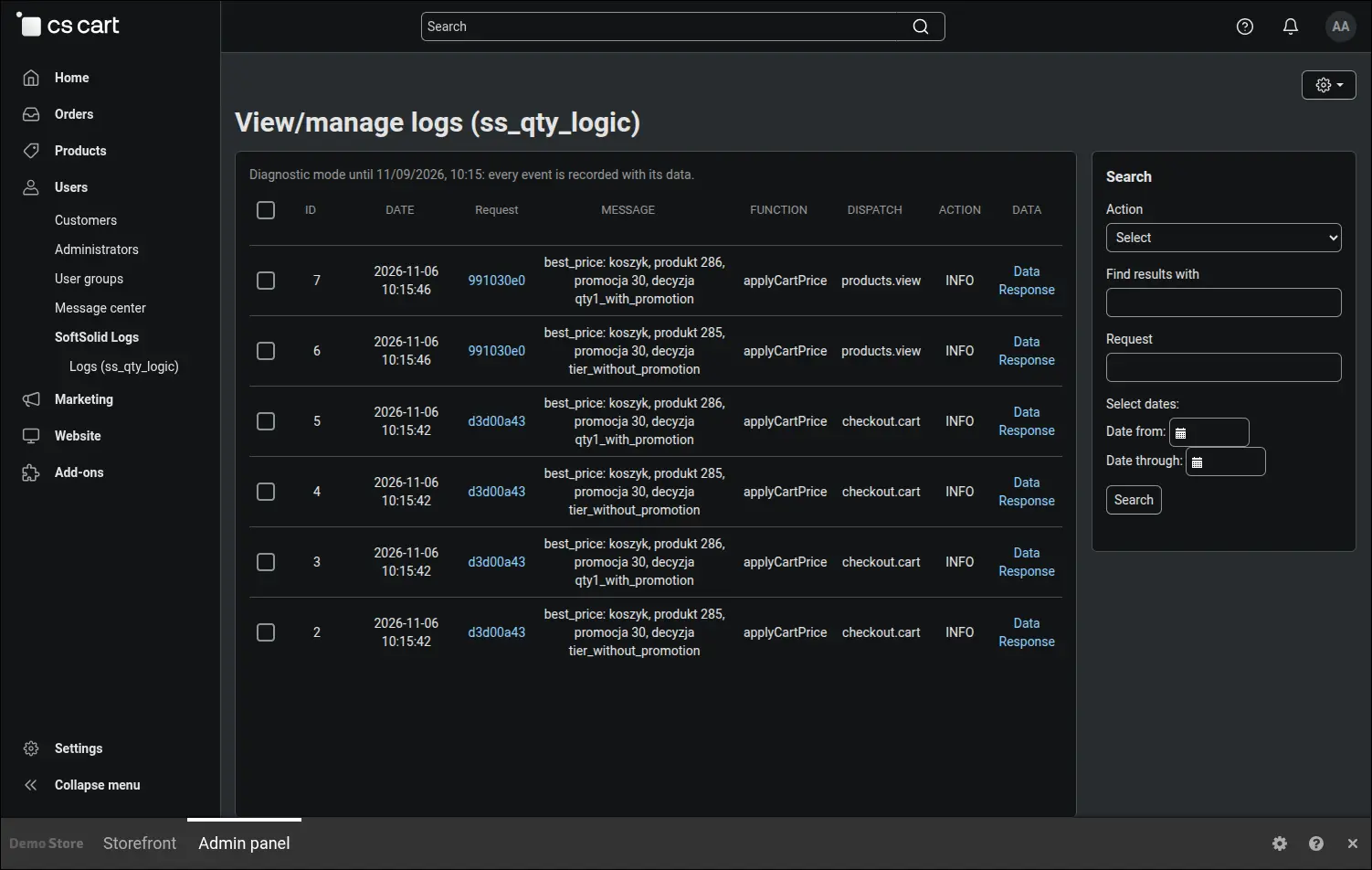
Screenshot 5: the log records every cart line price decision with the mode, product and promotion
The entry details hold the figures the decision was based on: the quantity in the cart, the tier price, the single unit price and the final prices of both compared variants. The example shows that at 20 units the tier price of 70 beat the promotional price of 80, which is why the line did not receive the promotional discount. Settling a price dispute takes a single click:
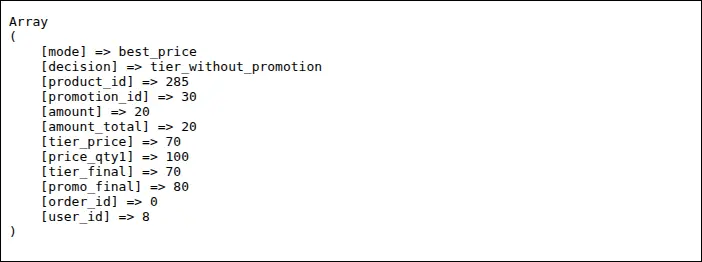
Screenshot 6: the entry details show both compared prices and the resulting decision
The summing mode, kept from earlier versions, serves stores with individual terms for regular buyers. It applies to promotions assigned to a specific customer and adds the promotion percentage to the tier percentage. For a $150 product with a tier of 5 units at $120 and a 10 percent promotion, CS-Cart charges $108, while the add-on charges $105, the promotional price reduced by the full amount of the quantity discount.
The price of each line is set before CS-Cart adds product options and the promotional discount, so an option with a 10 percent surcharge is calculated from the right amount, and products with variations keep the tier counting configured in the store. When staff correct a placed order in the admin panel and the store does not recalculate promotions on editing, the add-on follows the decision stored in the order, so the price of a sold line does not change unexpectedly.
On Multi-Vendor the rule is set by the marketplace administrator and applies to all vendors, including carts with products from several of them and child orders. The add-on was confirmed by tests on CS-Cart 4.17.2 and 4.21.2 and on Multi-Vendor 4.21.2, with PHP 7.4 and 8.1.
The Change interaction between quantity discounts and promotions add-on brings order to the point where two discounts meet on one product. The store decides whether the discounts add up, exclude each other or give the customer the better of two prices, and the margin no longer depends on an accidental overlap of a promotion and a tier.
Feel free to contact us and purchase the add-on!
- Monthly subscription
Choose the most convenient form of payment for the add-on. You can pay once and use the add-on. Choosing a subscription payment (monthly or annual) means that you pay for the add-on at regular intervals and have access to the latest versions of the addon and technical support.
- Store Bulider
- Multi-Vendor
- 4.21.x
- 4.20.x
- 4.18.x
- 4.17.x
- 4.16.x
- 4.15.x
- 4.14.x
- 4.13.x
- 4.12.x
- 4.11.x
- 4.10.x
- 4.9.x
- 4.8.x
- 4.7.x
- 4.6.x
- 4.5.x
- 4.4.x
- 4.3.x
- 4.2.x
- 4.1.x
- 4.0.x
- No changes
No reviews found