


MCP server data source - pay annually (subscription)

- — 12 months guarantee for all our add-ons
- — add-ons sold to entire world
- — stable, flexible, high-quality products
- — competitive prices, attractive discounts
- — quick and competent technical support
- — installation in 24 hours
- — personalized solutions - we'll write any add-on for you
Extension for Store Builder and Multi-Vendor that lets a shopper go all the way from a product question to an order in a conversation with an AI chat on the storefront. The chat receives ready tools that run on the customer's session: it searches the catalog at the prices of their customer group, builds the cart with them, reports on their orders and prepares a new order with delivery and payment. The decision always stays with the customer, because the order is created only after their click on a confirmation page in the store, and with PayU or Przelewy24 the customer goes from there straight to the payment gateway. The second part of the add-on works for the owner and the vendors. A built-in MCP server answers an AI assistant's questions about revenue, the best-selling products and the carts worth recovering, calculates the result inside the store and works strictly in read-only mode.
Key Features
- Tools for a shopper chat with the catalog at the prices of the shopper's customer group, access to their own orders and, once enabled in the settings, cart handling, always within call limits.
- Chat orders confirmed by the customer with a button on the store page, paid by bank transfer, on delivery or through the PayU or Przelewy24 gateway, BLIK included.
- An entry point for a chat widget in the browser, through which a ready widget, also one from another vendor, connects to the store tools with no PHP code to write.
- An MCP server built into the store and switched on with a single option, with thirteen tools that read the catalog, orders, customers, carts and statistics, and no way to change any data.
- Revenue with a per-status breakdown and a comparison with the previous period, matching the panel to the cent, a product ranking, a customer purchase summary and abandoned carts, also available as new REST API entities.
- Data isolation in Multi-Vendor and a separate permission for statistics only: a vendor sees only the results of their own company, and a reporting account never reaches orders or customer data.
A shopper chat in the store
Chat code running in the store, on the shopper's session, receives tools that return exactly what the storefront shows: products at the price of the shopper's customer group, without hidden items, and for a signed-in customer only their own orders and their own cart. These tools do not go through the owner's MCP server. They follow their own fenced-off path with their own call limits, counted separately for guests and for signed-in customers, so a conversation stuck in a loop cannot strain the store. The add-on does not include a chat window itself. What it provides is a safe foundation for a chat module or a ready-made widget to build on.
Once enabled in the settings, the chat can assemble a cart with the customer: it places a product in it, changes a quantity, removes an item and hands over a checkout link. A separate switch opens order placement in the conversation. The chat then prepares a summary with the items, the delivery of every vendor, the payment and the total, lists any obstacles such as an item out of stock or a delivery not yet chosen, and once everything is in order it gives the customer a link to a confirmation page in the store. The order is created only after the customer clicks the button there, because the language model cannot place it on its own. The available methods are those without a gateway that ask the customer to fill in nothing, such as a bank transfer or cash on delivery, and the PayU and Przelewy24 gateways, BLIK included. With a gateway, the click takes the customer straight to the payment. If they abandon it halfway, the order waits in their account, and the chat gives them a link to the order page instead of hastily placing another one. On a Multi-Vendor marketplace running the Direct Payments add-on, placing orders in the chat remains unavailable. The owner also sets a limit of orders per hour, and staff see straight away in the order note that it came from the chat.
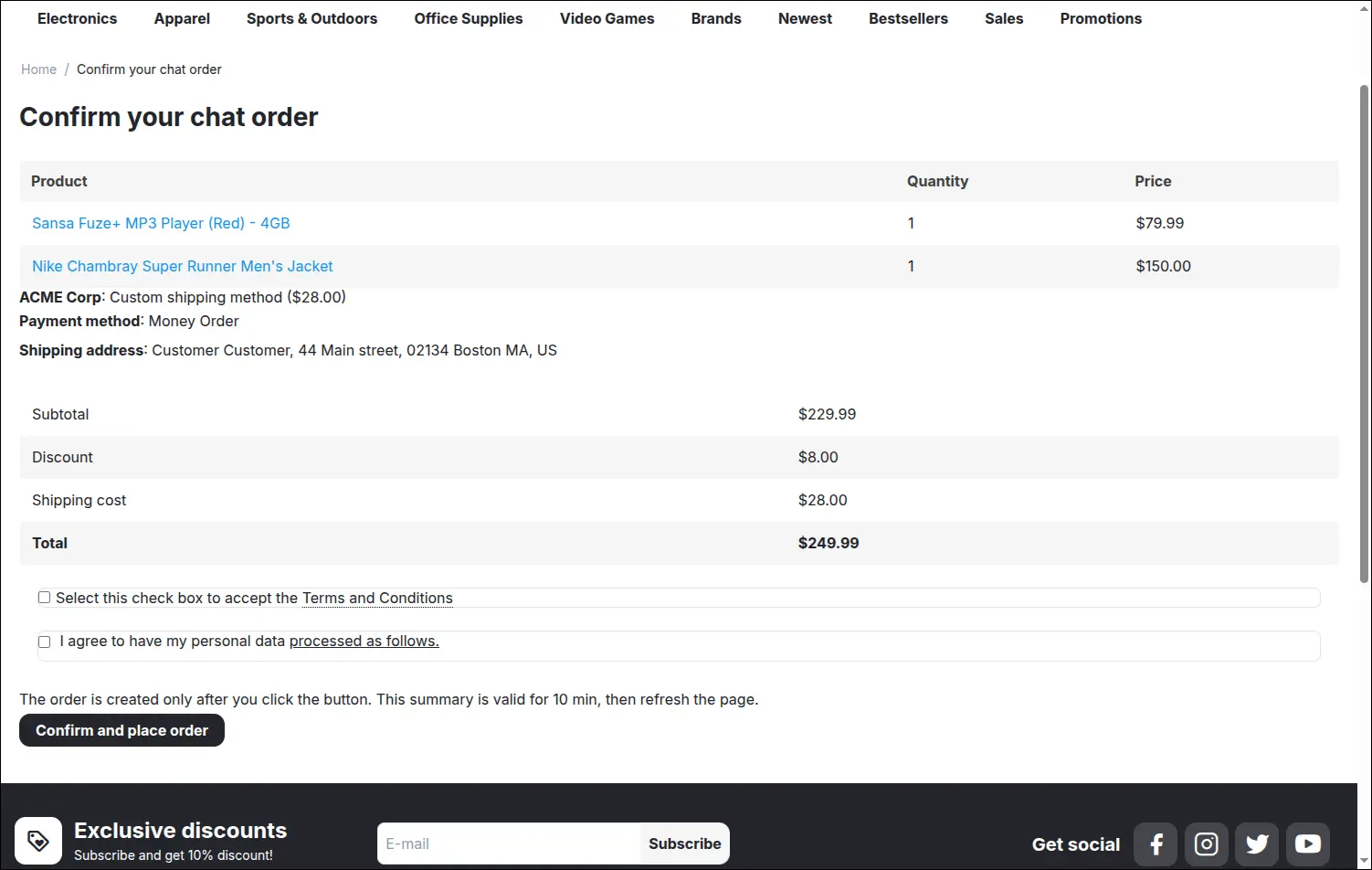
This is the confirmation page the chat sends the customer to. The customer sees the same items, prices, shipping, payment and total that the chat presented in the conversation, ticks the consents the store requires and only then clicks the button. The summary stays valid for ten minutes, and if the cart, shipping, payment or total changes in the meantime, no order is created and the chat prepares a new summary:
Screenshot 1
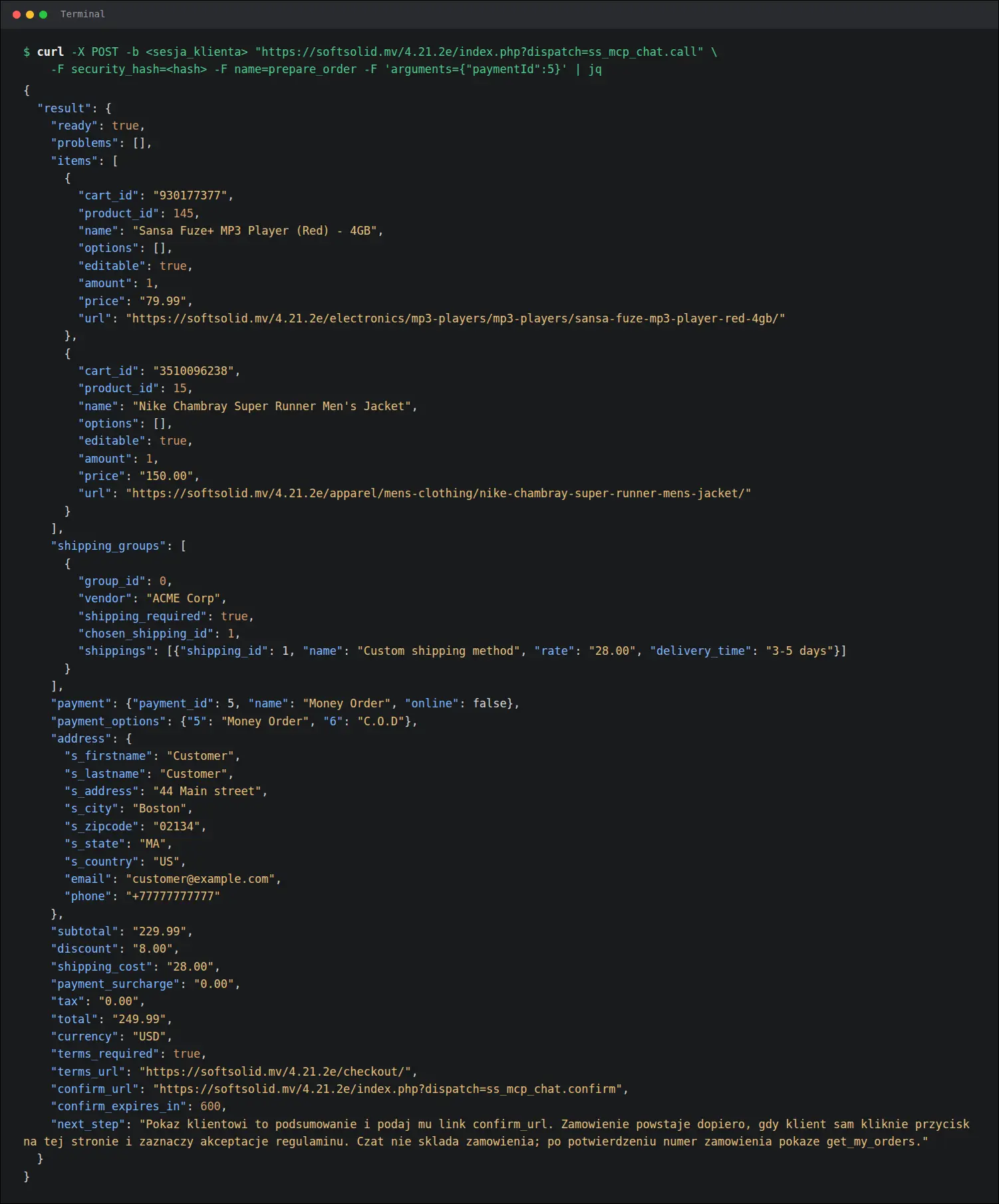
Behind this page works the prepare_order tool. It gives the chat a ready summary calculated in the store with the same core functions as the checkout: items, shipping for each vendor with the selected method, payment, discounts, the total and the address of the confirmation page. The ready field states plainly whether the order can be placed, and the problem list names any obstacles, so the chat developer has nothing to calculate or guess:
Screenshot 2
For a chat widget running in the browser on the store domain, the add-on provides a dedicated entry point. The widget, also one from another vendor, fetches the tool list and calls the tools with a plain HTTP request on the shopper's session, with no PHP code to write, and a page on a foreign domain cannot read the responses. This entry point also starts disabled. Every write, meaning a cart change or a placed order, waits for a deliberate decision of the owner.
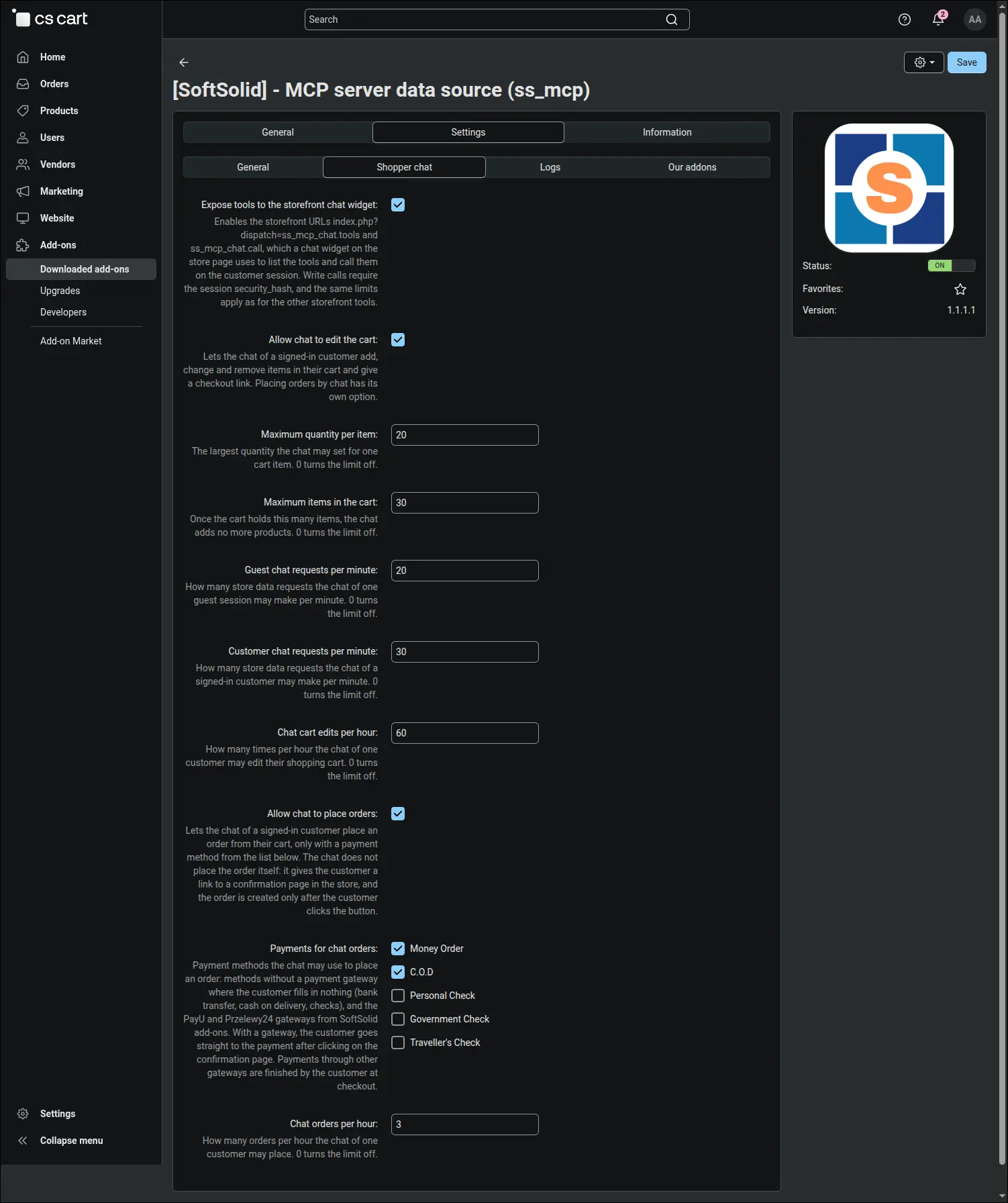
Everything the chat may do on the customer's behalf is set by the owner on the Shopper chat tab. The chat widget, cart changes and order placement each have their own switch, and next to them sit the limits: units of one item, items in the cart, requests per minute separately for guests and customers, and cart edits and orders per hour. The payment list shows only methods the chat can place an order with, and the owner ticks which of them go into the conversation:
Screenshot 3
An MCP server for the store owner
The second part of the add-on works in the panel. The owner's AI assistant, such as Claude Code or an n8n workflow, connects to the MCP server in the store with the API key of a panel user and sees exactly what its permissions allow, with no intermediary server. Stores on CS-Cart 4.22.1 in the higher license plans already have their own panel MCP server, so there this part of the add-on plays a complementary role, while on versions 4.12 to 4.21 it remains the only such path. The core offers no tools for shoppers in any version. The following screenshots show the MCP server at work.
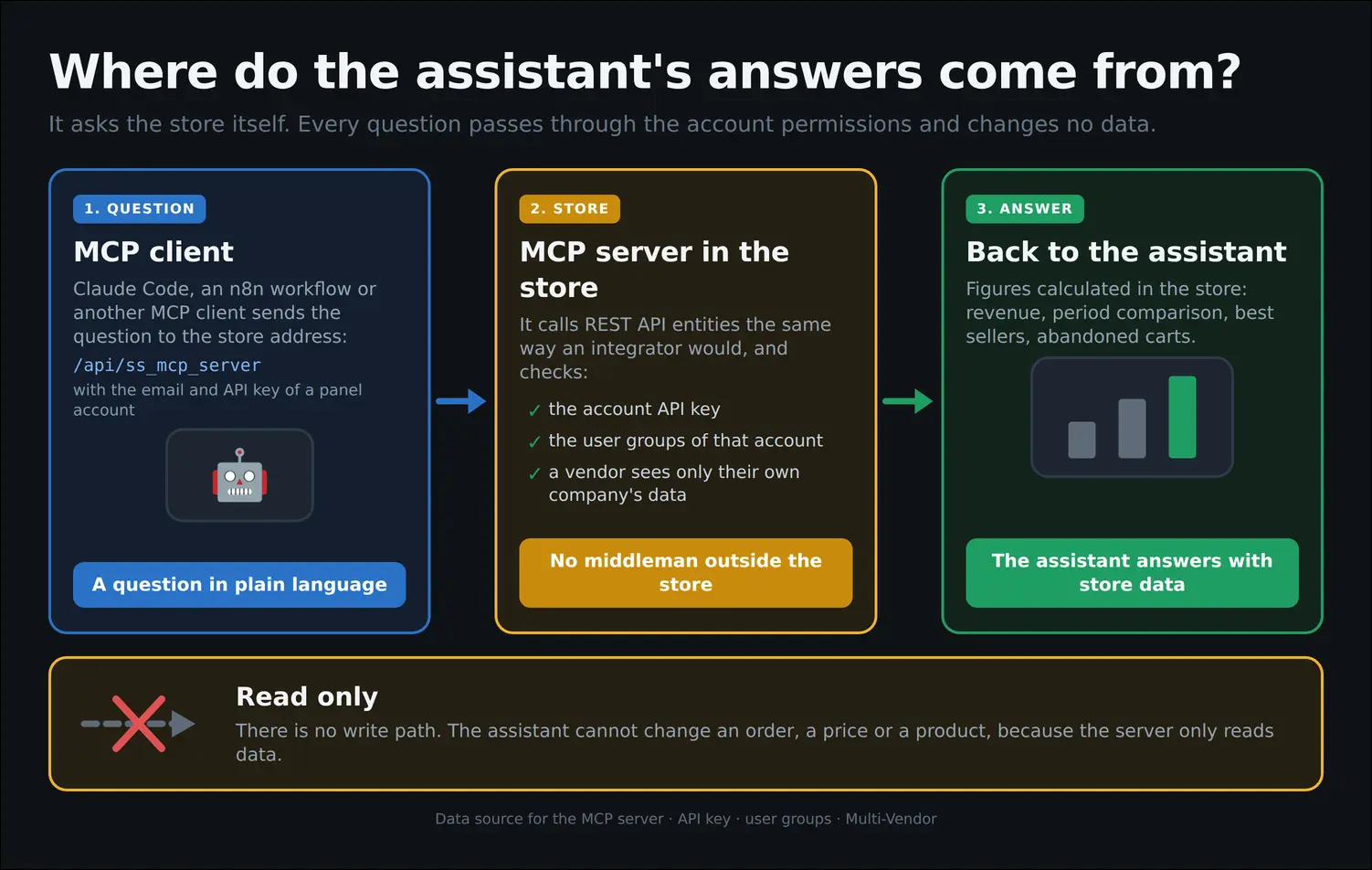
The AI assistant queries the store directly, and every answer passes through the account permissions without changing any data. The board shows the path of a question: the MCP client sends it to the server address in the store, the server checks the API key and the user group permissions, and the finished answer returns to the assistant. The MCP server deliberately has no write tools, so no model can alter a price, a status or the contents of an order, even if it misreads an instruction:
Screenshot 4
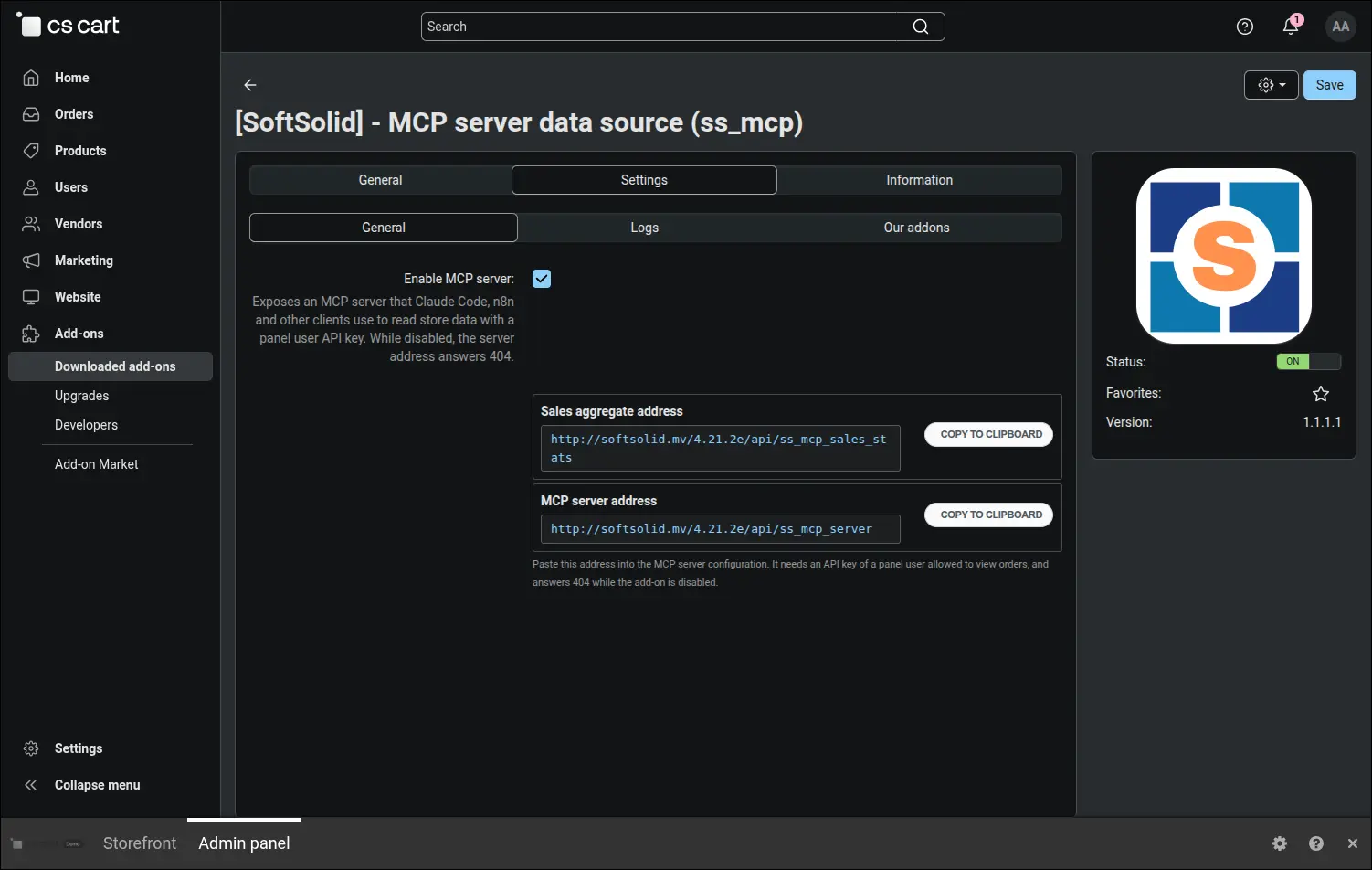
A single option on the General tab switches on the MCP server, and the address for the client sits right next to it, with a button that copies it to the clipboard. The server stays off by default, because a new path to store data should be a deliberate decision of the owner. The same place shows the address of the sales aggregate for integrators who prefer to fetch figures through the regular REST API. The shopper chat settings live on a separate tab, where the cart, orders and the chat widget each have their own switch, and each one starts disabled:
Screenshot 5
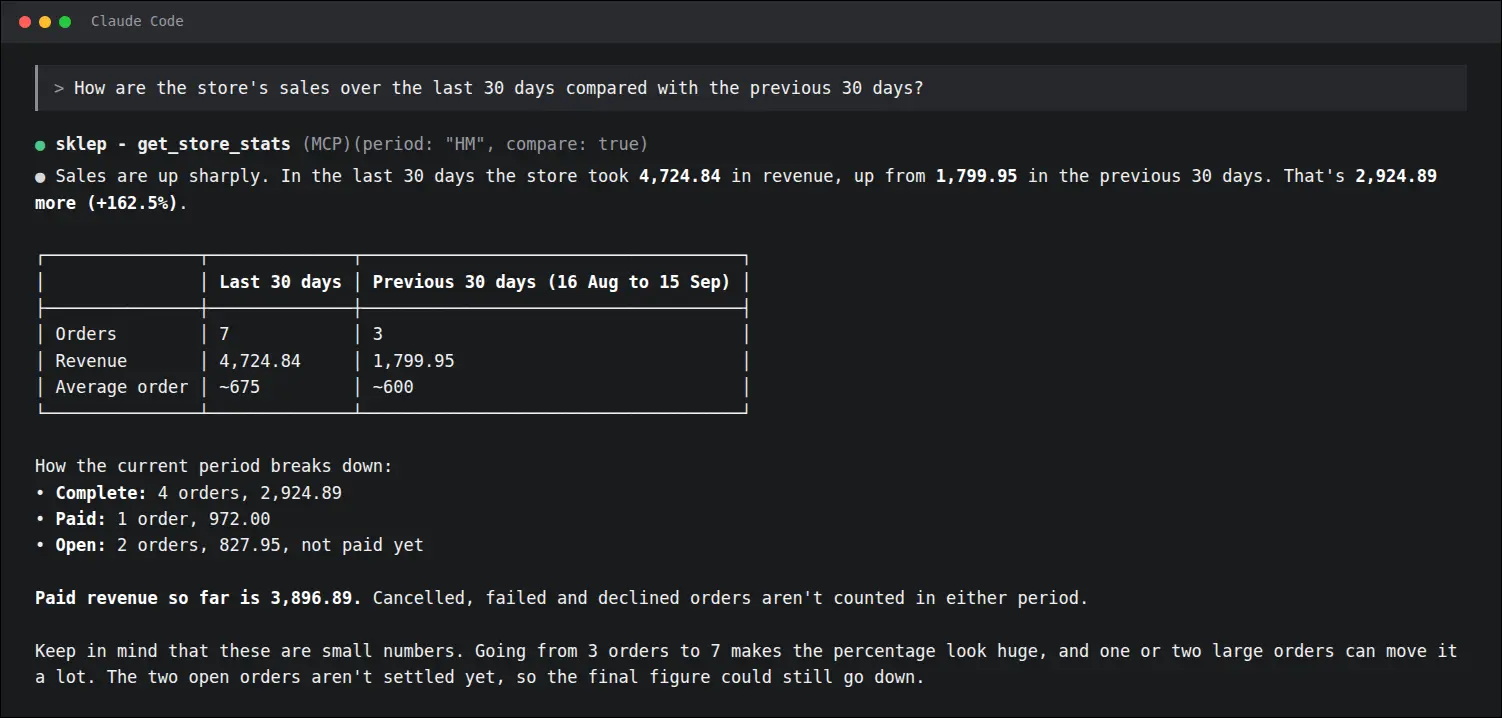
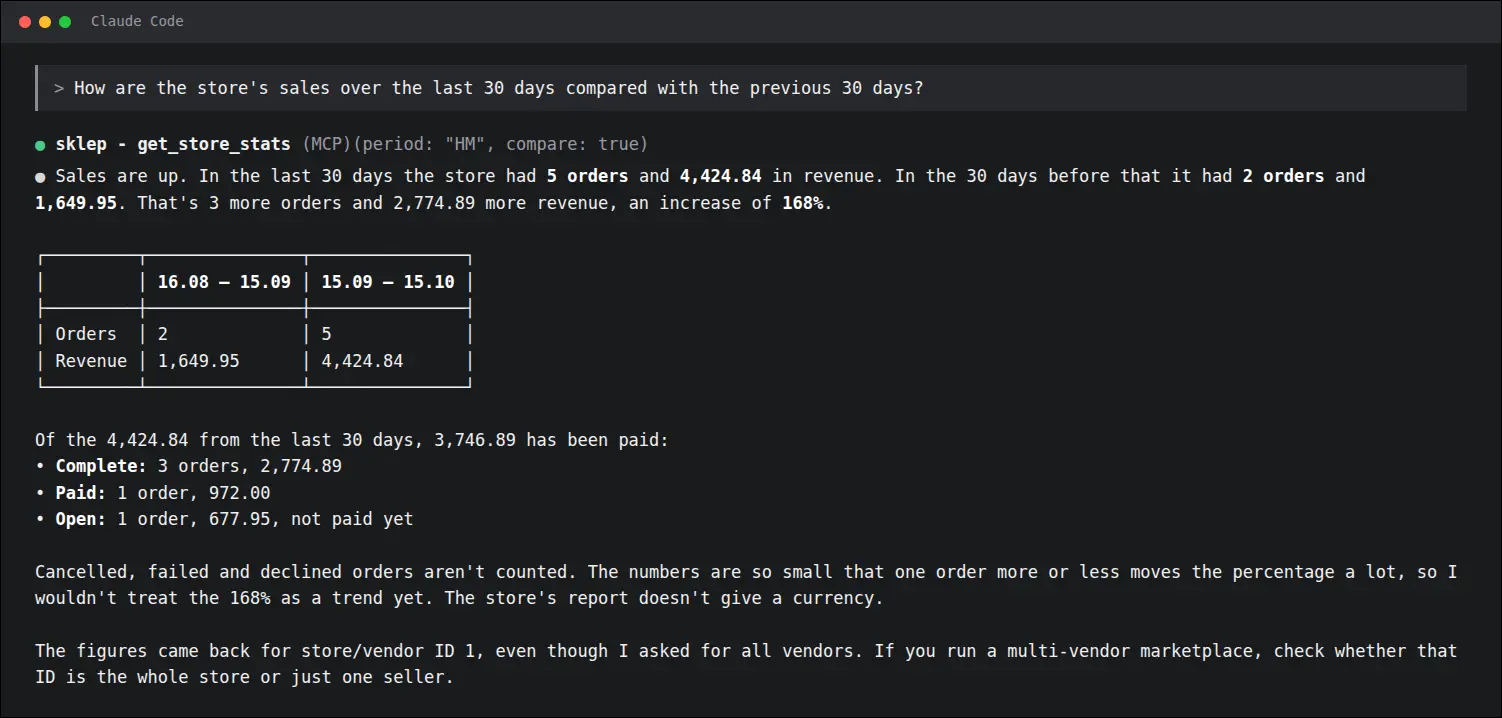
A sales question asked in plain language gets an answer calculated in the store, together with a comparison with the previous period. The assistant reports the number of orders, revenue, the amount already paid and the orders still open, as well as the absolute and percentage difference against the previous thirty days. The store picks the comparison period on its own, always of the same length, so the answer never sets a day against a month:
Screenshot 6
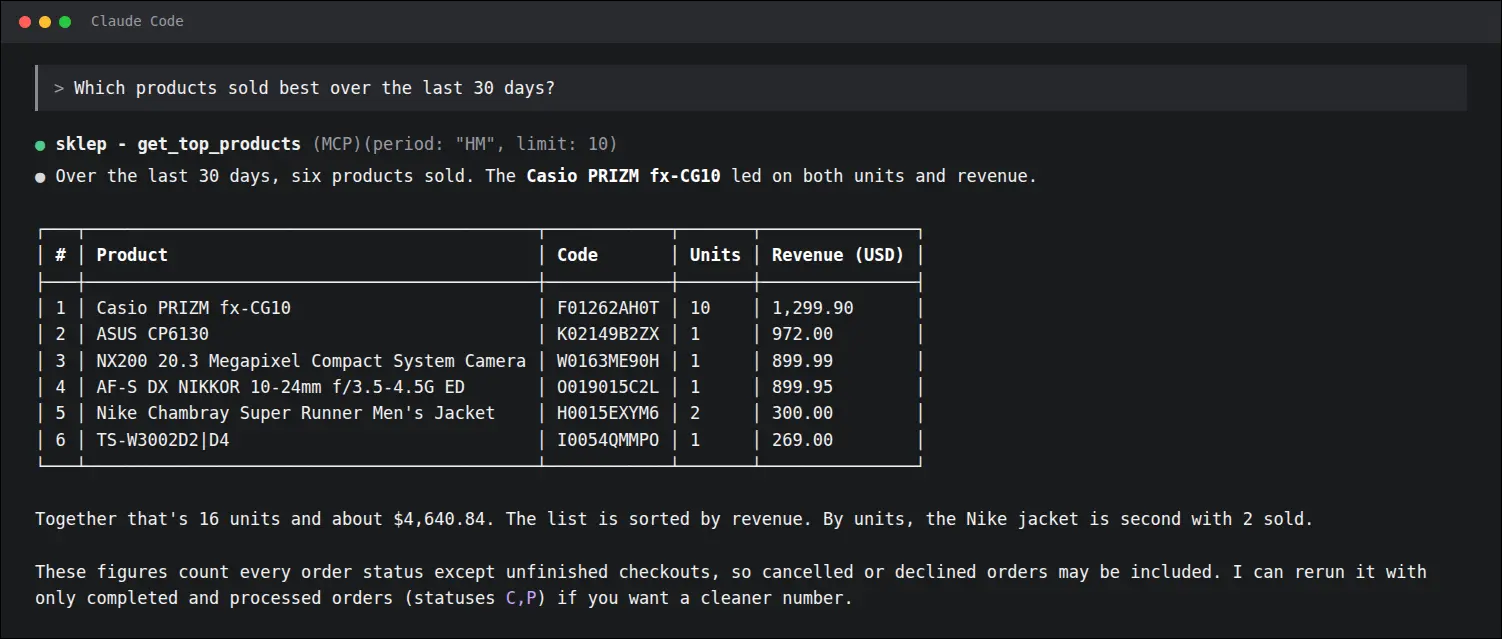
A ranking of best-selling products with units sold and sales value arrives in a single answer. The core REST API does not report sales per product, so without our add-on such a ranking meant going through every order one by one. Now one question is enough to see which items drive sales and what to base supplier orders or the next promotion on:
Screenshot 7
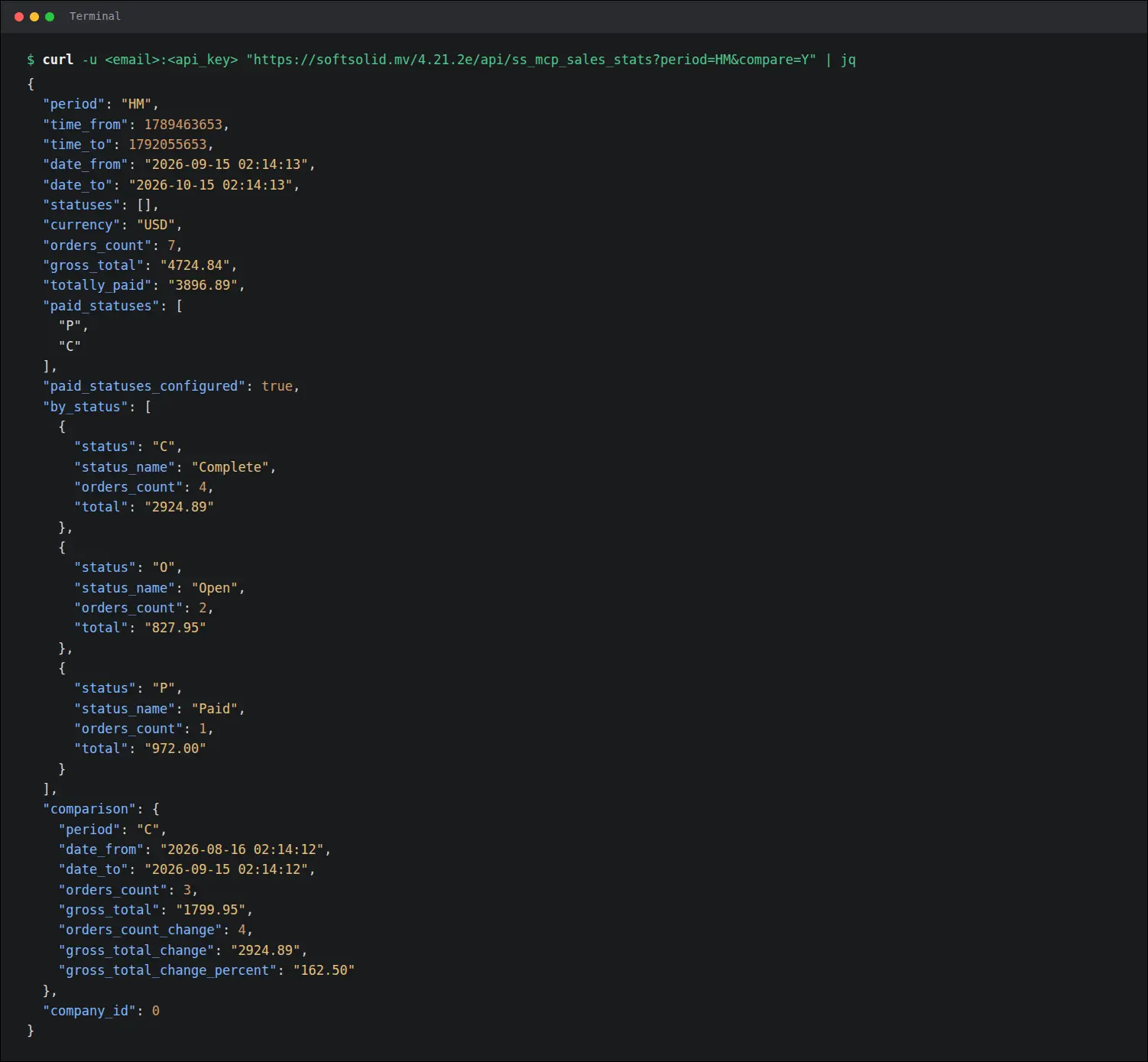
The sales aggregate in the REST API returns ready totals and the difference against the previous period, with amounts written as text. This is a new entity the core does not have: a report, a spreadsheet or an automation receives revenue, the paid amount, the order count and a per-status breakdown in one request, instead of downloading hundreds of orders and adding them up. Amounts kept as text pass through JSON without rounding errors:
Screenshot 8
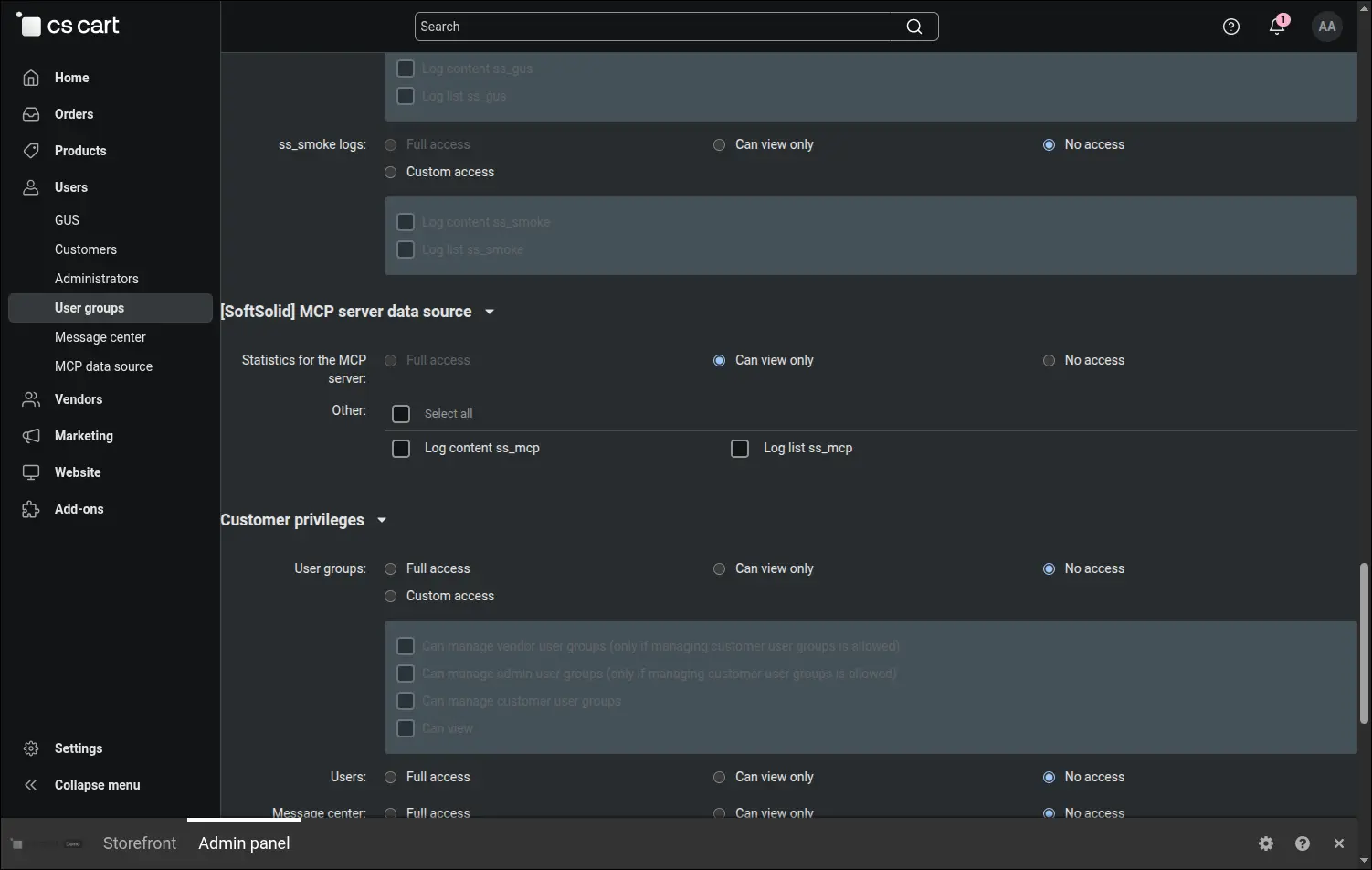
A separate permission shares sales statistics without access to orders or customer data. An administrator user group gains the Statistics for the MCP server item, set at the viewing level. The account of an accountant, an analyst or a reporting system then receives revenue and the product ranking, while any attempt to reach orders or personal data is refused. Existing keys with access to orders keep working unchanged:
Screenshot 9
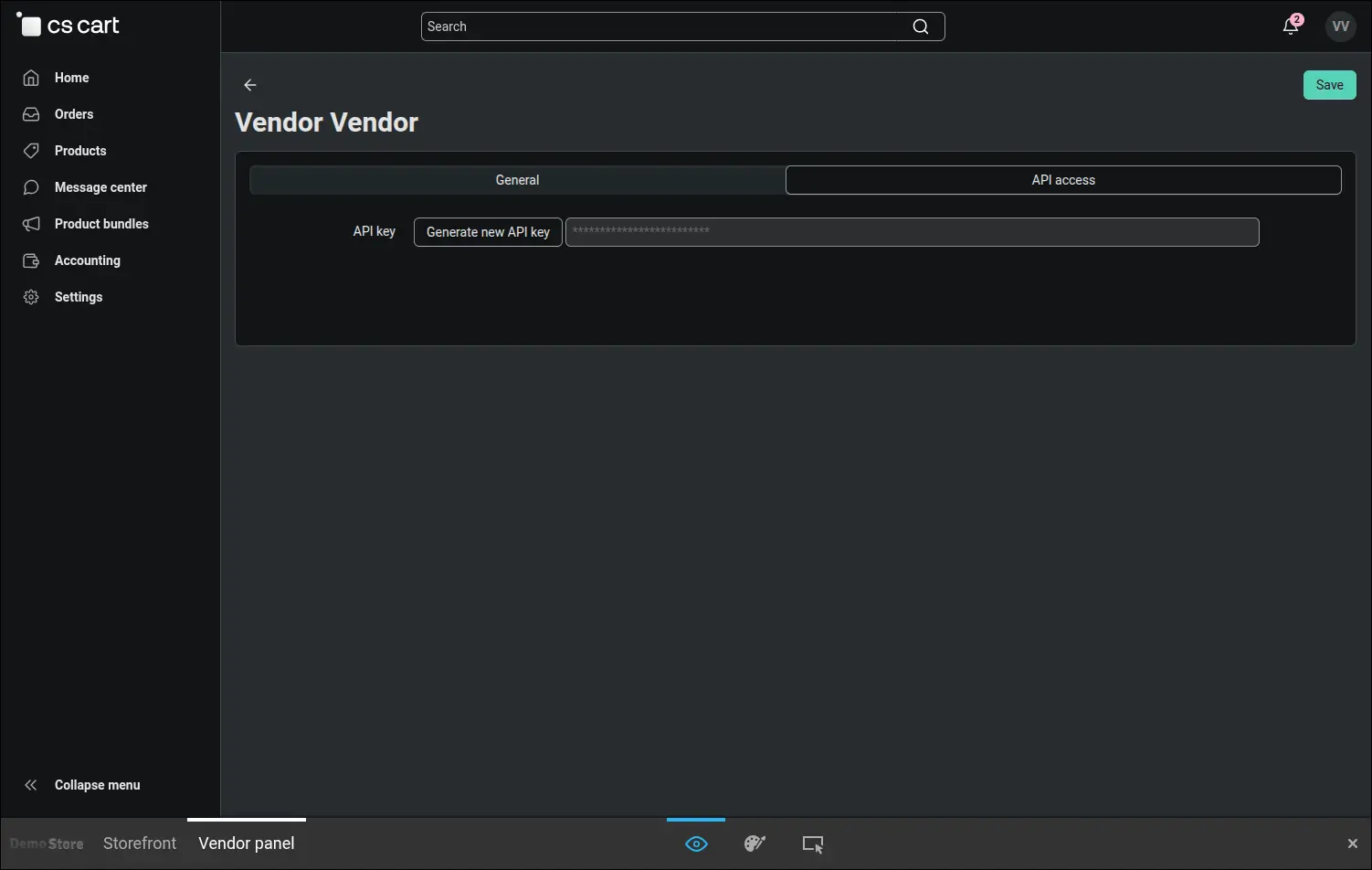
A vendor connects with their own API key from the profile in the vendor panel. There is no separate account to create and nothing to configure in the add-on settings, a key generated on the API access tab is enough. This is how the marketplace operator can give vendors an AI assistant with their own results:
Screenshot 10
With a vendor key, the assistant sees only the sales of that vendor's company. The same question the administrator asked earlier yields different, smaller figures here, because it covers only this vendor's orders. A parameter pointing to another vendor is ignored, so competitors' revenue and customer contacts stay out of reach, while the administrator can still narrow statistics to any company on the marketplace:
Screenshot 11
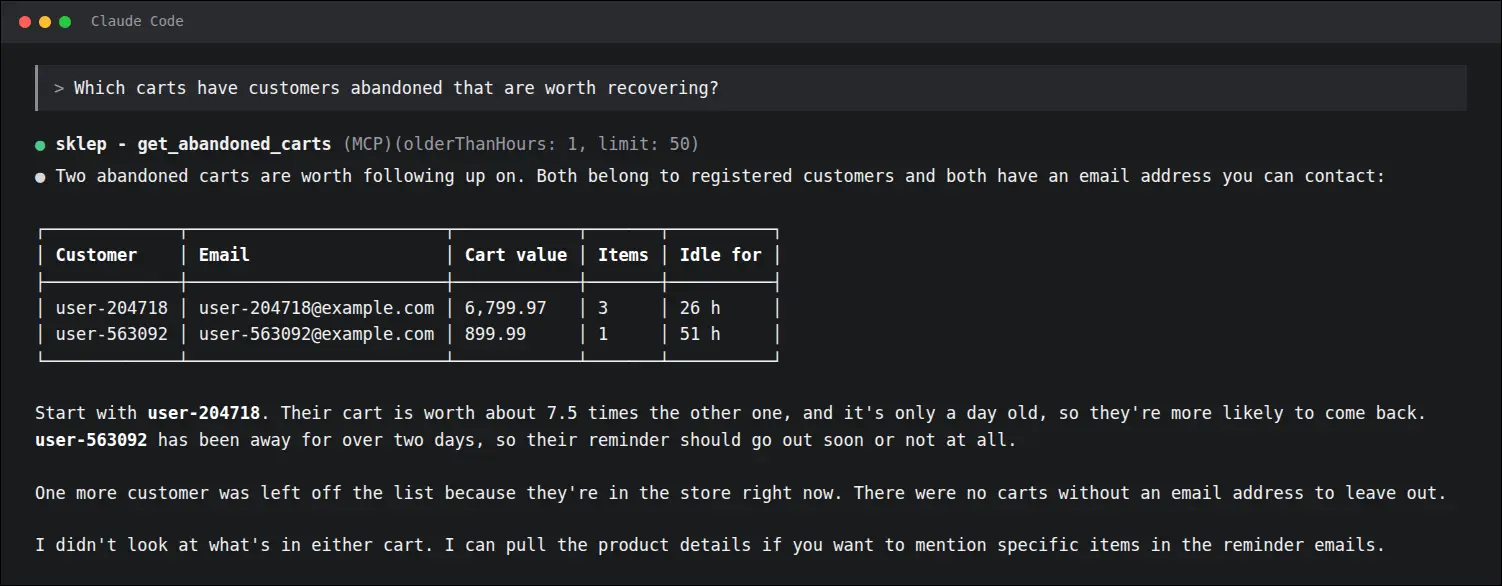
The abandoned cart list leaves out customers who are in the store right now and states how many carts it skipped. A reminder therefore never reaches someone standing at the checkout, and the assistant can suggest right away which cart to start with. A search by email address also covers guest carts that the core API cannot find:
Screenshot 12
The MCP server data source add-on takes the shopper from a product question to an order on terms the owner sets. The chat sees the same data as the storefront, cart changes and order placement are switched on deliberately, and the purchase decision always belongs to the customer, never to the model. The owner's assistant receives figures that match the panel and nothing beyond read access, and vendors on a Multi-Vendor marketplace see only their own company.
Feel free to contact us and purchase the add-on!
- Annual subscription
- Store Bulider
- Multi-Vendor
- 4.21.x
- No changes
No reviews found