


Stripe Billing for vendor plans
- View all variations as list
| CODE | Payment method | Price | ||
|---|---|---|---|---|
|
777
ss_stripe_vendor_plans
2026-10-29
1.1.1.1
|
1495.00 PLN
(Price without tax) |
|||
|
779
ss_stripe_vendor_plans_sub_1Y
2026-10-29
1.1.1.1
|
600.00 PLN
/year
(Price without tax) |
|||
|
778
ss_stripe_vendor_plans_sub_1M
2026-10-29
1.1.1.1
|
60.00 PLN
/month
(Price without tax) |

- — 12 months guarantee for all our add-ons
- — add-ons sold to entire world
- — stable, flexible, high-quality products
- — competitive prices, attractive discounts
- — quick and competent technical support
- — installation in 24 hours
- — personalized solutions - we'll write any add-on for you
An add-on for Multi-Vendor built for marketplaces that earn from vendor subscriptions. Multi-Vendor adds plan fees to the vendor balance, but it never charges a card. When a vendor sells little or nothing, the fee turns into debt, and the marketplace owner spends time on reminders and on watching balances by hand. The Stripe Billing for Vendor Plans add-on hands that job to Stripe: the vendor enters a card once, and every renewal that follows, monthly or yearly, happens without the vendor and without the marketplace team.
Key Features
- Vendor plan fees charged to the vendor's card automatically through Stripe Billing, with renewals, retries of failed payments and PDF invoices sent by Stripe.
- Every paid invoice settles the plan fee in the vendor balance, so the books in CS-Cart match the money that actually arrived.
- One-click subscription from a banner in the vendor panel, on the familiar Stripe Checkout page, with 3D Secure, trial periods and promotion codes.
- Prorated plan changes, plus a choice of whether a price increase applies to running subscriptions from the next period.
- A self-service Stripe portal where vendors update their card and download invoices, and a subscription list for the administrator with a filter for overdue payments.
- CS-Cart plans create their own Stripe products and prices, and the webhook is registered in Stripe with a single button in the settings.
Setup starts with the Stripe connection. Test and live mode have separate keys, and a green notice confirms right away which account and API version the store is talking to. The add-on shows its own webhook address and registers it in Stripe, secret included, with one button, so nothing has to be copied over from the Stripe dashboard:

Screenshot 1
Billing rules are set once for the whole marketplace. The administrator picks the plan a company moves to when its subscription ends, decides whether a new plan price applies to current vendors from their next renewal, and turns on promotion codes, a tax rate, tax ID collection and cancellation in the Stripe portal. The requirements field at the top shows straight away whether the marketplace has everything the add-on needs:

Screenshot 2
Pricing stays in CS-Cart. The vendor plan editor gains a Stripe tab with a trial period and a reminder switch, next to the plan's product and current price in Stripe. Whenever the amount changes, the add-on creates a new price and archives the previous one, so the price history sits in one place:
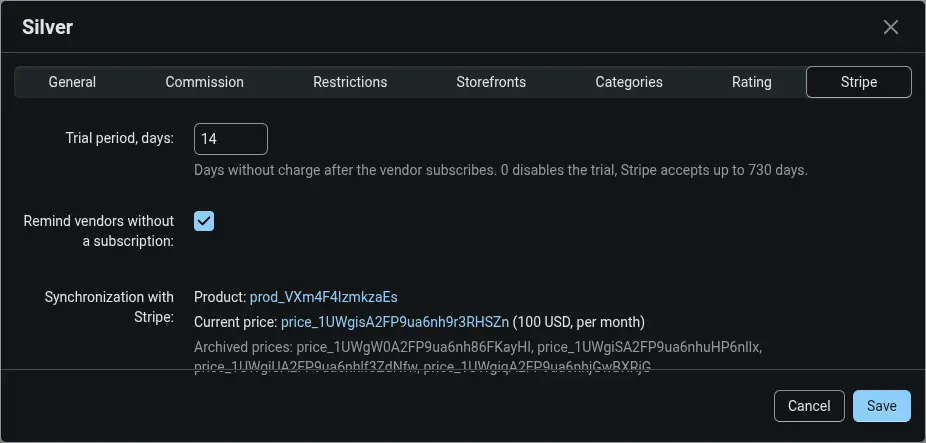
Screenshot 3
A vendor on a paid plan without a subscription sees a banner on the dashboard with the plan name, the price and the number of free days. The balance next to it shows the fee waiting to be paid. One click on Set up payments is all it takes for the plan to pay for itself from then on:

Screenshot 4
Payment takes place on the Stripe Checkout page, not in a store form. The vendor sees the trial period, the amount charged after it and a promotion code field, and the bank confirms the card with 3D Secure. Stripe may show the amount in the vendor's local currency, while the subscription and the balance entries stay in the plan currency:
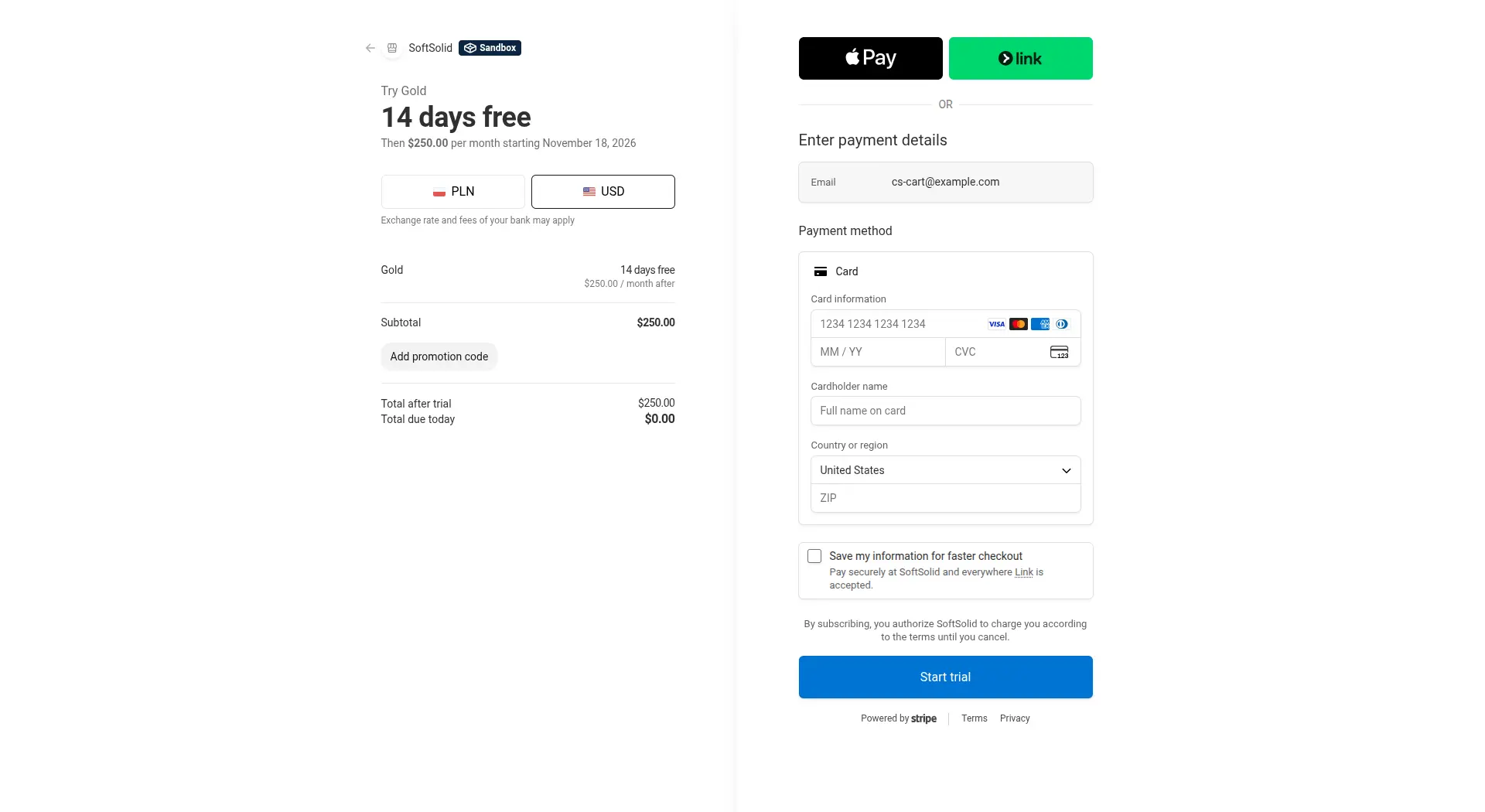
Screenshot 5
In the company profile, the Stripe subscription tab shows the status, the plan, the renewal date and the latest invoice. The Manage billing in Stripe button opens the portal, where the vendor updates the card and downloads invoices without writing to the administrator:
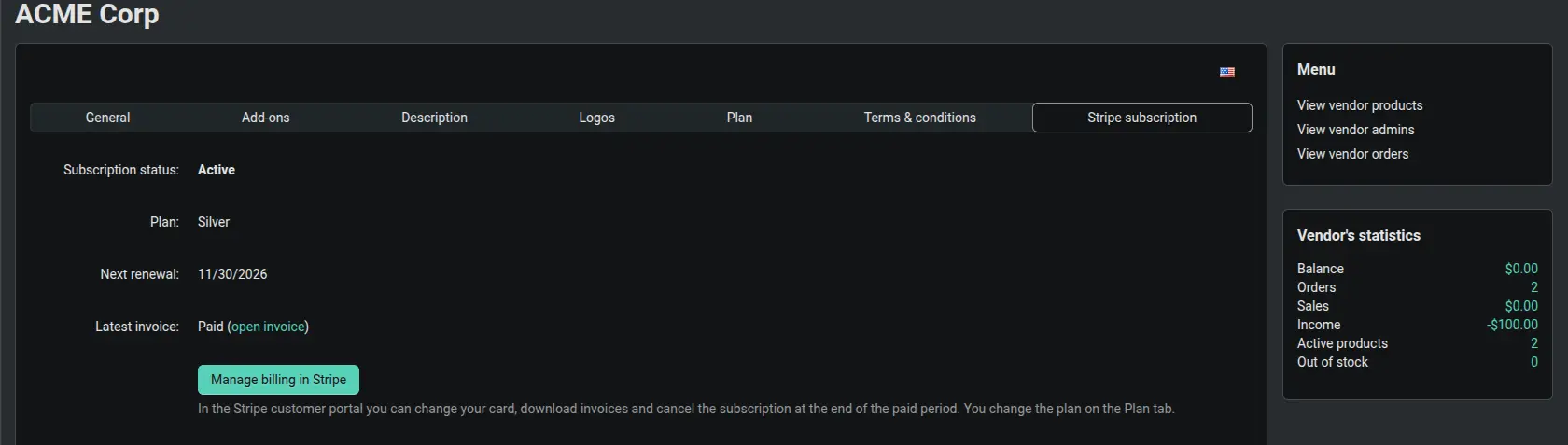
Screenshot 6
The administrator sees every subscription on the marketplace in one list: active ones, trials, overdue payments and those ending with a paid period. The failed payments filter points to the vendors who need attention, and canceling a subscription is one click away:

Screenshot 7
Every event sent by Stripe lands in a log with the time it arrived, the time it was processed and the result. When a vendor asks about a payment, the administrator can check within seconds whether the notice from Stripe reached the store and what happened to it:

Screenshot 8
The Stripe Billing for Vendor Plans add-on uses the Stripe library shipped with Multi-Vendor and runs alongside the core Stripe payments at checkout without affecting them. When a card is declined, Stripe retries the payment, the vendor sees a red banner in the panel with a link to the invoice, and debt and the grace period remain with the core Multi-Vendor mechanism. Plan fees no longer depend on the goodwill of vendors or on watching balances by hand.
Feel free to contact us and purchase the add-on!
- One-time payment
Choose the most convenient form of payment for the add-on. You can pay once and use the add-on. Choosing a subscription payment (monthly or annual) means that you pay for the add-on at regular intervals and have access to the latest versions of the addon and technical support.
- Multi-Vendor
- 4.21.x
- No changes
No reviews found