


Redirect after login

- View all variations as list
| CODE | Payment method | Price | ||
|---|---|---|---|---|

|
656
ss_redirect_after
2026-11-06
1.1.1.3
|
500.00 PLN
(Price without tax) |
||
|
|
658
ss_redirect_after_sub_1Y
2026-11-06
1.1.1.3
|
375.00 PLN
/year
(Price without tax) |
||
|
|
657
ss_redirect_after_sub_1M
2026-11-06
1.1.1.3
|
37.50 PLN
/month
(Price without tax) |

- — 12 months guarantee for all our add-ons
- — add-ons sold to entire world
- — stable, flexible, high-quality products
- — competitive prices, attractive discounts
- — quick and competent technical support
- — installation in 24 hours
- — personalized solutions - we'll write any add-on for you
An extension for Store Builder and Multi-Vendor that sends customers, administrators and vendors straight to the page where they usually begin after logging in. Instead of the home page and a walk through the menu, each of them sees right away what they came for.
After a successful login, CS-Cart returns people to the page they came from. A customer who wanted to track a parcel has to look for their orders, an administrator opens the same list every morning, and a vendor who signed in on the storefront never reaches the vendor panel at all. The Redirect after login add-on lets you choose a target for each of them, including a customer who has just created an account and selected customer groups. It does so with tact: a customer logging in at checkout stays with the cart, and a link to a specific panel page leads exactly where it was meant to lead.
Key Features
- A separate target for customers, administrators and vendors, depending on whether they log in on the storefront or in a panel.
- Customers land directly on their orders, profile, wish list, comparison list, messages, returns, reward points or any page of the store.
- A custom address in every field, checked on save so that it never takes customers outside the store.
- A separate target after registration, which welcomes a new customer with the page of your choice.
- Rules for customer groups, which take precedence over the general setting, with a priority for customers who belong to several groups.
- Administrators start work on orders, products or promotions instead of the dashboard.
- In Multi-Vendor, a vendor who logs in on the storefront moves into the vendor panel without a second login.
- A login at checkout never interrupts the purchase, and a return to a specific panel page from a link is preserved.
- A page of a disabled add-on is never used as a target, so changes in the store do not show customers an error.
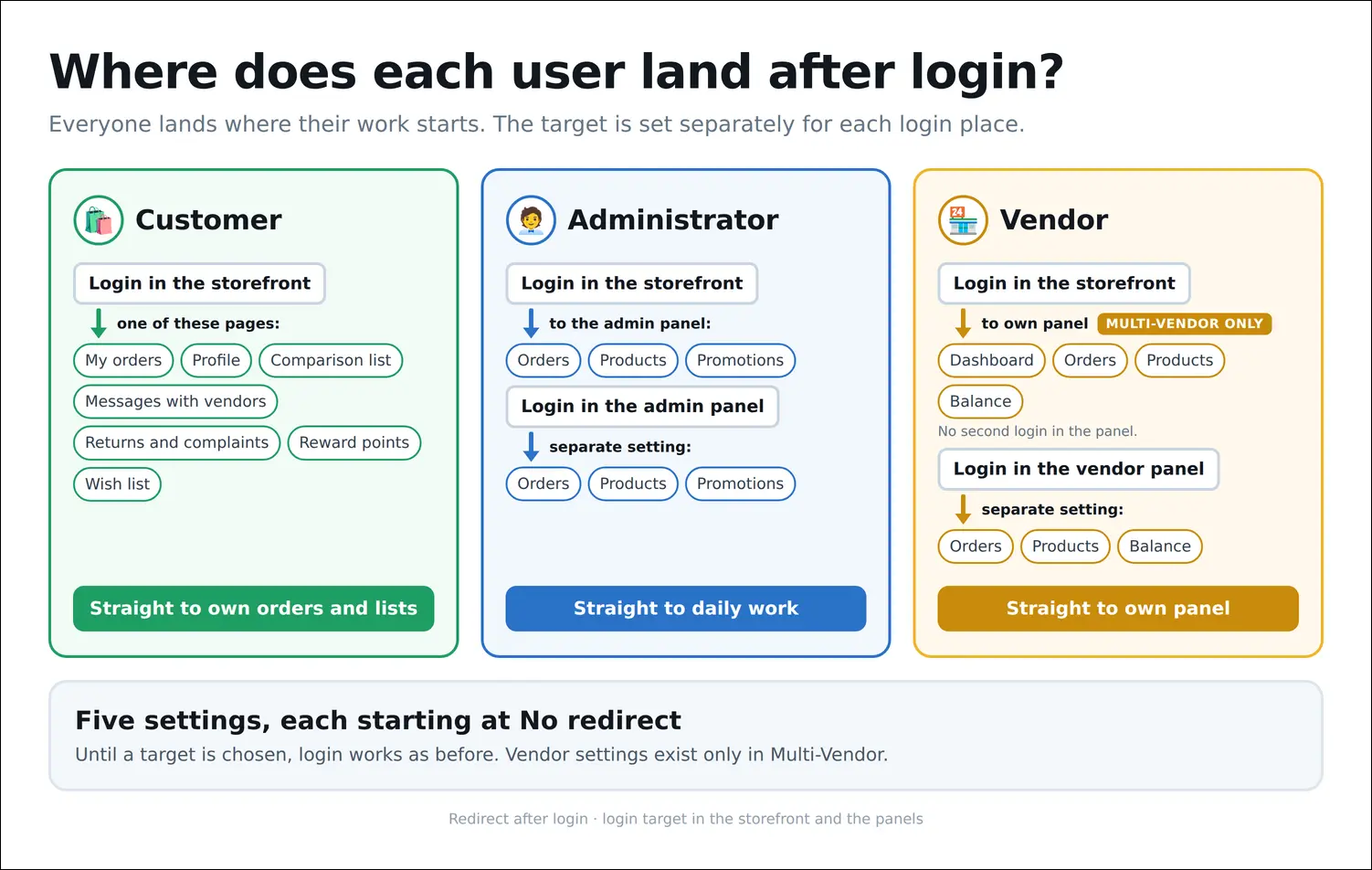
First, the big picture. Every kind of user has their own path, and where it ends depends on where they log in: a customer on the storefront reaches the chosen page of their account, an administrator the selected list in the admin panel, and a vendor, in Multi-Vendor, goes straight to the vendor panel. Until you pick anything, the store behaves exactly as before, because every setting starts with the No redirect value:
Screenshot 1
The whole configuration fits on a single settings tab. Six drop-down lists match six situations: a customer, administrator or vendor logging in on the storefront, the registration of a new account, and logins to the admin panel and to the vendor panel. Under each list there is a Custom address field for the cases when none of the ready pages fits. Each field is independent, and in a store with several storefronts the values are set for each storefront separately:

Screenshot 2
For customers there are their account pages: orders, profile, comparison list, messages, returns and complaints, reward points and wish list, with Custom address at the end of the list. A store with a loyalty program can greet customers with their points balance, while a store where people log in mostly to check a shipment can open the order list for them. Four of these pages belong to CS-Cart core add-ons, so the list shows them only when the corresponding add-on is enabled. Returns are missing from the screenshot because their add-on is disabled in the test store:

Screenshot 3
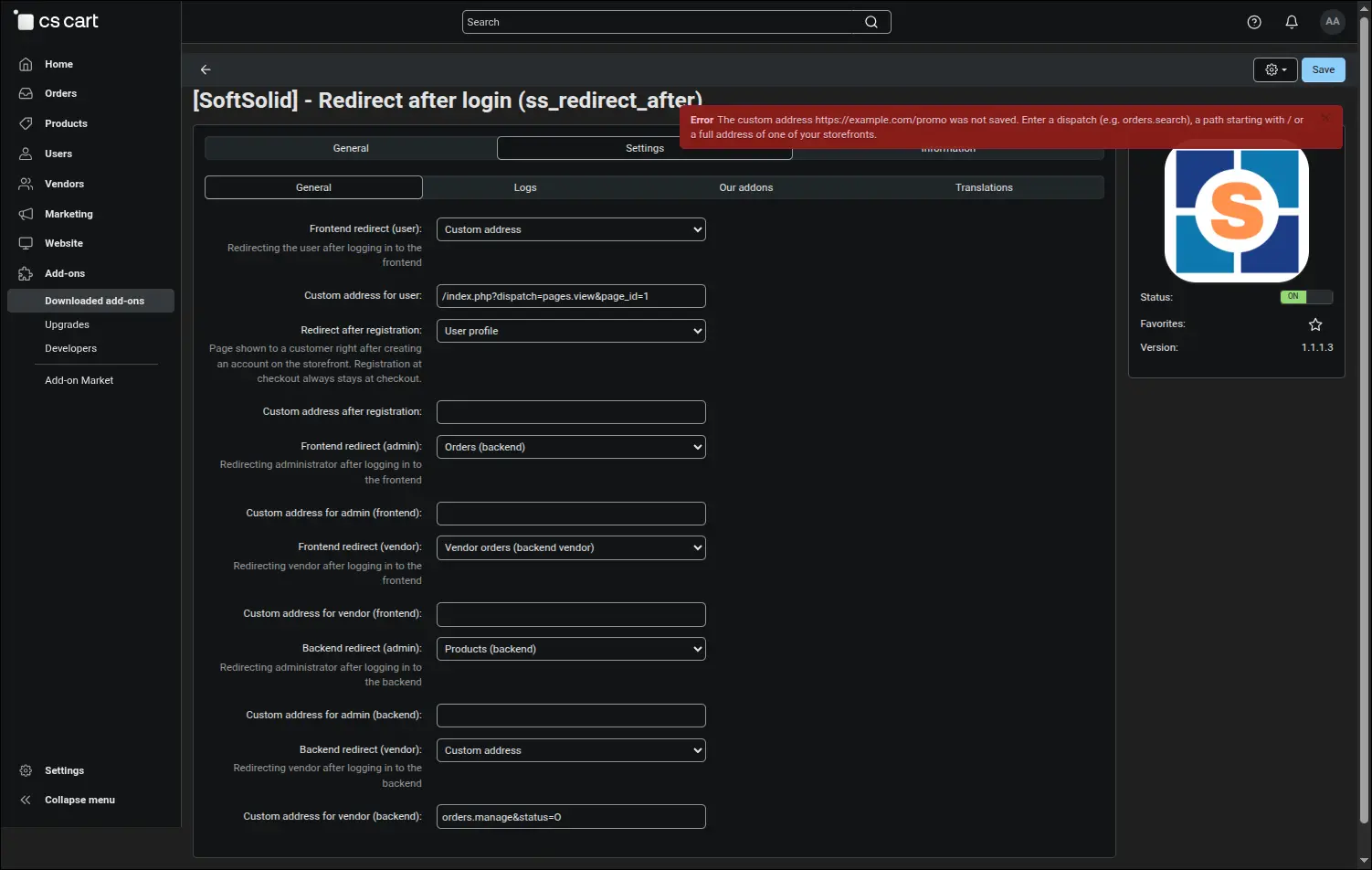
A custom address opens the way to any page of the store, such as a promotion page or a description of the loyalty program. You can enter a short CS-Cart address, a path from the store directory or a full address of one of its storefronts, and in the fields leading to a panel the address of a chosen list, for example orders in a single status. The add-on checks the address on save and rejects an address on another domain with a clear message, restoring the previous value, because CS-Cart would not let the customer go there anyway and would show the home page instead:
Screenshot 4
This is the result through the customer's eyes. A login from the pop-up on the home page is enough, and the store immediately opens the order list with statuses, dates and totals. The customer no longer hunts for the purchase history, and the support team hears fewer questions about where to check a parcel:

Screenshot 5
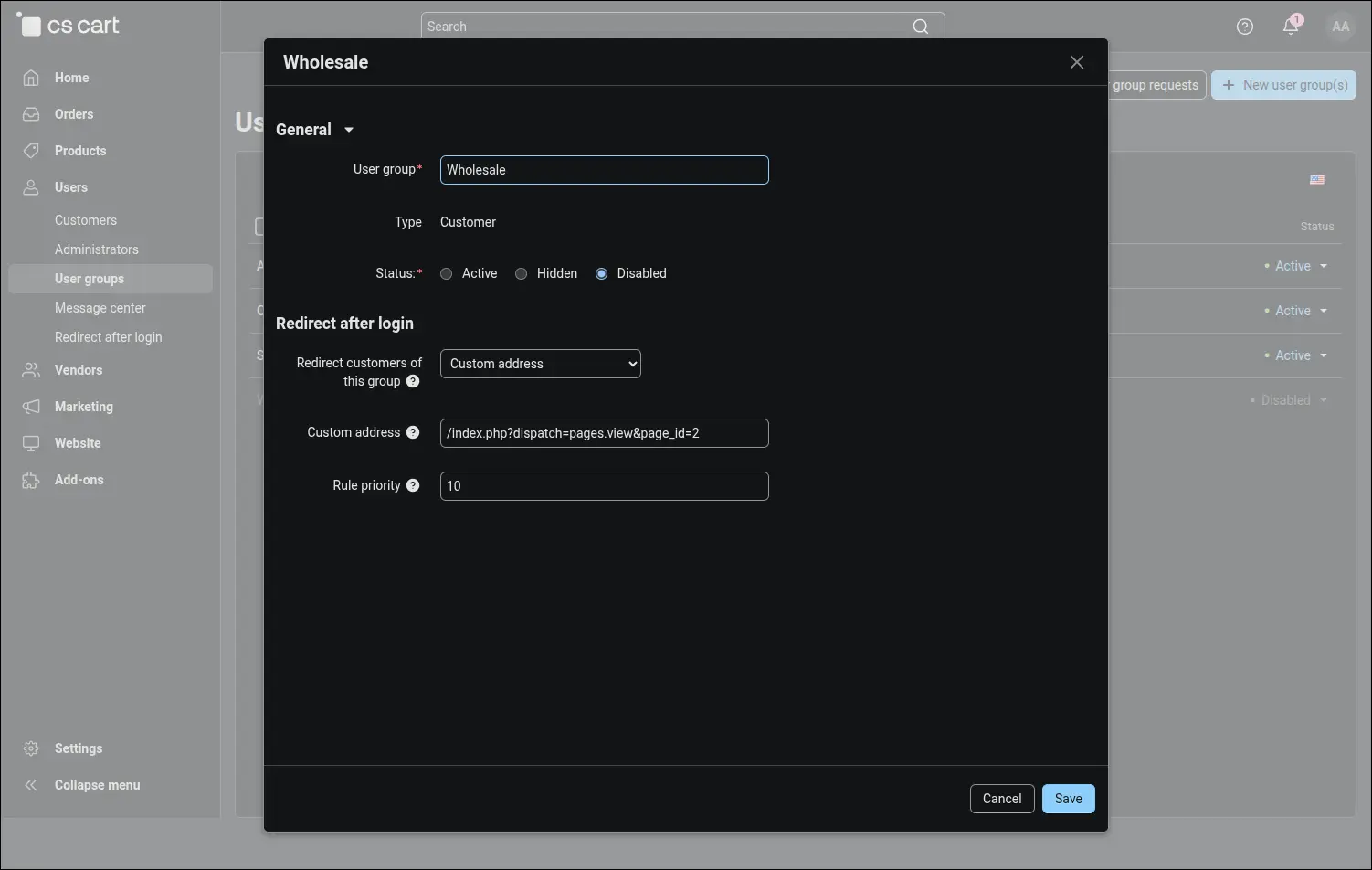
Not every customer starts in the same place. On the customer group page, the add-on adds a Redirect after login section where you choose the target for that group, a custom address if needed, and the rule priority. A wholesale buyer can therefore start on a page with the terms of cooperation, while a retail customer starts on their own orders. A group rule takes precedence over the general setting, and when a customer belongs to several groups, the higher priority decides:
Screenshot 6
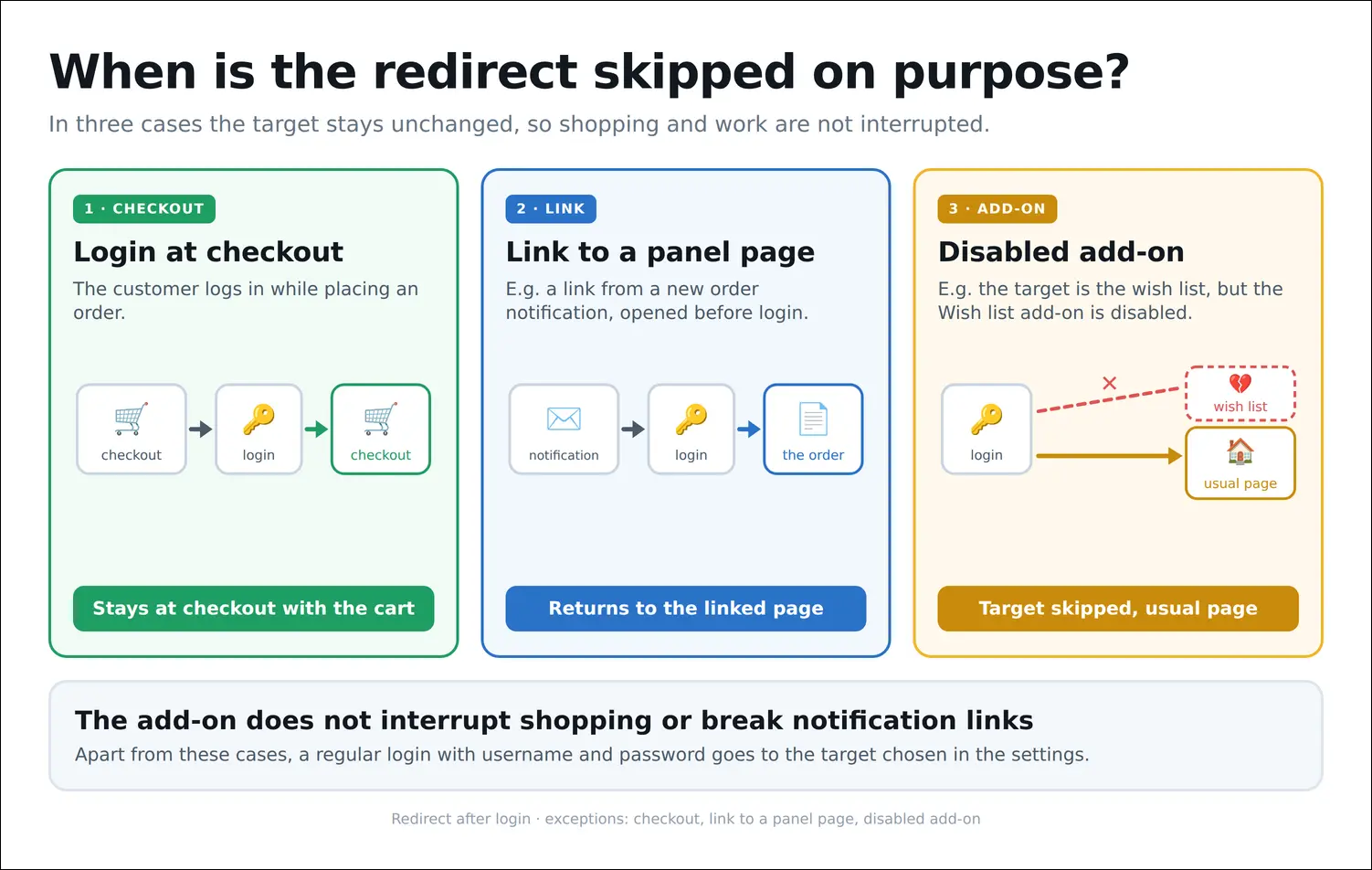
Just as important is when the add-on deliberately steps aside. A customer logging in at checkout returns to checkout, an administrator who opened a link to a specific order from an email notification lands on that order, and a target that leads to a disabled add-on is skipped, so the customer sees a regular page instead of an error. The chosen target applies to an ordinary login and does not take over every visit to the store and the panel:
Screenshot 7
The first of these exceptions protects your sales. A customer who already has a product in the cart and logs in with the checkout form stays at checkout, with the shipping address, the selected shipping method and the order summary in place. Setting a target for customers never pulls them away to the order list halfway through a purchase, it lets them finish the transaction calmly, also with SEO-friendly URLs enabled:

Screenshot 8
A customer who has just created an account gets a target of their own too. Instead of a random page, they can see their profile with the message about the new account and fill in the shipping details right away, or land on an offer prepared for new customers. A registration at checkout stays at checkout, just like a login:
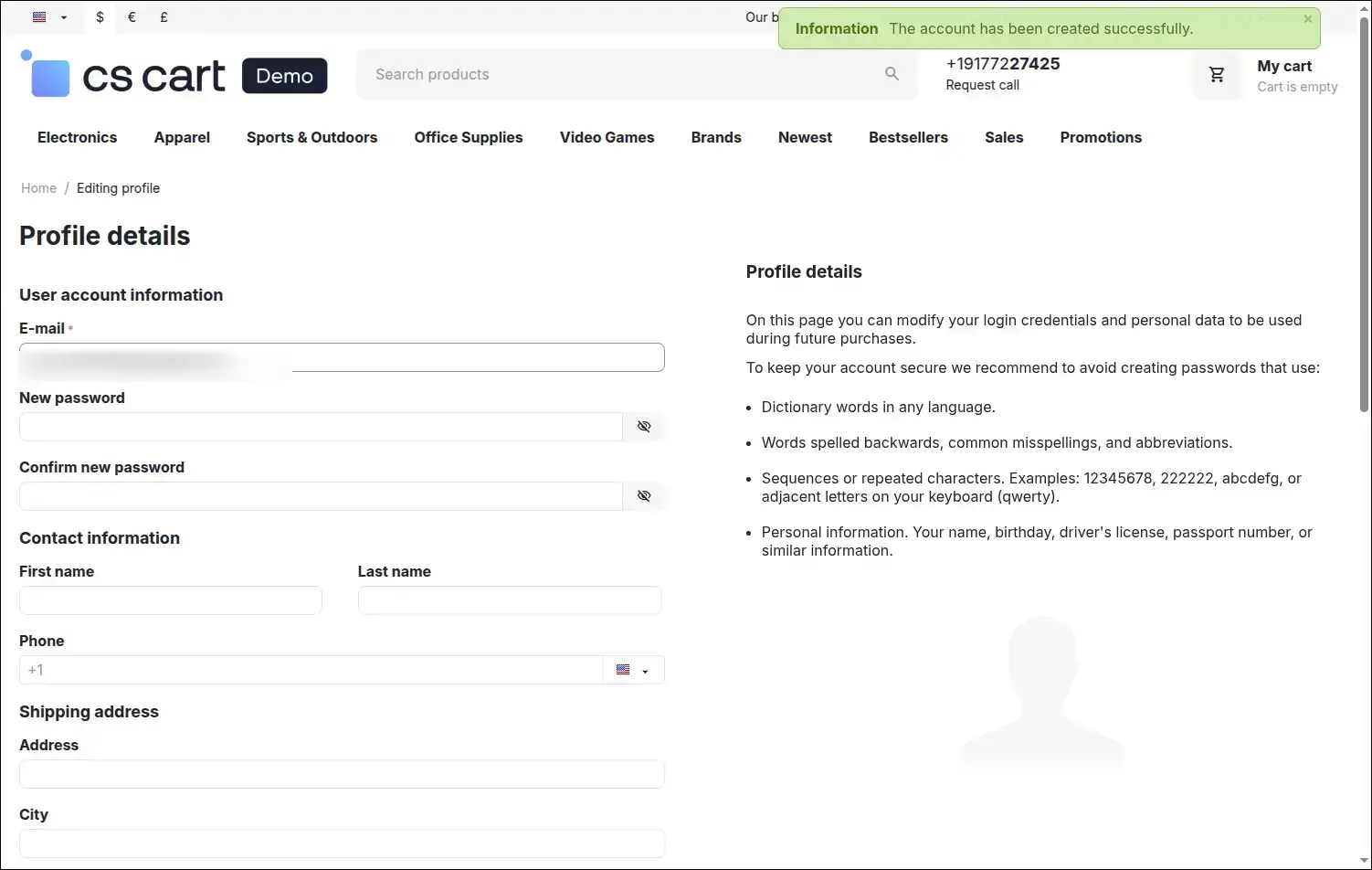
Screenshot 9
The support team benefits as well. After logging in to the admin panel, an administrator goes straight to the product, order or promotion list, depending on where the working day begins. Every login saves one trip through the menu, and the panel opens on the work itself rather than on the dashboard:

Screenshot 10
In Multi-Vendor, the add-on solves a problem that marketplace operators know all too well. A vendor logs in on the storefront, the same place customers use, and goes straight to work in the vendor panel, for instance on the list of orders waiting to be fulfilled. There is no separate panel address to remember and no second password prompt, because the add-on opens the panel with a one-time login key valid for one hour:

Screenshot 11
Redirect after login brings order to the first moment after every login and registration. Customers find their orders faster, new customers start on the right page, the team starts work without circling through the menu, and vendors on a Multi-Vendor marketplace enter their panel straight from the storefront. The add-on works from CS-Cart 4.10.1, needs no API keys and no cron jobs, and after installation it changes nothing until you choose the first target.
Feel free to contact us and purchase the add-on!
Choose the most convenient form of payment for the add-on. You can pay once and use the add-on. Choosing a subscription payment (monthly or annual) means that you pay for the add-on at regular intervals and have access to the latest versions of the addon and technical support.
- Store Bulider
- Multi-Vendor
- 4.22.x
- 4.21.x
- 4.20.x
- 4.18.x
- 4.17.x
- 4.16.x
- 4.15.x
- 4.14.x
- 4.13.x
- 4.12.x
- 4.11.x
- 4.10.x
- 4.9.x
- 4.8.x
- 4.7.x
- 4.6.x
- 4.5.x
- 4.4.x
- 4.3.x
- 4.2.x
- 4.1.x
- 4.0.x
- No changes
No reviews found