


Ronny Kühn
Verified purchase

| CODE | Payment method | Price | ||
|---|---|---|---|---|

|
356
ss_prom_vendor
2026-10-29
1.1.5.6
|
225.00 USD
(Price without tax) |
||
|
|
607
ss_prom_vendor_sub_1Y
2026-10-29
1.1.5.6
|
90.00 USD
/year
(Price without tax) |
||
|
|
606
ss_prom_vendor_sub_1M
2026-10-29
1.1.5.6
|
9.00 USD
/month
(Price without tax) |

An extension for Multi-Vendor that opens the promotion module to vendors in their own panel and makes sure every discount they create stays inside their own catalogue. Out of the box promotions belong to the marketplace administrator, so each vendor sale begins with a request and ends in the operator's task queue. Our add-on moves that work to the vendor and leaves the marketplace with what matters most: control over how far someone else's freedom reaches.
Key Features
- The vendor creates and runs own promotions in their panel, with no administrator in between.
- A condition limiting the promotion to the vendor's company is introduced on every save, so the discount never reaches beyond their offer.
- Six conditions and five bonuses calculated per company, from the subtotal with that vendor to free shipping of their own parcel.
- The administrator removes from the promotion schema anything vendors should not have, separately for conditions and for bonuses.
- The vendor plan grants the right to run promotions, their priority and firm limits on discount, campaign count and duration.
- Pre-moderation keeps every promotion disabled until the administrator approves it, with e-mail notifications to both sides.
Setup starts on a single screen and takes a moment. Two switches are enough to scope every promotion a vendor saves to their own company and to keep the condition logic beyond reach of an alternative branch. A third option decides how a fixed discount is spread across cart items, and a fourth appends the vendor name to the promotion name, which brings welcome order to the campaign list in the marketplace panel
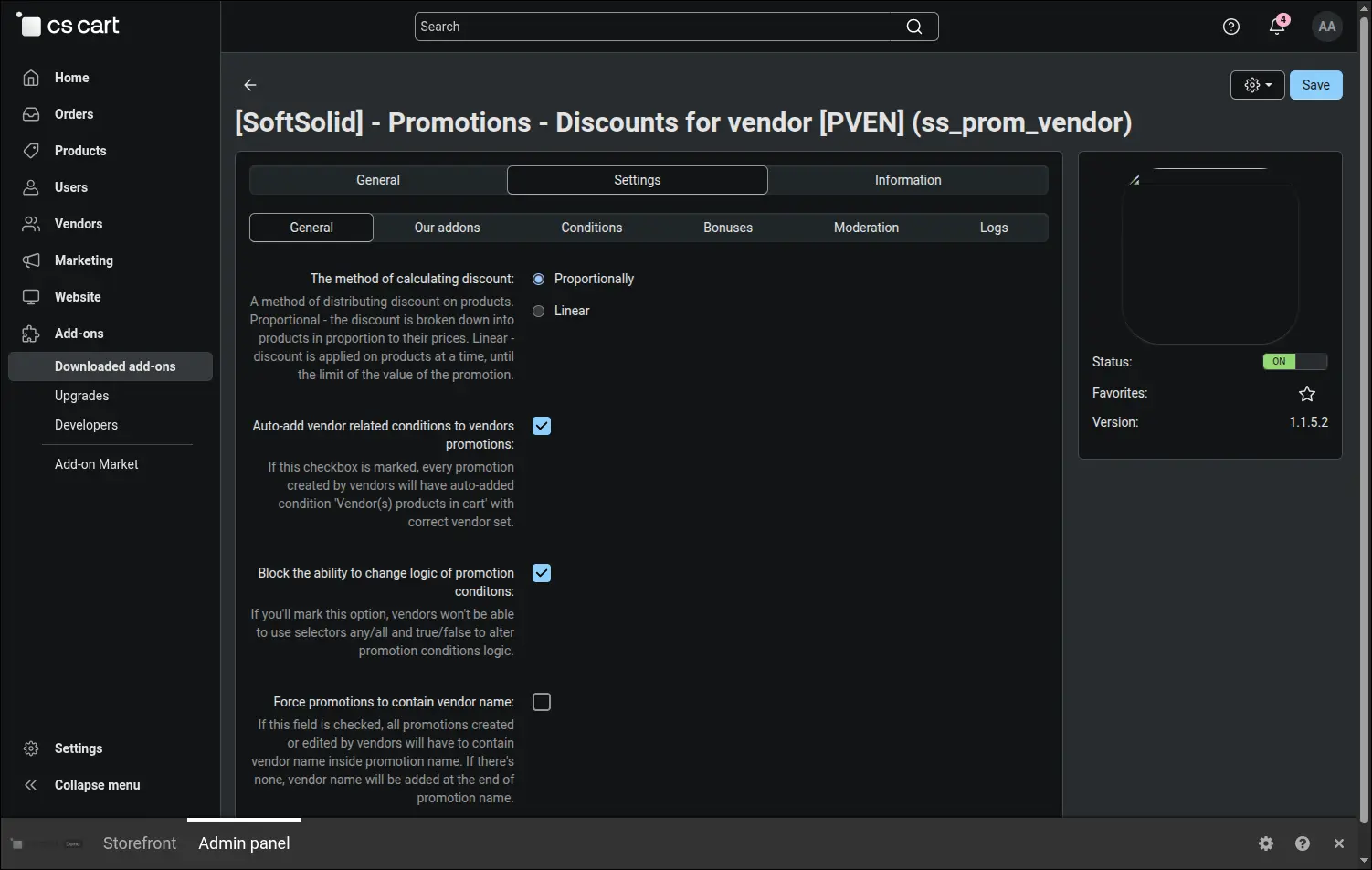
Screenshot 1 - general settings: automatic scoping of a vendor promotion to that vendor's own offer
Not every promotion condition is meant to be handed over. The list of blocked conditions is built from the real schema of your installation, separately for catalogue and cart promotions, so it covers the native CS-Cart mechanisms as well as those brought in by other extensions. Ticking an entry takes it away from vendors and leaves it untouched for the administrator
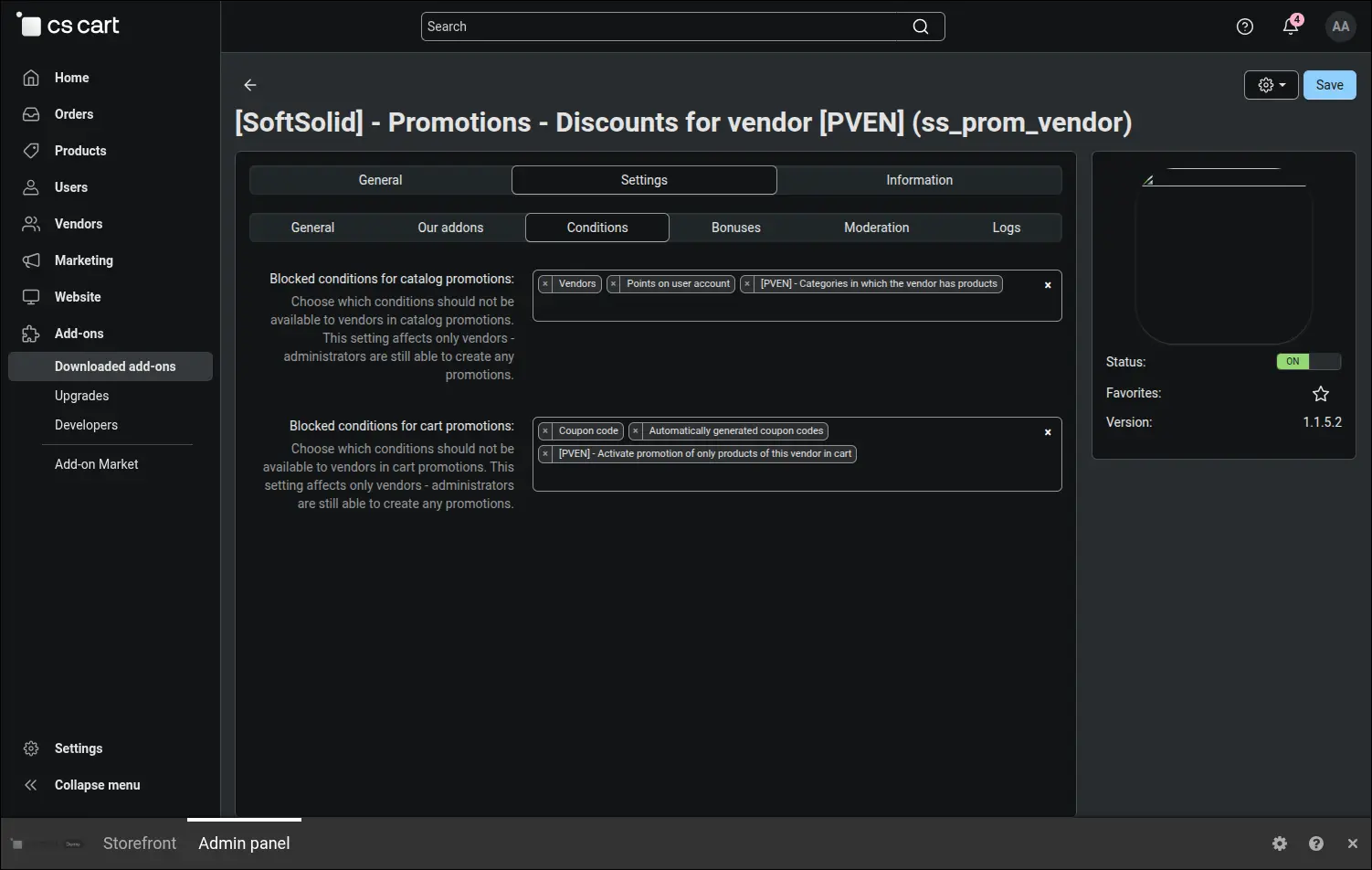
Screenshot 2 - the administrator removes the conditions that vendors should not have
Bonuses follow the same rule, except the default arrangement is already thought through. After installation the native bonuses are blocked, among them product and category discounts, granting a user group, issuing coupons and free shipping counted for the whole cart. Vendors keep the bonuses marked with the PVEN prefix, the ones that understand the notion of a company and never reach for someone else's parcel
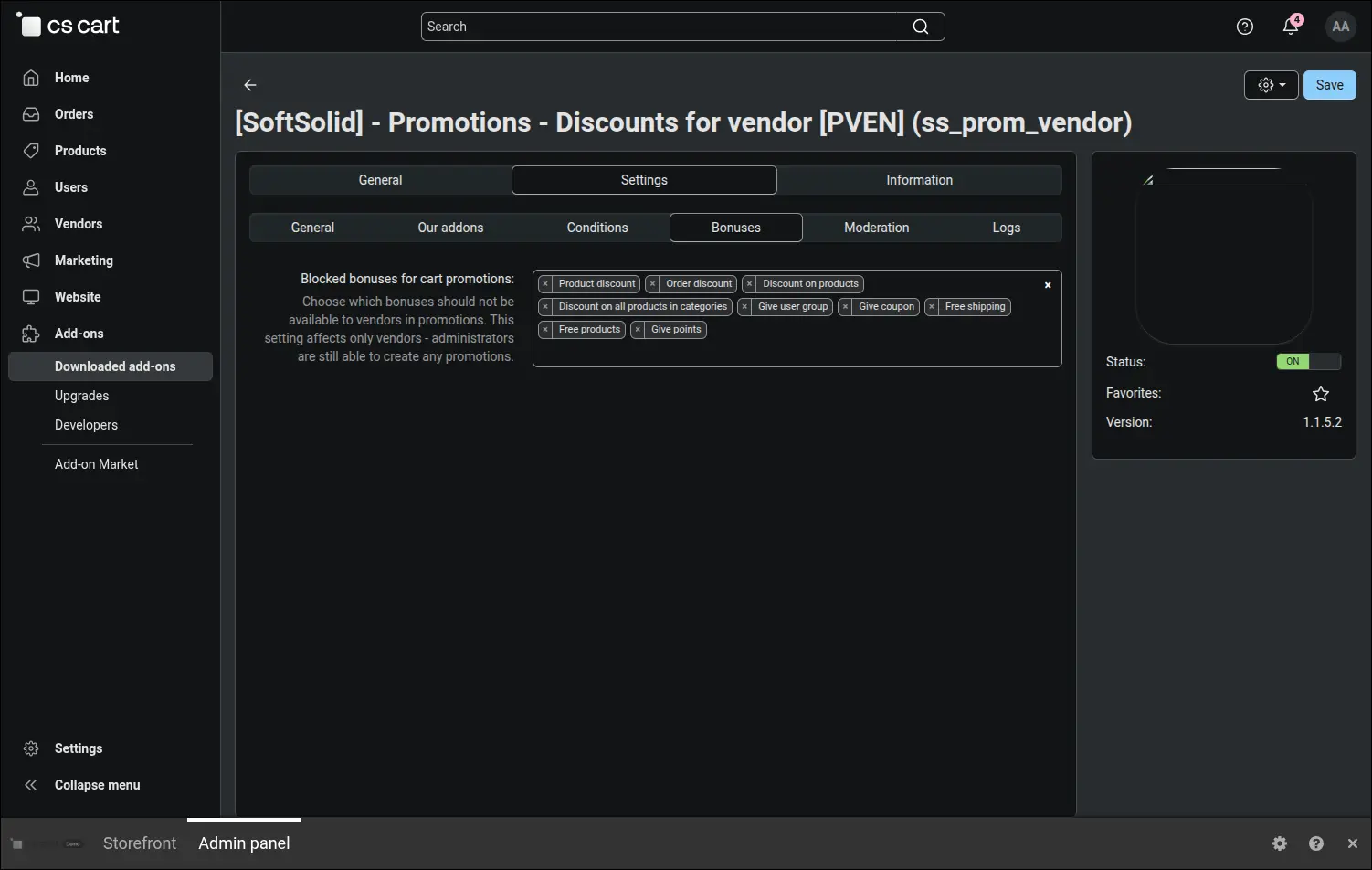
Screenshot 3 - core bonuses are blocked by default, vendors get the company-aware ones
A marketplace that wants to see every price cut before it goes live turns on pre-moderation with a single switch. From that moment a promotion saved by a vendor waits, disabled, for the administrator's decision, and the appointed moderators receive a message with a link that leads straight to the queue
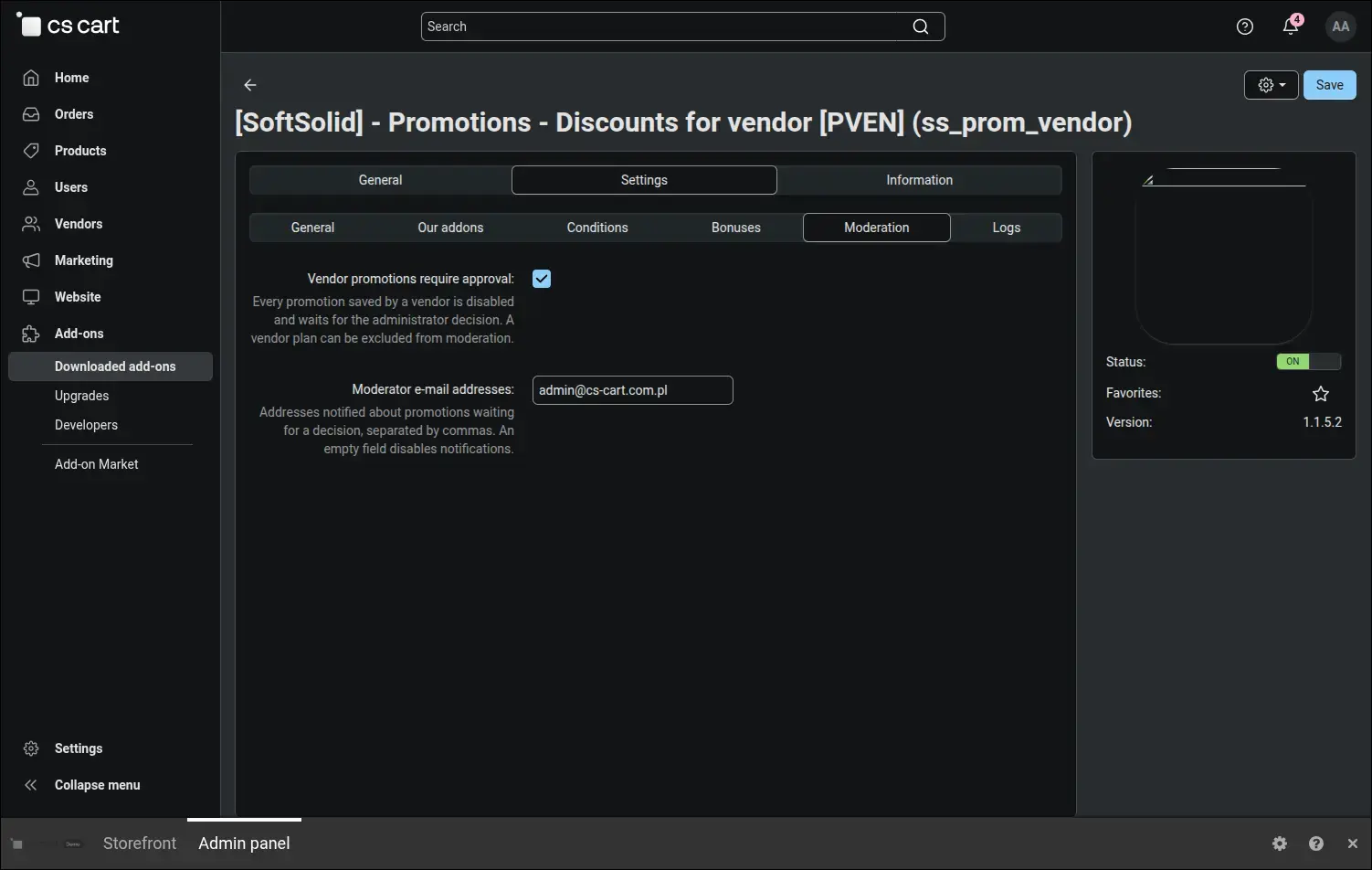
Screenshot 4 - promotion moderation is switched on in one click, with a notification to moderators
The most interesting part happens in the vendor plan, the very place where a marketplace already differentiates commissions and catalogue limits. The plan grants the right to run promotions, sets their priority against marketplace campaigns and enforces four boundaries: maximum discount in percent, maximum discount amount, maximum number of simultaneously active promotions and maximum duration of a single campaign. An empty field means no limit, so installing the add-on on a running marketplace changes nothing until you fill the values in yourself. A separate switch exempts a chosen plan from moderation, which comes in handy with long-standing vendors
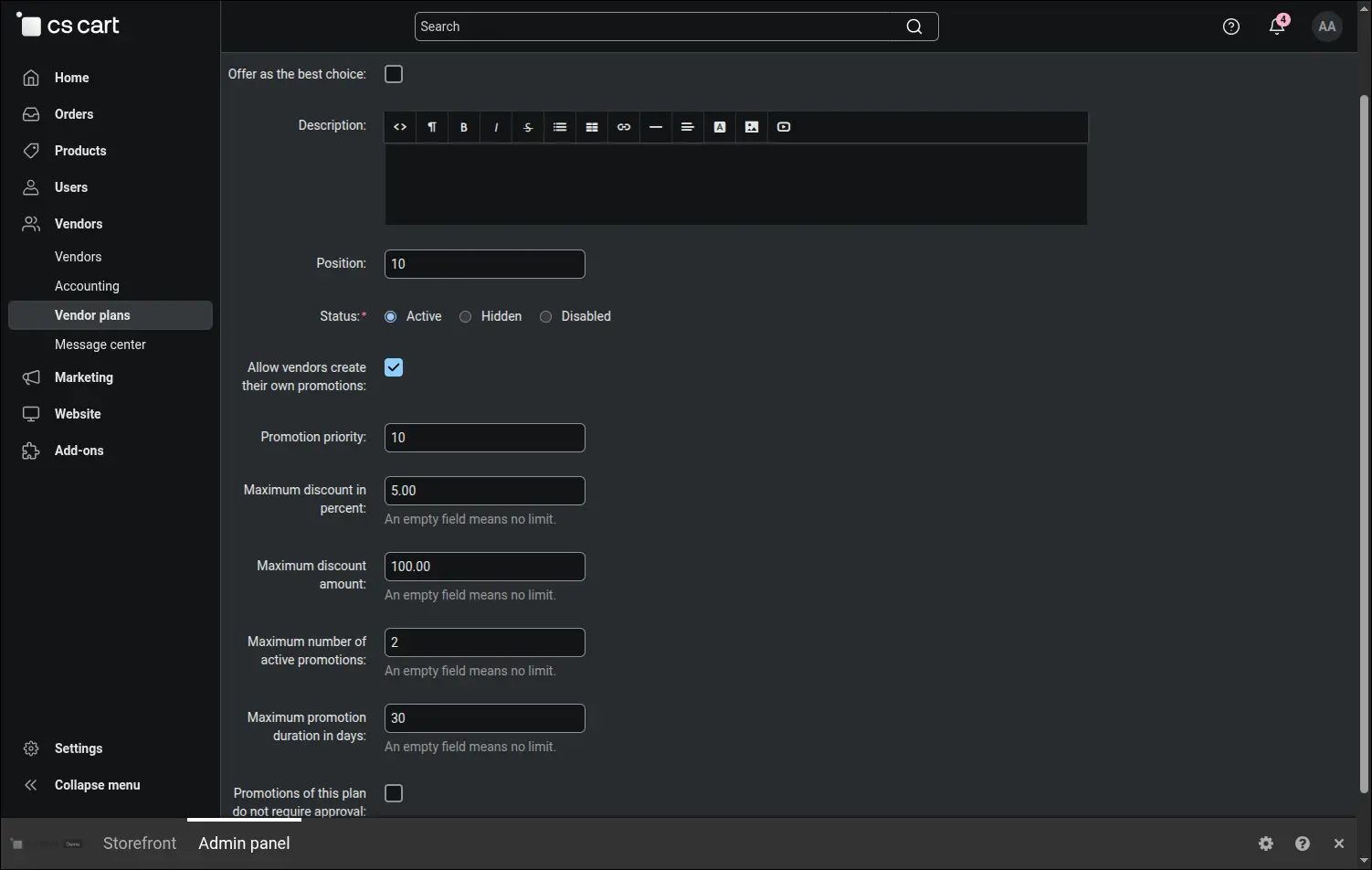
Screenshot 5 - the vendor plan decides on the right to run promotions and on the discount limits
From the vendor's side it looks simple: the Marketing section shows a promotion list that holds their campaigns only, with statuses and a button for adding another one. Other companies' promotions stay out of sight, both on the list and after typing an address by hand, because the company filter sits in the controller. On a marketplace that hosts rival companies this is the condition that makes anyone willing to run a pricing policy there at all
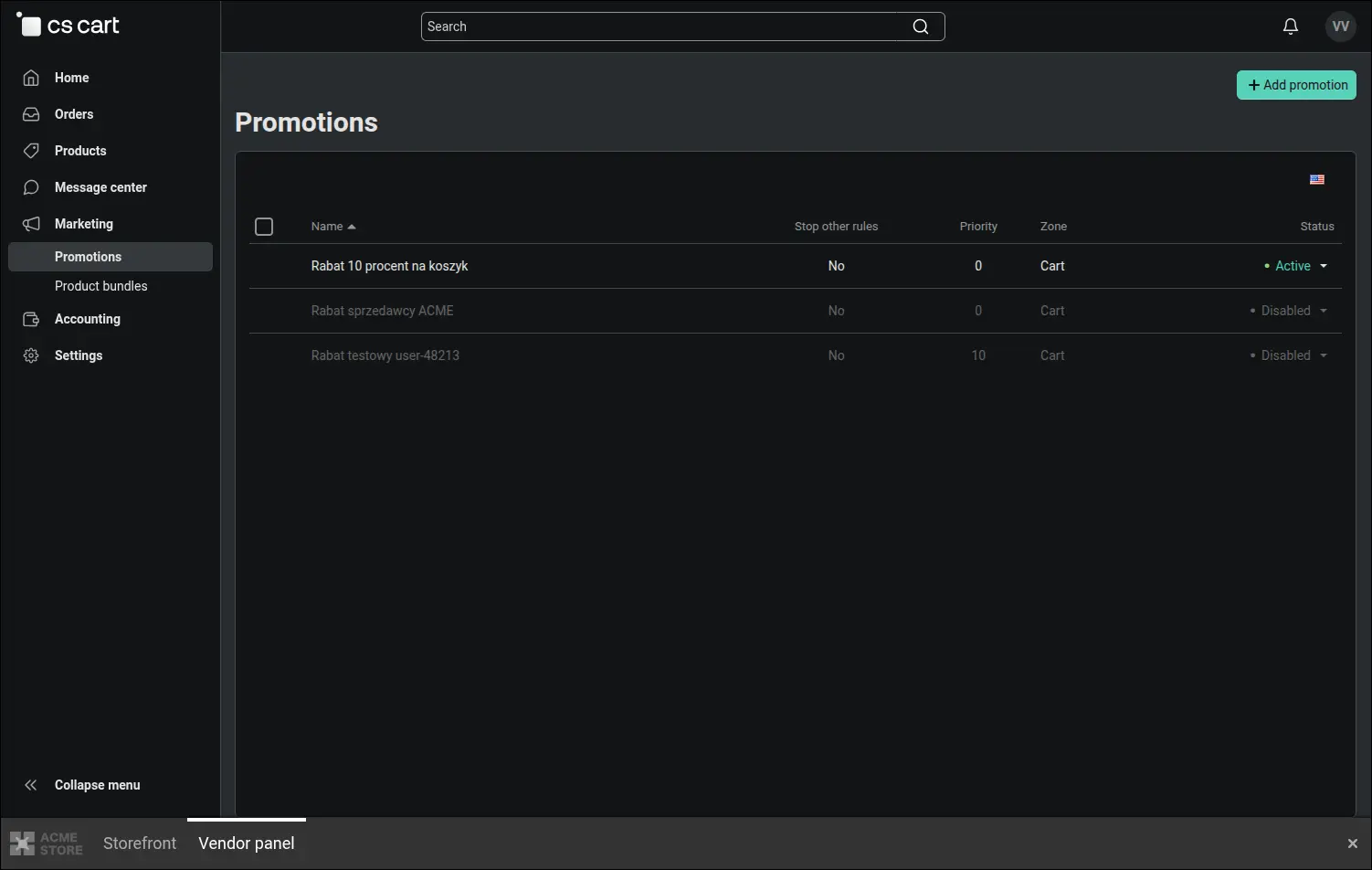
Screenshot 6 - the vendor runs an own promotion list, with no access to other companies' campaigns
Inside the promotion form the vendor reaches for the conditions marked with the PVEN prefix, and those make all the difference. The subtotal counts that vendor's products alone, the item count works the same way, and a separate condition fires the campaign only when the cart holds nothing from other companies. A threshold such as "spend 200 and save" finally means what the banner promises: 200 with that vendor, not the sum of purchases across every company. The screenshot also shows that a condition blocked by the administrator simply does not appear in the selector
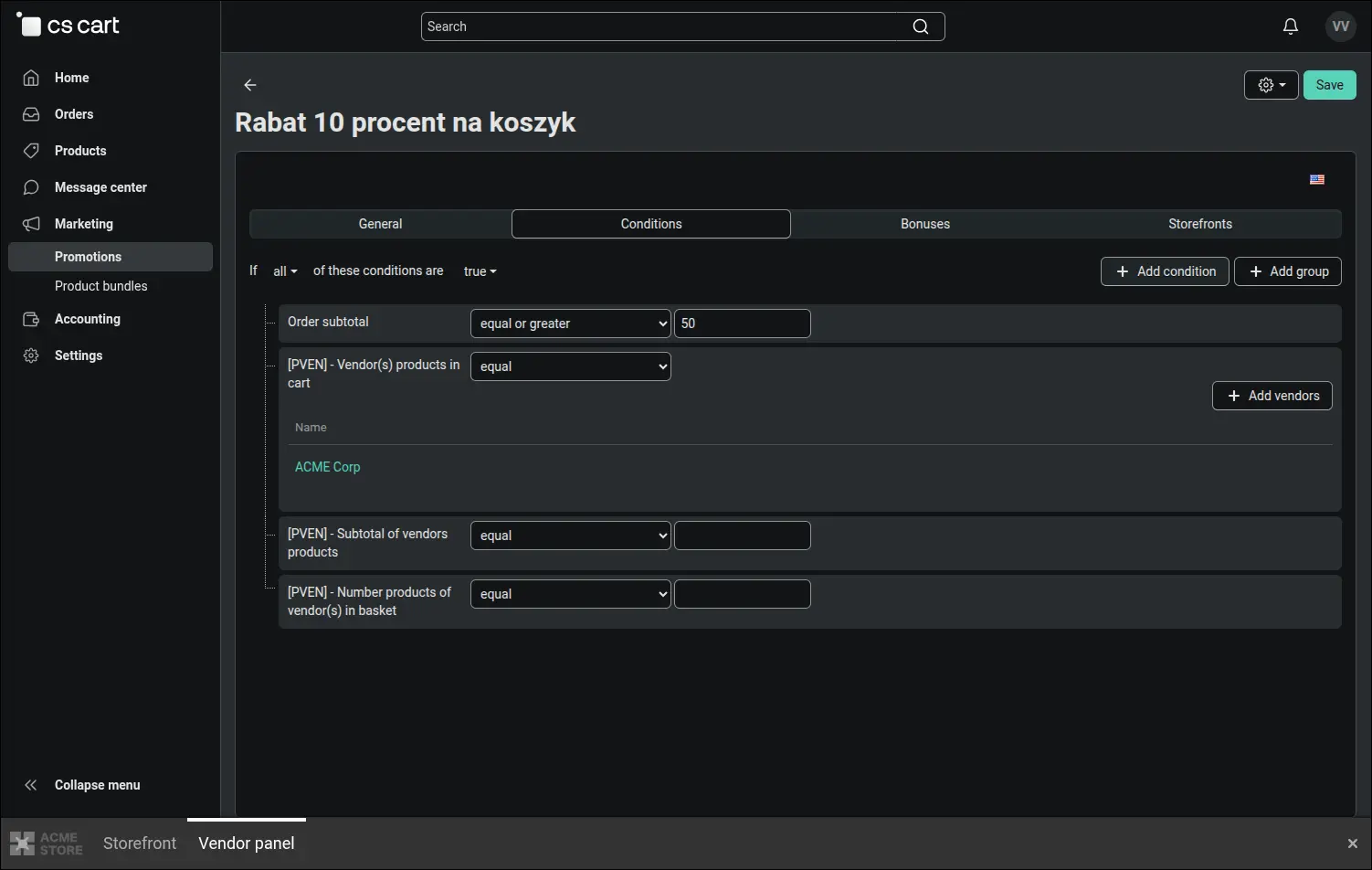
Screenshot 7 - conditions calculated from that vendor's part of the cart, not from the whole order
The bonuses available to a vendor keep to the same principle. The discount covers their items only, a fixed order-level reduction is spread across their company's products, free shipping zeroes the cost of their parcel alone, and a gift product comes from their own stock. The discount therefore comes out of the margin of whoever announced it, which keeps commission settlements readable and spares the remaining vendors from subsidising someone else's campaign
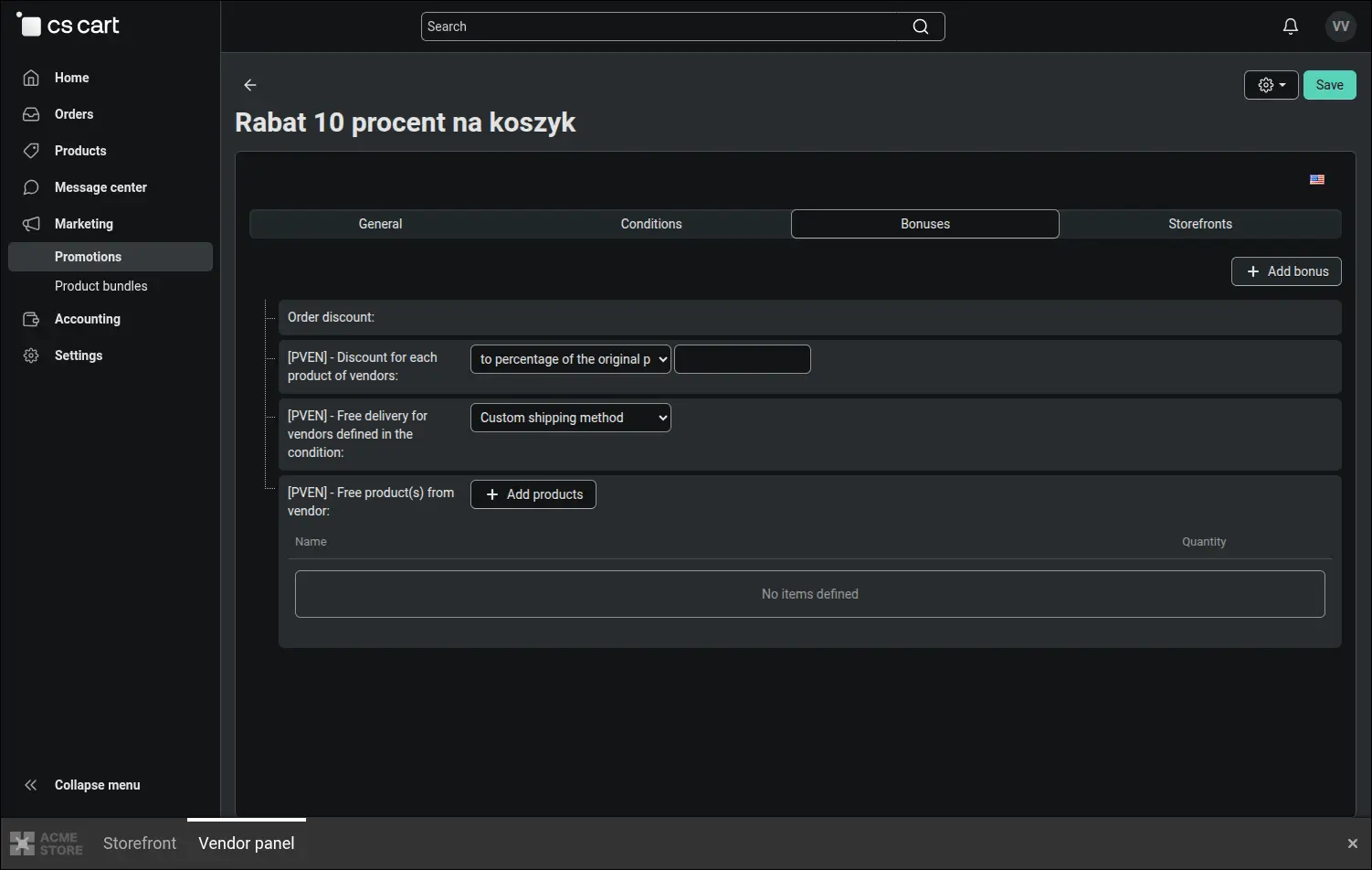
Screenshot 8 - bonuses that cover only the offer of the vendor running the promotion
Plan limits are not a clause in the terms of service but a real barrier at save time. A vendor who tries to enter a discount higher than the plan allows receives a message with the exact threshold, and the promotion never reaches the database. The boundary on the number of simultaneously active campaigns and the one on their duration work the same way, so a ninety percent typo never reaches a customer
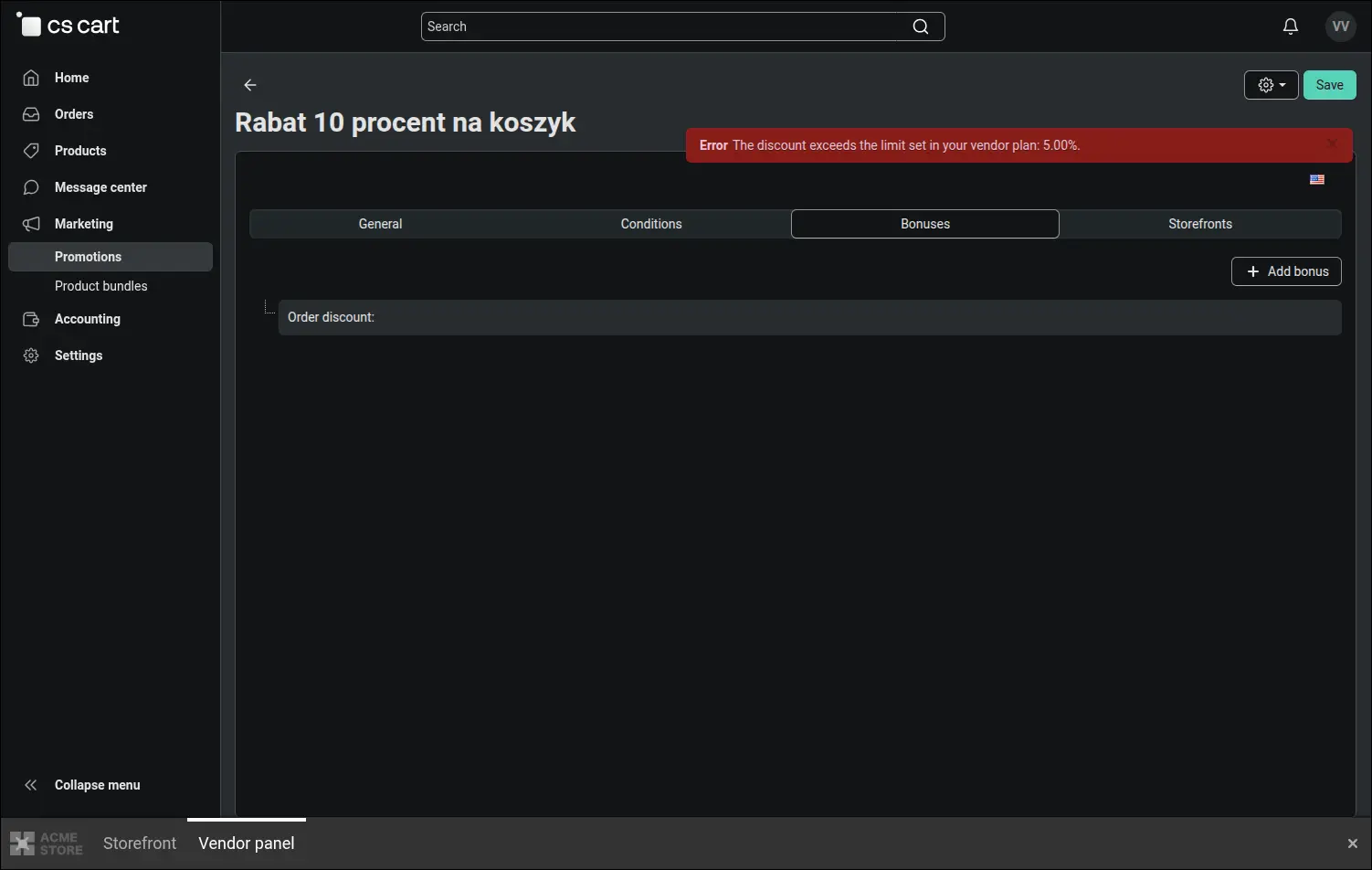
Screenshot 9 - a discount above the plan limit is not saved and the vendor gets a message
With moderation enabled the vendor is never left guessing. Above the promotion form they see its state, and in case of a refusal also the reason written by the administrator. Correcting the campaign and saving it again sends it for approval once more, with no e-mails to support and no guesswork about what went wrong
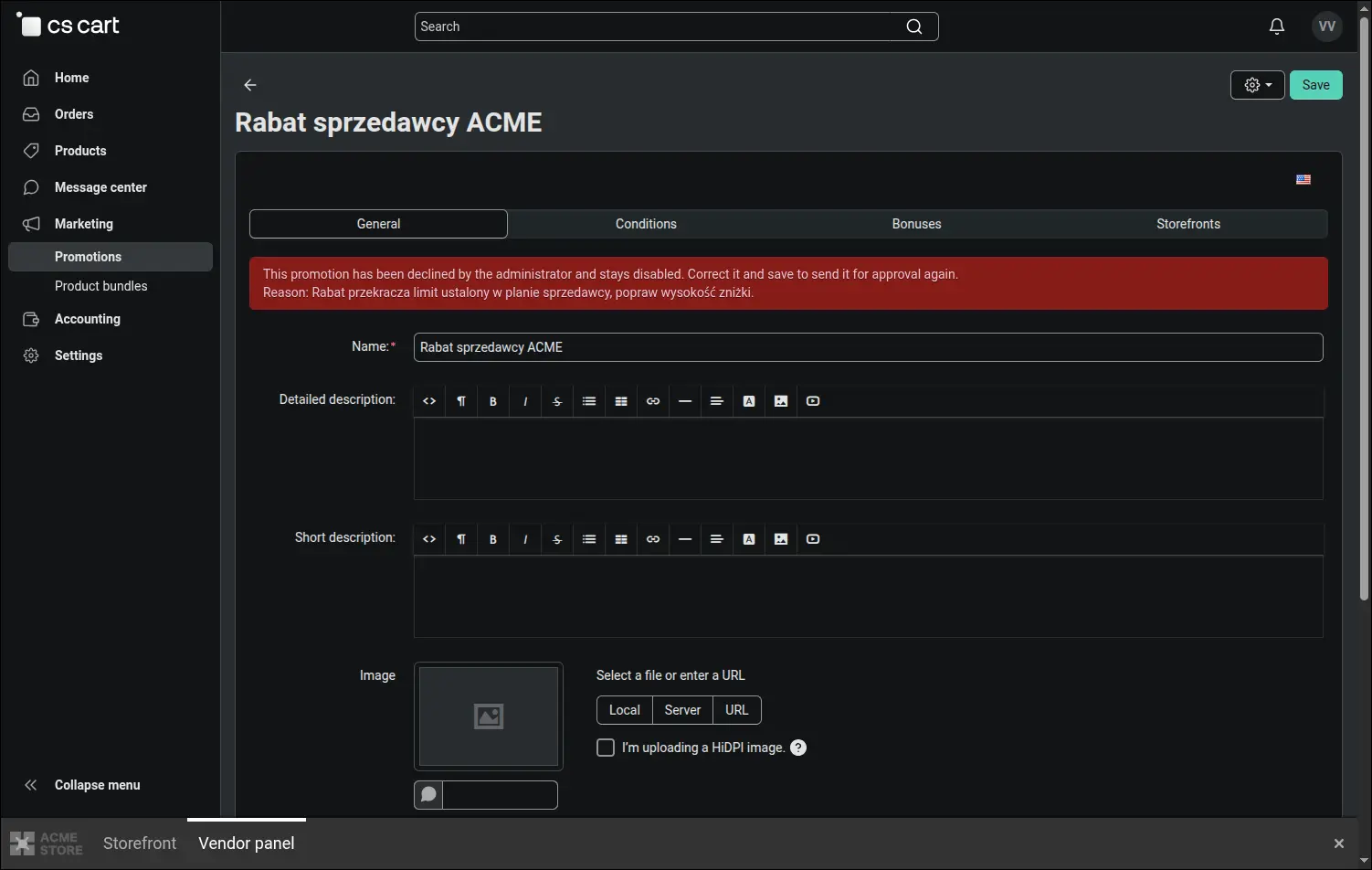
Screenshot 10 - the vendor sees the promotion status and the decline reason without contacting the administrator
On the marketplace side the whole moderation fits on one screen in the Marketing section. The queue separates submissions into waiting, approved and declined, and every entry shows the promotion, the vendor, the zone and the submission time. Approval gives the campaign the status the vendor asked for, a decline requires a reason and leaves the campaign disabled. With a few dozen vendors this is exactly what decides whether pre-moderation is workable or merely theoretical
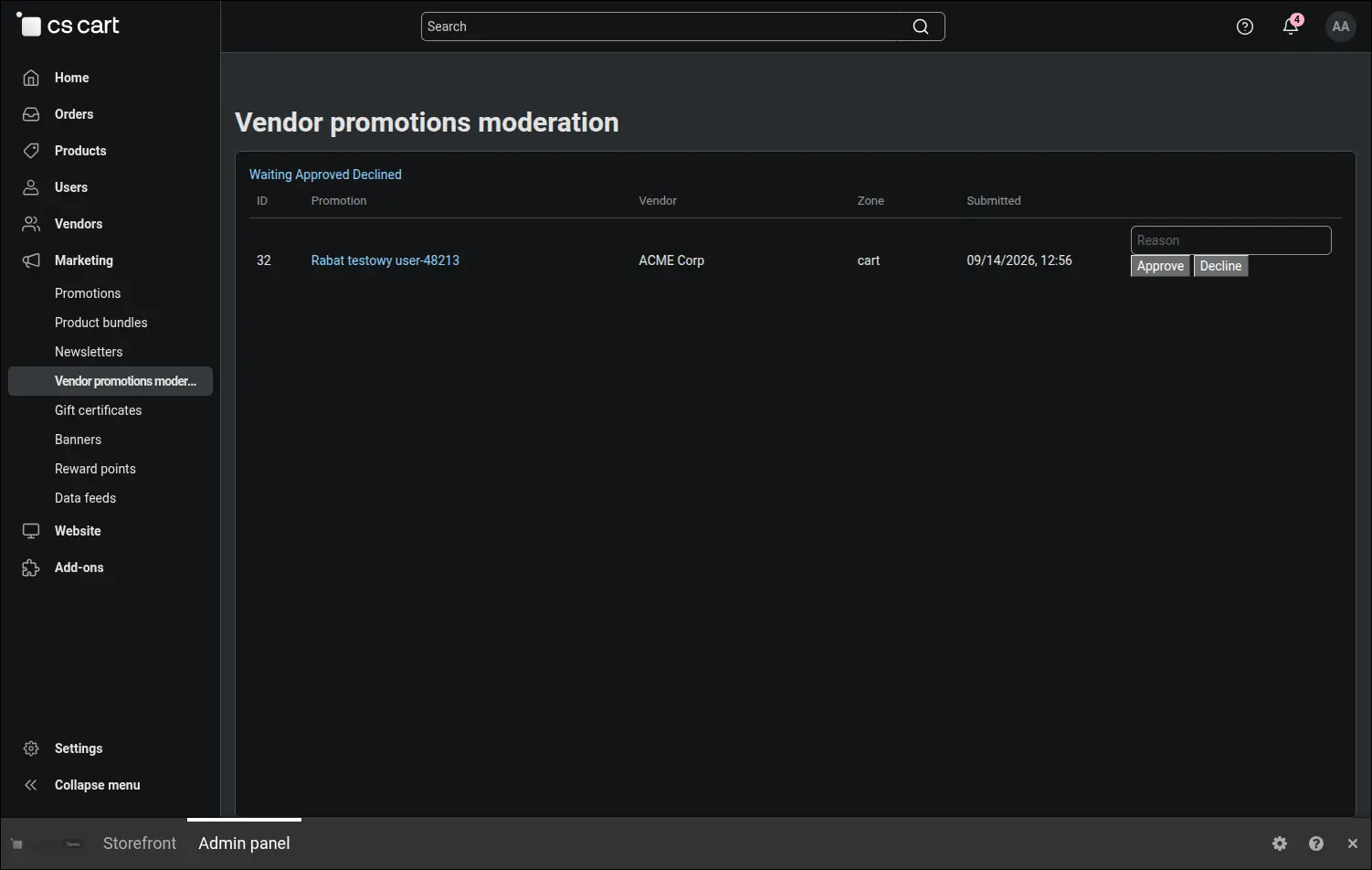
Screenshot 11 - the moderation queue: approve or decline a promotion from a single screen
The best proof shows up where the money is. In a cart holding products from two vendors the reduction covers the item of the company that announced the promotion, while the other vendor's goods keep their full price. Free shipping behaves in exactly the same way: Multi-Vendor calculates delivery separately for each company, and our add-on zeroes the rate in that one product group, leaving the remaining parcels untouched
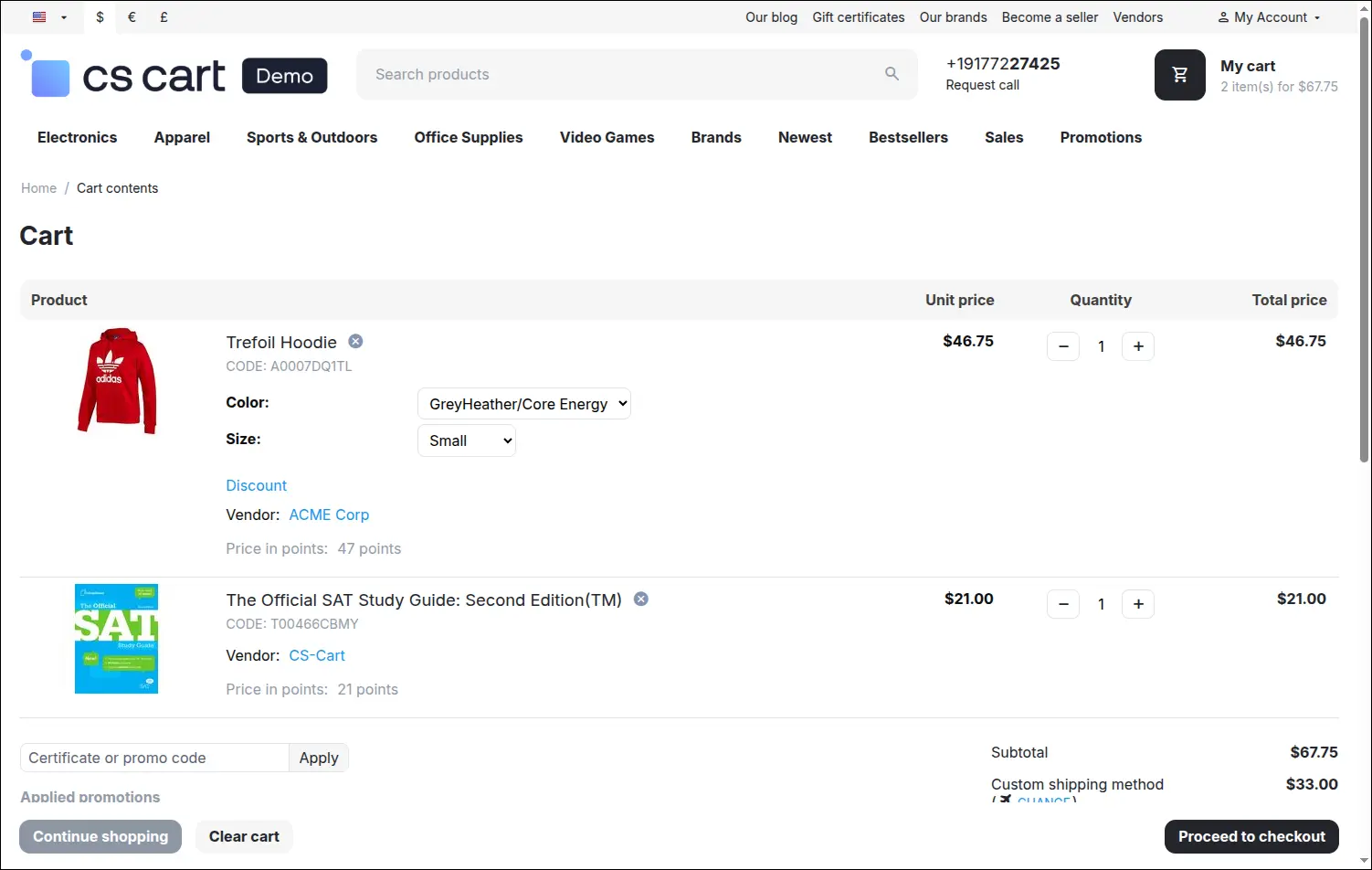
Screenshot 12 - the discount covers only the shipment and products of the vendor running the promotion
The Promotions and discounts for vendors add-on therefore solves two problems at once. It takes other people's sales off the administrator's desk and at the same time guarantees that the freedom given to vendors has firm boundaries: a reach defined by construction, limits written into the plan and pre-moderation wherever the marketplace wants the last word. Vendors receive the tool they have been waiting for, the support team gets its hours back, and the pricing policy of the platform stays under control.
Feel free to contact us and purchase the add-on!
Choose the most convenient form of payment for the add-on. You can pay once and use the add-on. Choosing a subscription payment (monthly or annual) means that you pay for the add-on at regular intervals and have access to the latest versions of the addon and technical support.