


GDPR extension - data retention

- — 12 months guarantee for all our add-ons
- — add-ons sold to entire world
- — stable, flexible, high-quality products
- — competitive prices, attractive discounts
- — quick and competent technical support
- — installation in 24 hours
- — personalized solutions - we'll write any add-on for you
An extension for Store Builder and Multi-Vendor closes a GDPR compliance gap that is easy to forget. The built-in GDPR module in CS-Cart anonymizes data only for registered customers, while orders placed by guests, without creating an account, carry a full set of personal data: first name, last name, address, phone, and email. Our add-on takes over those orders, lets you anonymize them one by one or in groups, and above all introduces a retention policy that keeps watch on its own, so data older than the defined period disappears without any staff involvement. It does not stop there. Customer data rarely leaves a store through a break-in, and far more often through ordinary daily work: through the order list opened for a tracking number, through an export of the entire customer base into a spreadsheet, and through a copy of the store pulled onto a developer machine. The add-on masks personal data on the panel screens, records every reach for it in an access log, and prepares a safe database copy for work outside the server.
See how it works, in about a minute
Full walkthrough, 6 minutes
Key Features
- Guest order anonymization one by one or in groups from the list, with line items and amounts left intact for accounting.
- An automatic retention policy in a cron job, with a configurable period, status exclusions, and test mode enabled by default.
- Personal data masking on the panel screens, with full values revealed by one deliberate click and a trace left in the history.
- An access log that raises an alert when one person reads or exports an unusual amount of data, and when somebody switches the add-on off.
- An encrypted order archive in place of anonymization beyond recovery, so a sales document can still be restored for a tax office or a court.
- Database copy anonymization for development work, run from the console and protected by four independent gates.
- Clearing that reaches every place the store keeps customer data: the delivery address held in the order structure, text typed into a product option, files uploaded by the customer, gift certificates and shipment comments.
- Order reads through the REST interface recorded as well, so the data pulled by integrations is as visible as the data viewed in the panel.
Before we get to the screens, it helps to separate three things the add-on does independently of one another. The first cleans data inside the store and runs without human involvement. The second covers data on screen without touching the database. The third cleans a copy of the database away from the store, for development work. Their reaches do not overlap, and mixing them up causes the most common misunderstandings:
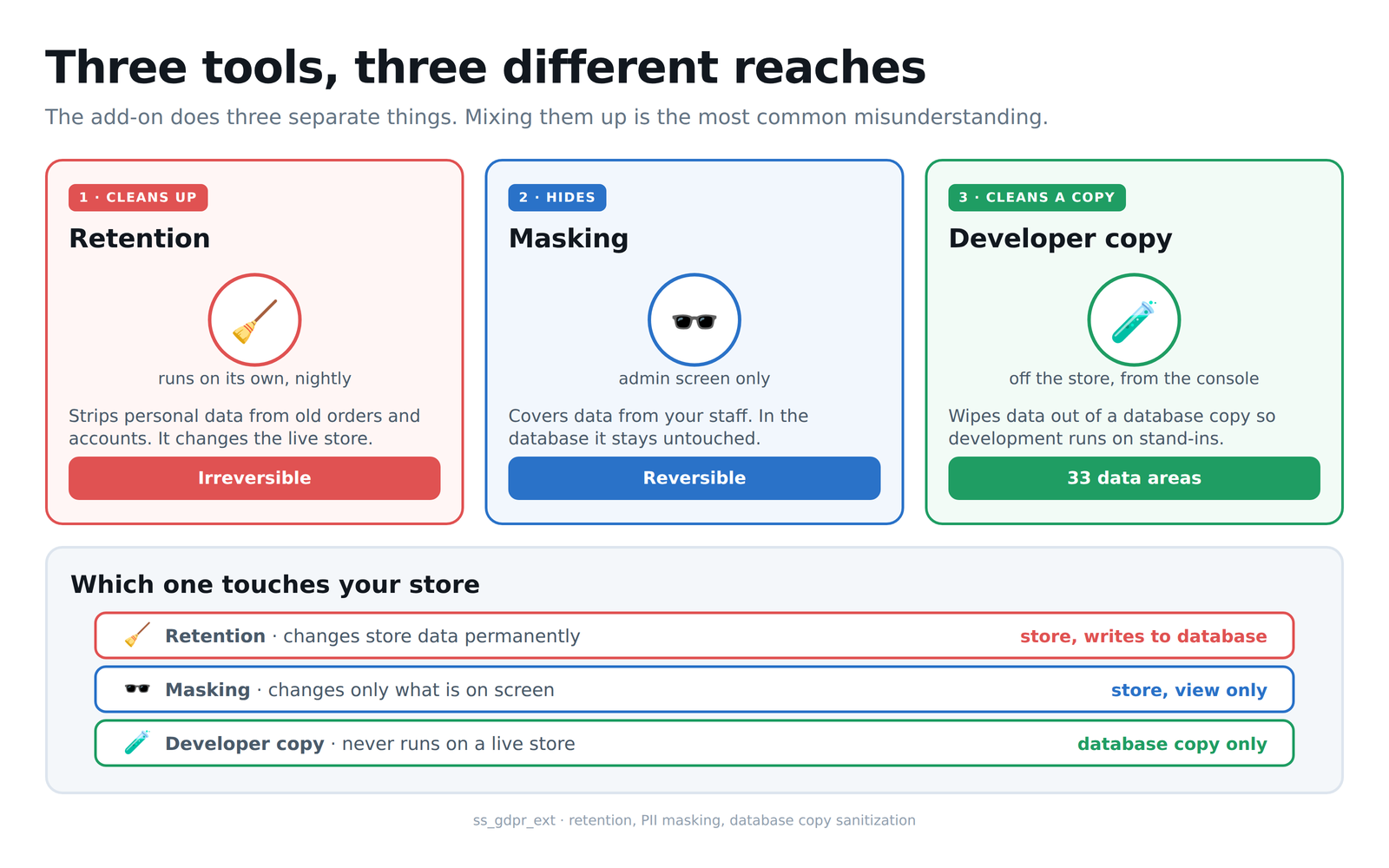
Diagram 1: the three mechanisms and the reach of each one
It all starts with a single setting. In the Data Retention tab you state how many years after a customer's last activity their data should be anonymized, and next to it you tick the order statuses excluded from that rule. On the screenshot the period is six years, which matches the usual requirement for keeping tax documentation, and three statuses are selected: open, awaiting delivery and awaiting a call. That second field matters more than it looks, because an order with an open return or an ongoing complaint keeps its full data for as long as the case stays unresolved, even when it has formally passed the retention period:
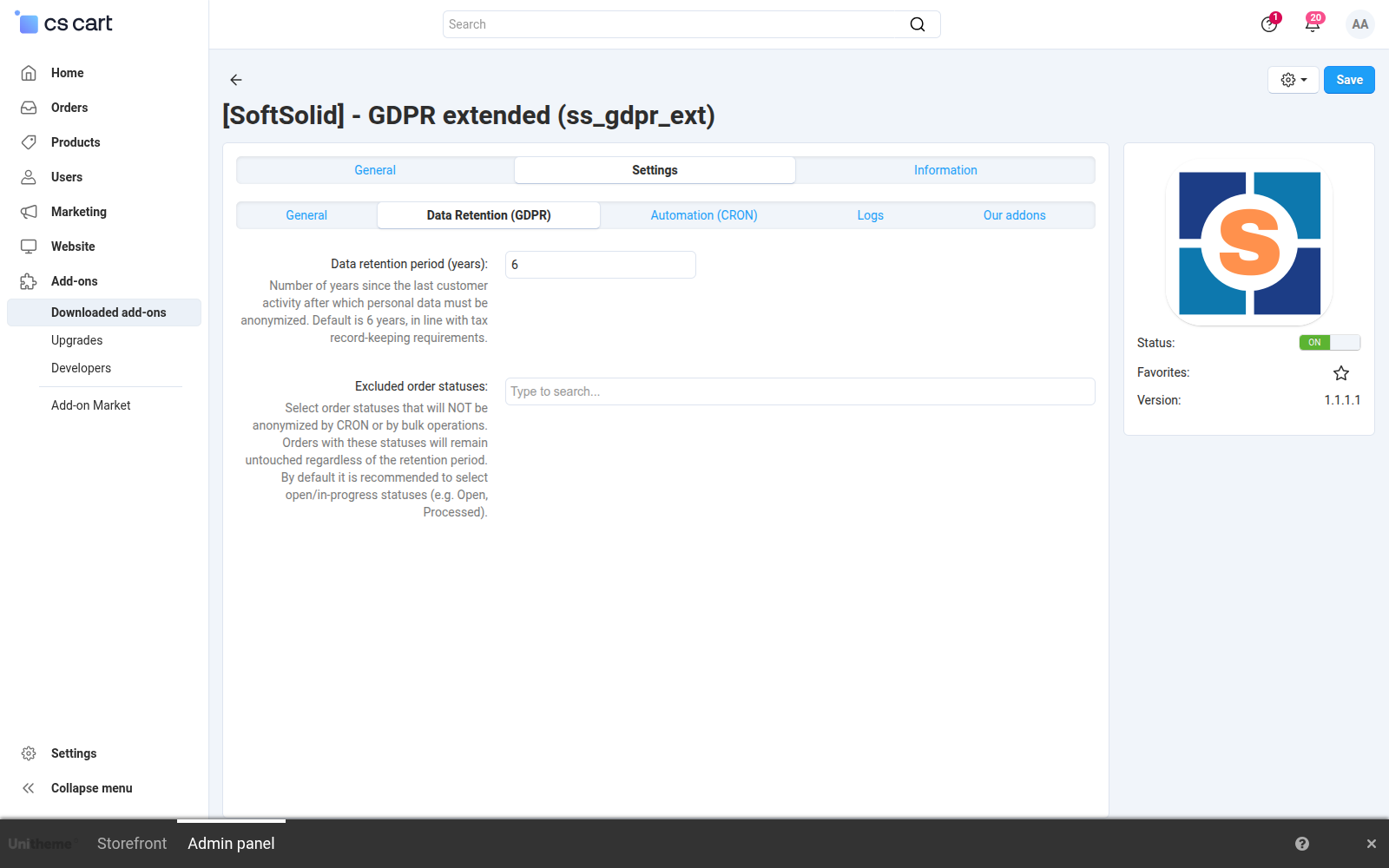
Screenshot 1: the retention period and the statuses excluded from automatic anonymization
The automatic cleanup is deliberately narrow. It covers orders placed without an account and customer accounts, and everything beyond those two areas stays untouched. An order qualifies only once it is older than the configured threshold and its status is absent from the exclusion list:
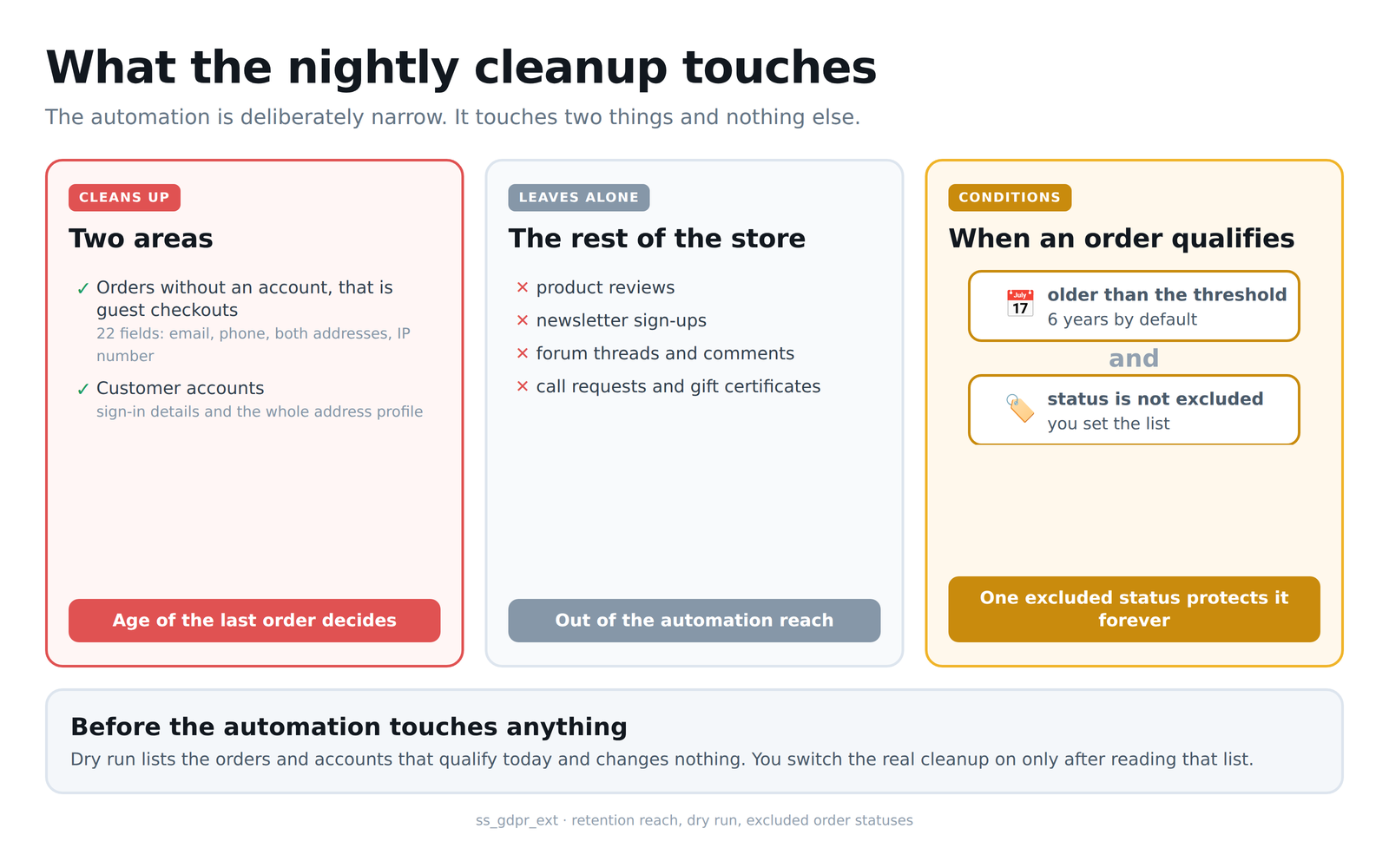
Diagram 2: reach of the automatic cleanup and the conditions an order must meet
The second tab governs what the staff sees every day. The Mask personal data switch turns on shortening of values across the panel screens, and the list below decides which fields it covers: the mail address, the phone, the surname, the address and the payment details. A separate field points out the administrator groups covered by masking, so the support desk can work under different rules than accounting. An empty selection means everyone here, so the default setting protects the data as widely as possible:
Screenshot 2: the scope of data masking and the administrator groups
The audit tab sets when the store should react to an unusual read. The alert threshold is given in records and the time window in minutes: on the screenshot that is two hundred records within fifteen minutes, clearly above a normal working day of the support desk. Exports have their own threshold counted in occurrences, because many small exports are the usual way around a threshold counted by volume. Below sit the log retention period and the address that notifications should go to:
Screenshot 3: alert thresholds, the time window and the notification recipient
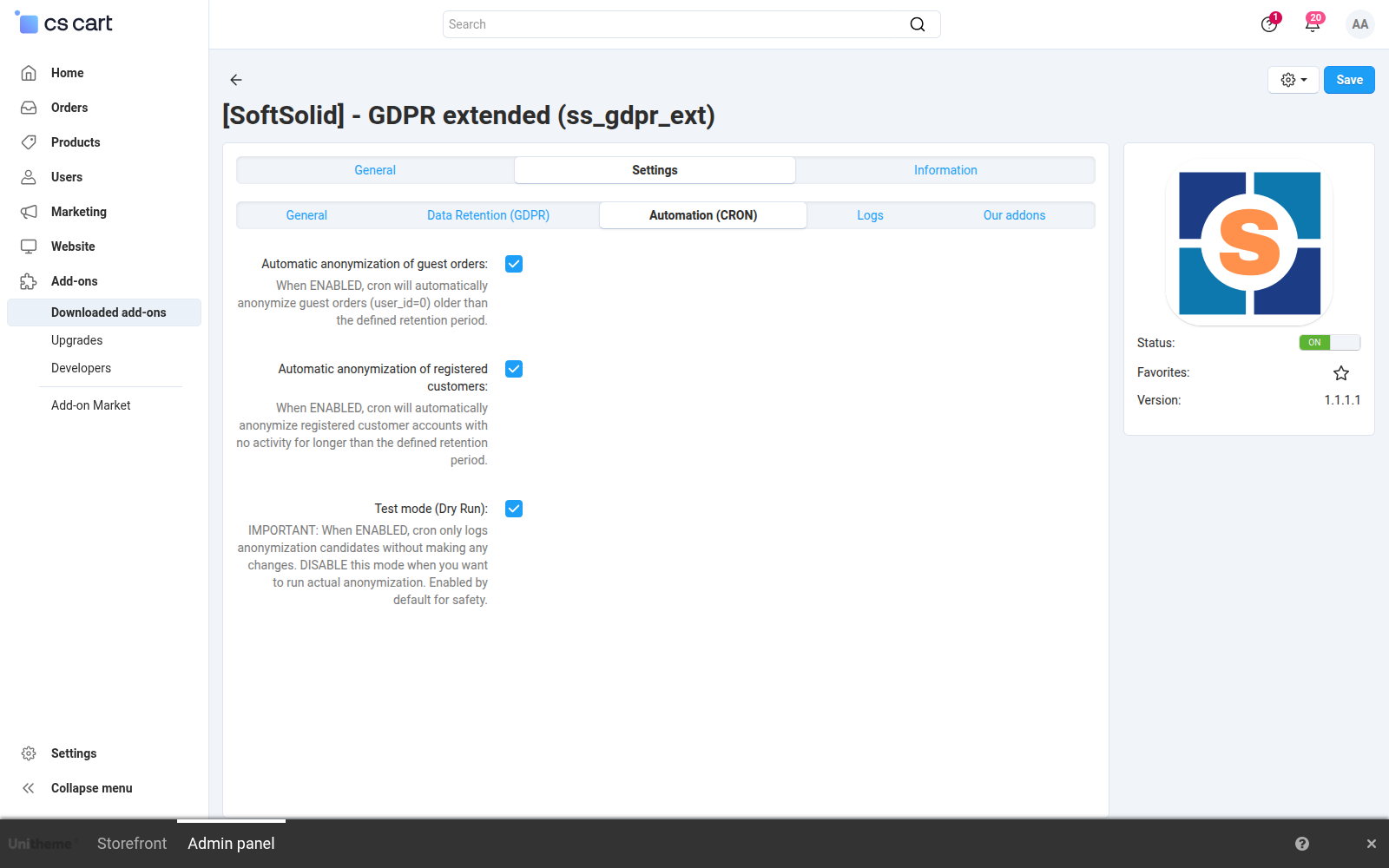
Automation comes down to three switches. The first two decide whether the scheduled job covers guest orders, registered customer accounts, or both. The third is test mode, enabled by default: a run then finds the candidates, counts them and records them in the history, but changes not a single row in the database. The first encounter with retention therefore ends with a report rather than a surprise, and the decision to switch it on for real comes only after looking at the numbers:
Screenshot 4: the scope of automatic anonymization and test mode
Before you see a masked list, it is worth telling apart two situations that look almost identical on screen. Masking covers data in the view only, while the database keeps it intact and returns it the moment the setting goes off. Anonymization overwrites the values in the database, and no setting brings them back:
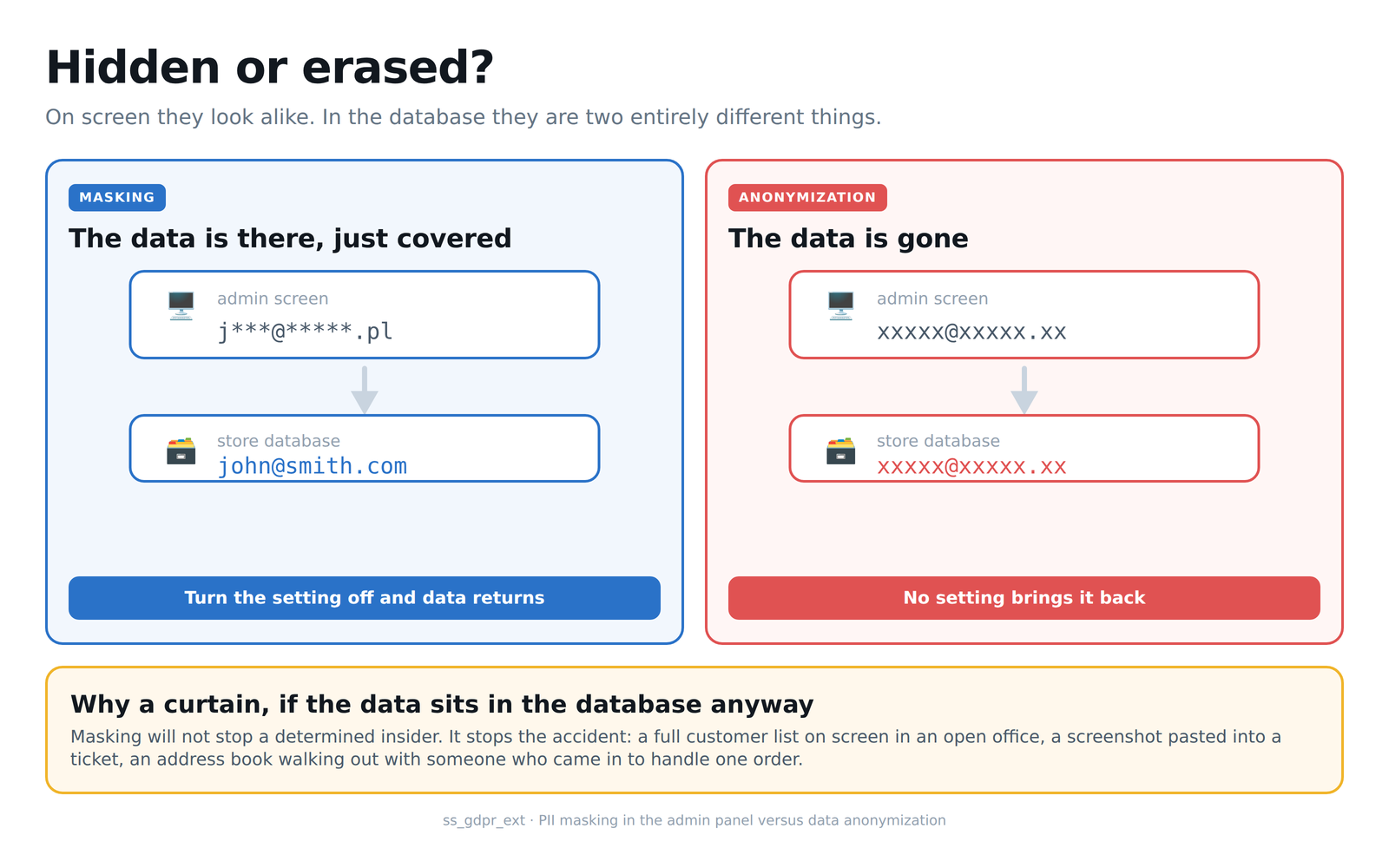
Diagram 3: masking in the admin panel compared with data anonymization
This is how the order list looks with masking on, and it is the screen that most people pass by during the day. The customer column holds a first name with the surname cut to an initial, and the phone column keeps the last three digits. Orders from 110 upwards look different, because they have already been through retention: substitute values stand where the data used to be. The order number, the status, the date and the amount stay untouched, so the staff still recognises an order and does their job, only without a full set of personal data on the screen:
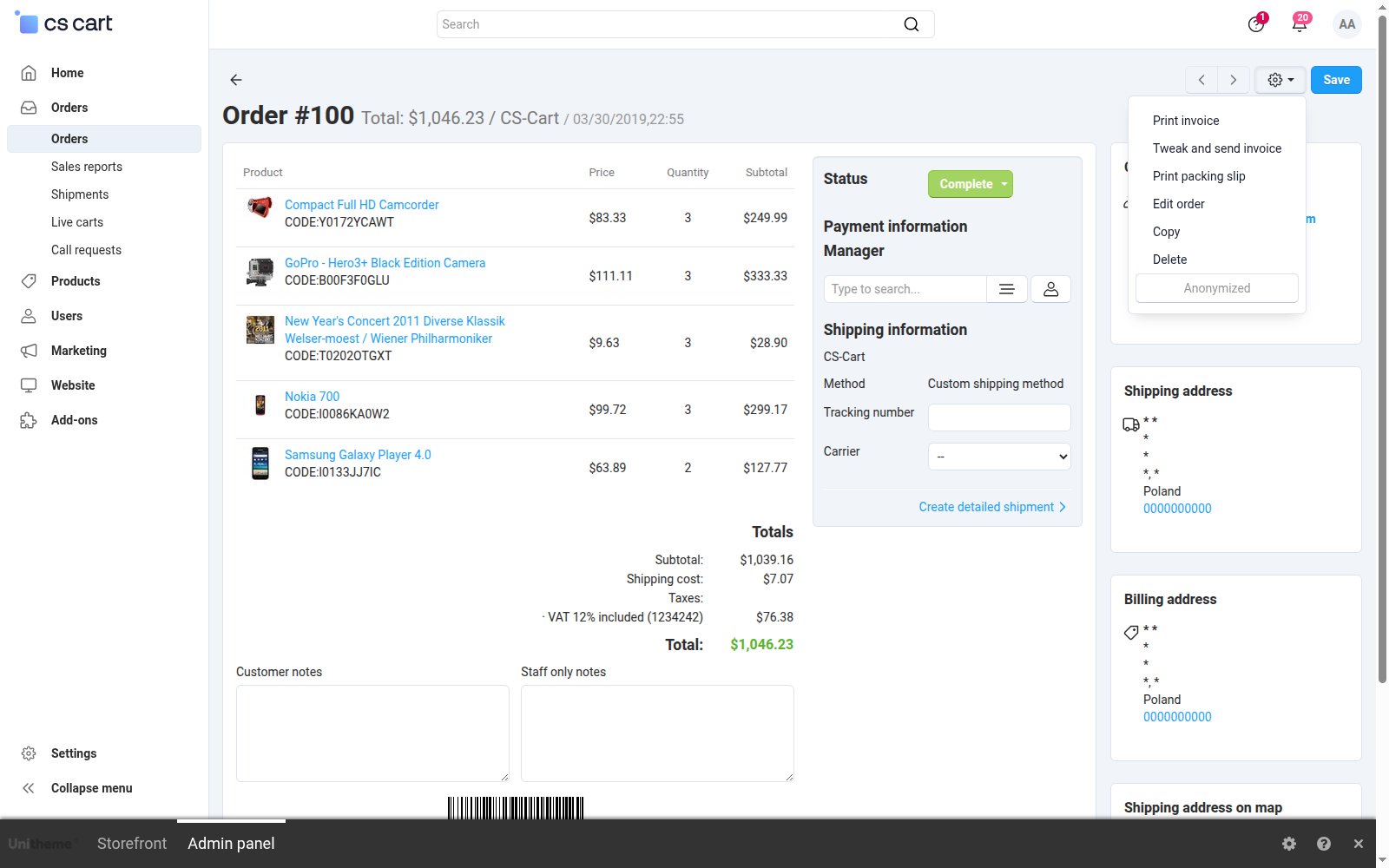
Screenshot 5: the order list with masked personal data
The same masking covers the customer list. The surname is cut to an initial, the mail address to the first three characters before the at sign, and the phone number to its ending. The operational columns, that is the number of orders, their value and the account status, stay fully legible, because without them the list would stop being usable. It is also visible here that the protection does not depend on whether the customer ever bought anything:
Screenshot 6: the customer list with masked contact details
The curtain is not an absolute barrier, and it was never meant to be one. Staff sometimes need the full address, so the add-on provides a separate reveal request, and every use of it leaves an entry in the log. What the reveal returns depends on the state the data is in:
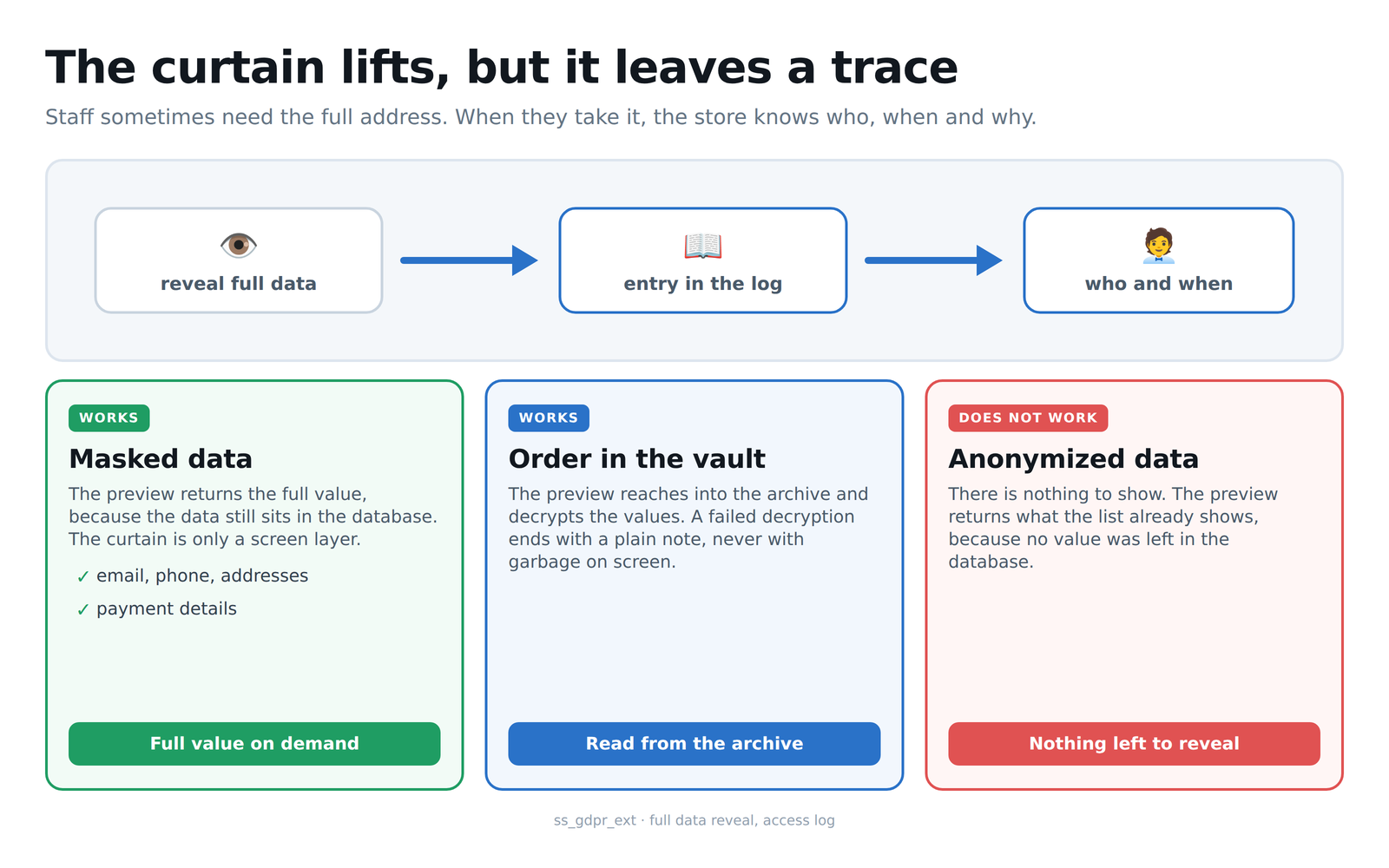
Diagram 4: revealing full data and the trace it leaves behind
When the full data is genuinely needed, an item in the row menu opens it in a separate window. Every field has its own button that copies the value to the clipboard, so the staff retypes nothing by hand. At the top of the window sits a note that the preview has been recorded in the operation history together with the administrator account and the time, and right below it an explanation that the values were restored from the encrypted archive, because this order has already been through retention. The store therefore shows the full data of a person whose personal details have left the order table, and it does not lose track of who reached for them:
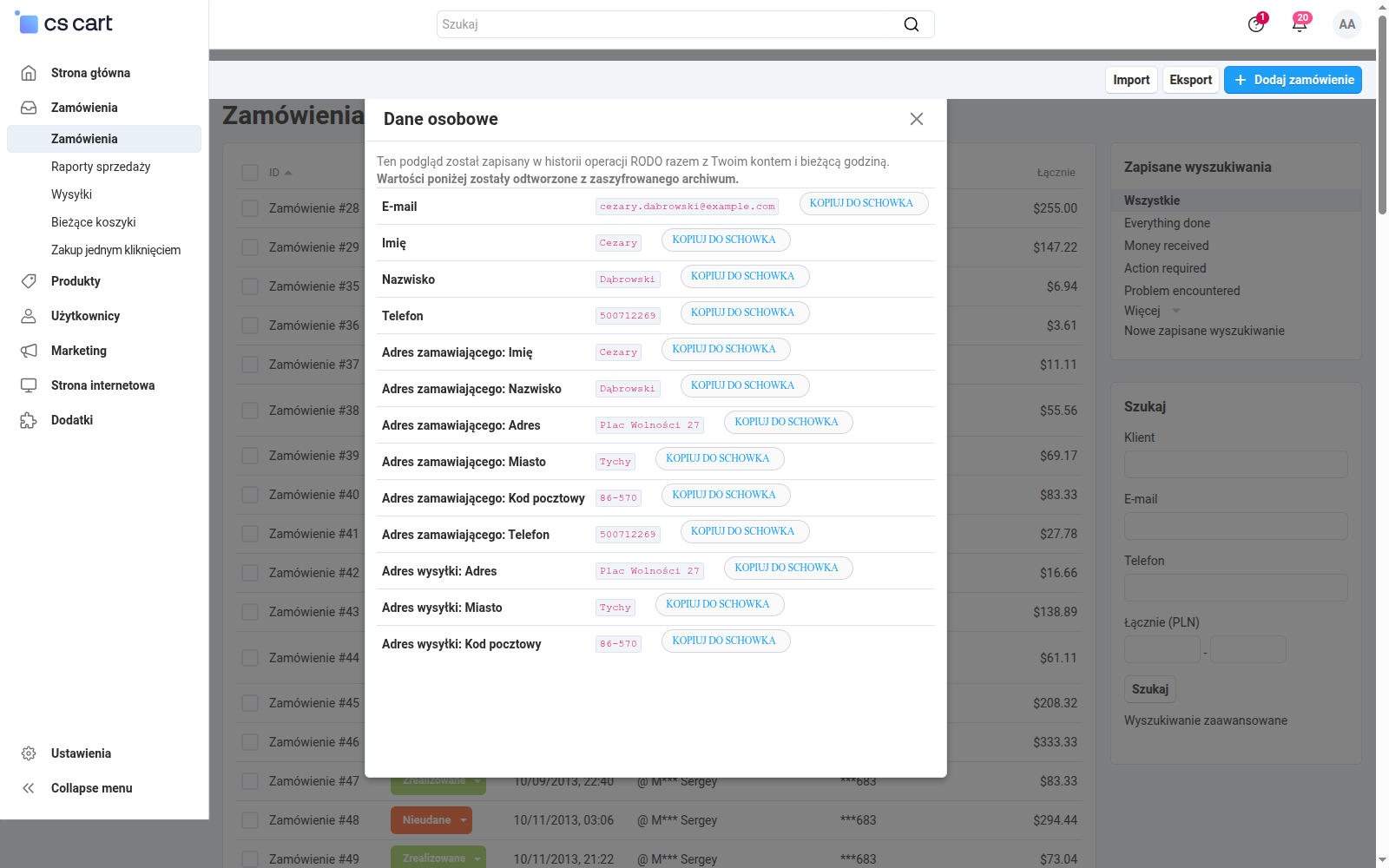
Screenshot 7: revealing the full personal data under control
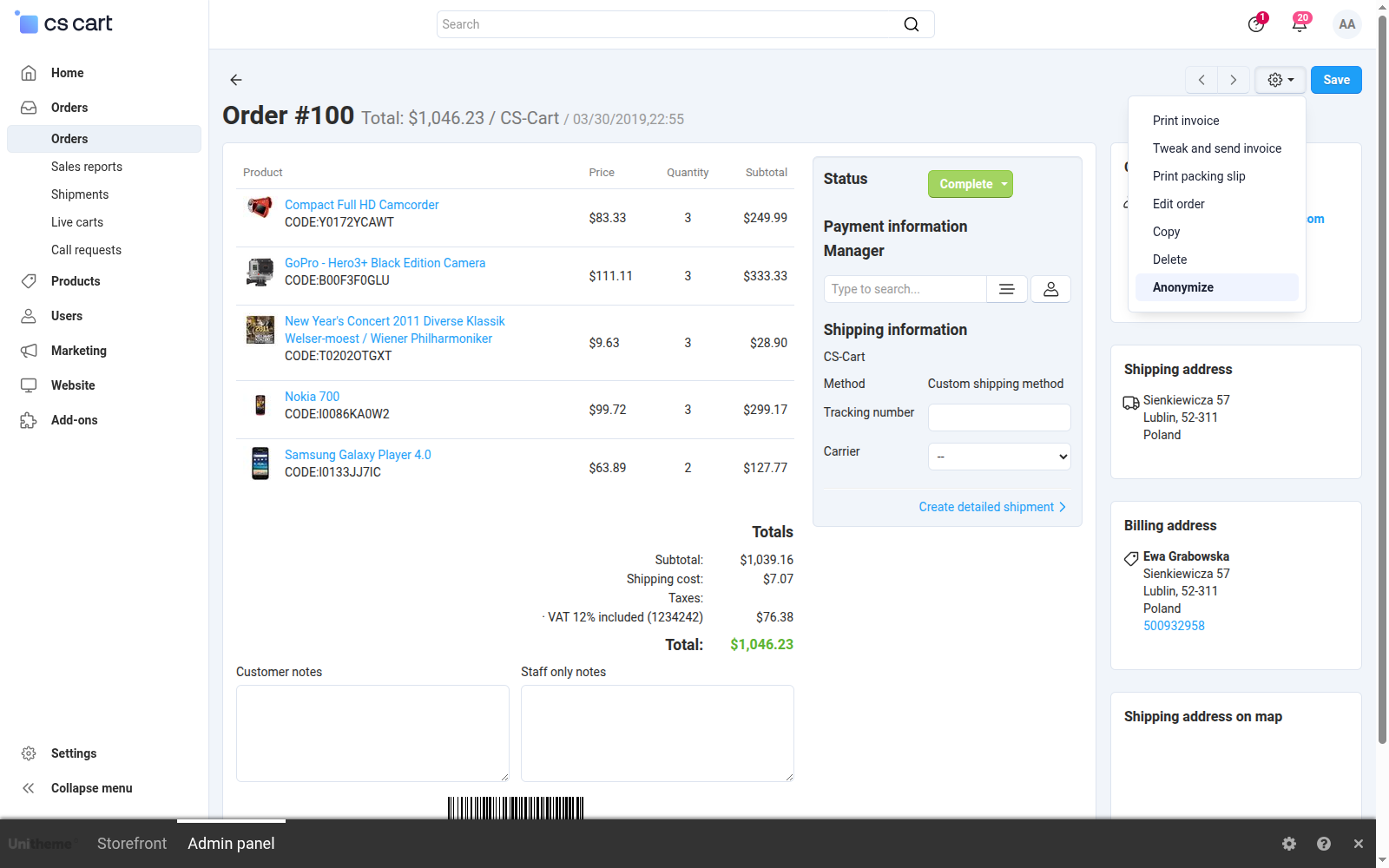
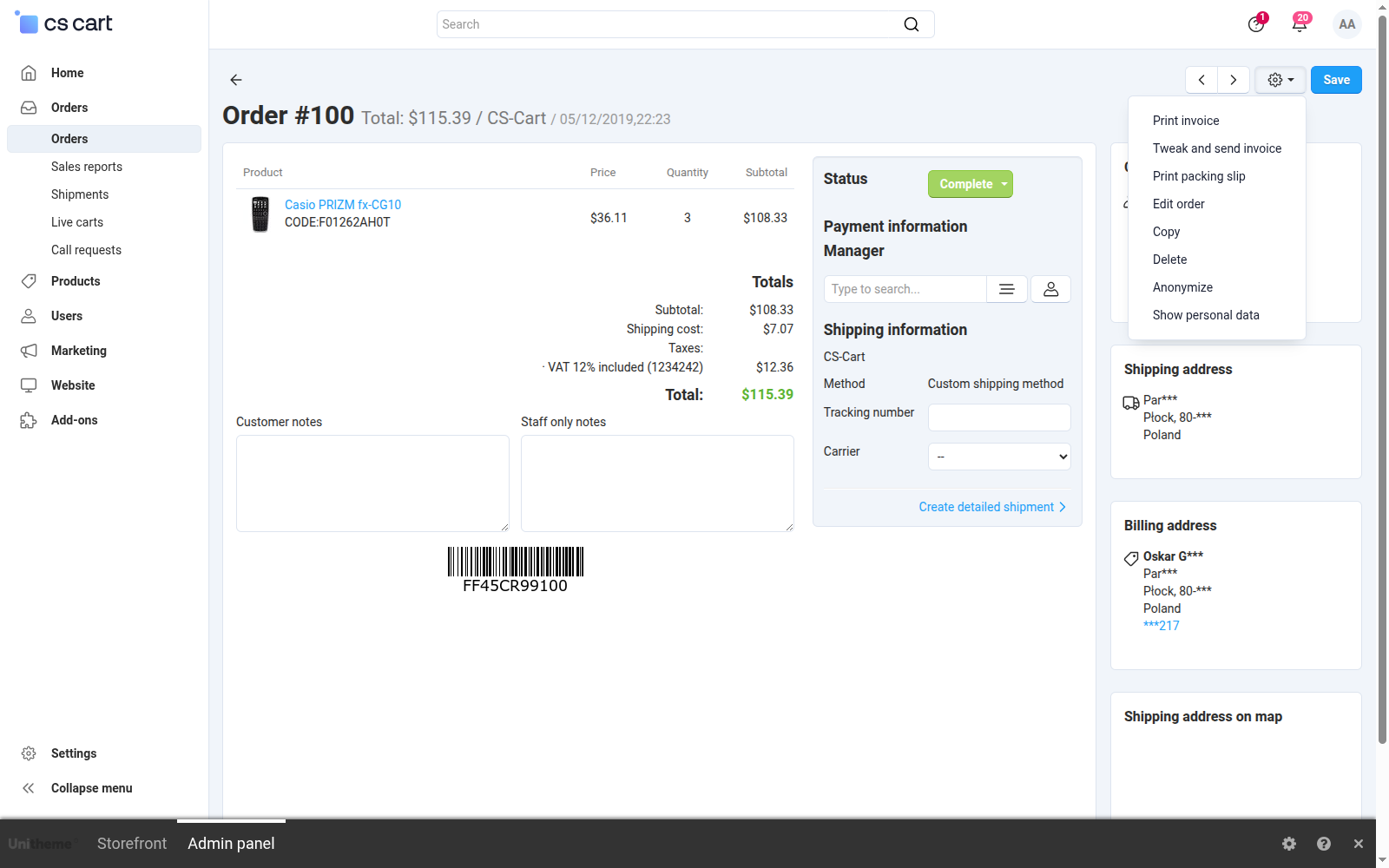
A single order is handled in the place you know best. In the order details action menu, next to the core printing and editing items, two new ones appear: Anonymize and Show personal data. The first shows up only where it makes sense, next to a guest order that has not been processed yet. An order of a registered customer goes to the core GDPR mechanism instead, so the two tools never get in each other's way:
Screenshot 8: the add-on items in the order action menu
You are about to see an order after the operation, so it helps to know that the add-on offers two roads for old data. The first overwrites it for good. The second moves it into an encrypted archive it can be restored from, for as long as the key file exists:
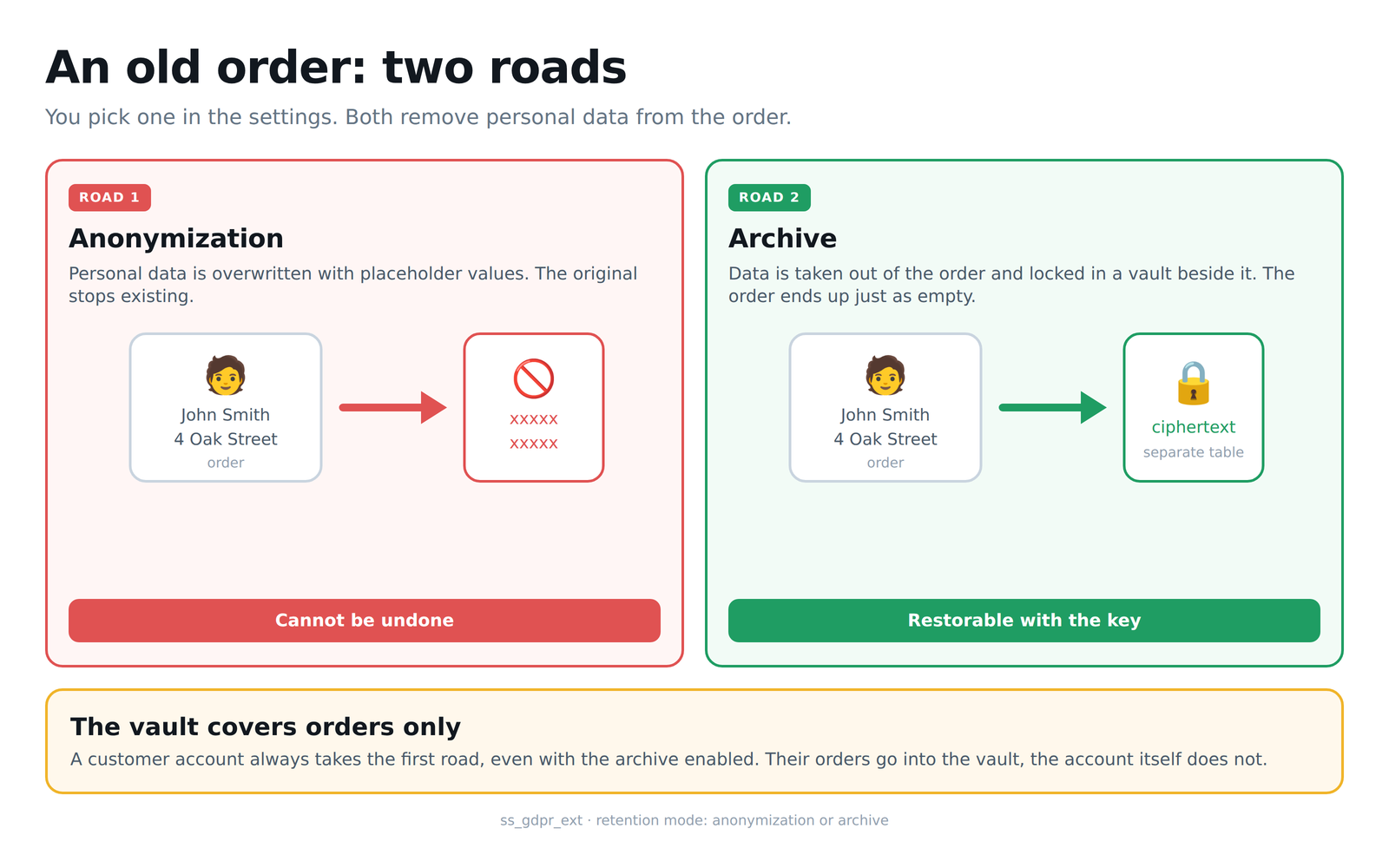
Diagram 5: anonymization and archive as two roads through the same cleanup
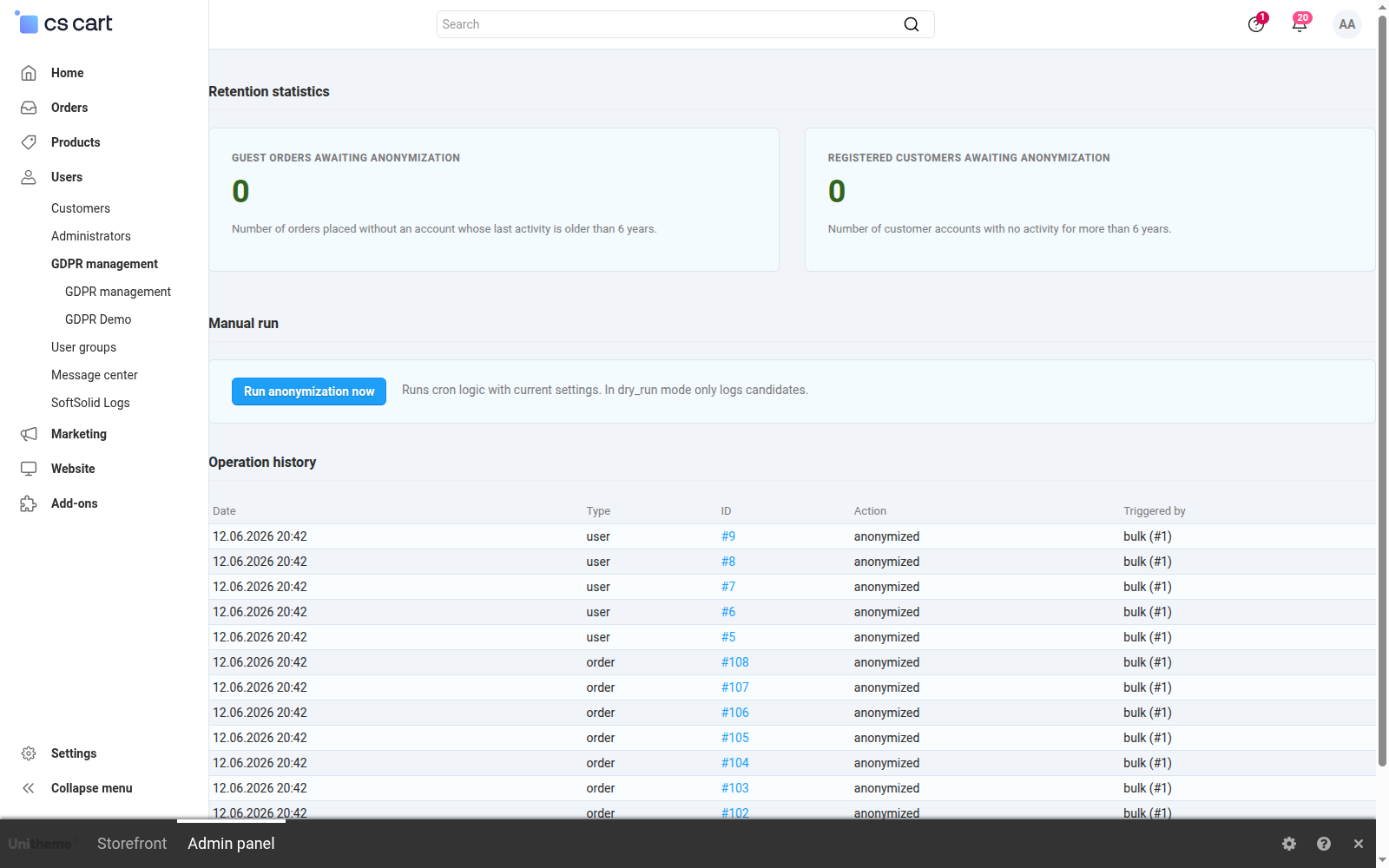
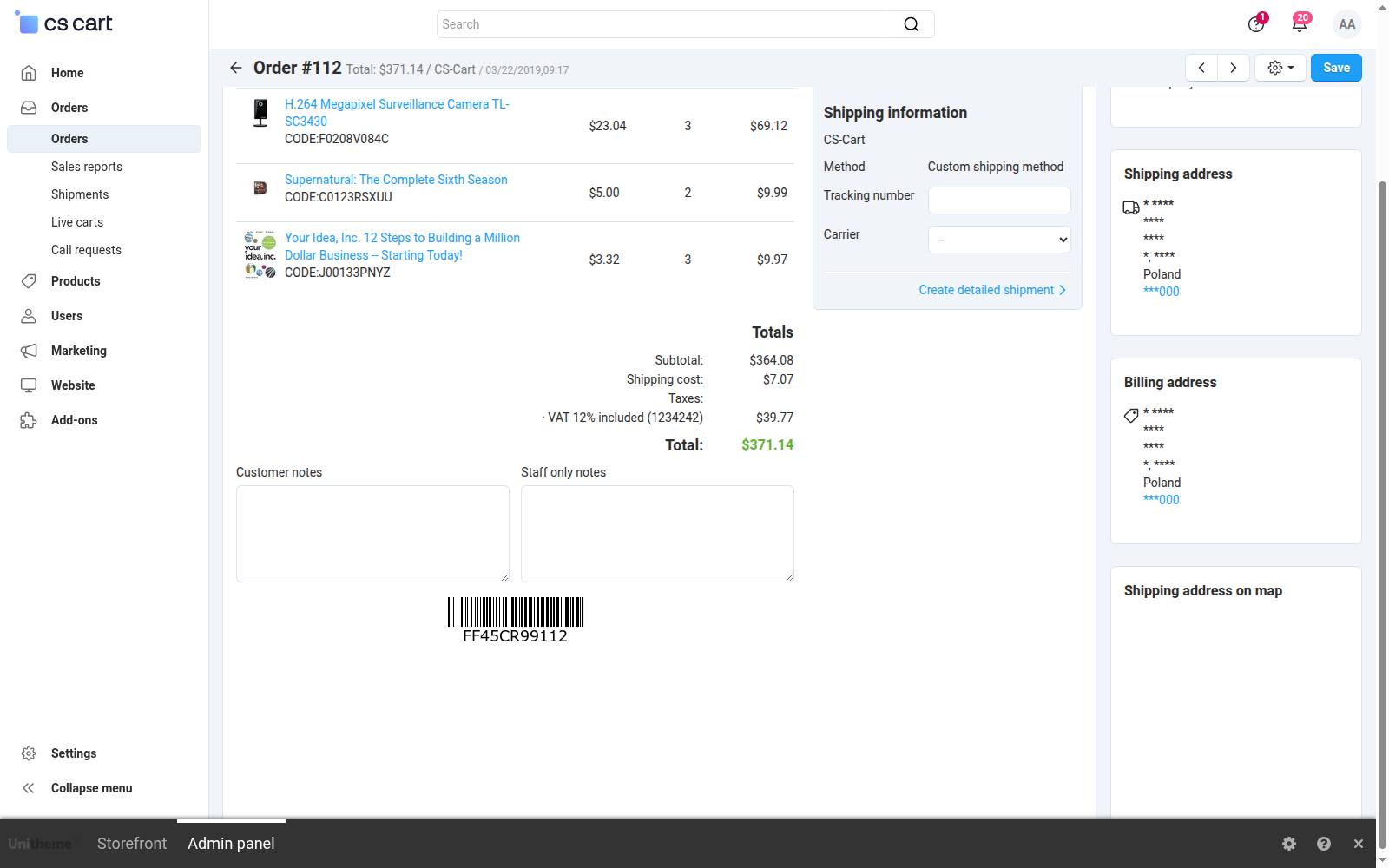
Once the operation is done, the same order looks completely different. In the customer section the first name and the surname have given way to asterisks, the mail address has taken a neutral form with a prefix, and the phone number has been zeroed. The line items, amounts and taxes on the left stay untouched, so the document still adds up in accounting and in the sales reports. This state cannot be undone, which is why the add-on guards it with three safeguards at once: test mode, excluded statuses and a confirmation prompt:
Screenshot 9: the order after anonymization, data replaced, amounts intact
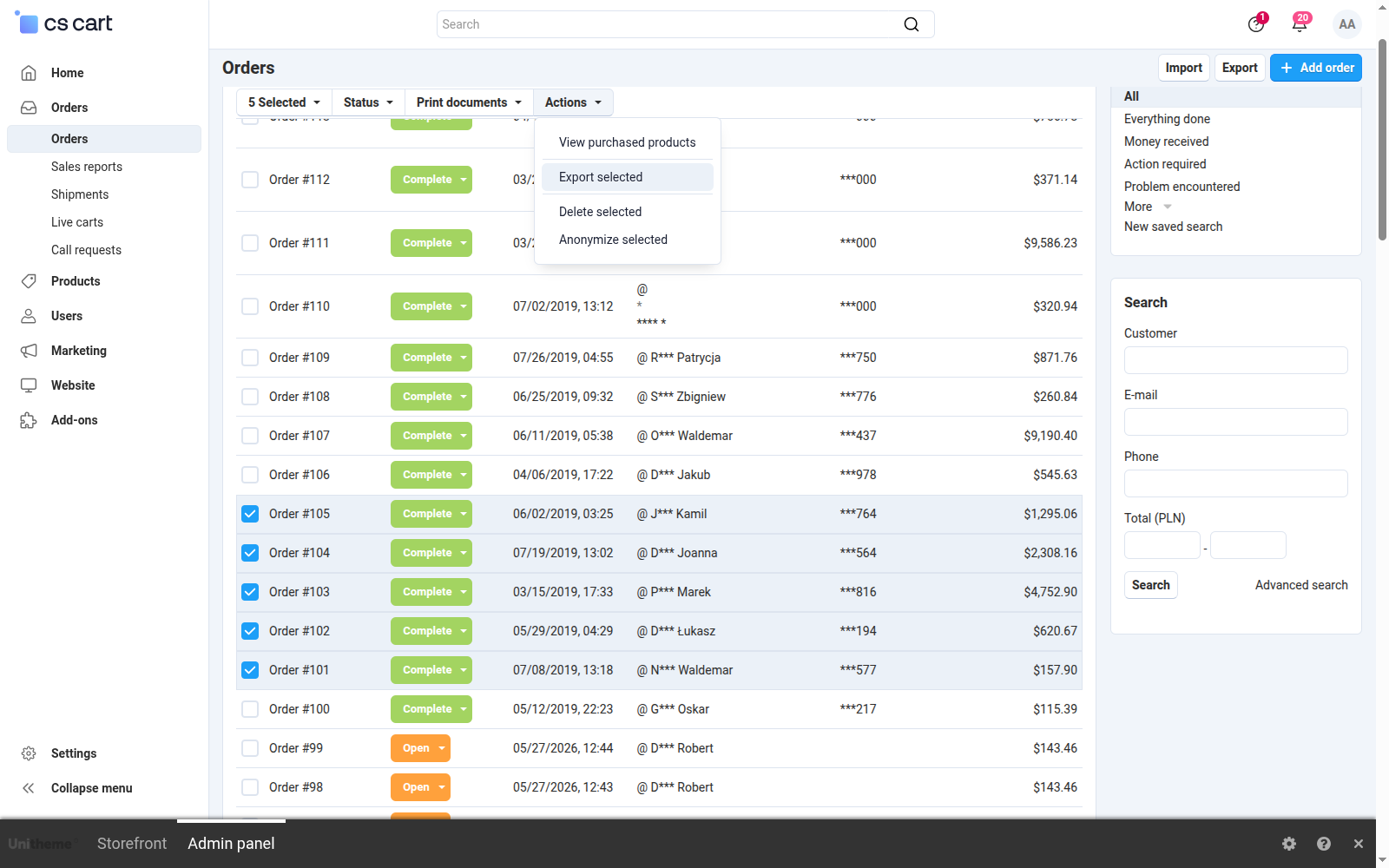
When clearing up after years, single orders are not enough. Once rows are ticked on the list, the bar at the top shows how many are selected, and the Actions menu holds an Anonymize selected item next to the core export and delete operations. One command then covers the whole selected set, and the store asks for confirmation first, because the operation cannot be undone. The same possibility works on the customer list:
Screenshot 10: anonymizing many selected orders with a single command
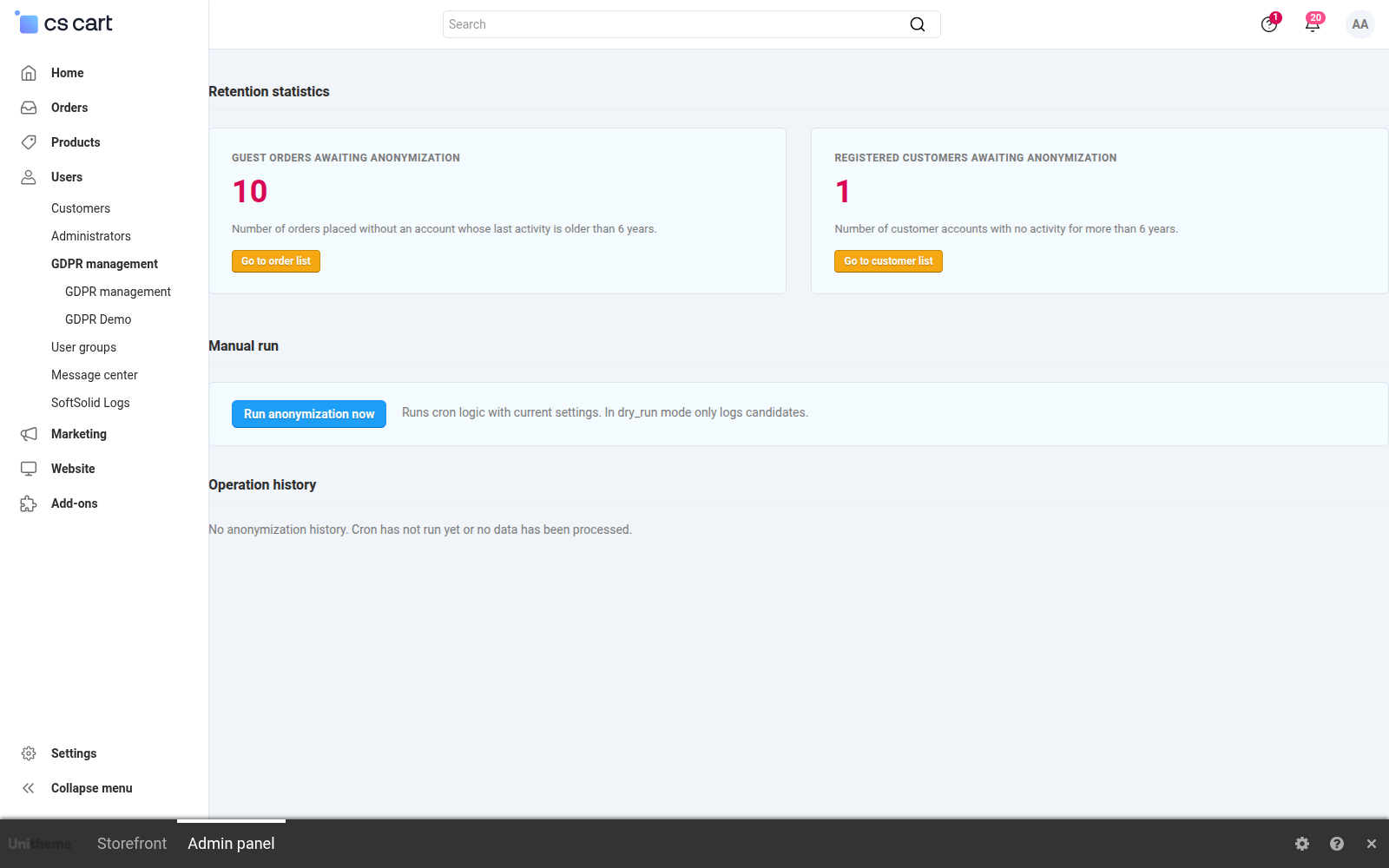
The GDPR management screen opens with whatever calls for a human reaction. A highlighted alert section reports that an administrator exceeded the data read threshold within the time window, together with the date, the account and the number of records read. Below stand two counters of anonymization candidates, each with a button leading straight to the matching list, and under them a button that runs the whole pass by hand, without waiting for the server schedule:
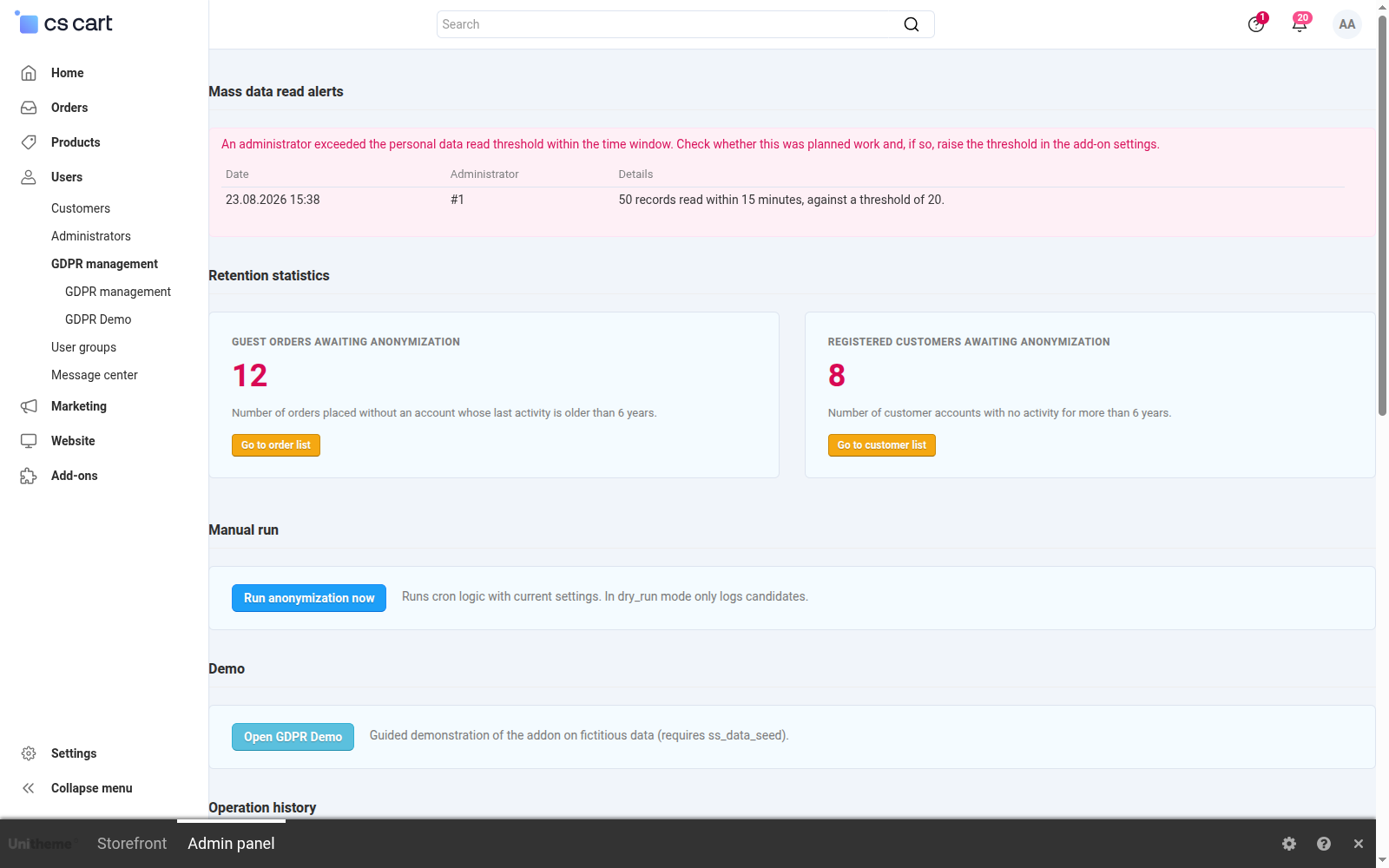
Screenshot 11: the mass read alert and the retention statistics
Further down the same screen lies the operation history, the material for an inspection. Every row says when the operation took place, which record it concerned, what action it was and what triggered it. The add-on's whole repertoire is visible side by side: anonymizing an order, moving it to the archive, clearing the source columns, previewing the full data and the mass read alert. The order number is a link, so from the history you go straight to the document the entry is about:
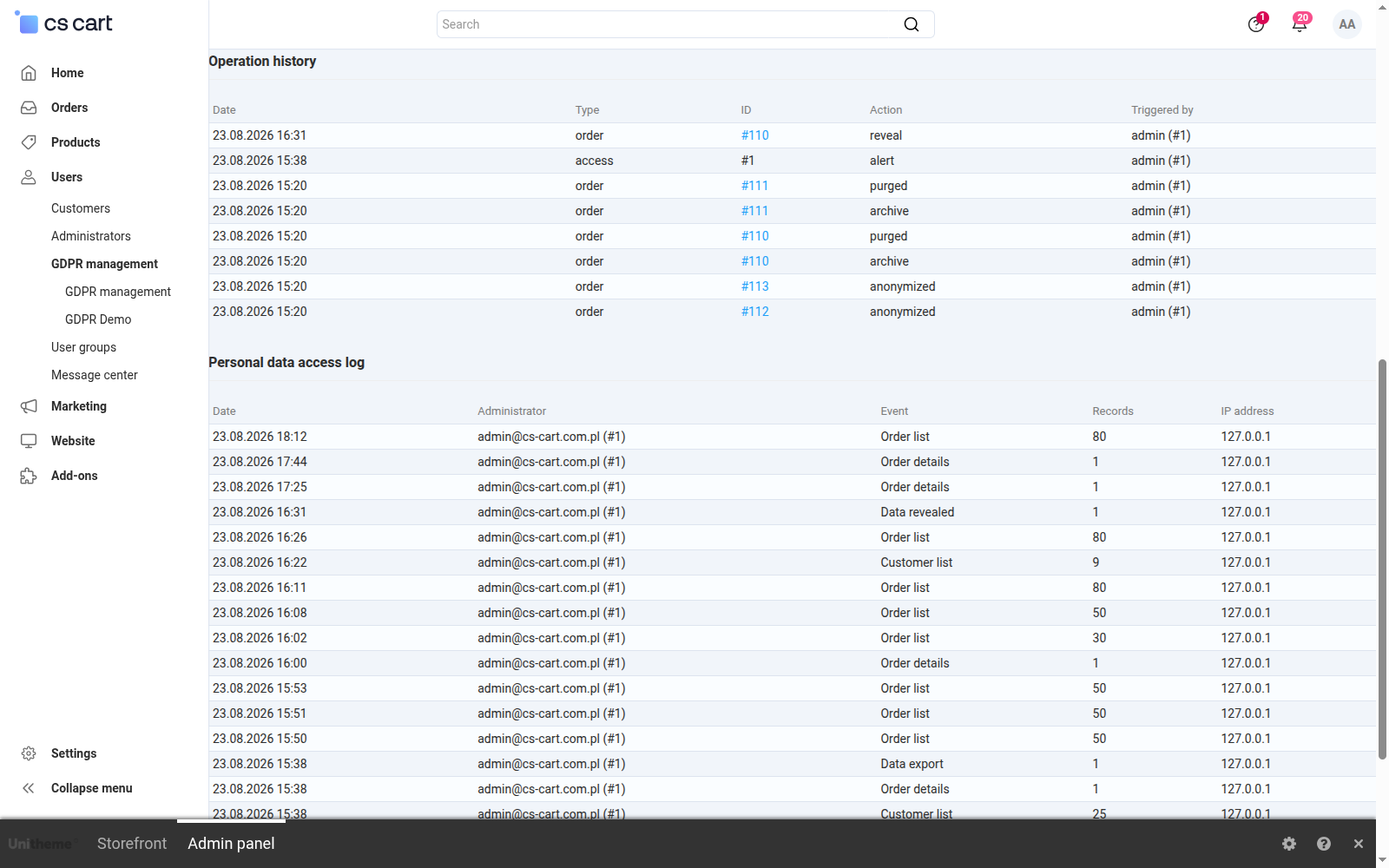
Screenshot 12: the history of operations on personal data
The access log measures two different things with two different units, and that distinction is deliberate. Ordinary browsing is counted in records seen within a time window, while exports are counted in runs, because the store platform does not reveal how large an exported file was:
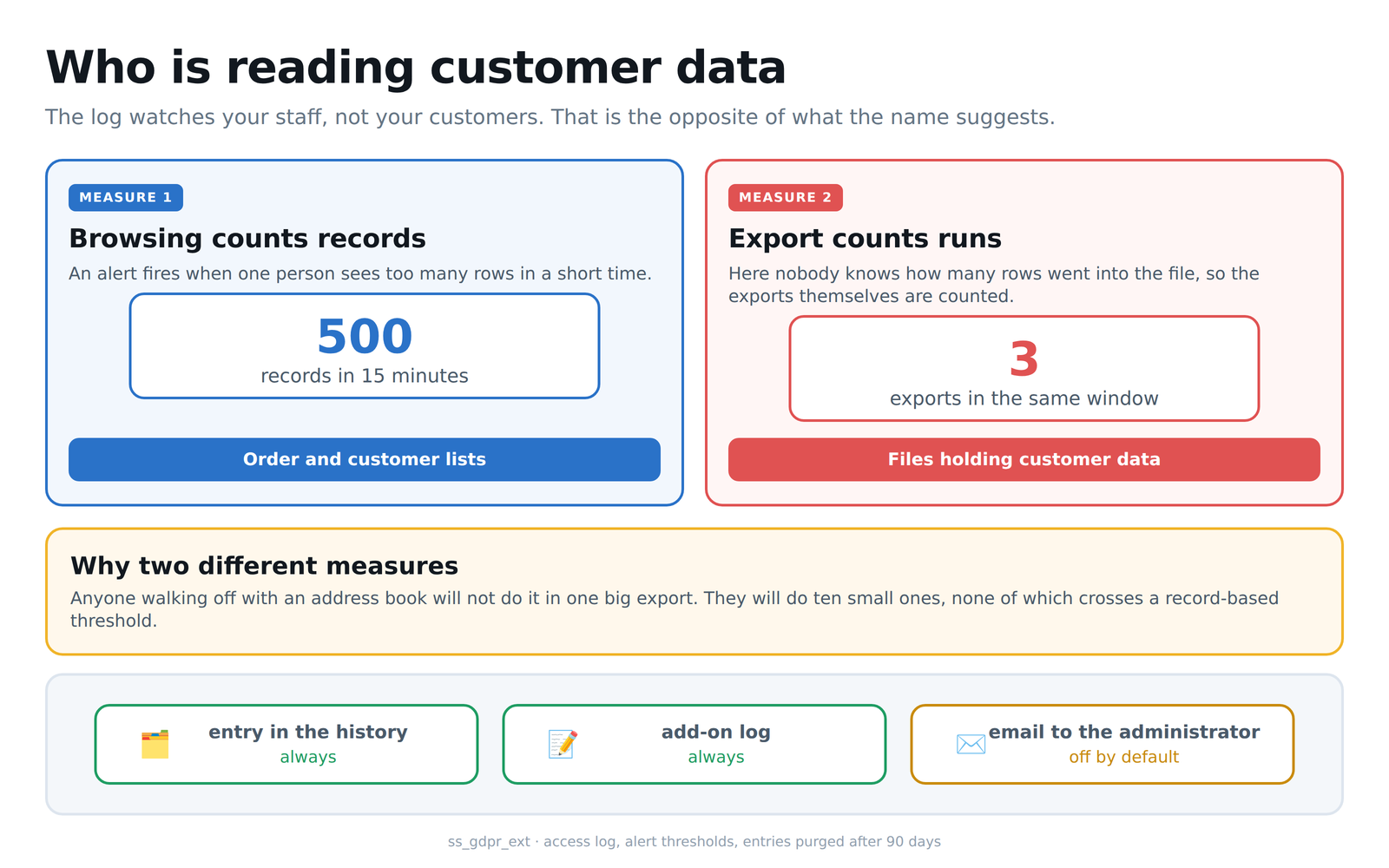
Diagram 6: the two alert threshold measures and the notification channels
The last section answers the question that comes up most often during an inspection: who had access to the data and when. The log notes every visit to the order list, the customer list and the order details, and records with each of them the number of records the administrator actually saw. The event column also shows reveals of masked values and data exports. The IP address sits next to the account, while the session identifier is not stored in the clear, because it is an authentication credential:
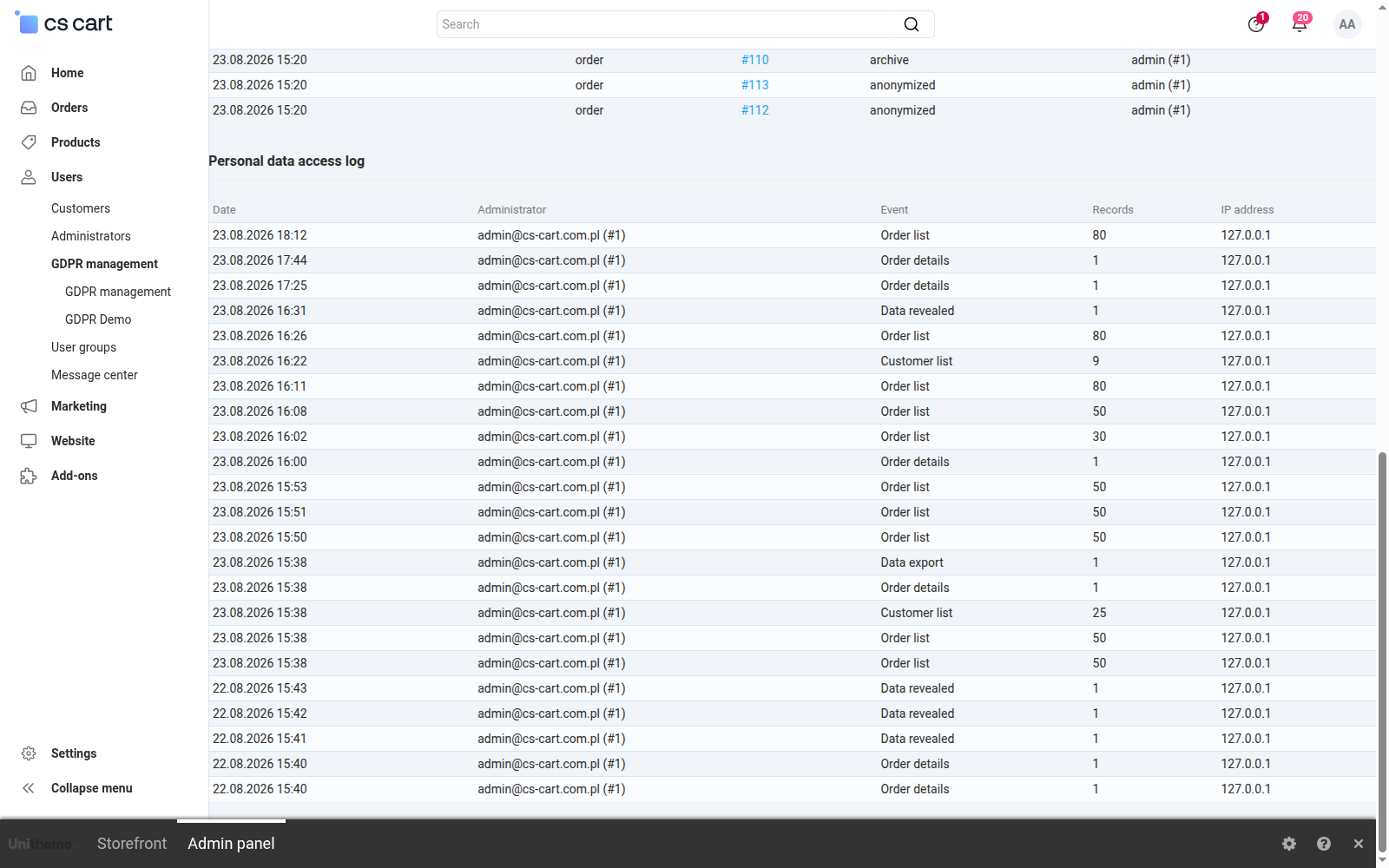
Screenshot 13: the personal data access log
At the end of the retention tab sits the setting that decides the fate of the data once the storage period is over. The first mode overwrites it beyond recovery and remains the default. The second moves it into the add-on's encrypted archive and only then clears the columns in the order table. Below you give the path of the key file, which has to live outside the store directory, and the store confirms its state with a message about readiness and available versions. Without the key the archive mode refuses to work, rather than quietly falling back to overwriting:
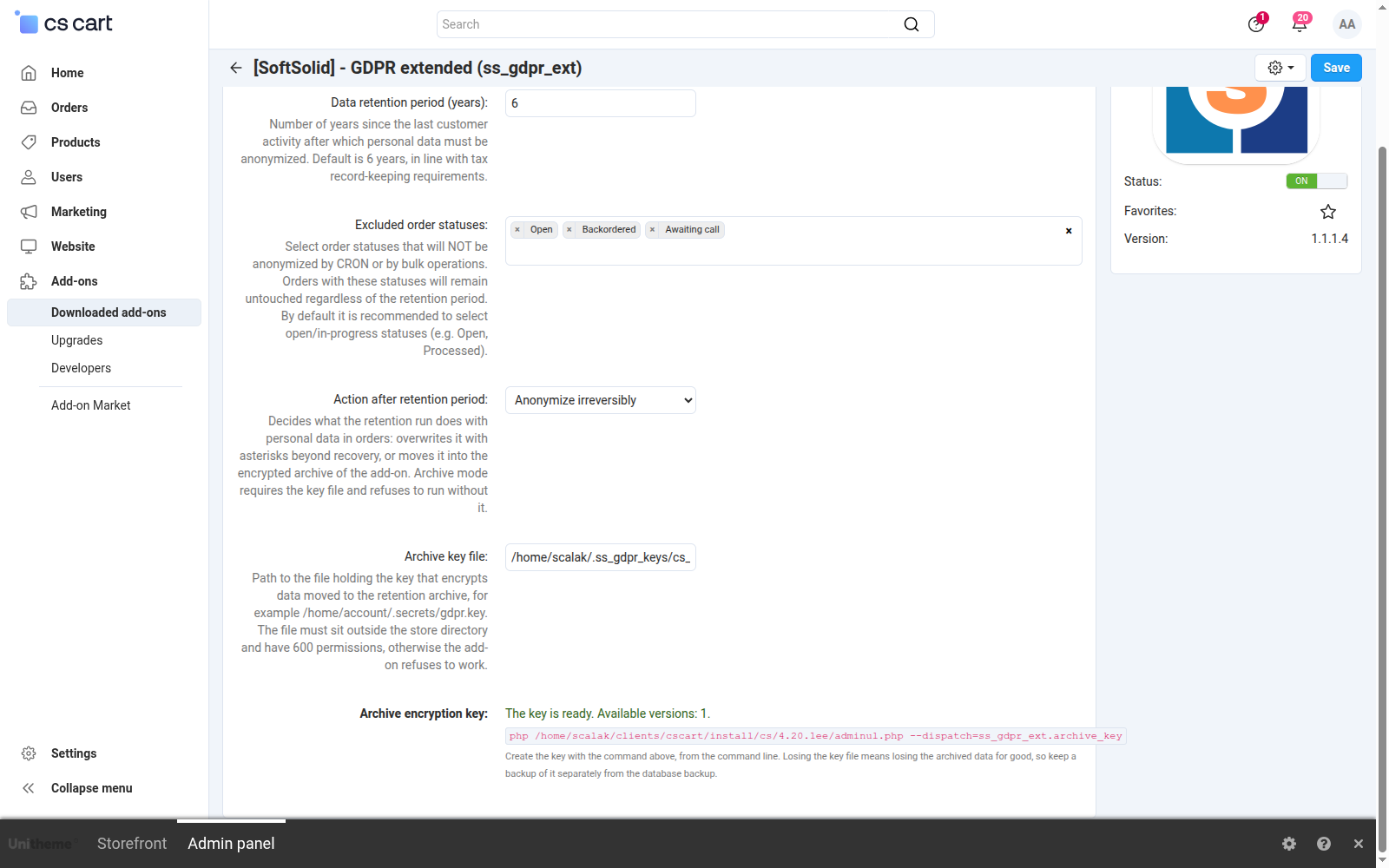
Screenshot 14: the retention mode and the state of the archive encryption key
The archive mode rests on a single key file kept outside the store directory. As long as the key exists, data comes back in full. Once it is lost, the archive stays unreadable forever, which makes the outcome equal to plain anonymization. The operation itself is protected by its order of steps, where an order is cleared only after its copy has been read back successfully:
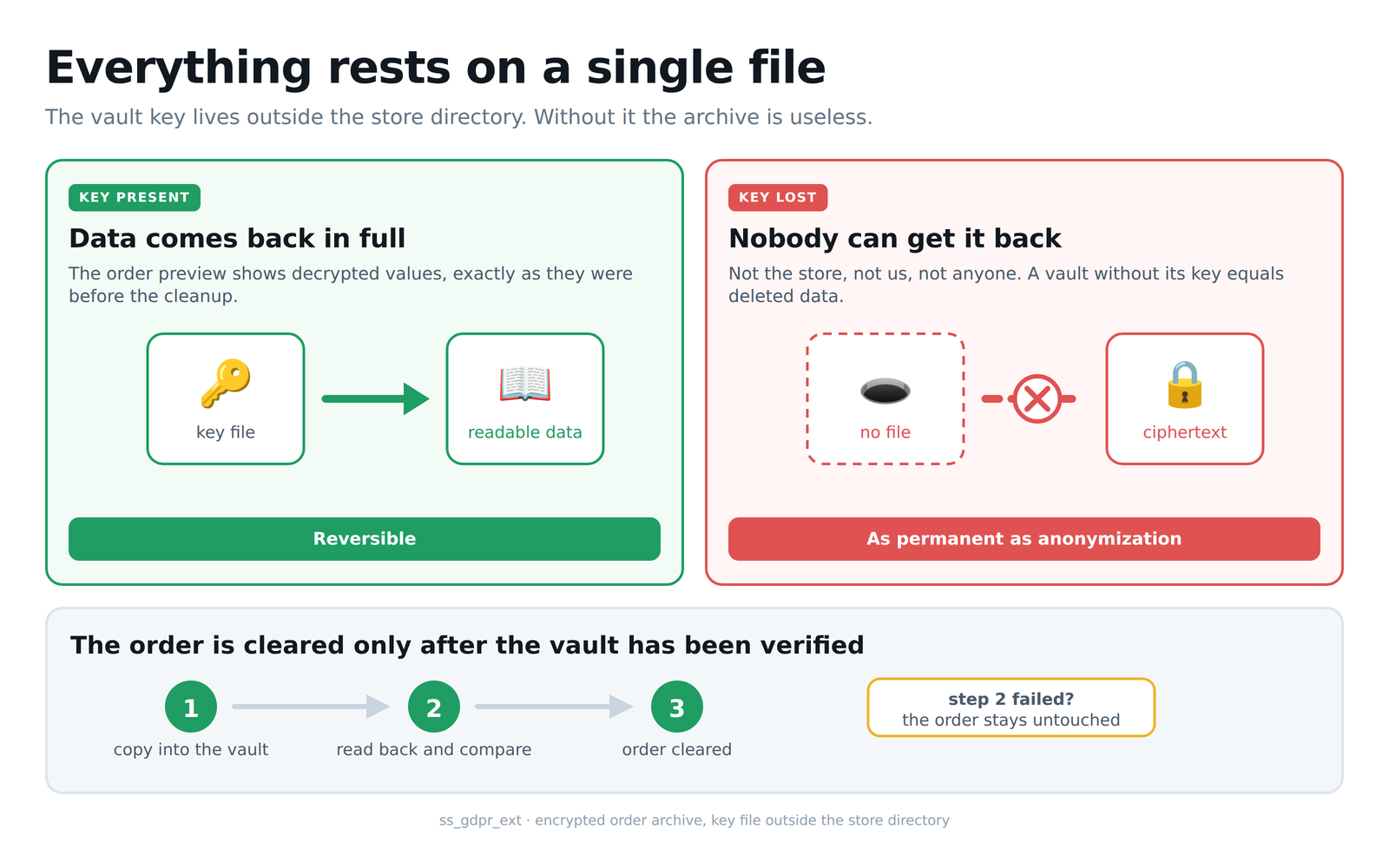
Diagram 7: the role of the key file and the step order that protects the data
Finally, a tool you cannot launch from the admin panel. Cleaning a database copy supports development on realistic data turned into stand-ins, and it is the only part of the add-on that works in bulk. That is exactly why it demands four independent conditions at once, and a single missing one stops the operation:
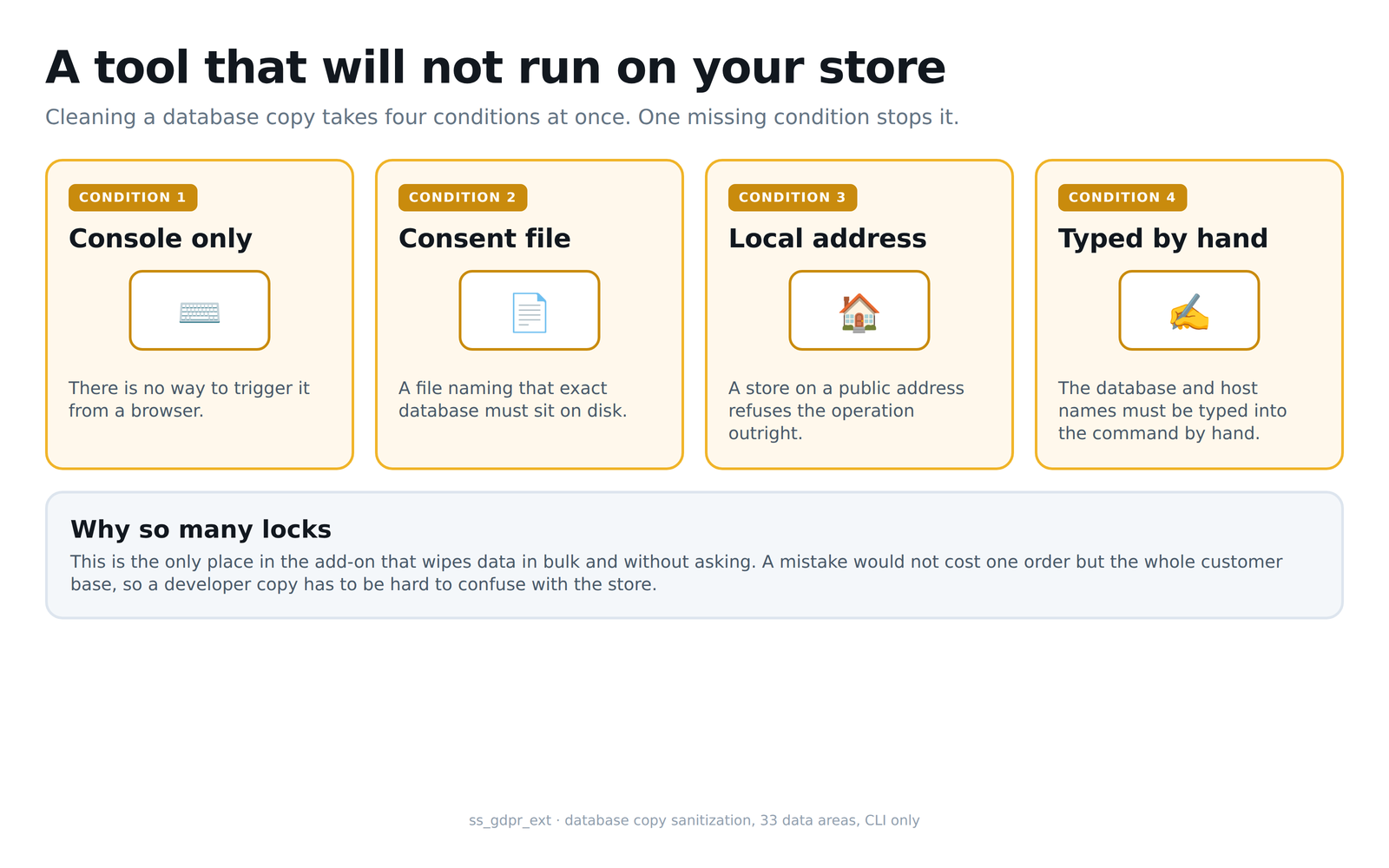
Diagram 8: the four conditions required to clean a database copy
How each feature works
Anonymizing a single guest order. An Anonymize item appears in the order details action menu, shown only for an order placed without registration and not processed yet. One click replaces the first name, the last name, both addresses, the phone numbers and the mail address with substitute values built on the same schema CS-Cart itself uses. Line items, amounts and taxes stay untouched, so the document still adds up in accounting. An order of a registered customer goes where it always went, to the core GDPR mechanism.
Bulk operations. From the order list you can select many rows at once and anonymize them with a single command from the actions menu, without opening each one separately. The same works on the customer list. For a registered account the add-on reaches for the core anonymization classes, so it covers exactly the tables and fields the store itself would cover, including address profiles and consents. When the operation runs from the schedule, that is without a logged-in administrator, the add-on switches to its own write path, because the core mechanism requires an active panel session.
The automatic retention policy. A scheduled job finds guest orders and customer accounts that have passed the retention period and anonymizes them with no staff involvement. Guest orders are grouped by mail address, and the threshold counts from the NEWEST order of that address, so a customer who returns every two years never loses their data mid-relationship. A registered account qualifies when its last order is older than the threshold, or when the customer never ordered at all. The job runs from a server schedule command or from an address opened in the panel, and both variants are ready to copy straight from the settings. An account that has never placed an order is measured by its own history, that is by its registration date and its last login, so an account created recently and yet to buy anything is never touched. The first run in a store with years of history spreads across several passes, because the size of a single batch is limited and the remaining candidates return with the next run; a run also refuses to start while another one is still going, so clicking the button in the panel during the nightly job duplicates nothing.
The retention period and excluded statuses. The period is given in years and defaults to six, which matches the usual requirement for keeping tax documentation. Next to it sits a list of statuses excluded from the rule. An order with an open return or an ongoing complaint keeps its full data for as long as the case stays unresolved, even when it has formally passed the retention period. The exclusion works both ways, so such an order is left out of bulk operations as well.
Test mode. Enabled by default and designed so that the first encounter with retention ends with a report rather than a surprise. A run in this mode finds the candidates, counts them and records them in the history, but changes not a single row in the database. That makes it possible to check on production how many customers and how many orders the policy will touch, before the decision to switch it on.
Data masking in the panel. On the order list, in the order details and on the customer list, personal data appears in a shortened form: the mail address down to its first three characters, the phone number to its last three digits, the surname to an initial, the street and the postcode to their beginning. The city and the country stay visible, because without them the list stops being usable in daily work, while on their own they identify nobody. Masking works on the view layer and never touches the database, so a masked value cannot be saved anywhere. The set of fields and the administrator groups covered by masking are configured separately, so the support desk can work under different rules than accounting. There is also one adjustable exception: orders from the last few days can show their full data, so that the person packing parcels does not have to reveal each of them separately. The window counts from the order date, an order leaves it on its own once the configured number of days has passed, and the exception is off by default, because it deliberately weakens the protection. Payment data stays masked inside that window as well.
Revealing the full data under control. Masking must not block the work, because sometimes you need to call the customer or correct a shipping address. An item in the row menu therefore opens a window with the full values and buttons that copy each of them to the clipboard. The full data does not sit in the list page source; it is fetched only by a deliberate click, and the whole thing is protected by its own permission. Every reveal leaves an entry in the history together with the administrator account and the timestamp, so it is known who reached for a particular person's data and when.
The personal data access log. The add-on records every visit to the order list, the customer list and the order details, along with the number of records the administrator actually saw. Reveals of masked values and exports of orders or customers are recorded as well. An entry holds the account, the time, the IP address and the place in the panel, while the session identifier is stored only as a hash, because it is an authentication credential. The write is failure-tolerant: a database error interrupts neither the list nor the export.
Alerts about unusual access. When one administrator exceeds the configured threshold within a rolling time window, the add-on reports it through three channels at once: an entry in the operation history, an entry in the diagnostic log and an e-mail message, provided that sending has been enabled. Exports have their own threshold counted in occurrences, because many small exports are the usual way around a threshold counted by volume. At most one alert per window and per administrator is raised, so notifications do not turn into an avalanche. Switching the add-on off is a separate event: it is recorded while the add-on is still running and is not subject to the rate limit, because every occurrence of it matters.
The encrypted order archive. A retention mode setting decides what happens to the data once the retention period is over. By default it is overwritten beyond recovery. The second mode moves it first into an encrypted table of the add-on and only then clears the columns in the order table, so a database dump no longer carries personal material while the store keeps the ability to restore the original on an authorised person's request. The archive is protected by AES-256-GCM, and the key lives in a file outside the store directory, created by a separate command run deliberately. The source columns disappear only after the encrypted copy has been confirmed to exist, to be readable and to match character for character the values that are about to go. The data preview recognises an order held in the archive and shows the decrypted values, and when the archive is unreadable it says so plainly instead of returning something arbitrary.
Anonymizing a database copy for development. A copy of the store on a developer machine is the most often overlooked route of a leak: customer data then sits outside the server, outside the backups and outside any record of processing activities. A command line tool turns such a copy into technical material that can still be worked on, but that holds nobody's name, address or phone number. Thirty-five areas are covered, reaching past accounts and orders into reviews, discussion posts, newsletter subscriptions, gift certificates, shipment comments, company and supplier data. Mail server credentials, payment gateway parameters and payment transactions are cleared separately, so no test on the copy will send a message to a real customer or touch a real payment. Run without parameters the tool prints a report only, and actual cleaning requires an explicit confirmation carrying the database name and the installation address, guarded by four independent gates.
Personal data outside the order columns. An order in CS-Cart does not fit into a single table, and that is the most common source of a false sense of compliance. Alongside the visible fields the store keeps the delivery address as a shipping structure, the text a customer typed into a product option, that is an engraving dedication or the content of a print, the files uploaded into such an option, the sender and recipient data of a gift certificate, and shipment comments. None of these places is cleared by the built-in GDPR module for a guest order, so an order that looked anonymized in the panel could still carry the customer's full name and address. Our add-on covers all of them, on every path that clears data, and files uploaded by the customer are removed from the store's disk as well. Caution is built into the scope: values of options picked from a list stay untouched, because they carry the price modifier of the line item, a gift certificate that can still be redeemed stays untouched regardless of the age of the order, and the store's own address, held in the same structure as the customer's, goes on to the invoice and the waybill. Stores that anonymized data with earlier versions of the add-on have a command line mode that closes that backlog, and run without a confirmation it only reports its scale.
Reads through the programming interface. A store usually knows who holds a panel account, yet rarely remembers how many external systems pull its orders and since when. A key issued long ago to a courier company or a wholesaler grants access to the same data as the panel, only without a single click in the interface. The access log therefore records order reads through the REST interface as well, as a separate event type and with the company taken from the integration's authentication, so in the multi-vendor edition the entry reaches the right vendor. Only reads are recorded, and an order created the same way does not count as access to data. Events of this kind are the only ones exempt from the alert threshold, because an integration pulling data every few minutes exceeds any sensible threshold by definition, and an alert that goes off daily for no reason stops being read.
Verifying the result of an operation. Anonymizing a customer account can fail quietly, because the replacement values are generated at random and the store rejects the write when it hits an address already taken by another account. The add-on therefore verifies the result of every write before it treats an account as processed: the account row, every address profile it owns and the values of custom fields are all checked. An account that fails verification is left without the marker, recorded in the history with a note about what had already been overwritten, and picked up again on the next run. Anonymization is separately held back for an account whose orders did not reach the encrypted archive first, because an order holding full personal data next to an account that can no longer identify it is the worst possible outcome. A run in which anything failed ends with an error status, so the server schedule reports it instead of treating it as done.
Operation history and accountability. Every operation on personal data leaves an entry with the date, the entity type, the action taken and the trigger source, ready to present during an inspection. The mail address lands there only as a hash, never in plain text, because a register of operations on personal data must not become one more place that stores it. In the multi-vendor edition the history is separated between vendors: each of them sees the entries about their own orders and their own customers, while the complete picture stays with the platform operator. The company stored with an entry belongs to the record the entry is about, not to the panel the operation was performed in, so a preview performed by the operator stays visible to the vendor as well and accountability works both ways.
The GDPR Extension closes the most often overlooked gap in a store's GDPR compliance, the personal data in guest orders, and along the way it puts order into what happens to that data inside the panel. Manual anonymization of single orders, bulk operations, and a fully automatic retention policy form its first layer, data masking, the access log, and the alerts form the second, and the encrypted archive forms the third, the one that lets a store reconcile the duty to erase personal data with the duty to keep sales documents. Test mode and status exclusions protect against accidental data loss, everything runs alongside the built-in GDPR module with no system file changes, and the full operation history gives you peace of mind in case of an inspection.
Feel free to contact us and purchase the add-on!
Choose the most convenient form of payment for the add-on. You can pay once and use the add-on. Choosing a subscription payment (monthly or annual) means that you pay for the add-on at regular intervals and have access to the latest versions of the addon and technical support.
- Store Bulider
- Multi-Vendor
- 4.21.x
- 4.20.x
- 4.19.x
- 4.18.x
- 4.17.x
- 4.16.x
- 4.15.x
- No changes
No reviews found