


Stanisław Chałupczak (ebielizna.pl)
Verified purchase

| CODE | Payment method | Price | ||
|---|---|---|---|---|

|
566
ss_mp_prom_div
2024-03-20
1.1.1.4
|
299.00 USD
(Price without tax) |
||
|
|
616
ss_mp_prom_div_sub_1Y
2024-03-20
1.1.1.4
|
120.00 USD
/year
(Price without tax) |
||
|
|
615
ss_mp_prom_div_sub_1M
2024-03-20
1.1.1.4
|
12.00 USD
/month
(Price without tax) |

An extension for Multi-Vendor that decides who bears the promotion cost when the payout commission is calculated: the marketplace owner or the vendor. By default the commission is taken from the order value after discounts, so a price reduction lowers both the vendor payout and the platform commission at the same time. In practice this means the marketplace owner co-funds every promotion, even one they did not decide on. The add-on lets you knowingly set which side carries that cost, globally for the whole store or separately for each promotion, and it solves the same problem for orders paid with a gift certificate.
See how it works
Key Features
- A choice of who bears the promotion cost when the commission is calculated: proportionally, the marketplace owner, or the vendor.
- One global rule for the whole store, or a separate split flag set on each promotion.
- A separate settlement for orders paid with a gift certificate, where the commission would normally drop to zero.
- The marketplace owner commission never drops below zero, even with very deep discounts.
- Safe by default: until you deliberately choose a rule, the add-on changes no commission or payout.
- The chosen rule carries over to the platform fee taken by the Stripe Connect and PayPal Commerce Platform gateways, with no separate configuration.
The mechanism is easiest to see in numbers. Take an order of 100 with a 10 percent discount and a 20 percent marketplace commission, so the promotion cost is 10. With a proportional split the platform takes 18 and the vendor 72, because both sides give up their share of the discount. When the marketplace owner covers the promotion cost, the platform commission drops to 10 and the vendor keeps the full 80. When the vendor covers it, the platform keeps the full 20 and the vendor is left with 70. The same mechanism holds regardless of the order size.

Screenshot 1 - the promotion cost split in numbers (example for the three rules)
In the add-on settings, in the Promotion settings section, a single screen sets the whole split rule. You pick whether the promotion cost is shared proportionally, charged to the marketplace owner, or charged to the vendor, and a separate field decides how the commission is calculated when an order is paid with a gift certificate. The global rule covers marketplace promotions, while promotions created by a vendor stay proportional, so a vendor cannot cut the platform commission with their own discount. Each field carries a tooltip that explains exactly what it changes in the settlement.
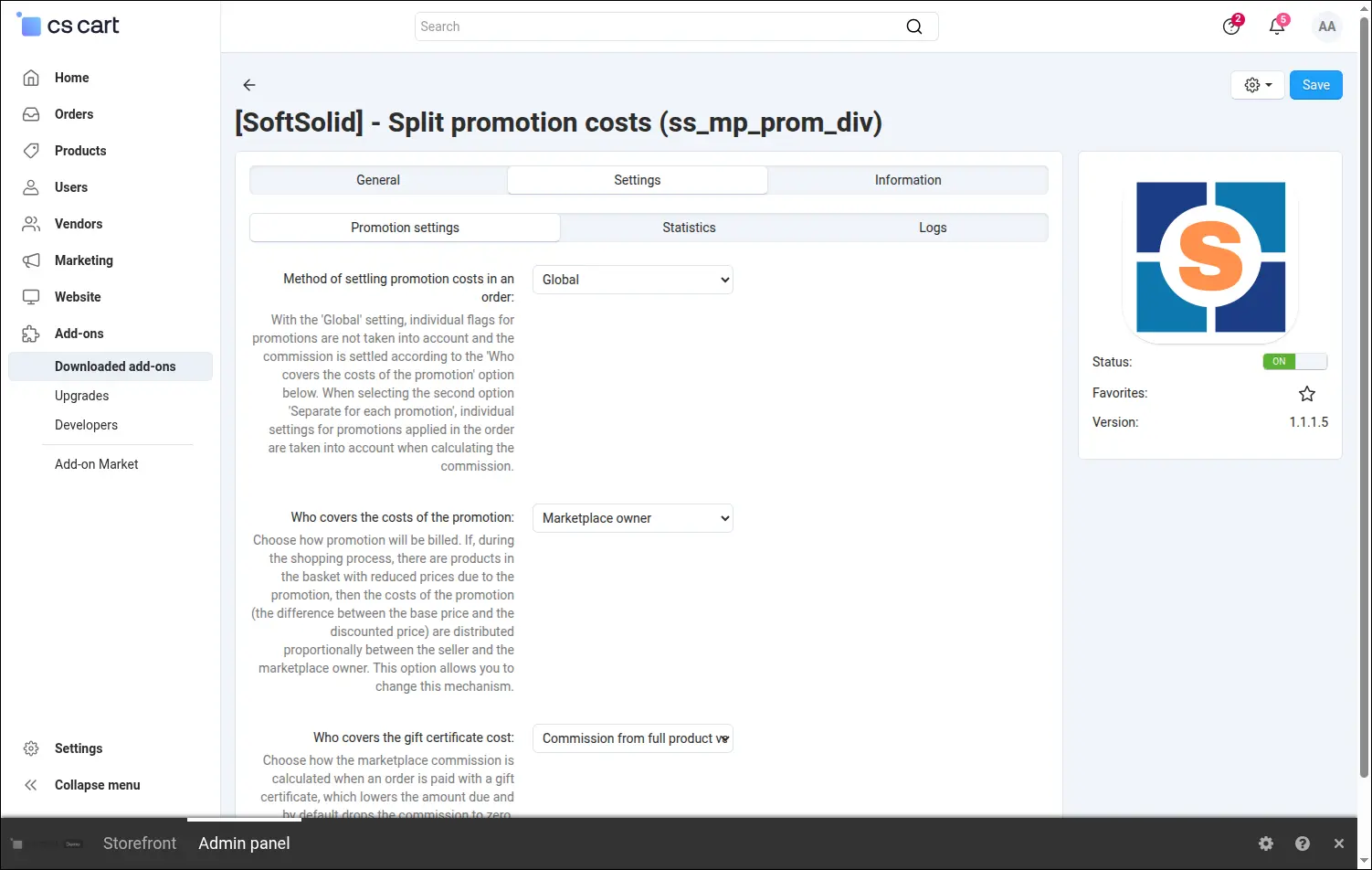
Screenshot 2 - promotion and gift certificate cost split settings
When you choose the separate settlement mode, you set the rule right in the promotion editor. On the General tab the add-on places a dropdown where you mark who will bear the cost of that particular campaign. The rule travels with the promotion, so you can easily run platform-funded promotions and vendor promotions side by side.
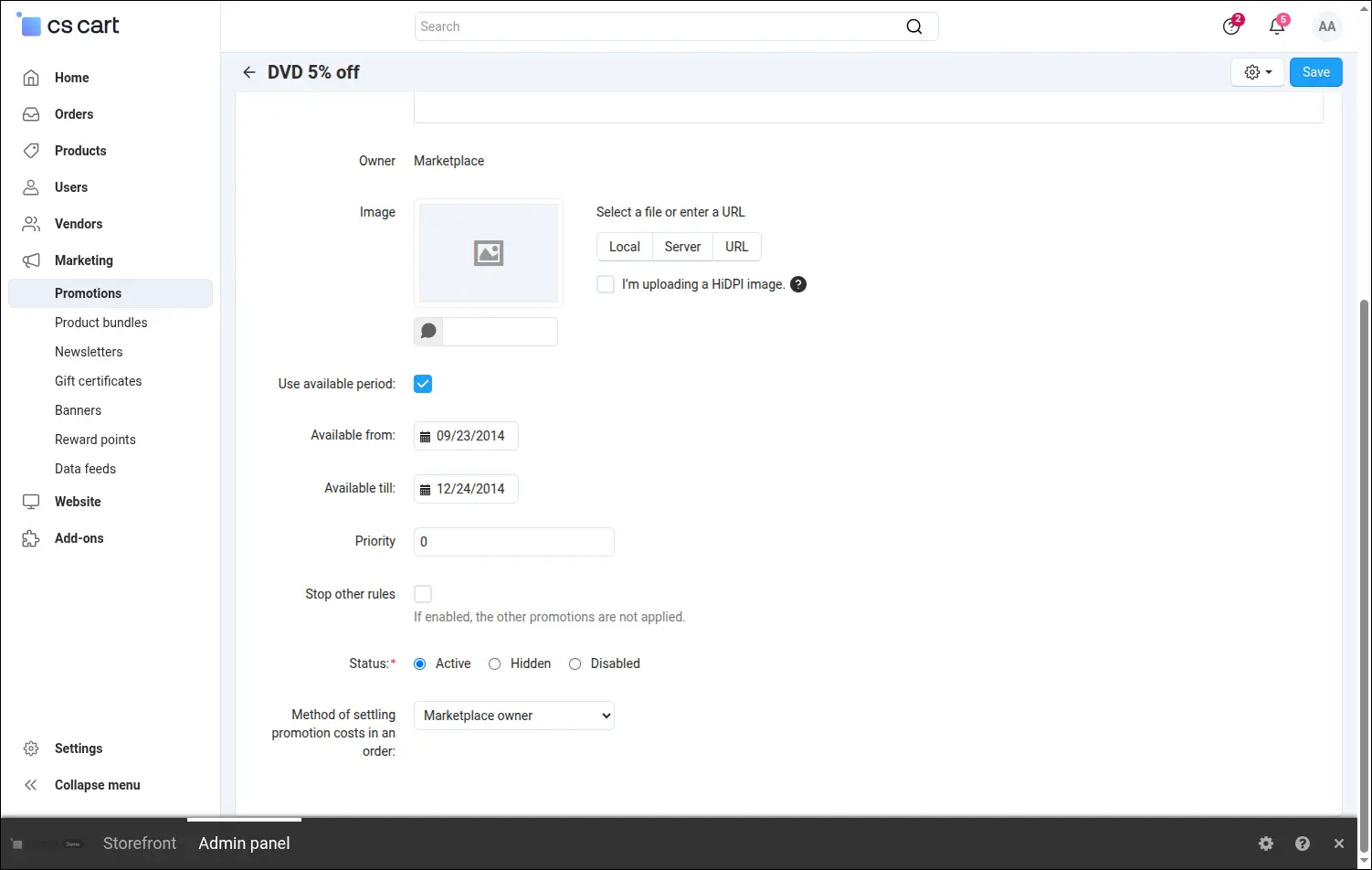
Screenshot 3 - the cost-split flag in promotion editing
The effect shows directly in the settlement with the vendor. The Vendors, Accounting view lines up three orders of the same value, each settled under a different split rule. The marketplace commission is 18, 20 and 10 out of 90 respectively, exactly as in the numeric example above: a proportional split, the cost on the vendor's side, and the cost on the marketplace owner's side. The settlement stays consistent also when two promotions apply to one product, because each is counted from its own discount, and after an order edit that removes or reduces the gift certificate.
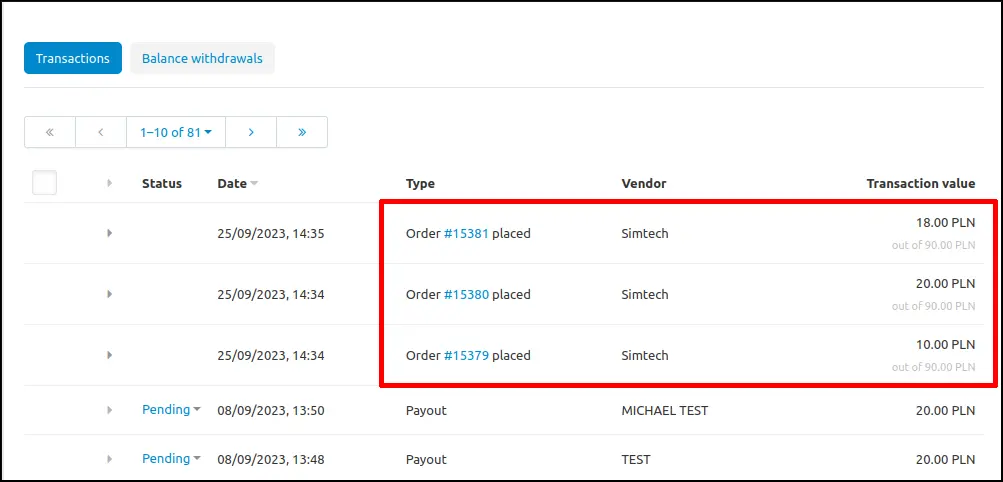
Screenshot 4 - the marketplace commission on promoted orders for the three rules
On a marketplace that accepts payments through Stripe Connect or PayPal Commerce Platform, the gateway splits the buyer's money at the moment of payment, and the platform keeps its share as a platform fee. Multi-Vendor reads the size of that fee from the commission the add-on corrects, so the chosen split rule goes straight into the gateway settlement, with no balancing transfers and no manual corrections. In tests in the Stripe test environment, covering among others an order from two vendors and payments with 3D Secure verification and through Stripe Checkout, the platform fee matched the commission calculated in CS-Cart to the cent. The tests in the PayPal Commerce Platform test environment gave the same result, also with a zero fee and with an order from two vendors. The commission never exceeds the order value including the gift certificate, and the gateway takes at most the payment amount, so any remainder is settled through the vendor balance. The add-on with the Stripe Connect and PayPal Commerce Platform gateways in test mode can be seen on the demo.
Split Promotion Costs settles one of the most sensitive questions on a marketplace: who pays for the discount. Instead of the default, proportional reduction of the commission, the platform owner gains full control over how promotions and gift certificates are settled, shared across the whole store or chosen separately for each campaign. The add-on works with the Vendor plans add-on and does not change the prices shown to the buyer, it only adjusts the split of revenue between the platform and the vendor.
Full walkthrough, 5 minutes
Feel free to contact us and purchase the add-on!
Choose the most convenient form of payment for the add-on. You can pay once and use the add-on. Choosing a subscription payment (monthly or annual) means that you pay for the add-on at regular intervals and have access to the latest versions of the addon and technical support.