


ORLEN Paczka integration (pickup points, shipping, statuses)

- View all variations as list
| CODE | Payment method | Price | ||
|---|---|---|---|---|

|
707
ss_orlen_paczka
2026-09-29
1.1.1.1
|
150.00 USD
(Price without tax) |
||

|
709
ss_orlen_paczka_sub_1Y
2026-09-29
1.1.1.1
|
75.00 USD
/year
(Price without tax) |
||

|
708
ss_orlen_paczka_sub_1M
2026-09-29
1.1.1.1
|
7.50 USD
/month
(Price without tax) |

- — 12 months guarantee for all our add-ons
- — add-ons sold to entire world
- — stable, flexible, high-quality products
- — competitive prices, attractive discounts
- — quick and competent technical support
- — installation in 24 hours
- — personalized solutions - we'll write any add-on for you
An extension for Store Builder and Multi-Vendor that brings ORLEN Paczka delivery to your store. ORLEN Paczka is a Polish network of parcel lockers, partner pickup points and ORLEN fuel stations, and many online shoppers in Poland choose it every day. The customer picks a point on the carrier's official map without leaving checkout, while store staff create the parcel straight from the order, print the label and follow the shipment. There is no retyping of addresses in the carrier panel and no checking statuses by hand, because our add-on connects the store to the ORLEN Paczka API and carries the shipment from the choice of a point all the way to collection.
Key Features
- Pickup point selection on the official ORLEN Paczka map, opened in a window over checkout, with the point verified before the order can be placed.
- Parcels created from a single order or in bulk for up to 50 orders at once, with the tracking number and link saved in the shipment.
- Labels in PDF A6, PDF 10x15, ZPL 203 and 300 dpi and EPL, fetched at print time and available for reprinting at any moment.
- Shipment statuses delivered by the carrier on their own, with an event history for every parcel and order statuses updated according to your mappings.
- A backup status check run by CRON, plus a Refresh status button in the order for the moments when an answer is needed right away.
- Multi-Vendor: every vendor ships their own parcels, and a vendor with an ORLEN Paczka contract can use their own API account and sender data.
Setup begins with the connection to your ORLEN Paczka account. You choose the API environment, enter the Partner ID and partner key issued by the carrier, and select the label format that suits the printer in your warehouse: PDF for a regular printer, or ZPL and EPL for thermal printers. The following tabs hold the sender data, the pickup point map token, status notifications and the pickup point list update. The shipping method itself is created in the shipping module like any other, with rates set in zones, so the price your customers pay stays entirely in your hands:
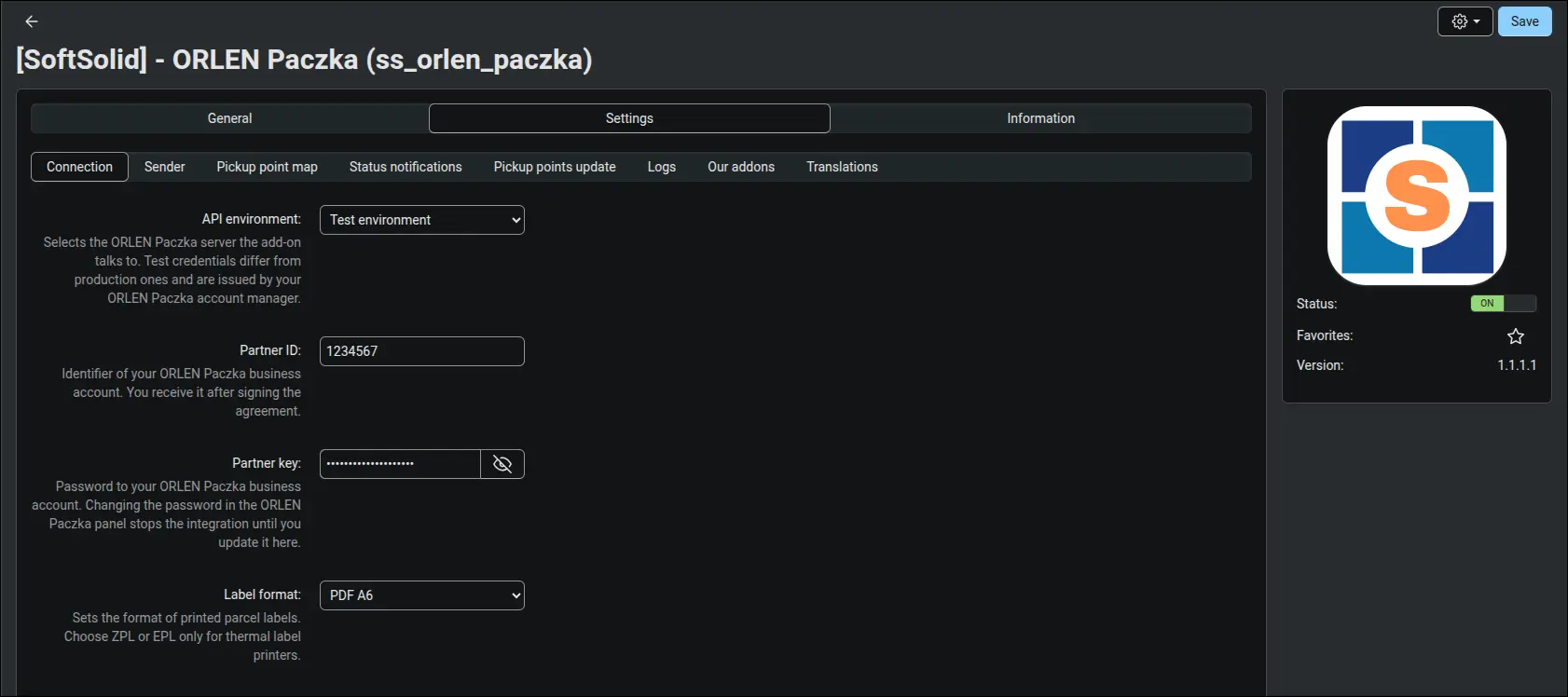
Screenshot 1 - connecting the ORLEN Paczka account and choosing the label format
At checkout the customer selects ORLEN Paczka delivery, and a pickup point field appears right below it. Once a point is chosen, its code and address are shown, and a button lets the customer change their mind before paying. The field is required, so an order without a point cannot be placed and your team never has to ask the customer afterwards where the parcel should go. A cart heavier than 20 kg receives a weight limit message, which keeps customers away from a method the carrier would not accept for that parcel:
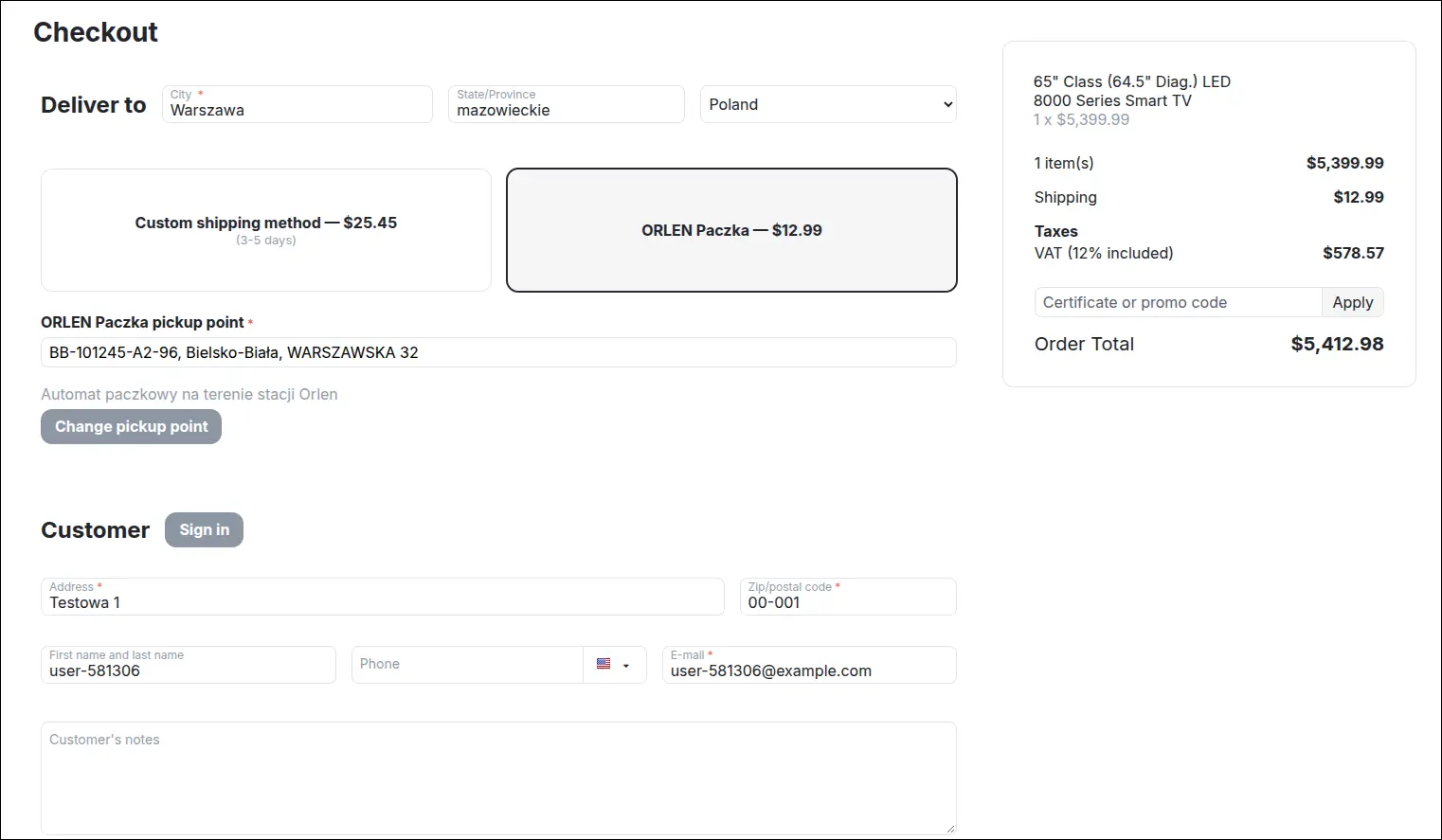
Screenshot 2 - the customer picks an ORLEN Paczka pickup point right at checkout
The map is the official ORLEN Paczka widget, the same one shoppers already know from other stores. It opens in a window over checkout, finds points around the address entered, narrows the choice to parcel lockers, partner points or ORLEN stations, and switches to a list view. The widget is supplied by ORLEN Paczka and its interface is in Polish, which matches the audience of a Polish delivery network. Because the map runs in a separate window, it does not clash with theme scripts or with other carriers' maps on the same checkout page. The store then checks the chosen code against its own copy of the point list, so a withdrawn point never reaches an order:
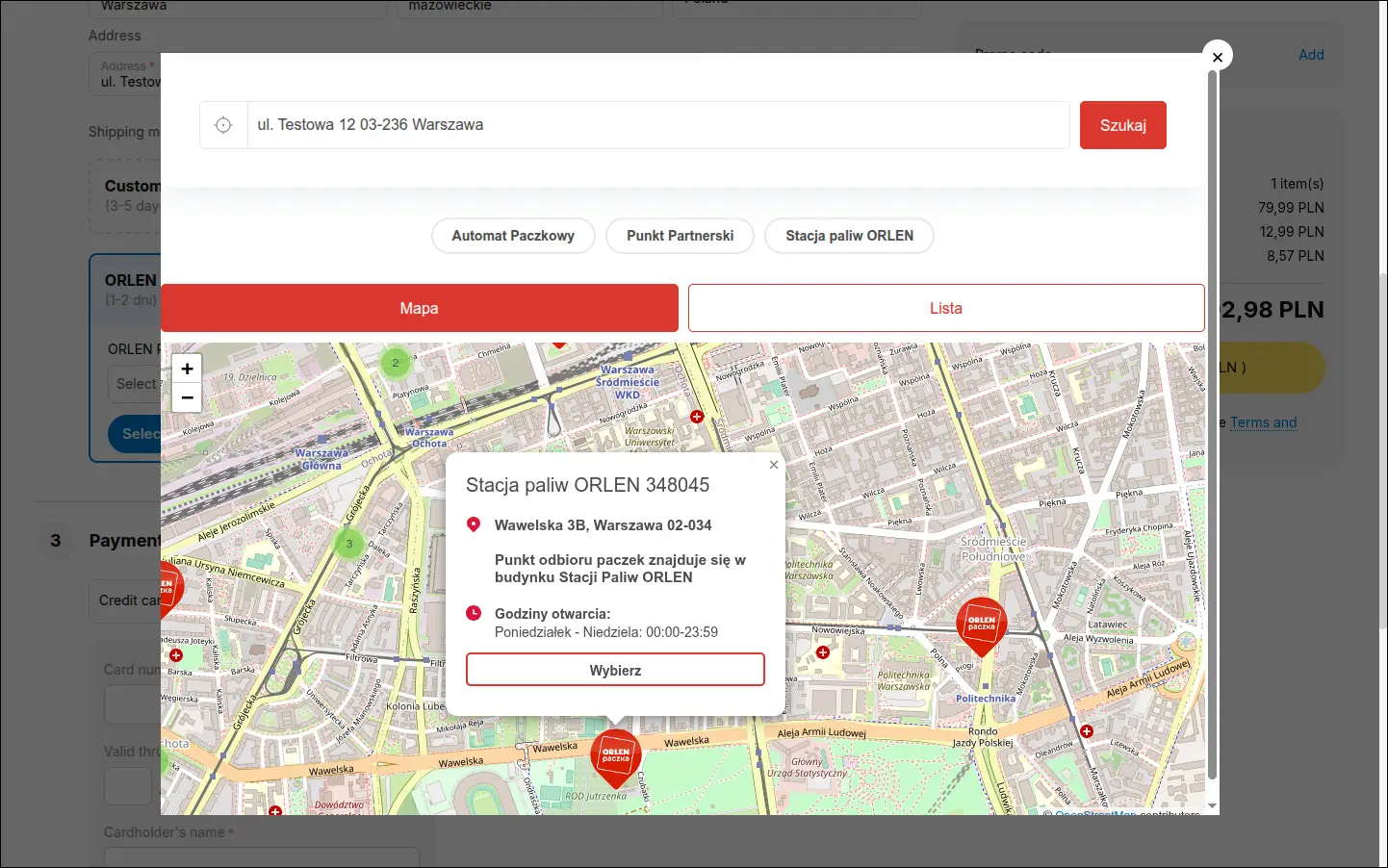
Screenshot 3 - the official ORLEN Paczka map opens in a window over checkout
In the order details, staff find everything they need for shipping in one block: the point code, its address, a location note and opening hours, and below them a list of parcels with their size and state. When a customer asks for a different point, it is enough to type the new code and save the order, and the email sent with that save already carries the new point. The customer sees the same point in their account, in order emails, on the invoice and on the packing slip, with no changes to document templates:
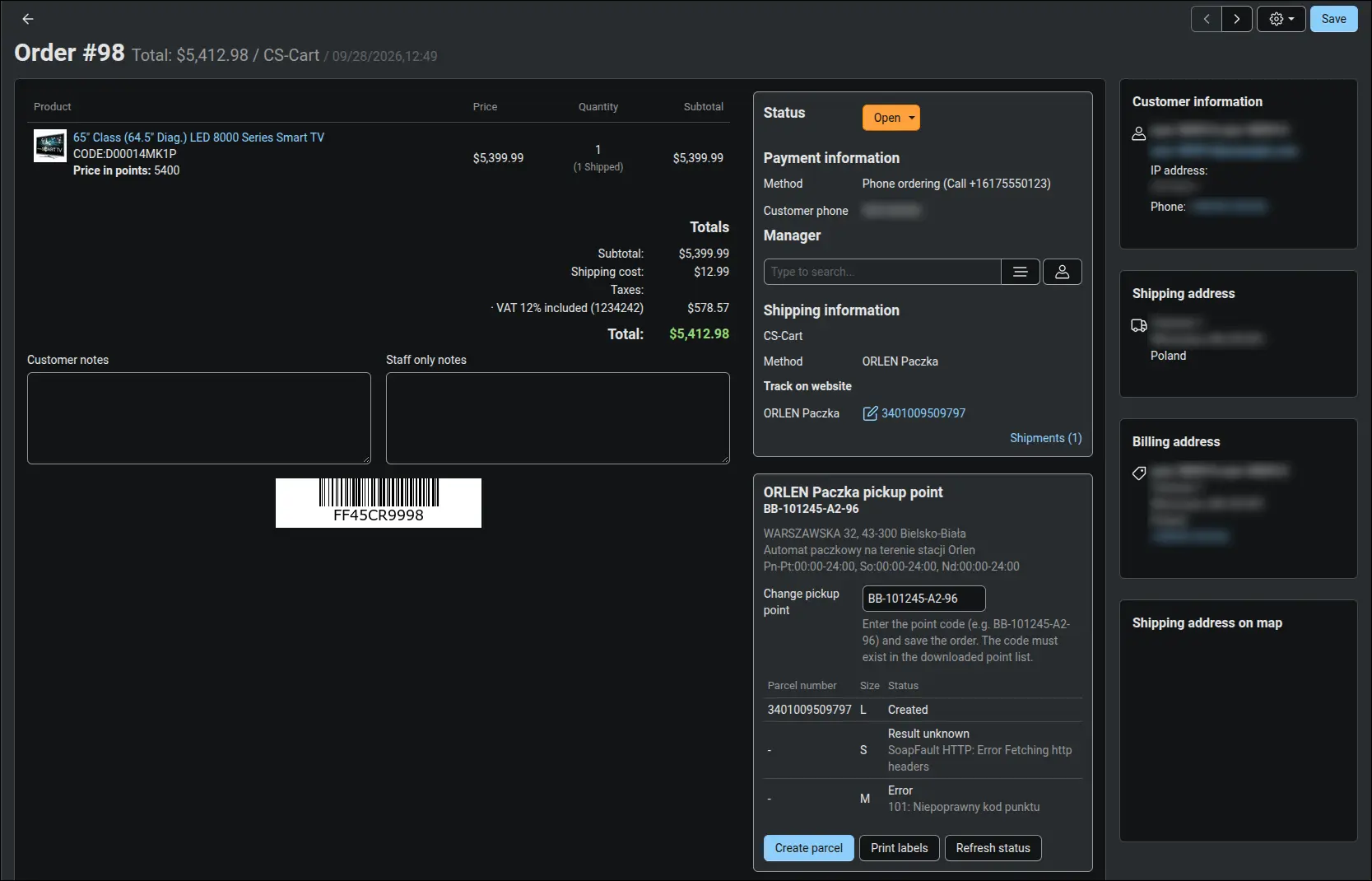
Screenshot 4 - pickup point, parcels and shipping in the order details
A parcel is created with a single form. The pickup point and size come from the order, the recipient phone from the address, and the form warns you if anything is missing in the sender data. After creation, the parcel number and tracking link land in the CS-Cart shipment, so the customer can follow the parcel from the very first moment. The add-on records the parcel before contacting the API and marks the result as unknown if the connection drops. Another parcel for the same order requires a separate confirmation, which protects you from shipping twice by accident:
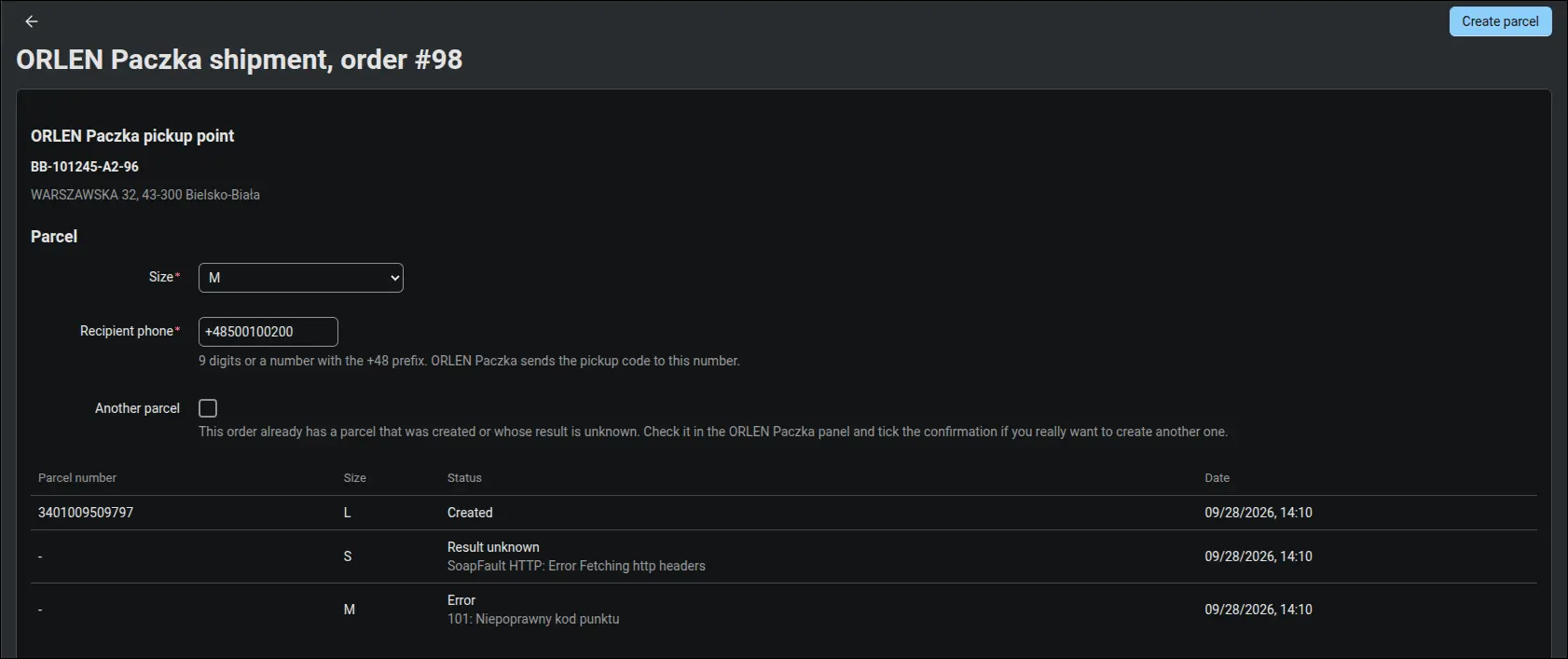
Screenshot 5 - creating a parcel with the size and recipient phone taken from the order
When orders pile up, shipping takes a few clicks. You select orders in the list and choose to create parcels or print labels from the ORLEN Paczka menu, for up to 50 orders at once. The add-on skips orders without this delivery method and those that already have a parcel, and at the end it shows a summary of created, failed and skipped orders. An error on one parcel never holds up the rest. Labels are not stored on the store server: each time you print, the add-on fetches them from the carrier, so a reprint after a printer jam takes a single click:
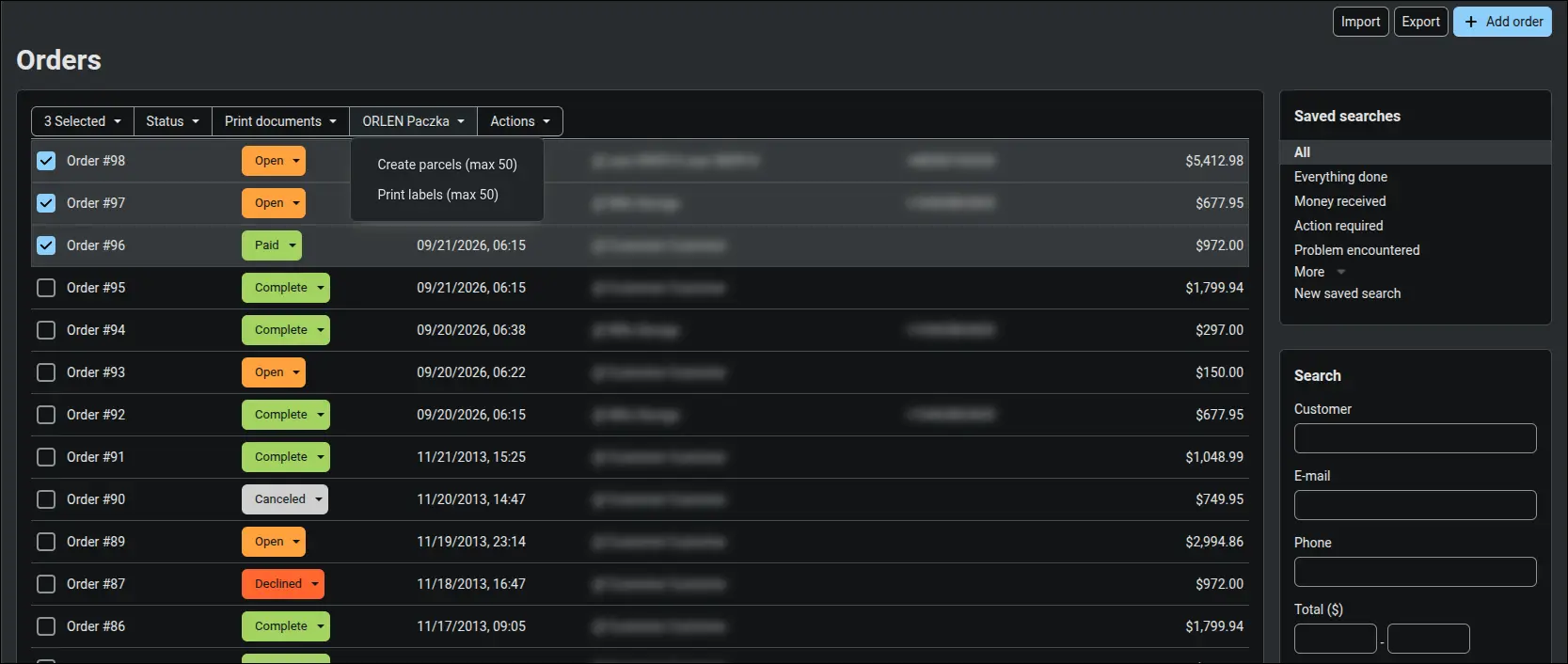
Screenshot 6 - creating parcels and printing labels for many orders at once
Shipment statuses arrive at the store on their own. ORLEN Paczka sends notifications to an address prepared by the add-on, protected with a login and password and, optionally, with a filter for the carrier's IP addresses. The address is registered with a single button, both for the platform account and for vendors with their own account. Every event goes into the parcel history, repeated notifications are rejected, and an older status never overwrites a newer one:
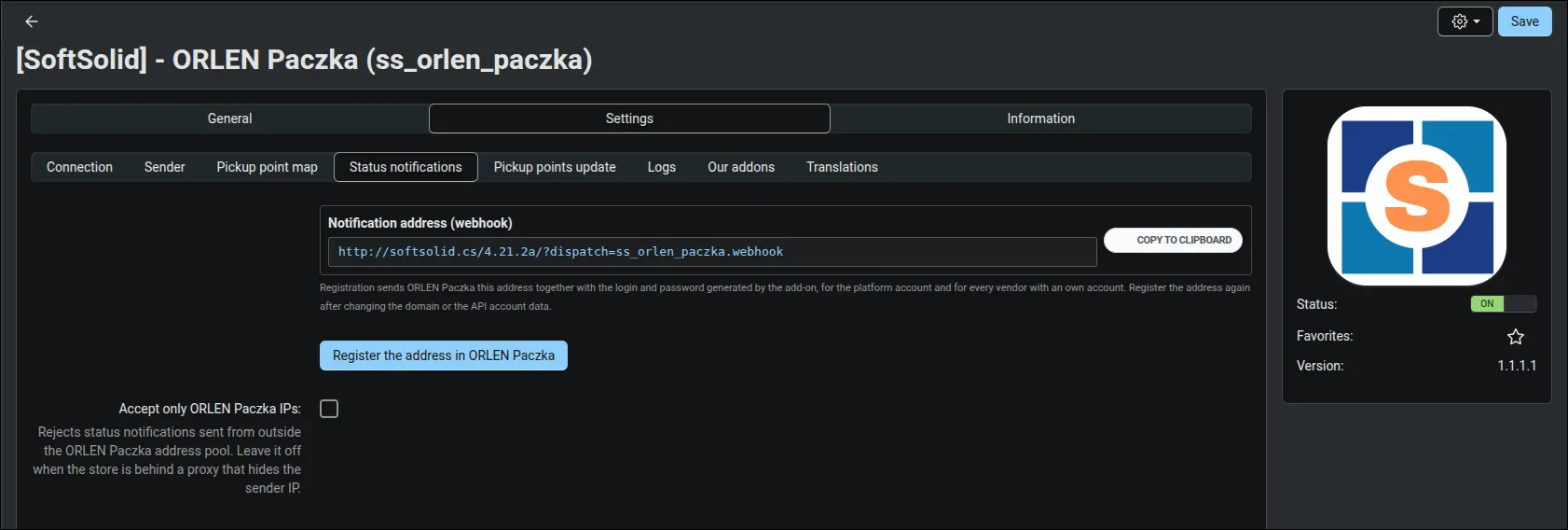
Screenshot 7 - registering the address where ORLEN Paczka sends shipment statuses
Selected shipment statuses can be mapped to order statuses. Collection of the parcel can close the order, for example, and a return can move it to a status handled by your returns team. The customer then receives the notification defined for that status, and staff no longer have to browse parcels to wrap up orders. If a carrier notification fails to arrive, for instance during server downtime, a CRON task checks every hour on parcels that have been silent for a day. It saves the full history but sets the order status from the latest event only, so the customer never receives a string of emails about stages long past. For a single order, the Refresh status button runs the same check on demand:
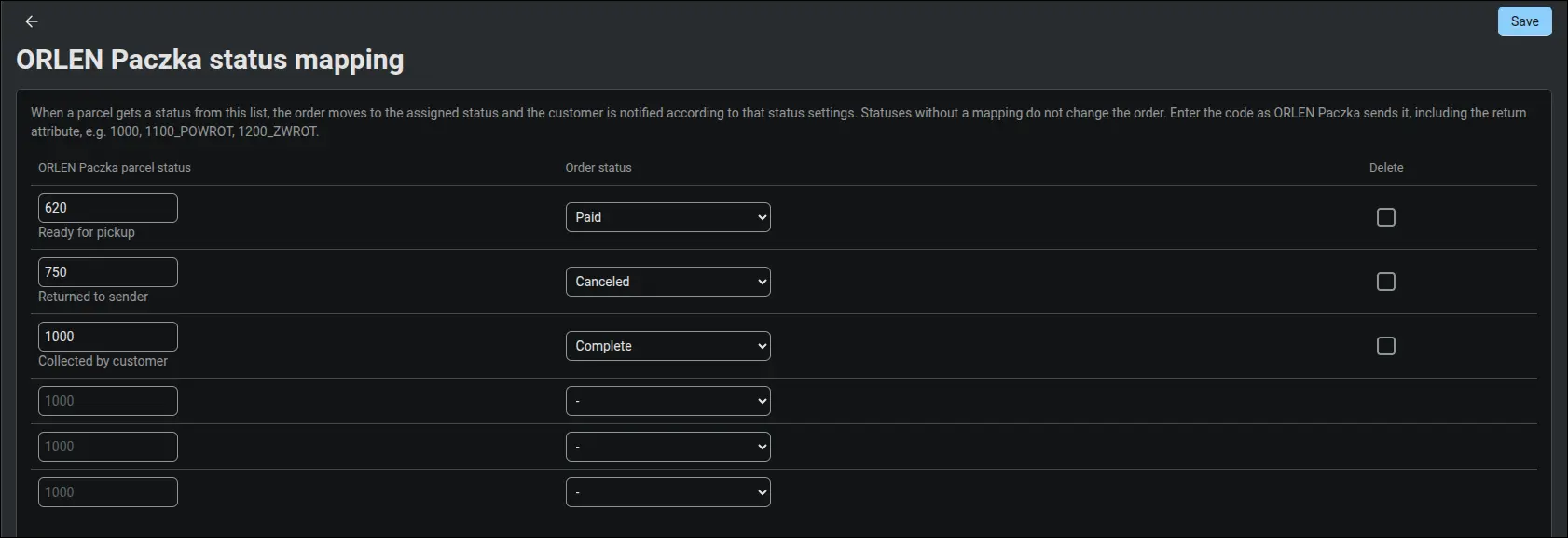
Screenshot 8 - parcel statuses mapped to order statuses
On a Multi-Vendor marketplace every vendor ships their own orders. The customer picks a separate point for each vendor's products in the cart, and the parcel belongs to that vendor's suborder. A vendor without a carrier contract ships from the platform account with no setup at all. A vendor with their own contract enables their own account in the profile, enters the Partner ID and key, and parcels go out from that account, settled directly with ORLEN Paczka. An empty sender field means the platform value applies, so the return address on the label can point to the vendor's warehouse. A saved key is never shown in the form again:
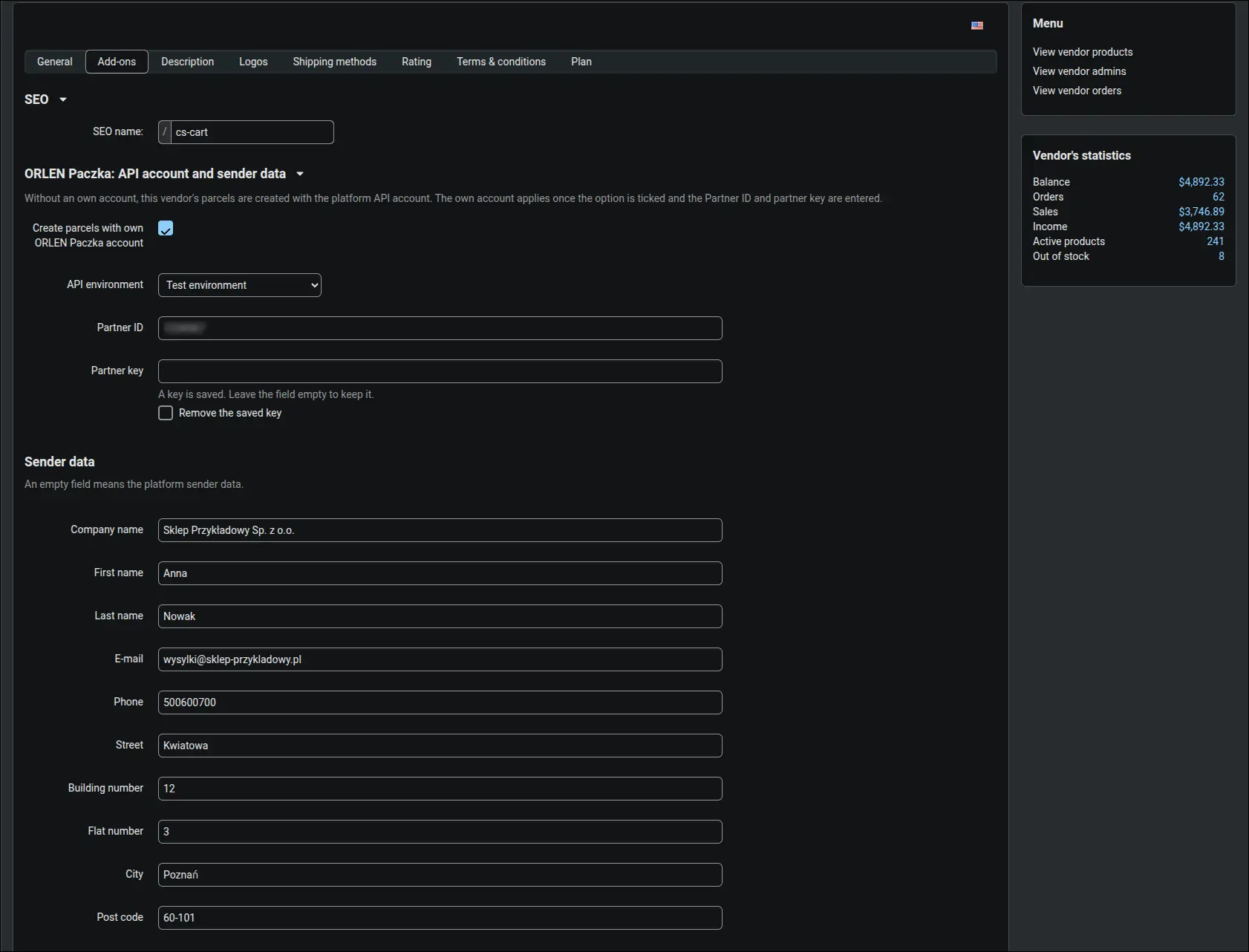
Screenshot 9 - a vendor ships parcels with their own ORLEN Paczka account
The ORLEN Paczka add-on covers the whole journey of a parcel to a pickup point: the customer chooses a point on a familiar map, staff create parcels one by one or in batches and print labels on a regular or thermal printer, and statuses return to orders without manual checking. It works with CS-Cart and Multi-Vendor from version 4.14.1, and on a marketplace it lets every vendor ship from the platform account or from their own. To get started you need the API credentials and the map token issued by ORLEN Paczka.
Feel free to contact us and purchase the add-on!
- Monthly subscription
Choose the most convenient form of payment for the add-on. You can pay once and use the add-on. Choosing a subscription payment (monthly or annual) means that you pay for the add-on at regular intervals and have access to the latest versions of the addon and technical support.
- Store Bulider
- Multi-Vendor
- 4.21.x
- 4.20.x
- 4.19.x
- 4.18.x
- 4.17.x
- 4.16.x
- 4.15.x
- 4.14.x
- No changes
No reviews found