


Combining shipping costs for vendors in the same location - pay annually (subscription)

- View all variations as list
| CODE | Payment method | Price | ||
|---|---|---|---|---|

|
663
ss_vendor_group_ship
2025-07-08
1.1.1.1
|
125.00 USD
(Price without tax) |
||
|
|
666
ss_vendor_group_ship_sub_1Y
2025-07-08
1.1.1.1
|
75.00 USD
/year
(Price without tax) |
||
|
|
665
ss_vendor_group_ship_sub_1M
2025-07-08
1.1.1.1
|
7.50 USD
/month
(Price without tax) |

- — 12 months guarantee for all our add-ons
- — add-ons sold to entire world
- — stable, flexible, high-quality products
- — competitive prices, attractive discounts
- — quick and competent technical support
- — installation in 24 hours
- — personalized solutions - we'll write any add-on for you
An extension for Multi-Vendor that combines the shipping costs of vendors who ship from the same place. In a standard marketplace every vendor charges its own shipping fee, even when several of them share a warehouse and their goods leave in a single parcel. At checkout the customer then sees two or three charges for the same shipment and often abandons the purchase. The add-on gathers such vendors into groups and charges each group a single fee, equal to the highest rate among them. The administrator decides whether that amount is covered by the vendor with the highest rate or shared by all of them in proportion to the value of their products, and the split goes straight into the sub-orders and vendor payouts.
Key Features
- Groups of vendors shipping from one location, set up in the admin panel and limited to the shipping methods you choose.
- A single fee for the shared parcel, equal to the highest rate among the group's vendors in the cart.
- Two cost split modes: the vendor with the highest rate pays, or the cost is shared in proportion to product value.
- A note next to the rate at checkout that tells the customer why delivery is free or cheaper.
- The split is recorded in sub-orders, so vendor balances and payouts match the amount the customer paid.
- Stable amounts when the customer switches shipping methods, and the split is kept when an order is edited in the admin panel.
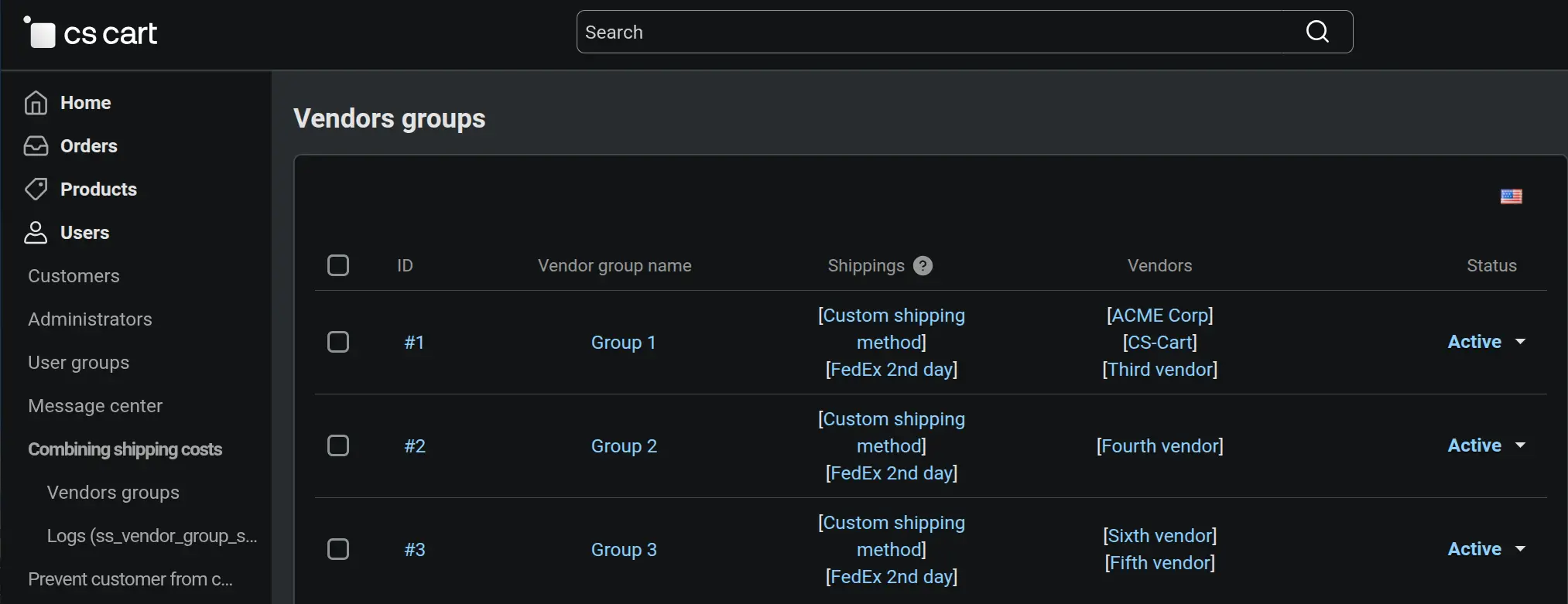
Combining shipping costs comes down to groups that the administrator manages in the admin panel, under Customers, Combining shipping costs. Each group stands for one real dispatch point, such as a shared warehouse or a market hall, and the list shows at a glance which shipping methods it covers and which vendors belong to it. Disabling a group restores standard charges, and cloning speeds up setting up further locations with similar settings.
Screenshot 1 - groups of vendors shipping from one location, managed in the admin panel
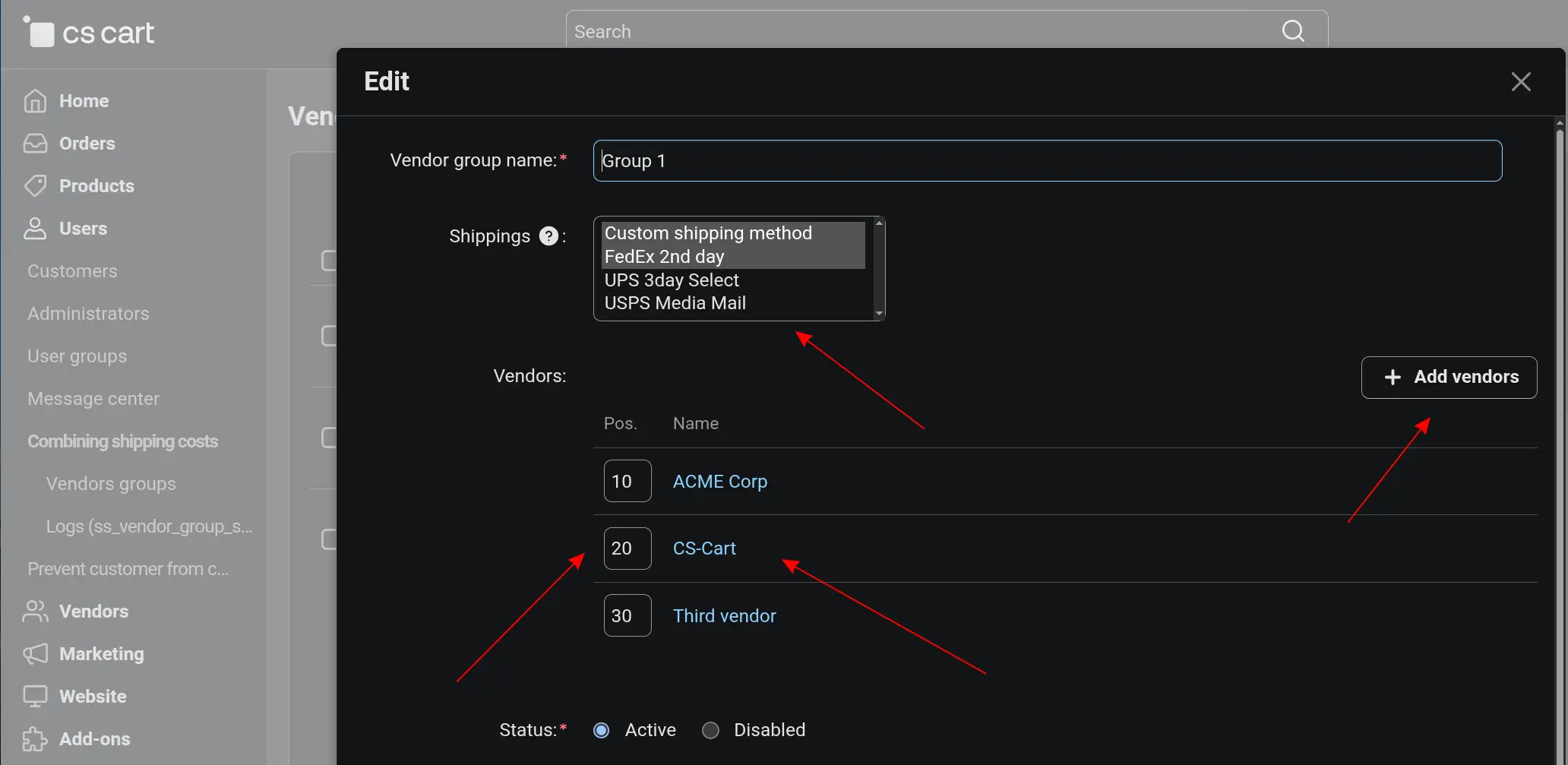
Every decision is made in a single group editing window. You give the group a name, select the shipping methods whose costs should be combined and add the vendors who ship from that place. The vendors' other methods are calculated as before, so in-store pickup at one of them keeps its usual charge. The Shipping cost split field settles who pays for the shared parcel: the vendor with the highest rate, or every vendor in part, according to the value of its products in the cart.
Screenshot 2 - each group defines its vendors, shipping methods and how the shared cost is split
The difference between the modes is easiest to see in numbers. Three vendors have rates of 10, 15 and 5 USD, and the customer buys products from them for 100, 50 and 30 USD. Without the add-on, shipping would cost 30 USD. With it, the customer pays 15 USD, the price of the most expensive of those shipments. In single payer mode the vendor with the 15 USD rate covers the whole amount. In proportional mode the same amount is split into 8.33, 4.17 and 2.50 USD. The mode therefore never changes what the customer pays; it only decides how the cost is settled between vendors.

Screenshot 3 - without the add-on the customer pays three times, with it once: the cost of the priciest shipment
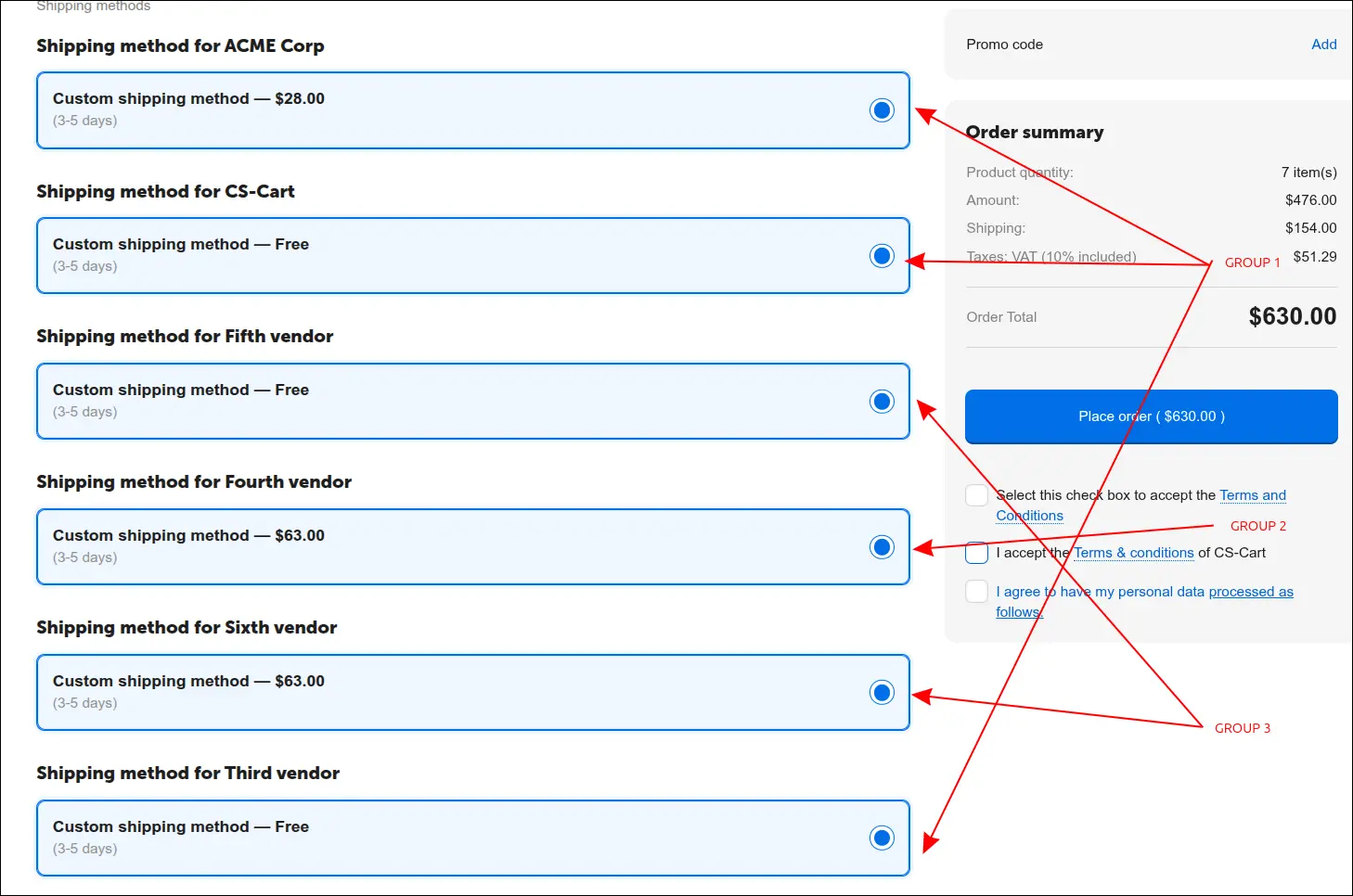
This is the shipping step at checkout when the group works in single payer mode. The vendor with the higher rate charges the full 15 USD, the other one offers the same method for free, and next to both rates the customer sees a short note about shipping combined with other vendors in the cart. Instead of suspecting a store error, the customer understands at once why delivery is free, and the order summary shows one fee for one parcel.
Screenshot 4 - the customer pays once for the shared parcel, and a note explains the free rate
The same group switched to proportional mode, this time with products from three vendors. Each of them charges its own part of the shared delivery, 8.33, 4.17 and 2.50 USD, and the note next to the rate tells the customer it is a share of a combined shipment. A vendor who added a small item to the parcel does not pay for the whole shipment. Any rounding difference goes to the vendor with the highest rate, so the shares always add up exactly to the amount the customer pays.
Screenshot 5 - in proportional mode the shared shipping cost is split by product value
Once the order is placed, Multi-Vendor divides it into vendor sub-orders as usual, and the add-on carries the calculated split over to them. The order list shows three sub-orders for 108.33, 54.17 and 32.50 USD, which together make 195.00 USD, exactly what the customer paid. Balances, commissions and payouts rely on the same amounts the customer saw at checkout, so nobody has to correct them by hand afterwards.

Screenshot 6 - the order is split into vendor sub-orders that add up to the amount the customer paid
The details of a single sub-order state the shipping cost plainly: a product for 100.00 USD, this vendor's share of delivery at 8.33 USD, a total of 108.33 USD. If the staff later correct the address or a product in such a sub-order and keep the same shipping method, the stored share stays as it was, and the full fee does not suddenly return to a vendor who was exempt from it.

Screenshot 7 - each vendor sub-order stores its own share of the shipping cost
The Combining Shipping Costs for Vendors in the Same Location add-on brings the marketplace's real logistics into the cart: when the goods of several vendors leave in one parcel, the customer pays for it once. A cart with products from many vendors no longer deters buyers with its shipping cost, while the platform operator chooses how the shared cost is split and can be sure that sub-orders and payouts match what the customer paid. The add-on adjusts the rates that the store's shipping methods have already calculated, so their configuration stays untouched, and the amounts remain stable until the order is placed, even when the customer switches methods at checkout.
Feel free to contact us and purchase the add-on!
- Annual subscription
Choose the most convenient form of payment for the add-on. You can pay once and use the add-on. Choosing a subscription payment (monthly or annual) means that you pay for the add-on at regular intervals and have access to the latest versions of the addon and technical support.
- Multi-Vendor
- Only Multi-Vendor
- 4.21.x
- 4.20.x
- 4.18.x
- 4.17.x
- 4.16.x
- 4.15.x
- 4.14.x
- 4.13.x
- 4.12.x
- 4.11.x
- 4.10.x
- 4.9.x
- 4.8.x
- 4.7.x
- 4.6.x
- 4.5.x
- 4.4.x
- 4.3.x
- 4.2.x
- 4.1.x
- 4.0.x
- No changes
No reviews found